🛒 Best Price Today on Amazon
Prime members get fast, free shipping on everything above, plus member-only deals. New members get a 30-day free trial — cancel anytime.
Choosing the right keyboard size affects desk space, mouse movement, and everyday convenience. Keyboard sizes explained (60 vs 65 vs 75 vs TKL) comes down to which keys you need within easy reach. This guide compares their layouts, gaming advantages, typing trade-offs, and practical uses to help you choose confidently.
1. Keyboard Sizes Explained: What Each Layout Offers
Keyboard percentages describe approximate layout sizes rather than exact physical dimensions. Manufacturers arrange keys differently, so two keyboards with the same percentage can have different key counts and spacing. The important distinction is which keys remain dedicated and which require function-layer shortcuts.
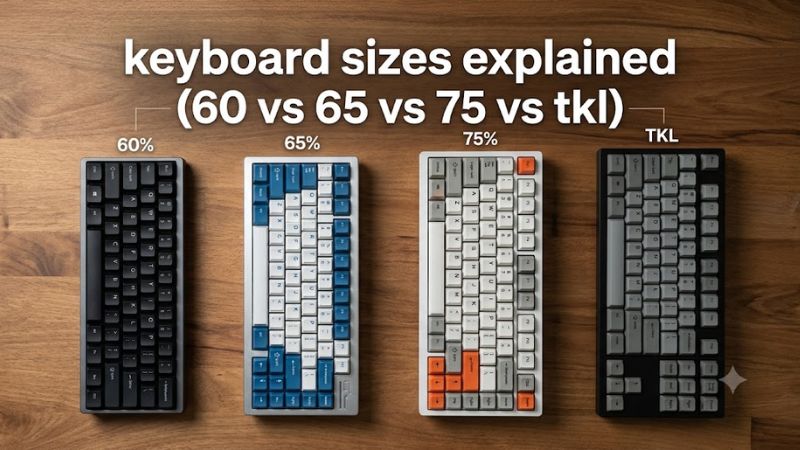
60% keyboards: Maximum desk space
A 60% keyboard typically has around 61 keys in a US ANSI layout. It retains the main typing block, number row, modifiers, and punctuation keys while removing the dedicated function row, arrow keys, navigation cluster, and numeric keypad. These missing controls are commonly accessed through an Fn layer or custom key mappings.
This layout suits competitive FPS players who want more room for wide mouse movements, particularly with low mouse sensitivity. It also works well for compact desks and portable setups. However, frequent use of arrow keys, F1–F12, or Home and End can become less convenient. Before buying, check the keyboard’s default function-layer combinations and whether its software supports remapping.
65% keyboards: Compact with dedicated arrow keys
A 65% keyboard usually has approximately 65–68 keys, depending on its layout. Compared with a typical 60% model, it adds dedicated arrow keys and often a small group of navigation keys while keeping the function row omitted. The number pad is also absent, preserving a compact footprint.
This is a practical option for gamers who navigate menus, edit text, or use arrow keys regularly. It retains much of the space-saving advantage of a 60% keyboard without forcing every arrow-key input through a function layer. The trade-off is that F1–F12 and many navigation commands still require shortcuts, and the location of Delete, Page Up, or Page Down varies between models.
75% keyboards: A balance of compactness and convenience
A 75% keyboard typically includes around 80–84 keys, although manufacturers use different layouts. It retains the function row and dedicated arrow keys, along with a compact selection of navigation keys. Instead of keeping the wider spacing of a TKL layout, it groups the keys more tightly to reduce overall width.
For someone who alternates between gaming, browsing, programming, and everyday productivity, this layout offers a useful balance. You can access function keys and arrows directly without giving up as much mouse space as a full-size keyboard requires. However, tightly grouped keys and shifted navigation controls can take some adjustment, particularly if you rely on familiar key positions.
TKL keyboards: Familiar layout without the number pad
TKL means tenkeyless, and the layout is commonly called 80%. A typical US ANSI TKL keyboard has around 87 keys. It removes the numeric keypad from a conventional full-size layout while retaining the function row, dedicated arrow keys, and most of the standard navigation cluster in familiar positions.
This makes TKL a sensible choice for gamers who want a traditional layout without the extra width of a number pad. It is especially convenient for games with numerous keyboard shortcuts and for people who switch between gaming and office work. The main disadvantage is size: a TKL is generally wider than a 75%, 65%, or 60% keyboard, so it frees less desk space for mouse movement.
2. 60% vs 65% vs 75% vs TKL: Direct Comparison
The best way to compare keyboard sizes is to look at dedicated keys, not the percentage printed on a product listing. The differences affect how quickly you access shortcuts, how much room remains for your mouse, and how easily the keyboard adapts to work beyond gaming. The following table summarizes the usual layouts.
| Feature | 60% | 65% | 75% | TKL (80%) |
| Typical key count | About 61 | About 65–68 | About 80–84 | About 87 |
| Dedicated arrow keys | No | Yes | Yes | Yes |
| Dedicated F1–F12 row | No | No | Yes | Yes |
| Navigation keys | Mostly layered | Limited selection | Compact selection | Mostly retained |
| Numeric keypad | No | No | No | No |
| Relative footprint | Smallest | Very small | Compact | Largest of these four |
| Mouse movement room | Highest potential | Very high | High | High |
| Learning curve | Highest | Moderate | Low to moderate | Lowest |
| Best suited to | Minimalist FPS setups | Compact gaming | Gaming and mixed work | Familiar all-purpose use |
Key counts and key groups are typical rather than universal. Confirm the manufacturer’s layout diagram, since regional layouts and individual models differ.
Which keyboard size is best for competitive FPS games?
For competitive FPS games, 60%, 65%, and 75% layouts can all be suitable. The biggest practical benefit of a compact board is the additional room available to position your mouse and make broad movements without hitting the keyboard. That can matter if you use low sensitivity in games such as Counter-Strike 2, Valorant, or Apex Legends.
A 60% keyboard maximizes compactness, but it is not automatically faster or more accurate. A 65% model retains dedicated arrows, while a 75% model keeps the function row. TKL offers a familiar layout with more dedicated navigation controls. Your mouse sensitivity, desk dimensions, keybinds, and personal comfort matter more than the percentage alone.
Which layout works best for MMOs, MOBAs, and keybind-heavy games?
For MMOs and other games with many shortcuts, TKL or 75% is often the more convenient starting point. Both retain a dedicated function row and arrow keys, and TKL generally provides more familiar navigation-key placement. These controls can be useful when assigning abilities, managing menus, or using shortcuts outside the game.
A 60% or 65% board can still work if your game relies primarily on the main typing block and you are comfortable with function layers or custom mappings. However, check your actual keybind requirements before choosing a smaller layout. Some games use function keys or navigation controls for actions that you may prefer to access directly.
How keyboard size affects productivity and everyday typing
If your daily routine includes spreadsheets, accounting, or frequent numeric entry, none of these four compact sizes includes a dedicated numeric keypad. A full-size keyboard or a compact full-size layout such as 96% may be more appropriate. You can also pair a separate numpad with a smaller keyboard, although it occupies some of the space you hoped to save.
For writing, browsing, programming, and general desktop use, a 75% keyboard provides dedicated function and arrow keys in a relatively compact arrangement. TKL is a strong alternative if you prefer conventional key spacing. A 65% board suits people who prioritize compactness but still use arrows, while 60% is best reserved for users who are happy to learn layered shortcuts.
Does a smaller keyboard improve gaming performance?
A smaller keyboard does not inherently deliver higher FPS, lower input latency, or better accuracy. Those outcomes depend on factors such as the keyboard’s electronics and firmware, the game, and the player’s input habits. Layout size alone is not evidence of a measurable performance advantage.
The more realistic benefit is ergonomic flexibility. A narrower keyboard may allow you to bring your mouse closer or adopt a more comfortable arm position, especially on a crowded desk. That can improve the practicality of your setup, but it does not guarantee better aim. Choose a layout that accommodates your preferred mouse movement without making frequently used keys awkward to reach.
3. How to Choose the Right Keyboard Size
The right layout is the smallest one that preserves the keys you regularly use without making your routine unnecessarily complicated. Consider your games, work habits, desk dimensions, and tolerance for shortcuts before deciding. A few minutes spent checking your most-used controls can prevent an inconvenient purchase.
Measure your desk and mouse space
Start by measuring the usable width of your desk and the area needed for your mouse. If your keyboard forces you to move your mouse farther outward than feels comfortable, switching to a narrower model may help. Remember that keyboard width depends on its case, bezel, and layout, not just its advertised percentage.
Do not assume a 60% keyboard is the right choice simply because it is the smallest. A 75% or TKL layout may still provide sufficient mouse room while keeping more keys accessible. If possible, compare the manufacturer’s dimensions with your existing setup before purchasing.
Identify the keys you use every day
List the controls you regularly press outside the main typing block. Consider the arrow keys, F1–F12, Delete, Home, End, Page Up, and Page Down. If you use these frequently, a 75% or TKL keyboard may reduce the need to memorize additional combinations.
If your gaming and everyday work primarily use the letter keys, number row, and modifiers, a 60% or 65% board may be sufficient. Review your actual game keybinds and software shortcuts rather than assuming every omitted key will be easy to replace. Programmable layers can help, but they require compatible firmware or software and time to configure.
Consider your adjustment period
TKL is usually the easiest transition from a full-size keyboard because most keys retain familiar positions. A 75% keyboard takes up less space but compresses the layout, so some navigation keys may move closer to other clusters. A 65% board requires more reliance on shortcuts for function keys.
A 60% layout makes the largest change to everyday key access. Before committing, review its default Fn combinations and whether you can remap the keys you need. If your keyboard must work across multiple computers or operating systems, check whether its layers and saved mappings remain available in your intended configuration.
Choose a layout that fits your whole setup
Think about gaming, work, and portability together. A keyboard that works well for FPS games may be less convenient when you edit documents or navigate spreadsheets. Similarly, a board that is excellent for office tasks may occupy more space than you want for low-sensitivity mouse movement.
For most people who want one compact keyboard for gaming and general computing, 75% is a sensible starting point. Choose TKL if you prefer conventional spacing, 65% if compactness and dedicated arrows are priorities, or 60% if minimal desk footprint matters more than dedicated controls.
FAQ
Is 65% better than 60% for gaming?
A 65% keyboard is more convenient if you regularly use dedicated arrow keys, while a 60% model offers a smaller footprint. Neither layout inherently provides better gaming performance; the better choice depends on your keybinds, mouse space, and preferred controls.
Is 75% better than TKL?
A 75% keyboard is better when you want to save more desk space while retaining the function row and arrow keys. TKL is preferable if you value familiar spacing and a more conventional navigation cluster. Both are suitable for gaming and everyday computing.
Which keyboard size is best for beginners?
TKL is generally the easiest compact layout for beginners because it preserves familiar key positions while removing the numeric keypad. A 75% keyboard is another good option if you want a smaller footprint and do not mind adjusting to a more tightly arranged layout.
Can a 60% keyboard do everything a full-size keyboard can?
A 60% keyboard can access many of the same functions through Fn layers, shortcuts, and remapping, but it does not provide the same dedicated controls. If you frequently use a numeric keypad or several navigation keys, a larger layout may be more convenient.
Final Thoughts
Keyboard sizes explained simply: 60% prioritizes minimalism, 65% adds dedicated arrows, 75% balances compactness with useful controls, and TKL preserves a familiar layout without the number pad. For most mixed gaming and productivity setups, start with 75%; choose a smaller board only if its trade-offs suit your daily habits.