For most of the last decade the advice was simple: if you cared about winning, you plugged in. That advice is now out of date. Low-latency wireless has trickled all the way down from flagship esports mice to models you’d buy without a second thought, and the performance gap that once justified a cable has narrowed to something the overwhelming majority of players will never feel in a real match.
That doesn’t make the decision trivial — it just moves it. In 2026 the real trade-offs are weight, battery management, price-per-gram of performance, and how much friction you’re willing to accept between you and your next game. Below we break down where wired mice still earn their keep, where wireless has genuinely won, and which models are worth your money right now.
As an Amazon Associate we earn from qualifying purchases at no extra cost to you.





⚡ Save on Your Next PC — Amazon Prime
Prime members get fast free shipping on the systems above, plus early access to Prime Day & Black Friday PC deals. New members get a 30-day free trial.
Watch: Wired vs Wireless Gaming Mouse in 2026 — Video Review
Quick Verdict
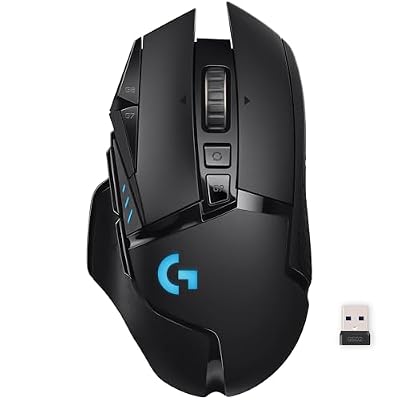
Go wired if you want the absolute lowest price for a given sensor and shape, you’d rather never think about charging, or you’re assembling a budget setup where every dollar has a job. Go wireless if you want a clean desk, occasional couch gaming, or a mouse that will still feel modern in three years — options like the Logitech G305 Lightspeed and the Razer Basilisk V3 X HyperSpeed now deliver competitive-grade responsiveness without flagship pricing, while the Logitech G703 Lightspeed covers larger hands and heavier grips.
Key Differences
- Latency: Wired is still theoretically the shortest path, but modern 2.4GHz protocols like Logitech Lightspeed and Razer HyperSpeed sit within a millisecond of a cable — a margin below human reaction thresholds.
- Weight: Wired mice avoid battery mass entirely, and ultralight wired shells remain the cheapest route to sub-70g. Wireless models carry a cell, though the G305 keeps things reasonable at roughly 99g with an AA installed.
- Power: Wired never needs charging. Wireless splits into swappable AA designs (G305, Basilisk V3 X) and rechargeable internal cells (G703, Redragon M810 PRO) — a genuine preference fork, not a quality difference.
- Cost: Dollar for dollar, wired buys you a better sensor, better switches, or a lighter shell. Wireless charges a premium for the radio, though budget models have compressed that gap dramatically.
- Cable drag: A stiff cable pulling against low-sens arm aim is the most underrated argument for cutting the cord. A good bungee fixes most of it; wireless removes the problem entirely.
- Connectivity: Wired is plug-and-play forever. Wireless adds dongle management and, on models like the Basilisk V3 X, a Bluetooth mode for laptops and travel.
Wired Gaming Mice: Cheap, Simple, and Still Excellent
The case for wired in 2026 is no longer about performance — it’s about value and predictability. A wired mouse puts your entire budget into the parts you actually touch: the sensor, the main switches, the scroll encoder, and the shell. At the lower end of the market that difference is stark, because the same money buys a noticeably better-specified mouse when it doesn’t have to fund a wireless radio and battery.
There’s also the matter of never being surprised. No dongle to lose in a laptop bag, no firmware update that resets your polling rate, no mouse dying twenty minutes into a ranked session. For LAN players, shared family PCs, and anyone who wants a peripheral they can ignore completely, a cable remains an entirely rational choice — and with a decent bungee, cable drag largely stops being a factor.
Wireless Gaming Mice: Where the Market Has Moved
Wireless is now the default recommendation for most players, and the models above explain why. The Logitech G305 Lightspeed remains the benchmark for affordable wireless: a HERO sensor, Lightspeed connectivity, and a single AA that can run for hundreds of hours in endurance mode. It also comes in Black, White, and Lilac, so it’s an easy fit for a colour-matched build. The Razer Basilisk V3 X HyperSpeed adds a tilt-scroll wheel, more programmable controls, Chroma lighting, and dual HyperSpeed plus Bluetooth connectivity — the better pick if you want one mouse for both desktop gaming and a work laptop.
For larger hands and heavier grips, the Logitech G703 Lightspeed offers a fuller ergonomic shell, a rechargeable battery, and compatibility with Logitech’s POWERPLAY wireless charging pad, which effectively eliminates the charging question altogether. If you’re optimising purely for features per dollar, the Redragon M810 PRO delivers a 10,000 DPI sensor, remappable buttons, and RGB at an aggressive price — an easy entry point if you’re curious about wireless but not ready to commit to a premium brand.
Which Should You Buy?
- For competitive FPS on a budget: pick the Logitech G305 Lightspeed — the shortest path to genuine esports-grade wireless.
- For MMOs, MOBAs, and macro-heavy play: pick the Razer Basilisk V3 X HyperSpeed for its extra programmable controls and tilt wheel.
- For large hands or palm grip: pick the Logitech G703 Lightspeed, ideally paired with a POWERPLAY pad.
- For a colour-matched or minimalist desk: pick the G305 in White or Lilac — identical internals, different aesthetic.
- For maximum specs at minimum spend: pick the Redragon M810 PRO, or a wired mouse if you’d rather put every dollar into the sensor and switches.
Frequently Asked Questions
Is wireless fast enough for competitive play in 2026?
Yes. Proprietary 2.4GHz protocols like Lightspeed and HyperSpeed measure within about a millisecond of wired, which is far below the threshold of human perception. Professional players across every major esport now compete on wireless mice.