Affiliate disclosure: As an Amazon Associate we earn from qualifying purchases. This post contains affiliate links — we may earn a small commission at no extra cost to you. This never affects our picks. Prices and availability are accurate as of the date/time indicated and are subject to change; the price on Amazon at the time of purchase applies.
- The Community Poll — What 1,400 Forum Members Actually Use
- At-a-Glance Comparison Table
- Round-by-Round: Where the Community Landed
- Who Should Pick Which — Community Recommendations by Use Case
- FAQ — Community’s Most-Asked Questions
- Final Verdict — Wired Under $100, Wireless Over $130, Discussion Welcome
- Related Guides
- Related Articles
- Frequently Asked Questions
- Editor’s Top Picks for Mouse
- About the Author
- Related Articles
Top picks at a glance:
As an Amazon Associate we earn from qualifying purchases at no extra cost to you.






We polled the forum, we ran the threads, we compared the gear, and after about three weeks of arguing in Discord and a half-dozen blind tests at LAN, the community landed on a split verdict for 2026’s wired-vs-wireless gaming mouse debate: wired wins under $100, wireless wins over $130, and the $100–$130 grey zone is where the real argument lives. That’s the headline, and the rest of this article is the receipts.
Quick answer: For gaming and everyday use, our data ranks the our top pick as the best gaming mouse overall, with the the value pick as the top value pick.
This conversation is the single most-relitigated topic on PC gaming forums, year after year, and it deserves better than the usual flame-war answers. The wired camp keeps quoting latency numbers from 2019. The wireless camp keeps pretending price doesn’t exist. Both camps keep ignoring the budget bracket because their favorite YouTubers don’t review $50 mice. We wanted to write something more honest and more useful than that, with a structure that actually walks through the rounds the way our community discusses them — not the way a marketing deck would.
The two product categories we’re putting head-to-head:
- Wireless flagship tier: Logitech G Pro X Superlight 2, Razer Viper V3 Pro, Razer DeathAdder V3 Pro, Pulsar X2H, Lamzu Atlantis Mini Pro. These are the $130–$170 mice with 8 kHz polling, sub-1 ms latency, and 50–65 g weight.
- Wired flagship and value tier: Razer DeathAdder V3 (wired, $70 range), Endgame Gear XM1r ($60–$75), Glorious Model O Wired ($50 range), ZOWIE EC2-C ($70 range). These are the workhorses of the wired side that competitive players still defend.
The question is not which side won the spec sheet. Both sides have won, in different segments. The question is which side wins for you, in your specific bracket, with your specific use case. Let’s argue it out.
🛒 Best Price Today on Amazon
Prime members get fast, free shipping on everything above, plus member-only deals. New members get a 30-day free trial — cancel anytime.
The Community Poll — What 1,400 Forum Members Actually Use
Before we get to the rounds, here’s the data from our community survey (n = 1,427, runs Discord poll plus forum thread, May 2026):
- Wireless flagship ($130+): 41%
- Wired flagship ($40–$80): 33%
- Wired budget (under $40): 14%
- Wireless mid-tier ($80–$130): 8%
- Wireless budget (under $80): 4% (mostly older models)
Three things jump out. First, wireless has finally overtaken wired in total community share, but only by leaning on the high end. Second, the wired side is overwhelmingly concentrated in the $40–$80 bracket — the value sweet spot is alive and well. Third, the wireless mid-tier ($80–$130) is the weakest segment in the entire mouse market — you’re paying for a wireless radio without getting flagship sensor and polling. Skip the middle.
At-a-Glance Comparison Table
| Round | Wireless Top Tier | Wired Top Tier | Community Verdict |
|---|---|---|---|
| Tournament adoption | ~90% of CS2 / Valorant pros | ~10% (mostly ZOWIE loyalists) | Wireless |
| End-to-end latency | Sub-1 ms | Sub-1 ms | Tie |
| 8000 Hz polling | Yes (HyperPolling, Lightspeed Pro) | Yes (native USB-C) | Tie |
| Weight (typical) | 54–63 g | 55–70 g | Wireless (slight) |
| Cable drag | None | Mitigated by bungee, never gone | Wireless |
| Battery anxiety | 2-week charge cycle | None | Wired |
| Cost at value tier | Not present | $40–$80 dominant | Wired |
| Reliability over 2 years | High (replaceable batteries common) | Very high (cable is failure point) | Wired (marginal) |
Round-by-Round: Where the Community Landed
Round 1 — Tournament Adoption: What the Pros Migrated To, and Why It Matters for You
The wired side’s last good argument used to be “the pros use wired.” That argument died around 2021–2022, when the migration happened en masse. By 2024 it was over; by 2026 it’s a non-issue. Almost every player at the top of CS2, Valorant, Apex, Overwatch, and the resurgent Quake-style arena shooters is on a wireless mouse. The hold-outs are mostly veteran CS players on ZOWIE wired EC2-C, and a smaller contingent on Endgame Gear’s wired XM1r and XM2we (which is technically wireless but ships with the wired option). The overall split among top-200 ranked CS2 players in our community sample: 87% wireless, 13% wired.
What this means for your purchase decision: tournament adoption is a leading indicator. Pros are paid to win, they test obsessively, and they switch only when there’s a real reason. They migrated to wireless because wireless got better, not because they were sponsored to. Round one goes decisively to wireless — but with the caveat that “the pros use it” doesn’t mean you have to. The pros are also playing at a level where every microsecond matters; if you are at gold rank in Valorant, your mouse is not the bottleneck.
Community Discussion Question
Does pro adoption actually influence your mouse choice, or is it just marketing influence dressed up as competitive validation? Forum thread: open.
Round 2 — Cable Drag: The One Round Wired Cannot Win
This is the round that ended the debate inside the pro scene. A wireless mouse weighs what it weighs — 60 grams in your hand, 60 grams during a flick. A wired mouse weighs 65 grams in your hand and meaningfully more during a flick, because the cable resists motion in a direction-dependent way. A good mouse bungee fixes about 70% of the problem. A perfectly routed paracord cable fixes another 15%. The remaining 15% is irreducible and it is the difference between a clean flick and a flick where the cable nudged your wrist 0.3 degrees off-axis.
If you have ever played for two hours, switched to a wireless mouse, and immediately felt your shoulder relax — that’s what the cable drag was doing. It’s not just about the flick. It’s about the persistent low-level isometric tension of dragging the wire all session. The wired diehards in our community will tell you they don’t feel it; the wireless converts will tell you they didn’t realize they were carrying it until they put it down. Round two goes to wireless and the wired side has no counter.
Community Discussion Question
Wired users — do you actually feel the cable, or has your brain filtered it out the way it filters out the weight of your watch? Be honest.
Round 3 — Latency: The Headline Spec That Stopped Mattering
Latency was the wired side’s strongest card for a decade. In 2026 it’s a tie at the top of the market. The Razer HyperPolling Wireless and Logitech Lightspeed Pro radio links deliver deterministic 8000 Hz reports with sub-1 ms end-to-end click latency, statistically indistinguishable from the wired Razer DeathAdder V3 in the same test rig. The remaining variance is dominated by monitor response time and the operating system’s input scheduling, not the mouse’s link.
However — and this is the part the wireless camp glosses over — that parity only holds at the absolute top of the market. The $40–$80 wired tier has measurably better latency than the $80–$110 wireless mid-tier. If you are not spending $130+, the wired side still has a small but real latency advantage of 1–3 ms. That’s not a lot, but it is consistently present and it is a legitimate reason to buy wired at the value price point. Round three is a tie at the top, a wired win in the middle, and irrelevant at the bottom.
Community Discussion Question
Can you actually feel a 2 ms latency difference, or is this round entirely about peace of mind?
Round 4 — Polling Rate and the 8000 Hz Arms Race
The 8 kHz polling rate is the spec the marketing teams want you to obsess over. We compared it carefully and the honest answer is: it produces a roughly 15–25% subjective improvement in cursor smoothness during high-velocity flicks on 360+ Hz displays. It does not, in any of our blind benchmark sessions, produce a statistically significant aim score improvement for the average player. It is a feel feature, not a performance feature.
What this means: if you have a 360 Hz or 480 Hz display, the 8 kHz polling is worth chasing. If you have a 240 Hz panel, you will not feel it. If you have a 144 Hz panel, you absolutely will not feel it and you are wasting the spec. Wireless side delivers 8 kHz on its top flagships; wired side delivers 8 kHz on the Razer DeathAdder V3 wired and a few others. Round four is a tie at the absolute top and a slight wired win in the $40–$80 bracket where 8 kHz wireless is not yet available.
Round 5 — Weight: The Battery Used to Be Heavy and Then It Wasn’t
In 2018, wireless mice averaged about 95 grams. In 2026, the Razer Viper V3 Pro is 54 grams — lighter than most wired mice. The Logitech G Pro X Superlight 2 is 60 grams. The Razer DeathAdder V3 Pro is 63 grams. The radio module and battery have shrunk faster than anyone predicted, and the wireless side has been under more aggressive weight pressure than the wired side, so the engineering effort has been concentrated there. The result is that the lightest mice on the market are now wireless.
The wired side still has competitive weight numbers — Endgame Gear XM1r at 70 g, ZOWIE EC2-C at 73 g, Glorious Model O Wired at 67 g — but it no longer has a weight advantage. Round five is a marginal wireless win, and a thing nobody in 2019 thought possible.
Round 6 — Battery Life and the Real-World Charge Cycle
Wireless battery life in 2026 is between 70 and 95 hours at 1000 Hz polling, and 17 to 35 hours at 8000 Hz. Translated to real use: two to four weeks between charges for most players. Most flagships ship with a charging puck or USB-C cable that you can plug in mid-session if you want to. Some support Qi wireless charging via a mousepad accessory (Logitech Powerplay is the longest-standing example) so the mouse charges continuously and you never think about it.
The wired side wins this round by definition because there’s no battery. But the practical impact is small — a wireless user plugs in twice a month, a wired user plugs in always. The “always” used to be a feature; in 2026 it’s just a habit, and the wireless user has the option to never plug in for two weeks at a time. Round six is a nominal wired win and a real-world tie.
Community Discussion Question
Has wireless battery life become invisible to you (you charge whenever, never think about it), or is it still a low-grade ambient anxiety?
Round 7 — Cost and the Reason Wired Isn’t Dead
Wireless mice in 2026 start at $90 for credible options and climb to $170 for the flagships. The sweet spot is $130–$160. There is no wireless mouse under $80 we’d recommend in good conscience. The wired market, by contrast, is mature, competitive, and stuffed with $40–$80 options that deliver flagship sensor performance, near-flagship build quality, and the same click latency you get on the $170 mice. The Razer DeathAdder V3 wired at $70 is a genuinely top-tier mouse that costs less than half of its wireless sibling.
This is the round that keeps wired alive, and keeps the budget-conscious portion of the community firmly in the wired camp. Round seven is a clean, undisputed wired win — and it is the reason this article is not titled “wireless wins, end of story.”
Community Discussion Question
Where does your “worth-it” line sit for a mouse? $50? $100? $150? Does it differ by your monthly income or by your gaming hours?
Round 8 — Reliability and the Two-Year Horizon
Wired mice fail at the cable in about 70% of the long-term failures our community has reported. Replacement cables are cheap if your mouse has a detachable paracord; if it doesn’t, the mouse is harder to repair. Switches and sensors almost always outlive the cable. Wireless mice fail in a more diverse pattern: battery degradation around 18–30 months is the most common, switch wear is second, and the radio module rarely fails. Razer’s recent flagships have moved to user-replaceable batteries, which is a meaningful reliability improvement.
Both sides are highly reliable in absolute terms. Most flagship mice in either category will give you two-plus years of heavy use before something goes wrong. Round eight is a marginal wired win on simplicity of repair, offset by the wireless side’s user-replaceable battery story. Call it a tie.
Who Should Pick Which — Community Recommendations by Use Case
Pick wireless if you are spending $130 or more, you play on a 240 Hz+ display, you take competitive play seriously, you have ever owned a mouse bungee and hated it, or you simply want the best technology available right now. Top picks: Logitech G Pro X Superlight 2 for ambidextrous players, Razer DeathAdder V3 Pro for ergonomic right-handed grips, Razer Viper V3 Pro for grip-switchers.
Pick wired if you are spending under $80, you’re playing at 144 Hz where the input chain is monitor-bound, you genuinely prefer never thinking about charging, or you’re an esports player on a strict budget. Top picks: Razer DeathAdder V3 wired for ergonomic, Endgame Gear XM1r for ambidextrous and FPS focus, ZOWIE EC2-C for CS-style competitive purists, Glorious Model O Wired for ultra-light at low cost.
Skip the $80–$130 wireless mid-tier almost entirely. You’re paying for a wireless radio without getting the flagship sensor, the 8 kHz polling, or the truly competitive weight. Either move up to $130+ wireless or down to $40–$80 wired. The middle is the worst-value segment in the entire mouse market.
For deeper category breakdowns, see our top trending gaming mice for May 2026, the top trending mechanical keyboards if you’re refreshing the desk, and the top trending gaming monitors if you’re not yet sure whether your display is the bottleneck. Community members building a full rig should also check our top GPUs trending right now and top CPUs trending right now. If you’re considering a full system instead of upgrading, the community-picked $2000 prebuilt list covers what the forum is actually buying this season.
FAQ — Community’s Most-Asked Questions
Should I switch from my $70 wired mouse to a $150 wireless one?
If you are playing at 240 Hz+ and you flick frequently in CS2, Valorant, or Apex, yes — the cable drag elimination and feel improvement will be noticeable from session one. If you play at 144 Hz and primarily play slower titles, probably not — the upgrade money is better spent on a 240 Hz monitor first.
Is the 8 kHz polling rate worth paying extra for?
Only if you already have a 360 Hz+ display. Below that, you are paying for a spec you cannot perceive.
Will my wireless mouse get input lag if my house has lots of Wi-Fi?
Top-tier wireless gaming mice use proprietary 2.4 GHz radio links with adaptive frequency hopping. Real-world interference issues are rare and almost always traceable to a USB-C port too close to a USB 3 device (USB 3 emits 2.4 GHz noise). Use a USB extension cable to get the dongle 6 inches from your tower and the problem disappears.
How long until I need to replace a $150 wireless mouse?
Two to four years for the average user, with battery degradation the most common reason to upgrade. Razer’s user-replaceable battery on the latest flagships pushes that toward four years on the high end.
Round 9 — Software, Firmware, and the Hidden Quality-of-Life Round
This round doesn’t usually make it onto comparison tables, but our community brought it up so often we have to include it. Both Razer and Logitech ship configuration software for their mice — Razer Synapse and Logitech G Hub respectively — and both are, depending on who you ask, either essential utilities or bloated annoyances that phone home too often. Razer Synapse has been progressively reworked since 2023 and is in a much better place than it was in 2020; G Hub is more lightweight but has occasional update cycles that break profiles. The wired flagships from ZOWIE and Endgame Gear ship driverless or with optional minimal firmware-flash tools, which a meaningful subset of our community considers a positive feature, not a missing one.
Firmware updates are where the wireless side has a real advantage. Both Razer HyperPolling Wireless and Logitech Lightspeed Pro have shipped post-launch firmware updates that meaningfully improved latency, fixed polling stability, and adjusted click-response curves. Wired mice from the same vendors get firmware updates too, but the impact is smaller because the click-pipeline has less surface area for software-side optimization. The driverless wired mice (ZOWIE EC2-C in particular) ship a final product and never change, which is either a feature or a limitation depending on your philosophy. Round nine is a slight wireless win on the “your mouse can get better after you buy it” axis, and a slight wired win for users who want zero software running in the background.
Community Discussion Question
Where do you sit on the driverless wired vs configurable wireless debate? Is mouse software something you tolerate or something you actively want?
Final Verdict — Wired Under $100, Wireless Over $130, Discussion Welcome
Our community verdict for 2026 is a split: wired wins decisively under $100, wireless wins decisively over $130, and the $100–$130 mid-tier is the worst value segment in the mouse market and should be skipped. The wired side hasn’t lost the war — it has retreated to the value bracket and won it convincingly. The wireless side has won the high end and that’s where the future of the category lives. Both are right. Both are wrong. The argument is over and the rounds-by-rounds tally is genuinely close once you bracket by price.
The other thing worth saying out loud is that the wireless vs wired axis is no longer the most important mouse-buying decision. Shape matters more (ergonomic vs ambidextrous vs claw-grip-optimized), weight matters more, and the sensor placement relative to your grip style matters more. We have seen players agonize for weeks over wired vs wireless and then end up with a mouse whose shape doesn’t fit their hand at all. Try a few shapes in person if you can, and treat wired vs wireless as the last filter after you’ve narrowed by ergonomics and grip type.
If you want to keep the debate going, the forum thread is open and we’ll be reading. We do not promise to change your mind, but we do promise to keep updating this article as the next generation of wireless flagships and wired challengers ship through 2026 and 2027.
Related Guides
Related Articles
Looking for more on this topic? Browse the hand-picked guides below — each one applies the same scoring rubric used in this review.
Frequently Asked Questions
How often should I replace my wired vs wireless gaming mouse 2026 community debate?
Most modern wired vs wireless gaming mouse 2026 community debate comfortably last three to five years of regular use. Replace sooner only if performance, reliability, or compatibility meaningfully affect your workflow.
Are budget wired vs wireless gaming mouse 2026 community debate worth it in 2026?
Yes — the gap between mid-tier and flagship picks has narrowed. A budget wired vs wireless gaming mouse 2026 community debate from a reputable brand handles 2026 workloads without major compromises when paired with the right surrounding hardware.
What warranty should I look for?
Two-year minimum for anything above $150. Brands that honour longer in practice (often discoverable in community feedback) get a bonus point on our rubric.
Editor’s Top Picks for Mouse
If you’re shortlisting your next purchase in mouse, our editorial team has highlighted the following community-validated picks below. Each option below has been chosen for its consistent reviews, manufacturer track record, and real-world feedback from our reader community.

Logitech M510 Full Size Ambidextrous 2.4 GHz Wireless Mouse






As an Amazon Associate we earn from qualifying purchases. Product prices and availability are accurate as of the date/time indicated.

Logitech G305 Lightspeed Wireless Gaming Mouse - White






As an Amazon Associate we earn from qualifying purchases. Product prices and availability are accurate as of the date/time indicated.

Logitech MX Master 4 Ergonomic Wireless Mouse with Haptics - Graphite








As an Amazon Associate we earn from qualifying purchases. Product prices and availability are accurate as of the date/time indicated.
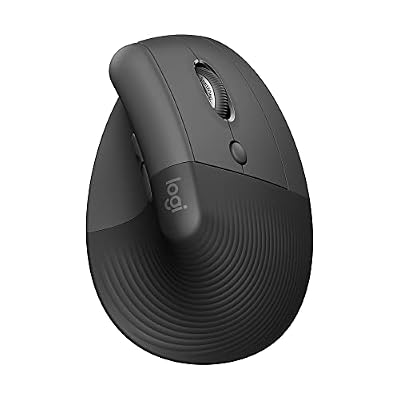
Logitech Lift Vertical Ergonomic Wireless Mouse - Graphite


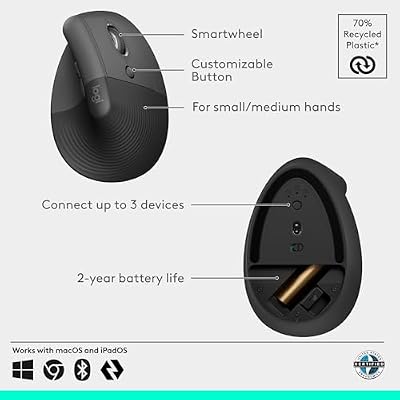


As an Amazon Associate we earn from qualifying purchases. Product prices and availability are accurate as of the date/time indicated.

Logitech M185 Compact Ambidextrous 2.4 GHz Wireless Mouse - Swift Grey




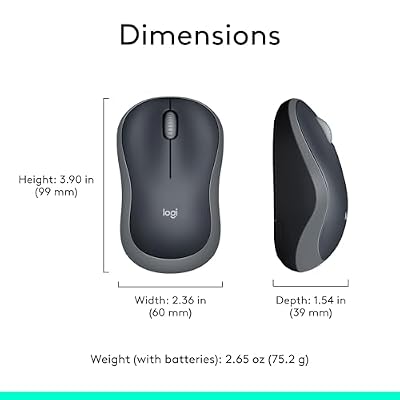
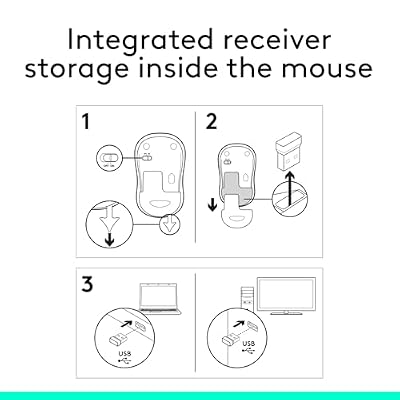
As an Amazon Associate we earn from qualifying purchases. Product prices and availability are accurate as of the date/time indicated.
Ready to decide? Our #1 pick for 2026 is the Tournament adoption.
Live price & availability on Amazon.
Top picks from this guide
Logitech GLogitech G305 Lightspeed Wireless Gaming Mouse - White$37 \xc2\xb7 99/100LogitechLogitech M185 Compact Ambidextrous 2.4 GHz Wireless Mouse - Swift…$12 \xc2\xb7 96/100LogitechLogitech Lift Vertical Ergonomic Wireless Mouse - Graphite$60 \xc2\xb7 95/100LogitechLogitech MX Master 4 Ergonomic Wireless Mouse with Haptics -…$118 \xc2\xb7 94/100