Shopping for a gaming keyboard under $100 sounds easy until you actually start looking. The sub-$100 tier is the most crowded category in PC gaming peripherals, packed with hundreds of near-identical listings promising “mechanical feel,” “anti-ghosting,” and rainbow lighting — and it’s genuinely difficult to tell which boards use real mechanical switches, which use membrane domes dressed up in gamer branding, and which will still feel good two years from now. Spend badly here and you get mushy actuation, keycap legends that wear off by spring, and RGB software that fights you every time Windows updates.
This guide cuts through that. We’ve focused on boards that deliver genuine value rather than spec-sheet theater, covering everything from ultra-budget compact membrane keyboards to hot-swappable wireless mechanical boards that punch well above their price. Below you’ll find our current picks, a practical buying checklist, honest reviews of the top five options, and answers to the questions we see most often from readers building or upgrading a setup in 2026.
As an Amazon Associate we earn from qualifying purchases.


⚡ Save on Your Next PC — Amazon Prime
Prime members get fast free shipping on the systems above, plus early access to Prime Day & Black Friday PC deals. New members get a 30-day free trial.
Watch: Best Gaming Keyboard Under $100 — Video Review
How to Choose Gaming Keyboard Under $100
- Switch type: Mechanical switches offer crisper actuation and far longer lifespans, while membrane boards are quieter and cheaper. Under $100 you can now get real mechanical — including pre-lubed switches — so only choose membrane if silence or budget is the priority.
- Layout and size: Full-size (104 keys) gives you a numpad; 75% and 65% layouts free up desk space for low-sensitivity mouse sweeps. Pick based on whether you use the numpad daily, not on which looks better in photos.
- Hot-swap sockets: A hot-swappable PCB lets you change switch feel later without soldering. It’s the single best future-proofing feature in this price bracket and turns a one-time purchase into an upgradeable platform.
- Build quality and keycaps: Look for an aluminium or metal top plate and PBT keycaps rather than ABS. PBT resists shine and legend wear, which is the most common complaint on cheap boards after a year of heavy use.
- Connectivity and extras: Wired USB-C is the reliable default for competitive play, but tri-mode boards (2.4GHz, Bluetooth, USB-C) add real flexibility. Media knobs, dedicated multimedia keys, wrist rests, and water resistance are meaningful quality-of-life wins when they don’t inflate the price.
The Best Picks Reviewed
AULA F75 Pro Wireless Mechanical Keyboard
This is the standout of the group and the closest thing to a custom keyboard experience at a mainstream price, combining a 75% layout, hot-swappable sockets, pre-lubed Reaper switches, side-printed PBT keycaps, and a control knob. Tri-mode connectivity (2.4GHz, Bluetooth 5.0, USB-C) means it works equally well on a gaming desktop and a work laptop, and the pre-lubed switches sound noticeably better out of the box than most boards at twice the cost.
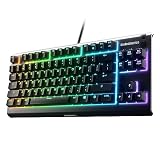
SteelSeries Apex 3 RGB Gaming Keyboard
The Apex 3 is the pick for anyone who wants a name-brand board with proper software support, offering 10-zone RGB, IP32 water resistance, and a genuinely comfortable magnetic wrist rest. Its whisper-quiet gaming switches are membrane-based rather than mechanical, so it won’t satisfy tactile purists, but it’s an excellent choice for shared spaces, late-night sessions, and anyone tired of typing over a keyboard that sounds like a woodpecker.
Logitech G213 Prodigy Wired RGB Keyboard
A long-running budget staple, the G213 pairs spill resistance with five-zone Lightsync RGB, dedicated media controls, and an integrated palm rest, all backed by Logitech’s G HUB ecosystem. The membrane switches are firmer and more responsive than typical office boards, making this the safe, no-surprises option when reliability matters more than switch feel.
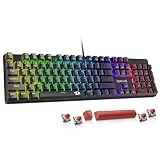
Redragon K521 Rainbow LED Gaming Keyboard
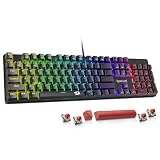
Redragon’s K521 delivers a full 104-key layout with multimedia keys, one-touch backlighting, and anti-ghosting across PC, Mac, and console, all at a price that leaves plenty of budget for a decent mouse. It uses a “mechanical feeling” membrane design rather than true mechanical switches — worth knowing before you buy — but the typing experience is snappier than the price suggests.
TECKNET Wired RGB Gaming Keyboard
The TECKNET’s metal top panel gives it a rigidity that most keyboards in this bracket simply don’t have, eliminating the flex and hollow rattle common to all-plastic budget boards. RGB backlighting, straightforward plug-and-play operation, and a sturdy chassis make this an easy recommendation for a secondary rig, LAN box, or a first gaming keyboard on a tight budget.
Frequently Asked Questions
Do I need a mechanical keyboard to game competitively?
No — plenty of high-level players use membrane boards, and input latency differences at this level are marginal. Mechanical switches mainly win on consistency, durability, and typing feel over thousands of hours, which is why they’re worth the modest premium if your budget allows.
Is a 65% or 75% layout worth losing the numpad?
If you play low-sensitivity FPS games, yes: a compact board gives you significantly more mouse room without expanding your desk. If you regularly enter numbers for spreadsheets, accounting, or MMO macros, stick with full-size or buy a separate numpad.
What does hot-swappable actually mean?
It means the switches sit in sockets rather than being soldered to the circuit board, so you can pull them out with a puller and install different ones in minutes. It lets you change from linear to tactile switches, or replace a single failed switch, without any soldering equipment.
Is wireless fast enough for competitive gaming in 2026?
Modern 2.4GHz dongles are effectively indistinguishable from wired for keyboard input, so wireless is fine for the vast majority of players. Bluetooth is a different story — use it for laptops and travel, not for ranked matches.
Final Thoughts
For most readers, the AULA F75 Pro is the best overall value under $100, offering hot-swap sockets, pre-lubed switches, PBT keycaps, and tri-mode wireless in a package that would have cost double just a couple of years ago. If you’d rather have brand-backed software, water resistance, and near-silent operation, the SteelSeries Apex 3 is the more comfortable everyday choice, while the Logitech G213 Prodigy remains the dependable, do-everything pick for anyone who just wants a solid keyboard that works flawlessly on day one and year three.