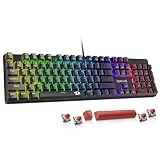
- Top Pick: SteelSeries Apex 3 TKL RGB Gaming Keyboard – Tenkeyless Compact Form Factor – 8-Zone RGB Illumination – IP32 Water & Dust Resistant – Whisper Quiet Gaming Switch – Gaming Grade Anti-Ghosting,Black
- Best Value: Logitech G PRO Mechanical TKL Tenkeyless Gaming Keyboard (Clicky) – Black
- Premium Choice: Corsair K55 CORE TKL RGB Gaming Keyboard – Tenkeyless, 8-Zone RGB, Quiet Membrane Keys, Spill Resistant, Media Keys, 1000Hz Polling – NA Layout – Black
Few peripheral decisions shape a desk as much as keyboard size. On one side sits the full-size layout: 104 keys, a dedicated number pad, and the familiar footprint most of us grew up typing on. On the other is the tenkeyless (TKL) board — the same layout minus the numpad, trimming roughly six inches of width without touching the arrow cluster, function row, or navigation keys. It sounds like a minor trim. In practice, it changes how you sit, how you swing your mouse, and how much of your desk stays usable.
That trade-off matters more in 2026 than it did a few years ago. Mousepads have grown, monitors have gotten wider and deeper, and hybrid work-and-play desks are now the norm rather than the exception. Meanwhile, TKL has quietly become the default in competitive gaming: walk any esports venue and the numpad is the exception, not the rule. The good news is that neither layout is objectively better. The right pick depends on what you actually do between matches — and this guide will get you there quickly.
As an Amazon Associate we earn from qualifying purchases at no extra cost to you.






⚡ Save on Your Next PC — Amazon Prime
Prime members get fast free shipping on the systems above, plus early access to Prime Day & Black Friday PC deals. New members get a 30-day free trial.
Watch: Full-Size vs TKL Keyboard: 2026 Comparison — Video Review
Quick Verdict
Choose a full-size keyboard if you regularly enter numbers, play simulators or MMOs that lean on numpad binds, or want one board that handles spreadsheets and shooters equally well. Choose a TKL keyboard if you play low-sensitivity FPS titles, run a compact or dual-purpose desk, travel to LANs, or simply want your mouse hand closer to your body. For most gamers in 2026 — especially anyone playing Counter-Strike, Valorant, or Apex — the TKL is the safer recommendation, and options like the Logitech G PRO TKL and SteelSeries Apex 3 TKL cover both the mechanical and quiet-membrane ends of that market.
Key Differences
- Footprint: Full-size boards typically run 17–18 inches wide; a TKL lands closer to 14 inches, freeing five to six inches of mouse space without shrinking the main typing area.
- Mouse ergonomics: TKL lets you centre your keyboard on your monitor while keeping your mouse arm near your shoulder line, reducing the outward reach that causes wrist and elbow strain during long sessions.
- Number entry: A full-size numpad is dramatically faster for spreadsheets, accounting, CAD, and anything data-heavy. TKL users fall back to the number row or a separate numpad accessory.
- Game compatibility: Flight and space sims, plus some MMOs and strategy titles, default to numpad binds. On a TKL you’ll spend time remapping — usually manageable, occasionally annoying.
- Portability: TKL boards are lighter and fit in most backpacks, which matters for LAN events, dorm rooms, and anyone who moves their setup between rooms.
- Price and selection: Both layouts span budget to premium, but TKL currently sees the most new releases, from the low-profile Razer Ornata V3 TKL to no-frills mechanical picks like the Logitech G413 TKL SE.
Full-Size Keyboards
The argument for full-size is versatility. If your gaming PC doubles as a work machine, the numpad earns its space every day — invoices, budgets, data entry, and inventory management all move faster with a dedicated ten-key. Sim pilots benefit too: DCS, Microsoft Flight Simulator, and Star Citizen ship with dense default bindings that assume a numpad exists, and MMO players often use it as a second action bar.
The cost is desk real estate and posture. A full-size board pushes your mouse further right, and if you play at 400 DPI with wide, arm-driven swipes, you’ll feel it — either by clipping the numpad mid-flick or by angling the keyboard so far left that your typing position suffers. Full-size also tends to weigh more, which is a plus for stability and a minus for anyone packing a bag. If you never touch the numpad, you’re paying rent on keys you don’t use.
TKL Keyboards
TKL is the competitive standard for a reason. Removing the numpad gives you room for genuinely low sensitivity and a more neutral shoulder angle, and it does so without the compromises of 60% or 65% boards — you keep your arrows, Delete, Home, and the full function row. The Logitech G PRO TKL leans into that pedigree with clicky mechanical switches and a detachable cable built for travel, while the G413 TKL SE offers a straightforward tactile mechanical feel with durable keycaps and clean white backlighting.
TKL also covers the quiet end well. The SteelSeries Apex 3 TKL pairs whisper-quiet membrane switches with 8-zone RGB and IP32 water and dust resistance — useful in shared spaces or near drinks — and its Renewed listing is a sensible way to spend less. The Corsair K55 CORE TKL adds dedicated media keys and 1000Hz polling with spill resistance, and the Razer Ornata V3 TKL brings a low-profile hybrid feel that suits typists who dislike tall keycaps.
Which Should You Buy?
- For competitive FPS: Pick TKL. The Logitech G PRO TKL is the tournament-proven choice if you want crisp clicky mechanical feedback.
- For shared rooms or late-night sessions: Pick a quiet TKL — the SteelSeries Apex 3 TKL or Corsair K55 CORE TKL keep noise down without sacrificing RGB or media control.
- For work and play on one desk: Pick full-size if you enter numbers daily; otherwise a TKL plus a wireless numpad is more flexible.
- For sims, MMOs, and strategy: Pick full-size, or accept a remapping session on a TKL like the Logitech G413 TKL SE.
- For tight budgets: Pick the Apex 3 TKL (Renewed) or the Razer Ornata V3 TKL for low-profile comfort at entry-level cost.
Frequently Asked Questions
Does a TKL keyboard actually improve aim?
Not directly — it improves the conditions for good aim. The extra space lets you drop your DPI and use larger, more repeatable arm movements, which most coaches consider the foundation of consistent tracking and flicking.
Can I add a numpad to a TKL setup?
Yes. Standalone USB or wireless numpads are inexpensive and can sit on your left side, which many users find more ergonomic than the traditional right-hand position. It’s the best of both layouts if you have the desk space.
Are membrane TKL boards good enough for gaming?
For most players, absolutely. Modern membrane and hybrid boards like the Apex 3 TKL, K55 CORE TKL, and Ornata V3 TKL offer anti-ghosting, fast polling, and quiet operation. Mechanical switches offer better feel and longevity, not necessarily better performance.
Is a Renewed keyboard worth the savings?
Renewed units are inspected and tested, and keyboards have few wear-prone parts beyond the switches and cable. If the listing includes a return window, it’s a low-risk way to get a higher-tier board for less.
Final Verdict
If you need a numpad, buy full-size and don’t overthink it — nothing replaces a dedicated ten-key for data work or sim binds. Everyone else should default to TKL: it costs you nothing in gaming functionality, hands back meaningful desk space, and puts your mouse where your shoulder wants it. The Logitech G PRO TKL is the pick for competitive mechanical feel, the SteelSeries Apex 3 TKL for quiet, spill-resistant everyday use, and the Razer Ornata V3 TKL for low-profile comfort on a budget.
Top picks from this guide
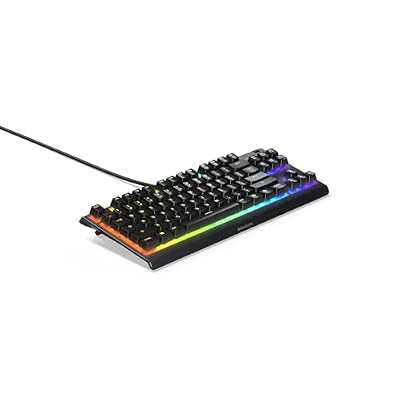 SteelSeriesSteelSeries Apex 3 TKL RGB Gaming Keyboard – Tenkeyless Compact…
 Logitech GLogitech G PRO Mechanical TKL Tenkeyless Gaming Keyboard (Clicky) -…
 Logitech GLogitech G515 LIGHTSPEED TKL Wireless Gaming Keyboard, Low Profile Keyboard…
 Logitech GLogitech G413 TKL SE Mechanical Gaming Keyboard - Black Aluminum…