
An upgradable gaming PC is an investment in the future. Instead of replacing the whole machine in a few years, you swap a graphics card, add RAM, or drop in a bigger SSD to keep pace with new games. That flexibility can save serious money over the life of the system.
- Watch: Best Upgradable Gaming PC — Video Review
- How to Choose an Upgradable Gaming PC
- The Best Upgradable Gaming PCs Reviewed
- What to Look For in a Truly Upgradable Machine
- Which One Should You Buy?
- Common Mistakes When Buying an Upgradable PC
- Plan Upgrades in the Right Order
- Seven Checks Before You Buy
- Why Cooling Matters for Upgrades
- Related Guides
- Related Guides
- Frequently Asked Questions
- Final Thoughts
- Related Articles
Not every prebuilt or mini PC makes upgrades easy, though. We focused on systems with standard components, accessible internals, and room to grow, whether you want a full tower or a compact machine you can tinker with down the line.


🎮 Get More From Your Setup — Free
Prime Gaming gives you free PC games every month, in-game loot, and a free Twitch channel sub — plus fast free shipping on all the gear above. New members get a 30-day free trial.
Watch: Best Upgradable Gaming PC — Video Review
How to Choose an Upgradable Gaming PC
- Standard components: Favor systems using standard motherboards, GPUs, and PSUs rather than proprietary parts that lock you into the manufacturer.
- Power supply headroom: A PSU with spare wattage lets you install a more powerful GPU later without replacing it.
- RAM and storage slots: Look for free memory slots and extra M.2 or drive bays so you can expand without removing existing parts.
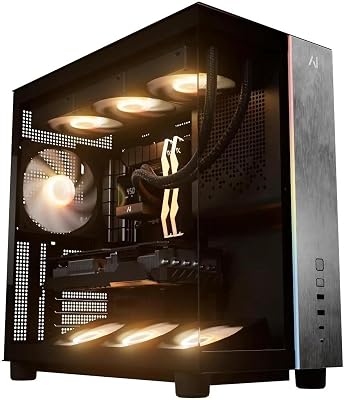
- Case space: Roomier cases accommodate larger future GPUs and better cooling, so weigh internal clearance when comparing options.
- CPU platform: A current socket like AM5 offers a clear upgrade path for future processors, extending the system’s useful life.
The Best Upgradable Gaming PCs Reviewed
KOTIN Prebuilt (RTX 5070, Ryzen 7 9700X)
This KOTIN build pairs a Ryzen 7 9700X with an RTX 5070 on the AM5 platform, giving strong performance and a clear upgrade path. Its standard parts make future swaps straightforward.
KOTIN Prebuilt (RTX 5060 Ti, Ryzen 5 9600X)
The RTX 5060 Ti version offers excellent value with room to grow, thanks to DDR5 memory and AM5 longevity. It is a smart starting point for a system you plan to upgrade over time.
WIWB Prebuilt (Ryzen 5 4500, RTX 3050)
The WIWB build is an affordable entry point with standard components ready for upgrades. Its RTX 3050 handles 1080p gaming today, and the platform welcomes a stronger GPU later.
GEEKOM A6 Mini PC
The GEEKOM A6 stands out among mini PCs for its upgradable RAM and PCIe 4.0 SSD. It is a compact option for those who want to expand memory and storage without a full tower.
GMKtec M6 Ultra Mini PC
The GMKtec M6 Ultra offers a Ryzen 7 7640HS with 32GB of DDR5 and a 1TB SSD in a small package. Its upgradable storage and memory make it a flexible compact choice.
What to Look For in a Truly Upgradable Machine
Standard Parts Versus Proprietary Ones
Upgradability depends less on the spec list than on whether the internals follow industry standards. A system with an ATX or Micro-ATX motherboard, a standard ATX power supply, and a regular case lets you replace almost anything. Some mainstream prebuilts use custom motherboards, unusual power connectors, or non-standard supply shapes, which can block a graphics card or storage upgrade years later. Look for product details that name the motherboard chipset and power supply wattage; vague listings are a warning sign.
Platform and Socket Decide Your CPU Path
The processor socket determines which chips you can drop in later. Ryzen 5 9600X, Ryzen 7 9700X, and Ryzen 7 9800X3D belong to AMD’s AM5 platform, which uses DDR5 memory only. The Ryzen 5 5600X in the MXZ build sits on the older AM4 platform with DDR4. That is still a capable setup, but AM4 is at the end of its life, so the upgrade ceiling is the last generation of AM4 chips. Intel’s Core Ultra 7 265F in the ASUS ROG G700 uses the LGA 1851 socket and DDR5, so check whether the motherboard has spare memory slots.
| Platform | Memory type | Upgrade outlook |
|---|---|---|
| AMD AM4 (Ryzen 5 5600X) | DDR4 | Limited to the final AM4 processors |
| AMD AM5 (Ryzen 5 9600X, 7 9700X, 7 9800X3D) | DDR5 | Newer AM5 chips are expected to fit; confirm with the motherboard maker |
| Intel LGA 1851 (Core Ultra 7 265F) | DDR5 | Depends on future compatible processors |
Power Supply Headroom for a Future Graphics Card
The graphics card is usually the first thing people upgrade, and it is also the part most likely to outgrow the power supply. Official total graphics power figures run roughly 145 W for an RTX 5060, 180 W for an RTX 5060 Ti, 250 W for an RTX 5070, and 300 W for an RTX 5070 Ti, and card makers publish a suggested supply size for each. A 750 W unit gives comfortable room for most of these, while a 550 W unit may cap you at a mid-range card. Look for an 80 Plus certified supply with spare PCIe power connectors.
Memory and Storage Expansion
Check how many memory slots the board has and how many are free. A machine that ships with two 16 GB sticks in a four-slot board can add more later, while one that uses all slots forces you to replace modules. For storage, count the M.2 slots and look for a 2.5 inch bay. Mini PCs like the GEEKOM A6 and GMKtec M6 Ultra are generally upgradable through laptop-style SO-DIMM memory and an M.2 drive, but they usually do not accept a desktop graphics card, so treat them as upgradable for memory and storage only.
Which One Should You Buy?
| If you… | Choose… |
|---|---|
| Want the strongest gaming performance with a high-end AMD processor | Galaxy V3 Gaming PC |
| Want a modern DDR5 platform with a mid-range graphics card | SKYESEV Gaming Desktop (Ryzen 5 9600X, RTX 5060) |
| Want a balanced 1440p system with a strong graphics card | KOTIN Prebuilt (RTX 5070, Ryzen 7 9700X) |
| Want a lower-cost entry to a current platform | KOTIN Prebuilt (RTX 5060 Ti, Ryzen 5 9600X) |
| Want a name-brand desktop with a newer Intel processor | ASUS ROG G700 (2025) |
| Already have a strong graphics card and want something compact for lighter games | GEEKOM A6 Mini PC or GMKtec M6 Ultra Mini PC |
| Are on a tight budget and plan to upgrade the graphics card soon | WIWB Prebuilt (Ryzen 5 4500, RTX 3050) |
Memory slot counts, supply wattage, and case size vary between versions, so confirm these on the listing before ordering.
Common Mistakes When Buying an Upgradable PC
- Assuming “upgradable” means every part. A prebuilt can have a standard graphics slot but a proprietary power supply or motherboard, limiting what you can swap.
- Overlooking DDR4 versus DDR5. The two memory types are not interchangeable, so a DDR4 system will not accept DDR5 sticks.
- Buying a weak power supply. A low-wattage unit can force you to replace it at the same time as the graphics card.
- Ignoring VRAM. Graphics cards with 8 GB of memory can run short in newer games at high settings, so consider a 12 GB or 16 GB card if you plan to keep the machine for years.
- Forgetting the case. Tight cases limit graphics card length, cooler height, and airflow, which matter once you install a larger part.
- Expecting mini PCs to take a desktop graphics card. Most compact machines have integrated graphics and are designed for memory and SSD upgrades only.
Plan Upgrades in the Right Order
Upgrading one part can expose another bottleneck, so it helps to know which changes pay off first.
| Upgrade | When it helps most | What to confirm first |
|---|---|---|
| Memory | Stutter when many apps are open or games exceed capacity | Free slots, memory type, and supported speeds |
| Storage | Slow load times or a full drive | Free M.2 slots and drive interface |
| Graphics card | Frame rates fall short at your resolution | Card length, power connectors, and supply wattage |
| Processor | CPU-limited games or heavy multitasking | Socket type and motherboard firmware support |
| Power supply | Moving to a more demanding graphics card | Connector type and physical size |
Seven Checks Before You Buy
- Find the motherboard model or chipset in the product details; if it is not named, treat that as a risk.
- Confirm the power supply wattage and whether it is a standard ATX unit.
- Count free memory slots and see whether the board uses DDR4 or DDR5.
- Check for at least one empty M.2 slot or a spare drive bay.
- Look at the case specifications for maximum graphics card length and cooler height.
- Note which processor socket the system uses and how long that platform is expected to stay supported.
- Read the warranty terms, since opening the case for upgrades is easier when the maker allows it.
Why Cooling Matters for Upgrades
Adding a larger graphics card or a faster processor raises heat output, and a prebuilt that was adequate before can run hotter afterward. Look for a case with a mesh front panel, at least one rear exhaust fan, and room for extra fans. A tower cooler is easier to service than a sealed liquid unit on a first upgrade, while a sealed unit can be tidy and quiet if it fits. If you plan to add storage and a graphics card in the same year, leave room around the lower intake fans so cables do not choke the airflow.
Related Guides
- Best Razer PC Gaming Controller 2026
- HP OMEN 45L vs Dell Alienware Aurora: 2026 Verdict
- Best Gaming PCs with RGB Lighting (2026 Guide)
- Best Lenovo Legion Gaming PCs in 2026
Frequently Asked Questions
What makes a PC upgradable?
Standard components, free RAM and storage slots, a capable power supply, and a current CPU socket. These let you improve the system piece by piece over time.
Should I buy a prebuilt or build my own?
Prebuilts with standard parts offer convenience plus upgradability. Building your own gives maximum control, but a well-chosen prebuilt is a great middle ground.
Can mini PCs be upgraded?
Some can. Many allow RAM and SSD upgrades even if the CPU and GPU are fixed. Check the specific model for accessible slots before buying.
What should I upgrade first?
The GPU usually delivers the biggest gaming boost. After that, adding RAM or faster storage keeps the whole system responsive as your needs grow.
Final Thoughts
The KOTIN RTX 5070 build is our top pick for future-proof power, the KOTIN RTX 5060 Ti offers the best upgradable value, and the GEEKOM A6 is the smart choice for a compact, expandable system.









