Affiliate disclosure: As an Amazon Associate we earn from qualifying purchases. This post contains affiliate links — we may earn a small commission at no extra cost to you. This never affects our picks. Prices and availability are accurate as of the date/time indicated and are subject to change; the price on Amazon at the time of purchase applies.
- Quick Comparison Table
- 1. MSI RTX 5070 Ti Ventus 3X OC: Best for high-refresh 1440p
- 2. ASUS Dual RTX 5060 Ti 16GB: Best for large textures on a modest card
- 3. ASUS Prime RTX 5070 12GB: Best for compact and small-form-factor builds
- 4. Gigabyte RTX 4060 Windforce OC 8G: Best for 1080p play on a short card
- 5. Intel Arc A750 Limited Edition 8GB: Best for an alternative to Nvidia and AMD
- How to Choose
- Frequently Asked Questions
- About the Author
- Related Articles
Quick answer: For the best GPUs under 2000, the MSI RTX 5070 Ti Ventus 3X is the top pick for high-refresh 1440p and some 4K. The ASUS 5060 Ti 16GB suits memory-hungry textures, the ASUS Prime 5070 suits small cases, the Gigabyte RTX 4060 suits modest builds, and the Intel Arc A750 suits tight spending.
This guide compares five graphics cards that sit comfortably inside a 2000 ceiling, from a Blackwell RTX 5070 Ti down to an entry Intel Arc board. Because that ceiling is generous, the real question is how much memory, board size and feature set you actually need rather than how much you can spend. All comparisons use each listing’s published specs; we did not run our own benchmarks, so treat performance tiers as general class guidance.
Quick Comparison Table
| # | Model | Key specs (per listing) | Best for |
|---|---|---|---|
| 1 | MSI RTX 5070 Ti Ventus 3X OC | 16GB GDDR7, 256-bit, 2497 MHz, 3x DP 2.1a | high-refresh 1440p |
| 2 | ASUS Dual RTX 5060 Ti 16GB | 16GB GDDR7, PCIe 5.0, 2.5-slot, 0dB fans | large textures on a modest card |
| 3 | ASUS Prime RTX 5070 12GB | 12GB GDDR7, SFF-ready, 2.5-slot, Dual BIOS | compact and small-form-factor builds |
| 4 | Gigabyte RTX 4060 Windforce OC 8G | 8GB GDDR6, 128-bit, 2x Windforce fans | 1080p play on a short card |
| 5 | Intel Arc A750 Limited Edition 8GB | 8GB, PCI Express 4.0 | an alternative to Nvidia and AMD |
1. MSI RTX 5070 Ti Ventus 3X OC: Best for high-refresh 1440p
Specs per the listing: GeForce RTX 5070 Ti, 16GB GDDR7, 256-bit bus, 2497 MHz extreme performance clock, three DisplayPort 2.1a outputs, one HDMI 2.1b, NVIDIA Blackwell architecture, triple-fan Ventus 3X cooler.
This is the strongest card in the lot and the one that makes the most of a large ceiling. RTX 5070 Ti class hardware is aimed at high-refresh 1440p and capable of 4K play with sensible settings, and 16GB on a 256-bit bus gives it room for large texture packs and ray-traced scenes that choke 8GB boards.
The triple-fan Ventus design is a straightforward, no-frills cooler, so expect a long, thick card that needs real clearance. Check the listing for exact length and the recommended power supply before ordering, because the page excerpt does not list either.
- Pros: 16GB of GDDR7 on a 256-bit bus; Three DisplayPort 2.1a outputs for multi-monitor setups; Blackwell feature set
- Cons: Large three-fan board needs case clearance; Power connector and PSU requirements not listed in the title
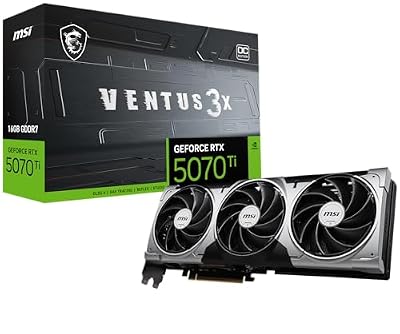
msi Gaming RTX 5070 Ti 16G Ventus 3X OC Graphics Card (16GB GDDR7, 256-bit, Extreme Performance: 2497 MHz, DisplayPort x 3 2.1a, HDMI 2.1b, NVIDIA Blackwell Architecture)
Included for 'Best GPUs Under 2000: Five Graphics Cards by Use Case' as a representative home product in this roundup; selection reflects the product set returned for this topic.
View on Amazon2. ASUS Dual RTX 5060 Ti 16GB: Best for large textures on a modest card
Specs per the listing: GeForce RTX 5060 Ti, 16GB GDDR7, OC Edition, PCIe 5.0, HDMI 2.1b, DisplayPort 2.1b, 2.5-slot design, Axial-tech fans, 0dB Technology, Dual BIOS.
The 5060 Ti sits a tier below the 5070 family in raw speed, but this version pairs the chip with 16GB, which is what makes it interesting. Many current games ask for more than 8GB at high texture settings, and a 16GB board avoids the stutter that appears when memory runs out.
ASUS’s 0dB mode stops the fans at light loads, and the Dual BIOS switch lets you choose between a performance and a quiet profile. It is a good fit for 1080p high refresh or 1440p at balanced settings, and the 2.5-slot cooler is manageable in most mid-tower cases.
- Pros: 16GB memory at a lower tier; Fans stop at idle with 0dB mode; Dual BIOS switch
- Cons: Slower core than the RTX 5070 tier; Memory bus width not listed in the title

ASUS Dual GeForce RTX 5060 Ti 16GB GDDR7 OC Edition Gaming Graphics Card | PCIe 5.0, HDMI 2.1b, DisplayPort 2.1b, 2.5-slot, Axial-tech Fans, 0dB Technology, Dual BIOS
Included for 'Best GPUs Under 2000: Five Graphics Cards by Use Case' as a representative home product in this roundup; selection reflects the product set returned for this topic.
View on Amazon3. ASUS Prime RTX 5070 12GB: Best for compact and small-form-factor builds
Specs per the listing: GeForce RTX 5070, 12GB GDDR7, OC Edition, SFF-Ready design, PCIe 5.0, HDMI/DP 2.1, 2.5-slot, Axial-tech fans, Dual BIOS.
The Prime keeps a restrained footprint on purpose, which is why ASUS labels it SFF-ready. If your case is small or already crowded, a 2.5-slot card that still carries RTX 5070 class performance is the practical choice over the larger triple-fan boards.
The trade-off is memory: 12GB is plenty for 1440p today but less future-proof than the 16GB cards above. Verify card length against your case’s published GPU clearance, since the title does not give millimeter dimensions.
- Pros: Slim 2.5-slot size; RTX 5070 class speed for 1440p; Dual BIOS switch
- Cons: 12GB is less headroom than 16GB cards; Exact length not listed

ASUS PRIME GeForce RTX 5070 12GB GDDR7 OC Edition Gaming Graphics Card | SFF-Ready, PCIe 5.0, HDMI/DP 2.1, 2.5-slot, Axial-tech Fans, Dual BIOS
Included for 'Best GPUs Under 2000: Five Graphics Cards by Use Case' as a representative home product in this roundup; selection reflects the product set returned for this topic.
View on Amazon4. Gigabyte RTX 4060 Windforce OC 8G: Best for 1080p play on a short card
Specs per the listing: GeForce RTX 4060, 8GB GDDR6, 128-bit, two Windforce fans, OC Edition, model GV-N4060WF2OC-8GD.
With a ceiling this high, the RTX 4060 is the restraint pick: it targets 1080p at high settings, with 1440p possible when you lower a few options. Its two-fan Windforce cooler keeps the board short enough for many compact cases.
The weak point is the 8GB, 128-bit memory configuration. It is adequate for esports and most 1080p titles but will limit the newest texture-heavy releases. Choose it when the rest of your parts are modest and you do not want to overbuild.
- Pros: Two-fan cooler suits smaller cases; Fits a modest CPU and PSU; Well-known Ada feature set
- Cons: 8GB can limit new releases; Narrow 128-bit bus

Gigabyte GeForce RTX 4060 WINDFORCE OC 8G Graphics Card, 2X WINDFORCE Fans, 8GB 128-bit GDDR6, GV-N4060WF2OC-8GD Video Card
Included for 'Best GPUs Under 2000: Five Graphics Cards by Use Case' as a representative home product in this roundup; selection reflects the product set returned for this topic.
View on Amazon5. Intel Arc A750 Limited Edition 8GB: Best for an alternative to Nvidia and AMD
Specs per the listing: Intel Arc A750 Limited Edition, 8GB, PCI Express 4.0. Memory type, clocks and outputs are not listed; check the maker page.
Intel’s A750 is the outlier here, a first-generation Arc board aimed at 1080p play. It appeals to builders who want something different from the usual vendors or need a second card for a secondary machine.
Be realistic about drivers and games: Arc support has improved through updates, but older or niche titles can still behave less predictably than on Nvidia. Resizable BAR support on your motherboard matters for this card, so confirm it before you buy.
- Pros: A different vendor with its own media engine; 8GB for 1080p use; PCIe 4.0 interface
- Cons: Driver maturity varies by game; Needs a motherboard with Resizable BAR for best results

Intel Arc A750 Limited Edition 8GB PCI Express 4.0 Graphics Card
Included for 'Best GPUs Under 2000: Five Graphics Cards by Use Case' as a representative home product in this roundup; selection reflects the product set returned for this topic.
View on AmazonHow to Choose
Match memory to your resolution
For 1080p, 8GB is serviceable. For 1440p at high settings, aim for 12GB. For 4K or heavy ray tracing, 16GB is the sensible floor. A larger ceiling should buy you memory first, since that is the spec you cannot upgrade later.
Check physical fit and power
Measure the clearance inside your case from the fan mount to the front radiator or drive cage, and compare it with the card’s published length. Cards in this guide range from two-fan boards to triple-fan designs, and the heaviest ones may need a support bracket. Confirm your power supply wattage and connector type on the maker page, because the listing titles here do not state them.
Pick the right tier for your monitor
Pairing a flagship card with a 1080p 60Hz screen wastes it, while an entry card on a 1440p 165Hz screen will leave the refresh rate unused. Match the card to the screen you own or plan to buy, and remember that DisplayPort 2.1 matters only if your monitor can use it.
What to skip
Skip workstation cards with similar names, such as RTX A2000 or RTX 2000 Ada boards, if your goal is gaming; they are built for professional software and offer a very different value for play. Also avoid unfamiliar sellers listing a known GPU name with unclear specs.
Frequently Asked Questions
Is 16GB of VRAM necessary?
Not for every game, but it is a safe choice for 1440p high textures and modern titles that exceed 8GB. If you play older or esports titles at 1080p, 8GB is enough.
Do I need PCIe 5.0 for these cards?
No. These cards also work in PCIe 4.0 slots. The newer interface is mainly a compatibility bonus, not a requirement for good play.
Is the Intel Arc A750 a good first card?
It can be a workable 1080p card, but expect more driver variation than with Nvidia. Enable Resizable BAR in your BIOS and keep drivers current.
Which card suits a small case best?
The ASUS Prime RTX 5070 is labelled SFF-ready and uses a 2.5-slot cooler. Always confirm card length against your case before ordering.
Do these cards come with a power cable adapter?
The listings do not say. Check the maker page and your power supply’s connectors before buying.