Affiliate disclosure: As an Amazon Associate we earn from qualifying purchases. This post contains affiliate links — we may earn a small commission at no extra cost to you. This never affects our picks. Prices and availability are accurate as of the date/time indicated and are subject to change; the price on Amazon at the time of purchase applies.
- Best Keyboards for Developers at a Glance
- How We Built This Guide
- Best Keyboards for Developers: Quick Comparison Table
- 1. Arteck Split Ergonomic Keyboard — Best Budget Split Board
- 2. Keychron K10 HE Hall Effect Keyboard — Best for Adjustable Actuation
- 3. Logitech MX Keys S Wireless Keyboard — Best Overall for Developers
- 4. Logitech Wave Keys Wireless Ergonomic Keyboard — Best Wave Shape for Comfort
- 5. Logitech Signature Slim Solar+ K980 — Best Low-Maintenance Slim Board
- More Keyboards for Developers: Programmable, Ergonomic and Compact Picks
- Best Keyboards for Developers by Budget and Need
- Mechanical Keyboard vs Membrane for Programming
- Buying Guide: The Specs That Matter
- Related Guides
- How to Choose a Keyboard for Programming
- Which Keyboard for Which Developer
- More Keyboard Questions for Developers
- Frequently Asked Questions
- Related Guides
- Related Articles
- Pro Tips for Choosing the Right Pick
- About the Author
- Related Articles
Quick answer: The best keyboards for developers combine a comfortable typing feel with remapping and multi-device switching. Our overall pick is the Logitech MX Keys S, the Keychron K8 Pro is the programmable choice, and the Kinesis Advantage360 is the premium ergonomic choice.
Choosing the best keyboards for developers should start with how you type all day. This guide compares thirteen keyboards for 2026, from budget split boards to programmable 75% and TKL layouts, with who each one suits and the trade-offs.
Best Keyboards for Developers at a Glance


How We Built This Guide
We did not run our own typing tests. Each keyboard was compared using manufacturer specifications, published documentation, professional review coverage and recurring buyer feedback, then grouped by what developers actually need: comfort, layout, remapping and connectivity.
Best Keyboards for Developers: Quick Comparison Table
| Pick | Keyboard | Layout | Connectivity | Best For |
|---|---|---|---|---|
| 1 | Arteck Split Ergonomic Keyboard | Split, palm rest | 2.4G USB wireless | Budget ergonomic typing |
| 2 | Keychron K10 HE | Full-size, Hall effect | Tri-mode wireless, aluminum + wood frame | Adjustable actuation |
| 3 | Logitech MX Keys S | Full-size, low profile | Bluetooth, USB-C rechargeable | Office and multi-device work |
| 4 | Logitech Wave Keys | Wave, palm rest | Bluetooth, Logi Bolt | Comfort on a budget |
| 5 | Logitech Signature Slim Solar+ K980 | Slim, solar | Bluetooth, solar powered | Low-maintenance slim board |
| 6 | Keychron K8 Pro | TKL, hot-swap | QMK/VIA, wireless | Programmable layers |
| 7 | Logitech MX Mechanical | Full-size, low profile | 3-device Bluetooth, USB-C | Tactile typing feel |
| 8 | Kinesis Advantage360 Professional | Split, contoured | Bluetooth, open source | Premium ergonomics |
| 9 | HHKB Professional Hybrid Type-S | Compact | Wireless and wired, silent | Minimal layout |
| 10 | NuPhy Air75 V2 | 75%, low profile | Bluetooth, 2.4G, USB-C | Portable 75% board |
1. Arteck Split Ergonomic Keyboard — Best Budget Split Board
The Arteck Split Ergonomic Keyboard is a low-cost way to try a split layout. Per the listing it has a split design with a cushioned wrist and palm rest and connects over a 2.4G USB wireless receiver for Windows computers. It suits developers who want to see whether a split layout reduces wrist strain before paying for a premium board. Skip it if you use a Mac or Linux machine, need Bluetooth, or want programmable layers.
- Pros: Split layout with a palm rest at a budget price
2.4G USB receiver, no pairing needed
Natural hand position for long sessions - Cons: Listing targets Windows computers
No remapping software or Bluetooth
Plastic build is not premium
7



As an Amazon Associate we earn from qualifying purchases. Product prices and availability are accurate as of the date/time indicated.
2. Keychron K10 HE Hall Effect Keyboard — Best for Adjustable Actuation
The Keychron K10 HE is a full-size wireless keyboard with Gateron double-rail magnetic switches. The listing highlights Hall effect sensing, rapid trigger, adjustable actuation, tri-mode wireless, RGB and an aluminum and wood frame. For developers, the adjustable actuation lets you set a light or deeper key press for typing, and the full-size layout keeps the numpad for data entry. It suits builders who like to tune their keyboard. Skip it if you want a compact layout or prefer a traditional switch feel.
- Pros: Magnetic switches with adjustable actuation
Tri-mode wireless connectivity
Full-size layout with numpad
Aluminum and wood frame - Cons: Priced well above entry-level boards
Hall effect features matter more for gaming than for coding
Prime
Keychron K10 HE Hall Effect Keyboard, Gateron Double-Rail Magnetic Nebula Switch, Full-Size Tri-Mode Wireless Keyboard with Rapid Trigger, Adjustable Actuation, RGB, Aluminum + Wooden Frame
In Stock
As an Amazon Associate we earn from qualifying purchases. Product prices and availability are accurate as of the date/time indicated.
3. Logitech MX Keys S Wireless Keyboard — Best Overall for Developers
The Logitech MX Keys S is our overall pick for developers who split time between a desk and a laptop. The listing highlights low-profile keys, quiet typing, programmable keys, backlighting, Bluetooth and a rechargeable USB-C battery, and it works with Windows, Linux, Chrome and Mac. The full-size layout includes a numpad, and the keys are shallow and quiet, which suits shared offices. Skip it if you want hot-swap switches or deep QMK-style remapping.
- Pros: Quiet low-profile typing in a full-size layout
Bluetooth with multi-device use
Rechargeable via USB-C
Works with Windows, Linux, Chrome and Mac - Cons: Priced above most office keyboards
No hot-swap or QMK/VIA programming
Logitech MX Keys S Wireless Keyboard, Low Profile, Fluid Precise Quiet Typing, Programmable Keys, Backlighting, Bluetooth, USB C Rechargeable, for Windows PC, Linux, Chrome, Mac – Graphite
In Stock
As an Amazon Associate we earn from qualifying purchases. Product prices and availability are accurate as of the date/time indicated.
4. Logitech Wave Keys Wireless Ergonomic Keyboard — Best Wave Shape for Comfort
The Logitech Wave Keys Wireless Ergonomic Keyboard has a wave-shaped key layout with a cushioned palm rest. The listing highlights Easy-Switch device pairing, Bluetooth, a Logi Bolt receiver and multi-OS support for Windows and Mac. It suits developers who want a more natural wrist angle without a full split board. Skip it if you want a mechanical feel or need a numpad-free compact layout.
- Pros: Cushioned palm rest and wave-shaped layout
Easy-Switch pairing between devices
Bluetooth or Logi Bolt receiver
Multi-OS compatibility - Cons: Not mechanical
Full-size footprint takes desk space
Logitech Wave Keys Wireless Ergonomic Keyboard with Cushioned Palm Rest, Comfortable Natural Typing, Easy-Switch, Bluetooth, Logi Bolt Receiver, for Multi-OS, Windows/Mac – Graphite
In Stock
As an Amazon Associate we earn from qualifying purchases. Product prices and availability are accurate as of the date/time indicated.
5. Logitech Signature Slim Solar+ K980 — Best Low-Maintenance Slim Board
The Logitech Signature Slim Solar+ K980 is a slim Bluetooth keyboard powered by solar and artificial light. The listing says up to 10 years of battery life and customizable keys. It suits developers who dislike recharging and want a thin board on a clean desk. Skip it if you prefer tall mechanical keys or if the room is often dark and you rely on battery alone.
- Pros: Solar and indoor light charging
Slim design with customizable keys
Bluetooth connection - Cons: Shallow keys are not for mechanical fans
Premium price for a slim board
Logitech Signature Slim Solar+ Wireless Bluetooth Keyboard K980, Solar and Artificial Light Powered, Up to 10 Years Battery Life, Customizable Keys – Graphite
In Stock
As an Amazon Associate we earn from qualifying purchases. Product prices and availability are accurate as of the date/time indicated.
More Keyboards for Developers: Programmable, Ergonomic and Compact Picks
The first five picks lean on comfort and wireless convenience. The keyboards below add what many developers ask for next: remappable layers, a split ergonomic layout, a minimal layout and a portable 75% board.
Keychron K8 Pro – Best Programmable TKL Keyboard
The Keychron K8 Pro is the programmable pick. QMK/VIA support lets you remap keys and build layers for IDE shortcuts, and hot-swap sockets let you change switches without soldering. The tenkeyless layout frees desk space for a mouse while keeping the arrow keys and function row.
- Layout: tenkeyless (TKL)
- Firmware: QMK/VIA programmable
- Switches: hot-swappable, Gateron G Pro Blue (clicky) in this listing
- Connectivity: wireless Bluetooth and wired
- Keycaps: PBT, white backlight
- Systems: Mac, Windows, Linux
Pros:
- QMK/VIA remapping for custom layers
- Hot-swap sockets for switch experiments
- Works across Mac, Windows and Linux
- Good balance of price and features
Cons:
- The Blue switch in this listing is clicky and loud
- No numpad
Skip it if you share an office; pick a different switch option or the Logitech MX Keys S for quiet typing.
Logitech MX Mechanical – Best Tactile Low-Profile Full-Size Board
The Logitech MX Mechanical brings tactile switches to a low-profile, full-size, multi-device board. It suits developers who want a mechanical feel with the same Bluetooth multi-device convenience as the MX Keys S.
- Switches: low-profile tactile
- Layout: full-size with numpad
- Connectivity: 3-device Bluetooth pairing
- Power: USB-C rechargeable, up to 15 days per the listing
- Backlight: smart backlight that adjusts automatically
Pros:
- Tactile feedback in a slim profile
- Pairs with three devices
- Smart backlight saves battery
Cons:
- Priced above the MX Keys S
- Low-profile switches feel different from standard mechanical boards
Skip it if you want hot-swap sockets or QMK-style remapping.
Kinesis Advantage360 Professional – Best Premium Ergonomic Keyboard
The Kinesis Advantage360 Professional is the premium ergonomic pick. It combines a split, contoured layout with adjustable tenting and fully programmable open-source firmware, aimed at developers who type for many hours and want to reduce wrist and shoulder strain.
- Layout: split, contoured
- Switches: quiet mechanical
- Connectivity: Bluetooth
- Firmware: fully programmable, open source
- Ergonomics: adjustable tenting, backlit
Pros:
- Strongest ergonomic design in this guide
- Fully programmable layers
- Wireless split halves reduce cable clutter
Cons:
- Expect a learning period when switching from a standard layout
Skip it if you want to be productive on day one or need a portable board.
HHKB Professional Hybrid Type-S – Best Minimal Layout
The HHKB Professional Hybrid Type-S is a compact board with a loyal following among programmers. It uses Topre switches in a minimal layout that keeps your hands close to the home row, with silent operation and both wireless and wired USB connection.
- Layout: compact, minimal key count
- Connectivity: Bluetooth wireless and wired USB
- Operation: silent (Type-S)
- Printed legends
- Warranty: 2-year advance exchange
Pros:
- Minimal layout keeps hands on the home row
- Silent Type-S switches
- Wireless and wired modes
Cons:
- Missing dedicated arrow and function keys takes getting used to
Skip it if you rely on a dedicated function row or arrow cluster.
NuPhy Air75 V2 – Best Portable 75% Keyboard
The NuPhy Air75 V2 is a slim 75% keyboard that keeps arrow keys and the function row in a small footprint. It suits developers who work in cafes or switch between a laptop and a desk, and who want a mechanical feel at a modest price.
- Layout: 75%, low profile
- Switches: Gateron Cowberry
- Connectivity: Bluetooth, 2.4G and USB-C
- Lighting: RGB
- Systems: Windows, Mac and Linux
Pros:
- 75% layout keeps function and arrow keys
- Three connection modes
Cons:
- Low-profile typing feel is not for everyone
- Plastic-heavy build compared with metal frames
Skip it if you want QMK/VIA remapping or heavy sound dampening.
Also Consider
Keychron K2 – Best Budget 75% Wireless Keyboard
The Keychron K2 packs 84 keys into a compact 75% wireless layout with Bluetooth, a USB-C connection and Silent K Pro Red switches.
- Layout: 75%, 84 keys
- Connectivity: Bluetooth and USB-C
- Switches: Silent K Pro Red (linear)
- Backlight: white LED
Pros:
- Compact layout with arrow keys
- Quiet linear switches
Cons:
- Linear switches feel light for some typists
Skip it if you prefer a tactile bump.
Logitech Ergo K860 – Best Split Wireless Office Keyboard
The Logitech Ergo K860 is a curved split keyboard with a pillowed wrist rest and Bluetooth or USB receiver connection. It suits developers who want split ergonomics without the price of a Kinesis board.
- Layout: curved split keyframe
- Wrist rest: pillowed
- Connectivity: Bluetooth and USB receiver
- Systems: Windows and Mac
Pros:
- Gentler learning curve than a fully split board
- Wrist rest included
Cons:
- Large footprint
- Not mechanical
Skip it if you need a compact travel keyboard.
Cherry KC 200 MX – Best Wired Silent Mechanical Office Board
The Cherry KC 200 MX is a wired mechanical keyboard with MX2A Silent Red switches and an aluminum surface. It suits developers who want a simple, quiet wired board with no batteries or pairing.
- Switches: MX2A Silent Red
- Connection: wired USB-A
- Surface: aluminum, black and bronze finish
Pros:
- Quiet mechanical switches
- No batteries or pairing
Cons:
- Wired only
- No remapping software
Skip it if you need wireless or multi-device switching.
Best Keyboards for Developers by Budget and Need
If you already know your budget or main priority, use this shortlist. Prices change, so these are tiers rather than quotes.
Best Keyboard for Programming Under $100
Best Mechanical Keyboard for Programming, $100-$150
- Keychron K10 HE · full-size · Hall effect · adjustable actuation · tri-mode wireless
Best Ergonomic Keyboard for Developers
- Kinesis Advantage360 Professional · split, contoured · adjustable tenting · open-source firmware
- Logitech Ergo K860 · curved split · pillowed wrist rest
- Logitech Wave Keys · wave shape · cushioned palm rest · Logi Bolt receiver
- Arteck Split Ergonomic Keyboard · budget split layout
Best Minimal and Portable Keyboard for Developers
- HHKB Professional Hybrid Type-S · compact · silent · wireless and wired
- NuPhy Air75 V2 · 75% · low profile · three connection modes
- Logitech Signature Slim Solar+ K980 · slim · solar powered · Bluetooth
Our top three overall for most developers are the Logitech MX Keys S, the Keychron K8 Pro and the Kinesis Advantage360 Professional, covering comfort, programmability and ergonomics respectively.
Mechanical Keyboard vs Membrane for Programming
A mechanical keyboard uses an individual switch under each key. A membrane or scissor-switch board uses a rubber or low-profile mechanism. For programming, mechanical boards give more consistent feedback and let you choose switch feel, while low-profile scissor boards like the Logitech MX Keys S are quieter and thinner. Both can work well. Choose by noise tolerance and desk setup, not by label alone.
Buying Guide: The Specs That Matter
Switch Type
Tactile switches are the most popular choice for coding because they give feedback without the noise of clicky switches. Linear switches suit fast, light typing, and clicky switches add audible feedback that can annoy colleagues. Hall effect boards such as the Keychron K10 HE let you adjust actuation instead of committing to one feel.
Layout and Size
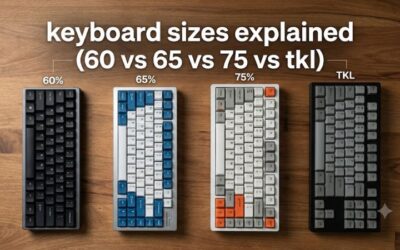
Full-size boards add a numpad for data entry and spreadsheets. TKL layouts such as the Keychron K8 Pro free up mouse space. 75% boards keep the arrow keys and function row, which many developers use for debugging shortcuts.
Build and Connectivity
Hot-swap sockets let you change switches without soldering, and QMK/VIA support lets you remap keys and build layers. Bluetooth with multi-device pairing helps if you switch between a desktop and a laptop.
How to Choose a Keyboard for Programming
Pick the Layout You Will Actually Use
Full-size (100%) boards add a numpad, which helps with data work. Tenkeyless (TKL) boards like the Keychron K8 Pro remove the numpad for mouse room. 75% boards like the NuPhy Air75 V2 and Keychron K2 keep the arrow keys and function row in a compact body. Minimal 60% designs like the HHKB save the most space but remove dedicated keys.
Choose Switches by Noise and Feel
Tactile switches give a bump at actuation and are the most popular for coding. Linear switches are smooth and light. Clicky switches add an audible click and suit private offices. If you share a room, choose silent switches such as the Cherry KC 200 MX with MX2A Silent Red, or a quiet low-profile board like the Logitech MX Keys S.
Look for Remapping and Layers
QMK/VIA support, as on the Keychron K8 Pro, lets you remap keys and store layers on the keyboard itself. The Kinesis Advantage360 Professional uses open-source firmware with similar flexibility. Layers are useful for IDE shortcuts and navigation keys.
Decide on Ergonomics Early
If you type for most of the day, consider a split or wave layout, a palm rest and tenting. Start with a gentler option such as the Logitech Wave Keys or Logitech Ergo K860 before moving to a fully split design like the Kinesis Advantage360 Professional.
Check Connectivity and Battery
Bluetooth with multi-device pairing, as on the Logitech MX Keys S and Logitech MX Mechanical, helps if you switch between a desktop and laptop. Solar charging on the Logitech Signature Slim Solar+ K980 removes battery management. Wired boards like the Cherry KC 200 MX avoid pairing issues entirely.
Which Keyboard for Which Developer
- Front-end or full-stack developer in an office: Logitech MX Keys S for quiet typing and multi-device switching.
- Developer who lives in the terminal and IDE: Keychron K8 Pro for layers and a compact TKL layout.
- Developer with wrist or shoulder pain: Kinesis Advantage360 Professional or Logitech Ergo K860.
- Remote developer who travels: NuPhy Air75 V2 or Keychron K2.
- Minimalist who wants less finger travel: HHKB Professional Hybrid Type-S.
- Budget developer: Arteck Split Ergonomic Keyboard or Cherry KC 200 MX.
More Keyboard Questions for Developers
Do programmers need a mechanical keyboard?
No. A good low-profile board such as the Logitech MX Keys S works well. Mechanical keyboards add switch choice, remapping and durability.
What size keyboard is best for programming?
A 75% or TKL layout is the usual sweet spot because it keeps arrow keys and the function row while saving desk space. Choose full-size if you use a numpad.
Are ergonomic keyboards worth it for developers?
If you type for many hours and feel wrist or forearm strain, a wave or split layout can help. Start with a mild option like the Logitech Wave Keys before spending on a premium board like the Kinesis Advantage360 Professional.
Which switches are best for coding?
Tactile switches are the most popular because they give feedback without the noise of clicky switches. Silent tactile or silent linear switches suit shared offices.
Is a wireless keyboard fine for programming?
Yes. Modern Bluetooth and 2.4G connections have low enough latency for typing. Wired boards avoid battery and pairing management.
Frequently Asked Questions
Which keyboard is best for developers in 2026?
The Logitech MX Keys S is our overall pick for developers who split time between devices. The Keychron K8 Pro suits programmable layouts and the Kinesis Advantage360 suits ergonomic needs.
How much should you spend on a keyboard for programming?
What specs should you compare for programming and development?
Look for tactile switches or quiet low-profile keys, a layout that keeps the keys you use, and remapping support. Add hot-swap sockets and wireless pairing if you work across devices.
Which pick offers the best value?
The Arteck Split Ergonomic Keyboard and Logitech Wave Keys lead on value for ergonomics, while the Logitech MX Keys S is the best all-round buy and the Kinesis Advantage360 Professional is the no-compromise ergonomic choice. Check live pricing above.
Bottom line: the Logitech MX Keys S is our top keyboard pick for developers, with a programmable Keychron K8 Pro and a premium Kinesis Advantage360 above for other needs. Check live pricing before you buy.
Related Guides
Related Articles
Looking for more on this topic? Browse the hand-picked guides below — each one applies the same scoring rubric used in this review.
Pro Tips for Choosing the Right Pick
Before you click buy, weigh the practical fit of any keyboard for developers against your day-to-day setup. Hardware decisions in 2026 hinge less on raw spec-sheet bragging rights and more on whether the unit will quietly do its job for years.
Three habits separate satisfied buyers from regretful ones. First, double-check return and warranty terms before payment. Second, lean on shopper review counts in the thousands — those reflect long-term reliability. Third, factor in accessory cost so the headline price is not a surprise once everything arrives.
Setup checklist before checkout
- Measure your space — confirm the keyboard fits your desk and any wrist rest.
- Verify compatibility — ports, standards, software.
- Read the warranty — two-plus years is the floor.
- Plan upgrades — pick a model with a sensible path.