Affiliate disclosure: As an Amazon Associate we earn from qualifying purchases. This post contains affiliate links — we may earn a small commission at no extra cost to you. This never affects our picks. Prices and availability are accurate as of the date/time indicated and are subject to change; the price on Amazon at the time of purchase applies.
- Quick Comparison Table
- 1. Keychron K2 HE: Best for wireless 75% gaming and typing
- 2. Razer Huntsman V3 HE Magnetic TKL: Best for competitive esports play
- 3. Logitech G PRO Mechanical TKL (Clicky): Best for compact tournament-style layout
- 4. SteelSeries Apex 5 Hybrid Mechanical: Best for a full-size board with an OLED display
- 5. Redragon K580 Wired RGB Mechanical: Best for a budget full-size macro board
- How to Choose
- Frequently Asked Questions
- About the Author
- Related Articles
Quick answer: The best keyboards here start with the Keychron K2 HE, a wireless 75% Hall Effect board for gaming and typing. The Razer Huntsman V3 HE targets esports, the Logitech G PRO TKL is a compact clicky board, the SteelSeries Apex 5 adds an OLED display, and the Redragon K580 is the full-size budget choice.
This guide compares five keyboards across layouts and switch technologies, from a 75% wireless Hall Effect model to a full-size tactile board with macro keys. Each comparison uses the specs in the listing: layout, switch type, connection and extras such as displays or software. We did not run our own typing or latency tests, so treat feel and speed claims as maker descriptions and confirm key travel and switch options before you decide.
Quick Comparison Table
| # | Model | Key specs (per listing) | Best for |
|---|---|---|---|
| 1 | Keychron K2 HE | 75% layout, Hall Effect, Gateron magnetic switch, 2.4GHz/Bluetooth/USB-C, QMK | wireless 75% gaming and typing |
| 2 | Razer Huntsman V3 HE Magnetic TKL | TKL, Hall Effect magnetic switches, 8000 Hz polling, wired, Rapid Trigger | competitive esports play |
| 3 | Logitech G PRO Mechanical TKL (Clicky) | TKL, mechanical clicky, detachable Micro USB, Lightsync RGB | compact tournament-style layout |
| 4 | SteelSeries Apex 5 Hybrid Mechanical | Full-size, Hybrid Blue switch, per-key RGB, OLED display, aluminum frame | a full-size board with an OLED display |
| 5 | Redragon K580 Wired RGB Mechanical | Full-size, tactile blue switch, macro keys, media wheel, RGB | a budget full-size macro board |
1. Keychron K2 HE: Best for wireless 75% gaming and typing
Specs per the listing: 75% layout, Hall Effect magnetic keyboard, Rapid Trigger with Gateron magnetic switches, 2.4 GHz, Bluetooth and Type-C connection, QMK launcher, aluminum and wood build, for Mac, Windows and Linux.
The K2 HE is the one board in this group that combines a compact 75% layout, three connection modes and adjustable magnetic switches. Rapid Trigger and adjustable actuation help fast, repeated inputs in shooters and rhythm games, and the QMK launcher supports remapping.
The aluminum and wood build gives a premium feel, but it is not a budget board. Compact layouts drop the numpad, so check you can live without one for spreadsheets, and confirm which switch variants and keycap options the maker sells, because the listing names only the Gateron magnetic switch.
- Pros: 75% layout with three connection modes; Hall Effect switches with Rapid Trigger; Mac, Windows and Linux support
- Cons: No numpad; Premium tier compared with the other boards

Keychron K2 HE Wireless Magnetic Hall Effect Custom Keyboard 75% Layout | 2.4 GHz/Bluetooth/Type-C, QMK Launcher, Rapid Trigger Gateron Magnetic Switch for Mac Windows Linux (Aluminum + Wood) - Black
Included for 'Best Keyboards for Gaming and Typing: Five Picks Compared' as a representative home product in this roundup; selection reflects the product set returned for this topic.
View on Amazon2. Razer Huntsman V3 HE Magnetic TKL: Best for competitive esports play
Specs per the listing: Tenkeyless wired keyboard with Hall Effect magnetic switches, 8000 Hz polling, Razer Snap Flex, Snap Tap, Rapid Trigger, adjustable actuation and Synapse Web support.
Razer builds this board around competitive play. The 8000 Hz polling rate, adjustable actuation and Rapid Trigger are features aimed at fast-paced shooters, and the TKL layout leaves more desk space for mouse movement.
It is wired only, so there is no wireless mode. Settings are handled through Razer software, so it suits you if you are comfortable with that ecosystem. Listing details such as keycap material and cable length are not given, so read the maker page for them before ordering.
- Pros: 8000 Hz polling; Adjustable magnetic switches; TKL layout saves space
- Cons: Wired only; Relies on Razer software for setup

Razer Huntsman V3 HE Magnetic TKL 8KHz Wired Gaming Keyboard | Hall Effect Magnetic Switches, 8000 Hz Polling, Razer Snap Flex, Snap Tap, Rapid Trigger, Adjustable Actuation, Synapse Web
Included for 'Best Keyboards for Gaming and Typing: Five Picks Compared' as a representative home product in this roundup; selection reflects the product set returned for this topic.
View on Amazon3. Logitech G PRO Mechanical TKL (Clicky): Best for compact tournament-style layout
Specs per the listing: Tenkeyless mechanical gaming keyboard with clicky switches, detachable Micro USB cable, 16.8 million color Lightsync backlit keys.
This is a long-running compact design with a detachable cable, which makes it easy to carry to a LAN event or between desks. The clicky switch is loud and tactile, so it is not for shared offices or late-night play.
The listing does not mention Hall Effect or adjustable actuation, so it is a traditional mechanical board. A Micro USB connector is also older than current USB-C, so keep a spare cable in your bag if you travel with it.
- Pros: Detachable cable for transport; Tactile clicky switches; Lightsync backlighting
- Cons: Loud in quiet rooms; Micro USB connector

Logitech G PRO Mechanical TKL Tenkeyless Gaming Keyboard (Clicky) - Black | Ultra portable, detachable Micro USB cable, 16.8 million color Lightsync backlit keys
Included for 'Best Keyboards for Gaming and Typing: Five Picks Compared' as a representative home product in this roundup; selection reflects the product set returned for this topic.
View on Amazon4. SteelSeries Apex 5 Hybrid Mechanical: Best for a full-size board with an OLED display
Specs per the listing: Full-size hybrid mechanical keyboard, Hybrid Blue switch, per-key RGB illumination, aircraft grade aluminum alloy frame, OLED smart display, USB.
The OLED display shows profile and system info, which is a nice extra for people who like on-keyboard feedback. The aluminum alloy frame gives it a sturdy base, and the full-size layout keeps the numpad.
Hybrid Blue is described as a hybrid switch, so confirm how it feels on the maker page before buying if you are sensitive to click noise or key travel. The OLED also lets you glance at settings without opening software, which some players find handy mid-match.
- Pros: OLED smart display; Full-size layout with numpad; Aluminum alloy frame
- Cons: Hybrid Blue feel is a matter of taste; Wired USB board

SteelSeries USB Apex 5 Hybrid Mechanical Gaming Keyboard – Per-Key RGB Illumination – Aircraft Grade Aluminum Alloy Frame – OLED Smart Display (Hybrid Blue Switch)
Included for 'Best Keyboards for Gaming and Typing: Five Picks Compared' because the listing is a hybrid/pocket-spring build, which is the attribute this article compares.
View on Amazon5. Redragon K580 Wired RGB Mechanical: Best for a budget full-size macro board
Specs per the listing: Wired full-size RGB mechanical keyboard with macro keys, media wheel, five on-board keybinding buttons for MMO and MOBA games and classic tactile blue switches.
Macro keys and a media wheel make this a practical board for MMO players and for anyone who likes dedicated media controls. It is the most feature-heavy of the budget options.
Blue switches are clicky, so expect noise. Build and software support are more basic than on premium boards, so it is best for players who value physical macro buttons over advanced customization.
- Pros: Dedicated macro keys; Media wheel; Full-size layout
- Cons: Clicky blue switches are loud; Basic build compared with premium boards

Redragon K580 Wired RGB Mechanical Gaming Keyboard, Macro Key & Media Wheel | 5 On-Board Keybinding Buttons for MMO MOBA Games, Dedicated Media Controls, Classic Tactile Blue Switch for Hype Typing Feel
Included for 'Best Keyboards for Gaming and Typing: Five Picks Compared' as a representative home product in this roundup; selection reflects the product set returned for this topic.
View on AmazonHow to Choose
Choose a layout that fits your desk
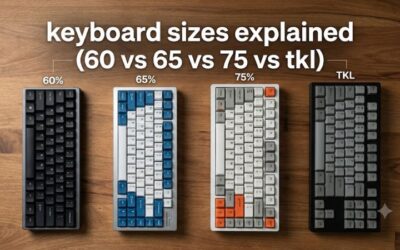
Full-size boards keep the numpad and suit spreadsheets, TKL drops it to free mouse space, and 75% keeps arrow keys and function row in a small footprint. Measure your desk and decide how often you use the numpad before you pick a smaller layout.
Understand switch types
Linear switches are smooth, tactile switches have a bump, and clicky switches add noise. Hall Effect magnetic switches add adjustable actuation and Rapid Trigger for fast repeats. If you share a room, avoid clicky blue-style switches and favor linear or tactile options.
Decide on wired or wireless
Wired boards avoid battery management and are standard for competitive play. A board with 2.4 GHz, Bluetooth and USB-C gives flexibility across devices. Check battery details and the polling rate on the maker page, since the listing may not state them. If you switch between a laptop and a desktop, a board with multi-device pairing saves you from re-plugging cables every day.
Skip what you cannot verify
Avoid keyboards with vague listings that do not state switch type, layout or connection. Be wary of boards without software support if you rely on remapping, and skip membrane keyboards sold as mechanical. Check the keycap legends for your language, and make sure the keys you rely on, such as arrows or function keys, exist on the layout you pick.
Frequently Asked Questions
What is a Hall Effect keyboard?
It uses magnetic switches that detect key position without physical contact. This allows adjustable actuation and Rapid Trigger, which resets a key as soon as you lift slightly.
Is a TKL keyboard good for typing?
Yes. A TKL has the same main keys as a full-size board without the numpad. You lose number entry, but you gain desk space.
Are clicky switches bad?
They are loud, which is fine for solo use but annoying in shared spaces. Many people enjoy the tactile feedback for typing.
Do I need a wireless keyboard?
Not for most desktops. Wireless helps with clean desks and multiple devices, while wired boards avoid battery management.
Does polling rate matter?
Higher polling lowers input delay slightly. 8000 Hz is a feature for competitive players, but most users will not notice the difference over standard rates.