Affiliate disclosure: As an Amazon Associate we earn from qualifying purchases. This post contains affiliate links — we may earn a small commission at no extra cost to you. This never affects our picks. Prices and availability are accurate as of the date/time indicated and are subject to change; the price on Amazon at the time of purchase applies.
- Quick Comparison Table
- 1. Logitech G PRO X TKL Rapid: Best for competitive play with rapid trigger
- 2. Razer Huntsman V3 HE Magnetic TKL: Best for 8KHz polling and Hall Effect switches
- 3. HyperX Alloy Origins Core: Best for a classic mechanical feel with RGB
- 4. SteelSeries Apex 3 TKL: Best for a quiet, spill-resistant board
- 5. Redragon K552: Best for a first mechanical keyboard
- How to Choose
- Frequently Asked Questions
- About the Author
- Related Articles
Quick answer: The best tenkeyless keyboards here start with the Logitech G PRO X TKL Rapid for competitive play. The Razer Huntsman V3 HE adds 8000Hz polling, the HyperX Alloy Origins Core is a classic mechanical, SteelSeries Apex 3 is quiet, and Redragon K552 is a first board.
This guide compares five tenkeyless gaming keyboards, from magnetic rapid trigger boards to classic mechanical models and a quiet spill-resistant option. Every comparison uses the specs published in each listing; we did not run our own benchmarks. Where a title leaves out details such as hot-swap support or switch brand, we say so and point you to the maker page.
Quick Comparison Table
| # | Model | Key specs (per listing) | Best for |
|---|---|---|---|
| 1 | Logitech G PRO X TKL Rapid | TKL, magnetic analog switches, rapid trigger, wired, RGB | competitive play with rapid trigger |
| 2 | Razer Huntsman V3 HE Magnetic TKL | TKL, Hall Effect magnetic switches, 8000Hz polling, rapid trigger | 8KHz polling and Hall Effect switches |
| 3 | HyperX Alloy Origins Core | TKL mechanical, linear HyperX Red switch, RGB, macro software | a classic mechanical feel with RGB |
| 4 | SteelSeries Apex 3 TKL | TKL, 8-zone RGB, IP32 water and dust resistant, quiet switch | a quiet, spill-resistant board |
| 5 | Redragon K552 | 87-key TKL, red switches, metal frame, anti-ghosting | a first mechanical keyboard |
1. Logitech G PRO X TKL Rapid: Best for competitive play with rapid trigger
Specs per the listing: Tenkeyless wired gaming keyboard, magnetic analog switches, rapid trigger mode, adjustable actuation, customizable RGB lighting.
This is the esports-leaning pick. Magnetic analog switches let you set where a key registers and use rapid trigger, which resets a key the moment you lift slightly. That matters in fast shooters and rhythm games where tiny timing differences count.
These features need software setup to get the most from them, and the listing does not mention hot-swap or polling rate, so check the maker page if those matter. If you type more than you play, a classic switch keyboard feels more familiar. For a competitive player, this is the most capable TKL in the group.
- Pros: Adjustable actuation and rapid trigger; Compact tenkeyless layout; Customizable RGB
- Cons: Needs software tuning; Polling rate not in the title

Logitech G PRO X TKL Rapid Tenkeyless Wired Gaming Keyboard - Black | Wired keyboard with magnetic analog switches, rapid trigger mode, adjustable actuation, and customizable RGB lighting
Included for 'Best Tenkeyless Keyboards for Gaming: TKL Picks Compared' as a representative home product in this roundup; selection reflects the product set returned for this topic.
View on Amazon2. Razer Huntsman V3 HE Magnetic TKL: Best for 8KHz polling and Hall Effect switches
Specs per the listing: Magnetic TKL wired gaming keyboard, Hall Effect magnetic switches, 8000Hz polling, Razer Snap Flex, Snap Tap, Rapid Trigger, adjustable actuation, Synapse Web.
Razer pairs Hall Effect switches with an 8000Hz polling rate, which means the keyboard reports to your PC far more often than a standard model. The listing also names Snap Tap and Rapid Trigger, which are tuned for fast direction changes in shooters.
A high polling rate benefits most when your mouse and PC can keep up, and the gains will be small for casual players. Settings run through Synapse Web, so you need a connection for some customization. Choose it if you want maximum tuning options in a TKL body.
- Pros: 8000Hz polling rate; Adjustable actuation and Rapid Trigger; Snap Tap features
- Cons: Software needed for tuning; Overkill for casual play

Razer Huntsman V3 HE Magnetic TKL 8KHz Wired Gaming Keyboard | Hall Effect Magnetic Switches, 8000 Hz Polling, Razer Snap Flex, Snap Tap, Rapid Trigger, Adjustable Actuation, Synapse Web
Included for 'Best Tenkeyless Keyboards for Gaming: TKL Picks Compared' as a representative home product in this roundup; selection reflects the product set returned for this topic.
View on Amazon3. HyperX Alloy Origins Core: Best for a classic mechanical feel with RGB
Specs per the listing: Tenkeyless mechanical gaming keyboard, linear HyperX Red switches, software-controlled lighting and macro customization, RGB LED backlit, compact form factor.
The Alloy Origins Core is a traditional mechanical TKL with a clear focus on a good typing and gaming feel. Linear Red switches press smoothly without a bump, which many gamers like for quick, repeated key presses.
It does not have adjustable actuation or rapid trigger, so it sits in the classic category rather than the newer magnetic class. The listing mentions software for lighting and macros. It is a good choice when you want a compact board that behaves the way mechanical keyboards always have.
- Pros: Smooth linear switches; Compact tenkeyless body; Software for lighting and macros
- Cons: No adjustable actuation; Linear only, no clicky or tactile option in this listing

HyperX Alloy Origins Core - Tenkeyless Mechanical Gaming Keyboard, Software Controlled Light & Macro Customization, Compact Form Factor, RGB LED Backlit, Linear HyperX Red Switch,Black
Included for 'Best Tenkeyless Keyboards for Gaming: TKL Picks Compared' as a representative home product in this roundup; selection reflects the product set returned for this topic.
View on Amazon4. SteelSeries Apex 3 TKL: Best for a quiet, spill-resistant board
Specs per the listing: Tenkeyless compact gaming keyboard, 8-zone RGB illumination, IP32 water and dust resistant, Whisper Quiet Gaming Switch.
The Apex 3 TKL is the pick for shared spaces. Quiet switches reduce clatter for roommates or late-night sessions, and the IP32 rating means it handles light spills and dust better than a standard board.
The lighting is zone-based instead of per-key, and the quiet switch design is not a traditional mechanical type, so expect a softer, different feel. It suits a player who values quiet and durability over enthusiast features, and a compact layout keeps desk space free for the mouse.
- Pros: Quiet switches; IP32 water and dust resistance; 8-zone RGB
- Cons: Zone lighting rather than per-key; Different feel from mechanical switches

SteelSeries Apex 3 TKL RGB Gaming Keyboard – Black | Tenkeyless Compact Form Factor - 8-Zone RGB Illumination – IP32 Water & Dust Resistant – Whisper Quiet Gaming Switch
Included for 'Best Tenkeyless Keyboards for Gaming: TKL Picks Compared' as a representative home product in this roundup; selection reflects the product set returned for this topic.
View on Amazon5. Redragon K552: Best for a first mechanical keyboard
Specs per the listing: 87-key TKL mechanical keyboard, red switches, LED backlight, anti-ghosting, metal frame.
The K552 is the entry point to mechanical keyboards in this group. An 87-key compact layout, red switches and a metal frame cover the basics, and anti-ghosting keeps key combinations registering correctly during busy moments.
The listing describes LED backlighting but gives few details about the switch brand or software, so check the maker page if those matter. It is not a premium board, and it skips advanced features, but for a gamer making a first move to mechanical switches it is a straightforward and sturdy way to start.
- Pros: 87-key compact layout; Metal frame; Anti-ghosting
- Cons: Few advanced features; Switch details limited in the title
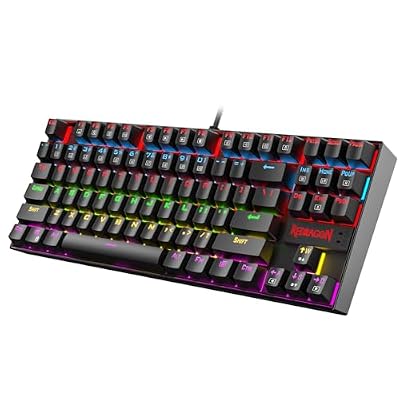
Redragon K552 Mechanical Keyboard, LED Gaming Keyboard with Red Switches | 87-Key TKL Compact, Anti-Ghosting, Metal Frame for PC Gaming & Typing, Beginner-Friendly, Redragon Classic Gaming Keyboard
Included for 'Best Tenkeyless Keyboards for Gaming: TKL Picks Compared' as a representative home product in this roundup; selection reflects the product set returned for this topic.
View on AmazonHow to Choose
Choose the switch type that fits your play
Classic mechanical switches, such as the HyperX linear reds and the Redragon reds, give a familiar press. Magnetic Hall Effect or analog switches, as on the Logitech and Razer models, let you adjust actuation and use rapid trigger. Pick the magnetic type only if you will actually tune it.
Understand what tenkeyless gives you
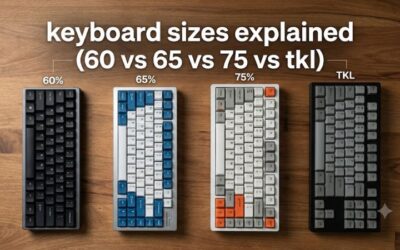
A TKL layout drops the number pad, leaving more room for mouse movement and a shorter reach. Keep a full-size board if you work with spreadsheets all day. For gaming-first desks, TKL is a good compromise and fits most travel bags.
Look at polling rate and software
Polling rate is how often the keyboard reports to the PC. Standard boards run at a lower rate, while 8000Hz is a headline feature of the Razer listing. Check that the maker software works on your operating system, and whether settings are stored on the keyboard.
Match noise, build and durability to your room
Quiet switches suit shared rooms. Metal frames and water resistance, as on the Redragon and SteelSeries listings, add toughness. If you are unsure, pick a keyboard whose listing clearly states the switch type, and avoid models that leave it out.
Frequently Asked Questions
Is a tenkeyless keyboard better for gaming?
For most gamers, yes. Without the number pad you get more room for mouse movement. If you need numeric entry for work, a full-size layout is easier to live with.
What is rapid trigger?
Rapid trigger lets a key reset the instant you start to release it, instead of at a fixed point. It helps with fast direction changes in shooters. It needs magnetic or analog switches and some setup.
Are quiet switches worth it?
They are worth it in shared rooms or late-night play. They feel softer than classic mechanical switches, so enthusiasts who like crisp feedback may prefer a linear mechanical board.
Which board suits a first mechanical keyboard?
The Redragon K552 is the simplest entry in this guide. It gives a compact layout, red switches and a metal frame. Upgrade later if you want adjustable features.
Do these keyboards work on consoles?
Compatibility depends on the model and the console. The listings here focus on PC use, so check the maker page for console support before you buy.