Understanding cpu package power vs tdp explained helps you make better decisions about CPU cooling, power consumption, and gaming performance. Although both values use watts, they describe different things. One represents reported processor power during operation, while the other provides a thermal design reference. Knowing the distinction helps you interpret monitoring software and avoid unnecessary upgrades.
1. What CPU Package Power and TDP Really Mean
CPU package power and TDP are related, but they are not interchangeable measurements. TDP is primarily a manufacturer-defined thermal design specification, while package power describes the processor’s reported electrical power consumption under a particular workload. For gamers, the distinction matters when choosing a cooler, investigating temperatures, or checking whether a CPU is operating within its configured power limits.
What Is CPU Package Power?
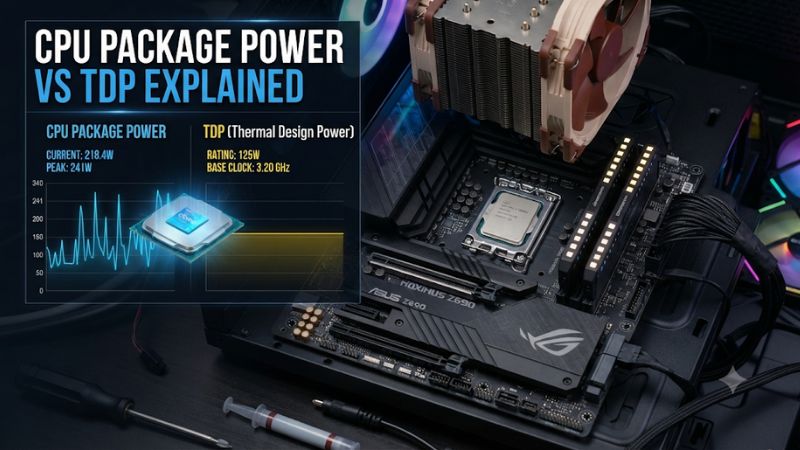
CPU package power is a measurement or telemetry-based estimate of how much electrical power the processor package consumes at a particular moment. Unlike a fixed specification, this reading changes according to workload, operating frequency, voltage, temperature, and processor power management.
The package can include more than just the CPU cores. Depending on the architecture and monitoring implementation, reported power may account for cache, integrated graphics, memory controllers, and other on-package components. Consequently, package power should not automatically be interpreted as core-only consumption.
What Is TDP?
Thermal Design Power, or TDP, is a manufacturer-defined specification used to guide thermal solution design. It helps system builders determine the cooling capability needed to operate a processor within its specified operating conditions.
However, TDP does not necessarily represent the maximum electrical power a processor can consume. Intel explains that its Processor Base Power, the terminology replacing TDP for 12th-generation and newer Core processors, is a thermal design reference rather than an absolute maximum power limit.
Intel+1
For gaming PC builders, this means a CPU advertised with a particular TDP can report a higher package power reading during demanding workloads. The cooler must be appropriate for the processor’s actual operating behavior, not just the number printed on its specification sheet.
Why CPU Package Power Changes During Gaming
Modern processors dynamically adjust their frequency and voltage to balance performance, temperature, and power consumption. A CPU handling a lightweight desktop task generally consumes less power than one running a demanding game or a multithreaded rendering workload.
Gaming workloads also vary considerably. A CPU-intensive strategy game may keep several cores busy, while a graphically demanding game may leave the processor with more available resources. Background applications, shader compilation, and loading processes can also create temporary power fluctuations.
Therefore, a single package power reading does not describe the processor’s overall behavior. Monitor power consumption alongside CPU temperature, effective clock speed, utilization, and performance to understand what is happening.
Does Higher TDP Mean Higher Gaming Performance?
No. A higher TDP does not automatically make a processor faster in games. Gaming performance depends on architecture, clock speed, cache, core configuration, memory performance, and the workload being executed.
A processor with a higher thermal design rating may have more room for sustained power consumption, but that advantage only matters when the workload benefits from additional frequency or processing resources. Many games depend more heavily on single-thread performance, cache behavior, and GPU limitations than on maximum CPU power.
A lower-TDP processor can therefore deliver excellent gaming performance without consuming as much power. When comparing CPUs, look at independent gaming benchmarks using similar hardware and settings rather than assuming the higher-wattage model is automatically better.
2. CPU Package Power vs TDP: Key Differences Explained
The practical difference becomes clearer when you compare what each measurement represents, how it changes, and how it affects hardware decisions. Both values are useful, but they answer different questions. Understanding their relationship also helps explain why monitoring applications sometimes display power readings that appear higher than the CPU’s advertised specification.
Direct Comparison: Package Power vs TDP
| Comparison | CPU Package Power | TDP |
|---|---|---|
| Meaning | Reported processor package power | Thermal design specification |
| Measurement | Dynamic telemetry reading | Manufacturer-defined specification |
| Unit | Watts (W) | Watts (W) |
| Changes with workload | Yes | Generally fixed for a CPU configuration |
| Gaming behavior | Rises and falls with activity | Does not track live consumption |
| Cooling relevance | Helps evaluate actual operating heat and load | Provides a thermal design reference |
| Maximum power limit | Not necessarily | Not necessarily |
| Monitoring | HWiNFO and manufacturer utilities | Manufacturer specifications |
The most important distinction is that neither value should be treated as a universal maximum power limit. Actual processor behavior also depends on configured power limits, boost policies, motherboard settings, and thermal restrictions.
Intel: TDP, Processor Base Power, and Turbo Power
Intel uses several power-related specifications that help explain why package power can exceed the advertised TDP. Processor Base Power (PBP) describes the processor’s base thermal design target, while Maximum Turbo Power (MTP) identifies a higher power level associated with turbo operation.
For example, Intel’s 12th-generation desktop processor documentation distinguishes Processor Base Power from Power Limit 1 (PL1) and Power Limit 2 (PL2). These limits help define sustained and higher turbo power behavior. Their actual configuration depends on the processor and platform.
Intel+1
This distinction matters when reading monitoring software. A processor operating above its base power specification is not automatically malfunctioning. Check its configured limits, temperatures, and clock speeds before deciding that its power consumption is abnormal.
AMD: TDP, PPT, TDC, and EDC
AMD Ryzen processors use several power and current parameters, particularly when monitoring Precision Boost and Precision Boost Overdrive behavior. Understanding these terms makes it easier to interpret readings in Ryzen Master.
-
TDP: A thermal design specification used to characterize the processor’s cooling requirements.
-
PPT (Package Power Tracking): The total socket power limit used by the processor’s power management system.
-
TDC (Thermal Design Current): A sustained current limit.
-
EDC (Electrical Design Current): A peak current limit.
AMD’s Ryzen Master documentation identifies PPT as total socket power, TDC as the sustained current limit, and EDC as the peak current limit. These parameters work together to influence processor boosting behavior.
68886+1
An important detail is that PPT should not be confused with a monitoring application’s package power reading. PPT represents a configured power limit, whereas the live reading indicates how much power the processor is currently using according to its telemetry.
How to Read CPU Power in HWiNFO
HWiNFO is useful for understanding processor behavior because it provides multiple monitoring values rather than relying on a single wattage number. After opening the application, select the Sensors view and locate the CPU-related power readings.
Depending on your processor, motherboard, and sensor implementation, you may see entries such as CPU Package Power, CPU PPT, CPU Core Power, or related power measurements. Their availability and exact labels vary between platforms.
Pay attention to these readings:
-
CPU Package Power: Reported power consumption for the processor package.
-
CPU Core Power: Power attributed to the processor cores.
-
CPU PPT: AMD’s package power limit or related utilization reading.
-
CPU Temperature: The thermal condition associated with the reported workload.
-
Core Effective Clocks: The effective operating frequency of individual cores.
Do not assume that every monitoring field measures the same electrical domain. Compare readings from the same processor and monitoring session, and avoid adding overlapping power values together.
Why Package Power Can Exceed TDP
A higher package power reading does not automatically indicate a hardware problem. Processors can use additional power during boost operation when their configured power, current, and thermal limits allow it.
Intel explicitly documents that processor power can exceed TDP during turbo operation or certain workloads, including AVX workloads, subject to applicable time, temperature, and power-delivery restrictions.
Intel+1
For AMD, PPT provides an additional reference for understanding the socket power budget. A processor can operate above its nominal TDP while remaining within its configured operating limits. However, motherboard settings and Precision Boost Overdrive can change those limits, so default and manually configured behavior should not be treated as identical.
3. How These Differences Affect Your Gaming PC
Understanding the relationship between package power and TDP is useful beyond reading specifications. It influences cooler selection, temperature troubleshooting, and the way you interpret gaming performance. Instead of treating wattage as a direct measure of speed, consider how the processor behaves under the workloads you actually run and whether its cooling solution can handle sustained operation.
Choosing the Right CPU Cooler
TDP provides a useful starting point when selecting a CPU cooler, but it should not be your only consideration. A processor’s boost behavior, configured power limits, case airflow, ambient temperature, and workload intensity all affect cooling requirements.
A CPU that regularly operates above its nominal TDP may need a stronger cooling solution than its advertised thermal design rating initially suggests. Check independent thermal reviews and manufacturer cooler specifications before choosing between an air cooler and an AIO liquid cooler.
Also verify socket compatibility, cooler mounting hardware, RAM clearance, case height restrictions, and radiator support. A cooler’s advertised capacity alone does not guarantee that it will fit your particular system or maintain the temperatures you want.
Diagnosing High CPU Package Power
High package power is not necessarily a sign of overheating or instability. First, identify what the processor is doing when the reading increases. A demanding game, background compilation, rendering application, or stress test can produce very different power consumption patterns.
Use HWiNFO to compare package power, CPU temperature, utilization, and effective clock speeds. If power rises alongside utilization during a demanding workload, the behavior may be normal. If temperatures approach the processor’s thermal limit and clock speeds decrease, investigate cooling and thermal throttling.
Also check BIOS power settings and motherboard enhancement features. Some motherboards apply power configurations that differ from standard processor specifications. Restore default settings before experimenting with manual power limits or overclocking.
Does Lower Package Power Improve Gaming Efficiency?
Lower package power can reduce heat output and cooling demands, but it does not automatically mean better gaming efficiency. A CPU that consumes less power because it is operating at a substantially lower clock speed may also deliver lower frame rates.
A more useful comparison considers performance relative to power consumption. For gaming, compare average FPS and 1% lows alongside CPU power under the same game, resolution, graphics settings, and test conditions.
Power efficiency also depends on the game and graphics card. When a game is GPU-limited, reducing CPU power might have little impact on frame rates. When a game is CPU-limited, restricting processor power could reduce performance or worsen frame-time consistency.
What Doesn’t Help When Comparing CPU Power
Several common assumptions make processor power readings unnecessarily confusing. The biggest mistake is treating TDP as an exact real-time wattage target or assuming that every reading above it indicates a problem.
Avoid these mistakes:
-
Comparing TDP directly with wall-power measurements from a power meter. Wall power includes the entire computer and PSU conversion losses.
-
Assuming CPU package power represents the power consumed by the whole PC.
-
Treating PPT as identical to current package power.
-
Comparing readings from different monitoring applications without checking their sensor definitions.
-
Increasing power limits simply because a processor appears to have unused thermal headroom.
-
Buying a larger cooler solely because one temporary power spike exceeds the advertised TDP.
The better approach is to evaluate sustained power, temperature, clock behavior, and gaming performance together. This gives you a more useful picture of whether your processor needs a cooling adjustment or whether its current configuration is already appropriate.
4. Frequently Asked Questions
Is CPU Package Power the Same as TDP?
No. CPU package power is a dynamic reading of reported processor power consumption, while TDP is a manufacturer-defined thermal design specification. Package power changes with workload and processor behavior, whereas TDP provides a reference for designing the cooling solution. Neither value should automatically be interpreted as the processor’s absolute maximum power consumption.
Can CPU Package Power Be Higher Than TDP?
Yes. Modern processors can exceed their nominal TDP during boost operation when their power, current, and thermal limits allow it. Intel documents this behavior for turbo workloads, while AMD uses PPT to define a package power limit. Check your processor’s official specifications and configured limits before treating a higher reading as abnormal.
Which Value Should I Use When Choosing a CPU Cooler?
Use TDP as an initial reference, then consider actual power behavior, boost limits, workload intensity, and thermal reviews. Check the cooler’s socket compatibility, mounting hardware, physical dimensions, and case clearance. For CPUs with substantial boost power, choosing cooling capacity based only on the advertised TDP may result in insufficient thermal headroom.
Does Lower CPU Package Power Mean Better Gaming Performance?
No. Lower package power does not automatically indicate better performance or efficiency. A processor might consume less power because it is running at a lower frequency, while another CPU may deliver higher FPS with additional power. Compare gaming benchmarks, average FPS, 1% lows, and power consumption under matching test conditions.
Final Thoughts
Understanding cpu package power vs tdp explained makes CPU specifications and monitoring readings much easier to interpret. TDP helps guide cooling decisions, while package power shows reported consumption during real workloads. For a gaming PC, monitor temperatures, clock speeds, and power limits together, then choose a cooler based on your processor’s actual operating requirements.