🛒 Best Price Today on Amazon
Prime members get fast, free shipping on everything above, plus member-only deals. New members get a 30-day free trial — cancel anytime.
For the best cpu for streaming and gaming, should you prioritize gaming cache, CPU cores, or hardware encoding? Which platform fits your build, and which chips suit x264? The short answer is to match the processor to your encoder first, then compare gaming performance, core count, cooling, memory, and motherboard requirements before buying.
How to Choose a CPU for Streaming and Gaming
The right processor depends heavily on whether OBS uses a dedicated GPU encoder or the CPU itself. Hardware encoders move much of the video work away from the CPU, while x264 relies on processor resources. Current AM5 and Intel 800-series platforms both offer suitable choices, but their memory and motherboard requirements differ.
Gaming Performance and Cache
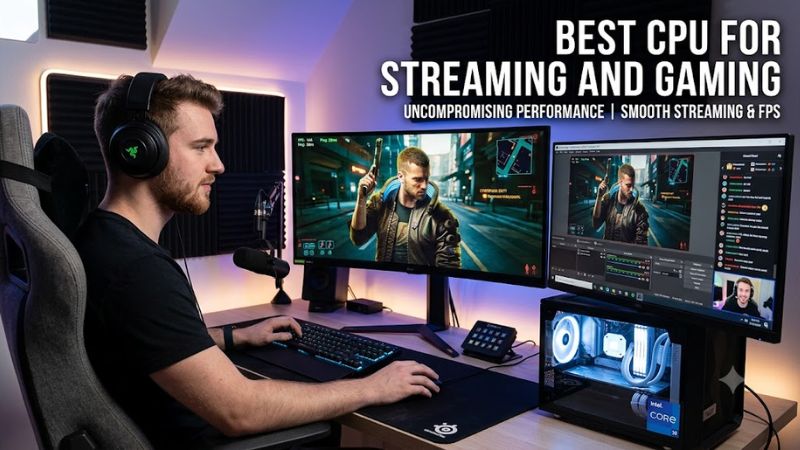
For a gaming-heavy stream, CPU performance still matters because the processor handles game logic, simulation, draw calls, and background applications. The Ryzen 7 9850X3D combines eight cores and 16 threads with 96MB of L3 cache and a 5.6 GHz maximum boost, making it a gaming-focused option for high-refresh systems.
The best cpu for streaming and gaming does not necessarily need the highest core count when NVENC, AMF, or another hardware encoder handles the stream. A large cache can matter more in CPU-limited games, particularly at 1080p. At 1440p and 4K, GPU limitations often reduce the visible gap between processors.
Core Count for CPU Encoding
CPU encoding changes the balance because x264 uses the processor rather than a dedicated video engine. A 16-core Ryzen 9 9950X3D supplies 32 threads, while the Ryzen 9 9950X offers the same core and thread count without 3D V-Cache. That additional parallel capacity is useful when streaming is combined with recording, rendering, or other sustained workloads.
If your workflow uses NVENC or another hardware encoder, buying extra cores solely for streaming has less justification. OBS currently exposes software x264 alongside hardware options including NVENC, QuickSync, AMD H.264, AMD HEVC, and AMD AV1. The encoder you select therefore changes what the CPU actually needs to handle.
Platform and Memory Compatibility
AMD’s Ryzen 9000 processors use AM5 and DDR5, with PCIe 5.0 support; AMD lists AM5 support through 2027 and beyond. The Ryzen 7 9850X3D supports AM5 chipsets including B650, B650E, X670, X670E, B850, and X870 families. A compatible motherboard and DDR5 memory are therefore required rather than older AM4/DDR4 parts.
Intel’s current enthusiast desktop option is the Core Ultra 7 270K Plus, which uses LGA1851 and Intel 800-series motherboards. Intel lists DDR5-7200 support, while the platform also adds QuickSync through its integrated graphics. This can be useful for streaming systems that want Intel’s media features without depending entirely on a discrete GPU encoder.
Cooling and Power Requirements
Cooling deserves attention because high-end streaming workloads can keep all cores busy for long periods. The Ryzen 7 9850X3D has a 120W default TDP and does not include a boxed cooler; AMD recommends liquid cooling for optimal performance. The Ryzen 9 9950X3D is rated at 170W, so the cooling solution, motherboard power delivery, case airflow, and PSU capacity should all be chosen around the complete system rather than the CPU alone.
Intel’s Core Ultra 7 270K Plus has 125W processor base power and up to 250W maximum turbo power. That makes cooler and motherboard selection important for sustained workloads. CPU sockets also dictate the motherboard choice, while the processor itself does not require a special PSU connector; the complete PC must simply use a PSU appropriate for its CPU and GPU combination.
Top Picks for Streaming and Gaming
The table separates gaming-focused hardware encoding from heavier CPU-encoding workloads, because these use the processor differently. Benchmark figures should also be read in context: CPU reviews commonly use low resolutions and powerful GPUs to expose processor differences, rather than representing every streamer’s actual gaming setup.
| Product | Best For | Key Spec | Compatibility | Watch Out For |
| AMD Ryzen 9 9950X3D | Best Overall | 16C/32T, 5.7 GHz | AM5, DDR5, PCIe 5.0 | Premium price tier |
| AMD Ryzen 7 9850X3D | Best Value | 8C/16T, 5.6 GHz | AM5, DDR5, PCIe 5.0 | Less CPU headroom for x264 |
| AMD Ryzen 9 9950X | Best For CPU Encoding | 16C/32T, 5.7 GHz | AM5, DDR5, PCIe 5.0 | No 3D V-Cache |
| Intel Core Ultra 7 270K Plus | Best For QuickSync | 24C/24T, 5.5 GHz | LGA1851, DDR5, 800-series | Up to 250W turbo power |
AMD Ryzen 9 9950X3D: Best Overall
The Ryzen 9 9950X3D combines 16 cores, 32 threads, a 5.7 GHz maximum boost, and 144MB of combined cache. It suits a single-PC setup where gaming shares the machine with streaming, recording, editing, or other heavily threaded work. It uses AM5, DDR5, and PCIe 5.0, with a 170W default TDP.
For the best cpu for streaming and gaming when both gaming and creator workloads matter, this chip offers more CPU resources than an eight-core X3D model. Tom’s Hardware measured the 9950X3D against the Core Ultra 9 285K using 1080p gaming with an RTX 5090 and found the AMD chip essentially tied with the 9800X3D in its 16-game suite. Its real weakness is cost and the need for substantial cooling.
AMD Ryzen 7 9850X3D: Best Value
The Ryzen 7 9850X3D is an eight-core, 16-thread Zen 5 processor with 96MB of L3 cache, a 5.6 GHz maximum boost, and a 120W default TDP. It is an AM5/DDR5 processor with PCIe 5.0, and AMD does not include a boxed cooler. This combination targets systems where gaming performance is more important than sustained CPU encoding.
For hardware-encoded streaming, the 9850X3D leaves substantial CPU capacity for the game, OBS, chat, browser sources, and background tasks. GamersNexus found it at most about 4% faster than the 9800X3D in its gaming tests, while TechPowerUp’s 2026 coverage includes 1080p, 1440p, and 4K comparisons. Its weakness is straightforward: eight cores provide less x264 headroom than the 16-core Ryzen 9 parts.
AMD Ryzen 9 9950X: Best For CPU Encoding
The Ryzen 9 9950X provides 16 cores and 32 threads, boosts up to 5.7 GHz, carries 80MB of cache, and has a 170W default TDP. It belongs to the same AM5 and DDR5 platform as the X3D Ryzen 9000 processors, so builders can use the same broad motherboard family while choosing a non-X3D design.
For users deliberately choosing x264 instead of a hardware encoder, those 16 cores make the 9950X a logical fit for simultaneous gaming and encoding. Tom’s Hardware found the 9950X3D roughly matched the standard 9950X in its overall multi-threaded productivity measure, illustrating why the non-X3D model remains relevant when the workload is primarily threaded rather than gaming-cache sensitive.
Intel Core Ultra 7 270K Plus: Best For QuickSync
The Core Ultra 7 270K Plus brings 24 cores arranged as eight P-cores and 16 E-cores, 24 threads, a 5.5 GHz maximum turbo frequency, and support for DDR5-7200. It uses LGA1851 and remains compatible with Intel 800-series motherboards. Intel launched it in March 2026 with a suggested price starting at $299.
This option is especially relevant when Intel’s integrated media engine fits the streaming workflow. Intel specifies QuickSync Video plus H.265 and AV1 hardware encode/decode on the Core Ultra family, while OBS exposes QuickSync encoders. Its weakness is platform power: the 270K Plus can reach 250W maximum turbo power, so cooling and board selection deserve more attention.
FAQ
Is the 9850X3D good for streaming and gaming?
Yes, the Ryzen 7 9850X3D is well suited to gaming plus hardware-encoded streaming because it combines eight Zen 5 cores, 16 threads, and 96MB of L3 cache. AMD rates it at up to 5.6 GHz and 120W, while OBS supports hardware encoding that reduces the CPU’s encoding workload.
The best cpu for streaming and gaming depends on the encoder, so the 9850X3D is a different proposition from a 16-core CPU intended for x264. If you use NVENC, AMF, or another hardware encoder, the eight-core design can leave more of the processor available for game workloads and normal streaming software.
How many CPU cores do I need for streaming?
For hardware-encoded streaming, six to eight modern cores can be a reasonable starting range, while CPU encoding creates a stronger case for 12 or 16 cores. OBS supports both software x264 and several hardware encoders, so there is no universal core-count requirement independent of the chosen encoder.
A 16-core Ryzen 9 becomes more relevant when the PC also performs CPU-based encoding, local recording, video editing, compiling, or other sustained multi-threaded work. Core count should therefore follow the workload rather than a fixed streaming rule, especially when a discrete GPU already provides a suitable hardware encoder.
Is AMD or Intel better for streaming and gaming?
Both platforms can handle gaming and streaming, but they offer different strengths: AMD’s current AM5 CPUs emphasize X3D gaming performance and high core counts, while Intel’s Core Ultra 200S Plus platform combines modern gaming CPUs with integrated media features such as QuickSync.
For the best cpu for streaming and gaming, compare the complete platform rather than the processor name alone. AM5 requires DDR5 and an AM5 motherboard, while the 270K Plus requires LGA1851 and an Intel 800-series board. The choice can also depend on whether OBS uses GPU encoding, QuickSync, or x264.
Does streaming require a high-end CPU?
No, hardware encoding can reduce the CPU requirement substantially because dedicated GPU or integrated media hardware performs the video encoding work. NVIDIA documents that NVENC offloads compute-intensive encoding from the CPU, while OBS provides hardware encoder options alongside x264.
A high-end CPU becomes more useful when the stream uses x264, the PC records locally while gaming, or the same system handles editing and other CPU-heavy applications. Before moving to a more expensive processor, check which encoder OBS is actually using and whether the current CPU is the limiting component.
Final Thoughts
The best cpu for streaming and gaming is the one that matches your encoder and workload: Ryzen 7 9850X3D suits gaming with hardware encoding, Ryzen 9 9950X3D adds substantial multi-core capacity, Ryzen 9 9950X favors CPU-heavy work, and Core Ultra 7 270K Plus adds QuickSync and an Intel platform option.