Affiliate disclosure: As an Amazon Associate we earn from qualifying purchases. This post contains affiliate links — if you buy through them we may earn a small commission at no extra cost to you. This never affects our picks. Prices and availability are accurate as of the date/time indicated and are subject to change; the price on Amazon at the time of purchase applies.
- Quick Comparison Table
- 1. ASUS Dual RTX 5060 Ti 16GB: Best for All-Round Gaming
- 2. MSI RTX 5070 Ventus 2X: Best for Smooth 1440p
- 3. MSI RTX 5070 Ti Gaming Trio: Best for High-Refresh 1440p and Entry 4K
- 4. NVIDIA RTX 5080 Founders Edition: Best for Flagship 4K Builds
- 5. GIGABYTE RTX 3060 WINDFORCE OC 12G: Best for Older Platforms and 1080p
- How to Choose
- Full Spec Comparison: Memory, Board Power and Connectors
- Worked Example: Sizing the Power Supply
- Pre-Purchase Checklist
- Who Should Skip Each Tier
- Setup and Care After the Card Arrives
- Common Mistakes
- More Questions Buyers Ask
- More Picks Worth Considering
- Frequently Asked Questions
- About the Author
- Related Articles
Quick answer: For the best RTX series GPUs, the ASUS Dual RTX 5060 Ti 16GB is the all-round pick. The MSI RTX 5070 Ventus 2X suits 1440p players, the MSI RTX 5070 Ti Gaming Trio targets high-refresh 1440p and entry 4K, the NVIDIA RTX 5080 Founders Edition is the flagship, and the GIGABYTE RTX 3060 12GB fits older builds.
This guide compares five GeForce RTX cards that span the line-up, from a previous-generation 12GB card up to a 16GB flagship. Every comparison uses each listing’s published specs, such as memory size, bus width and cooler design. We did not run our own benchmarks, so treat performance tiers as general class guidance and confirm frame rates for your own games and resolution before buying.
Quick Comparison Table
| # | Model | Key specs (per listing) | Best for |
|---|---|---|---|
| 1 | ASUS Dual GeForce RTX 5060 Ti 16GB OC | 16GB GDDR7, PCIe 5.0, HDMI 2.1b, DisplayPort 2.1b, 2.5-slot | All-round 1080p and 1440p |
| 2 | MSI RTX 5070 12G Ventus 2X OC | 12GB GDDR7, 192-bit, 2557 MHz boost, three DisplayPort 2.1a | Smooth 1440p |
| 3 | MSI RTX 5070 Ti 16G Gaming Trio OC | 16GB GDDR7, 256-bit, 2580 MHz boost, Blackwell | High-refresh 1440p, entry 4K |
| 4 | NVIDIA GeForce RTX 5080 Founders Edition | RTX 5080 reference design; check NVIDIA page for full specs | Flagship 4K builds |
| 5 | GIGABYTE RTX 3060 WINDFORCE OC 12G | 12GB GDDR6, 192-bit, two WINDFORCE fans | Older platforms, 1080p |
1. ASUS Dual RTX 5060 Ti 16GB: Best for All-Round Gaming
Specs per the listing: GeForce RTX 5060 Ti, 16GB GDDR7, OC Edition, PCIe 5.0, HDMI 2.1b, DisplayPort 2.1b, 2.5-slot design, Axial-tech fans, 0dB technology, dual BIOS.
The headline feature is the 16GB of video memory. Modern texture packs and ray-traced titles can overrun smaller frame buffers, and this card gives you room to keep high texture settings on at 1080p and 1440p. The 0dB mode lets the fans stop at idle, and the 2.5-slot cooler is a sensible size for most mid-tower cases. The dual BIOS switch is useful if you prefer a quieter profile.
The trade-off is that the card sits in the middle of the range, so it is not the answer for native 4K at maximum settings. Check that your power supply has the connector layout the listing describes and that the case has space for a card of this thickness.
- Pros: 16GB GDDR7 memory; fans stop at idle; dual BIOS; modern display outputs
- Cons: Not aimed at native 4K ultra; 2.5-slot cooler needs case room
2. MSI RTX 5070 Ventus 2X: Best for Smooth 1440p
Specs per the listing: GeForce RTX 5070, 12GB GDDR7, 192-bit, 2557 MHz extreme performance clock, three DisplayPort 2.1a, one HDMI 2.1b, Blackwell architecture, dual-fan Ventus 2X cooler.
RTX 5070 class cards are generally aimed at 1440p gaming with high settings, and the Ventus 2X is the plain, dependable way to buy one. The twin-fan cooler keeps the footprint modest, so it fits cases where a three-fan card would not. Three DisplayPort outputs make multi-monitor desks easy.
The compromise is memory: 12GB is enough for most 1440p play today, but it offers less headroom than the 16GB cards in this list if you plan to keep the card for many years or move to 4K later. If long-term headroom matters more than the cooler size, look at the next card up.
- Pros: Compact dual-fan design; three DisplayPort 2.1a outputs; strong 1440p class; modern architecture
- Cons: 12GB gives less headroom than 16GB cards; basic cooler tier
3. MSI RTX 5070 Ti Gaming Trio: Best for High-Refresh 1440p and Entry 4K
Specs per the listing: GeForce RTX 5070 Ti, 16GB GDDR7, 256-bit, 2580 MHz extreme performance clock, three DisplayPort 2.1a, HDMI 2.1b, Blackwell architecture, Gaming Trio OC cooler.
The 256-bit bus and 16GB of memory put this card in a different bracket from the 5070. It is the right choice if you own a 1440p panel at a high refresh rate, or a 4K display where you are happy to lower a few settings. The larger Trio cooler is built for sustained load, which helps keep clocks steady in long sessions.
Size is the cost. A three-fan card of this class needs a roomy case and a power supply with enough capacity and the right cables, so read the maker page for the exact length and power requirement before ordering. It also costs notably more than the mid-range options.
- Pros: 16GB GDDR7 on a 256-bit bus; Trio cooler for sustained load; handles high-refresh 1440p; three DisplayPort outputs
- Cons: Large card needs case clearance; higher power demand
4. NVIDIA RTX 5080 Founders Edition: Best for Flagship 4K Builds
Specs per the listing: GeForce RTX 5080 Founders Edition. The listing title gives no further numbers, so check NVIDIA’s product page for memory, power and dimensions.
The RTX 5080 class is the card for players who want 4K as the default rather than the stretch goal. The Founders Edition is NVIDIA’s own reference design, which appeals to builders who want a clean, understated look and a known cooler design rather than a partner-brand variation.
Because the listing is sparse, do your homework: confirm the power connector, the slot width and the case clearance on the maker page. This tier also assumes a capable CPU and a quality power supply, otherwise you leave performance unused. If you play at 1440p, a step down is the better value.
- Pros: Flagship-class 4K target; reference design from NVIDIA; clean, understated look
- Cons: Listing gives few specs; needs a strong CPU and power supply; overkill for 1080p
5. GIGABYTE RTX 3060 WINDFORCE OC 12G: Best for Older Platforms and 1080p
Specs per the listing: GeForce RTX 3060, 12GB GDDR6, 192-bit, two WINDFORCE fans, revision 2.0, model GV-N3060WF2OC-12GD.
This is the previous-generation option, and it still makes sense in a specific case: you have an older system and a 1080p monitor, and you want a card that does not demand a new power supply or a large case. The 12GB of memory is generous for the class, and the two-fan cooler is compact.
The limits are clear. It lacks the newer memory type and architecture of the 50-series cards, so ray tracing and demanding new games will push it hard. Treat it as a practical 1080p card, and verify the revision number matches what you expect when it arrives.
- Pros: 12GB memory for the class; compact two-fan cooler; fits older systems
- Cons: Older architecture; limited for ray tracing; not suited to 4K
How to Choose
Match the card to your resolution
As a general rule, 1080p play suits an RTX 3060 or RTX 5060 class card, 1440p suits the RTX 5060 Ti and RTX 5070 tier, and 4K play is where the RTX 5070 Ti and RTX 5080 belong. Buying a flagship for a 1080p monitor wastes money, while pairing an entry card with a 4K screen forces heavy compromises. Decide your screen first, then your card.
Treat video memory as a long-term safeguard
Aim for at least 12GB if you play new releases at 1440p, and prefer 16GB if you want the card to last several years or use high texture settings. An 8GB card can run into limits in current titles at higher settings. The cards in this list were chosen with that threshold in mind.
Check physical fit and power before buying
Measure the space in your case for card length and thickness. A 2.5-slot cooler needs room beside the card, and a three-fan model is longer still. Then check your power supply: confirm it has enough rated capacity for the card plus your CPU, and that it provides the connector the maker page specifies. Do not rely on adapters if the manufacturer recommends a native cable.
Do not forget the rest of the system
A fast graphics card paired with an old quad-core processor will be held back. For the RTX 5070 Ti and RTX 5080, pair with a recent mid-range or better CPU, and make sure your motherboard slot is a full-length PCIe x16. PCIe 5.0 cards work in older slots, but check the maker page for any notes.
Full Spec Comparison: Memory, Board Power and Connectors
The quick comparison table above covers memory and display outputs, but the figures that decide whether a card actually runs in your PC are board power, the power connector, and the supply size the maker recommends. Here are all five picks side by side using the published reference and maker specifications.
| GPU | VRAM | Memory bus | Board power | Power connector | Recommended PSU |
|---|---|---|---|---|---|
| ASUS Dual RTX 5060 Ti 16GB OC | 16GB GDDR7 | 128-bit | 180W | 1x 8-pin | 550W |
| MSI RTX 5070 Ventus 2X OC | 12GB GDDR7 | 192-bit | 250W | 1x 16-pin | 650W |
| MSI RTX 5070 Ti Gaming Trio OC | 16GB GDDR7 | 256-bit | 300W | 1x 16-pin | 750W |
| NVIDIA RTX 5080 Founders Edition | 16GB GDDR7 | 256-bit | 360W | 1x 16-pin | 850W |
| GIGABYTE RTX 3060 WINDFORCE OC 12G | 12GB GDDR6 | 192-bit | 170W | 1x 8-pin | 550W |
Two patterns stand out. First, the three fastest cards all use the 16-pin connector, so an older supply without one needs the adapter included in the box and enough separate 8-pin leads to feed it. Second, memory capacity and bus width do not rise together: the RTX 5060 Ti carries 16GB on a narrow 128-bit bus, while the RTX 5070 carries 12GB on a wider 192-bit bus, which is why capacity alone never tells the whole story.
Worked Example: Sizing the Power Supply
Maker recommendations look generous until the arithmetic is written out. Take a build around the MSI RTX 5070 Ti Gaming Trio. The card is rated at 300W. Add a mid-range gaming CPU at roughly 125W under load, then around 75W for the motherboard, storage, fans and USB devices. That totals about 500W before any safety margin. Power supplies also deliver their best efficiency and quietest operation when they are not running at their limit, and graphics cards draw short transient spikes above their rated figure, so a healthy margin on top of the sum is standard practice. That is how the total lands on the maker’s 750W recommendation.
Repeat the exercise for the RTX 5080 Founders Edition at 360W with the same supporting parts and the sum rises to roughly 560W, which is why NVIDIA points builders at an 850W supply. The lesson transfers to every tier: add the card’s board power to the rest of the system, leave clear headroom, and treat the maker’s recommended wattage as the floor rather than a suggestion to exceed by as little as possible.
Pre-Purchase Checklist
- Resolution and refresh rate first. Match the tier to the monitor you own today, not the one you might buy later. A 1080p 60Hz screen cannot use what an RTX 5080 offers.
- VRAM floor by target. Treat 12GB as the sensible minimum for a new 1440p card and 16GB as the safer figure for 4K or for keeping a card through several game generations.
- Physical fit. Measure card length, thickness in slots, and clearance under the card for the power cable bend, especially with the 16-pin connector, which needs straight room before it can curve.
- Connector inventory. Count the free 8-pin leads on your supply before ordering a 16-pin card, because the included adapter needs separate leads rather than one daisy-chained cable.
- CPU balance. Pair the RTX 5070 Ti and RTX 5080 with a recent mid-range or better processor; an old quad-core will cap frame rates no matter which card is fitted.
- Display cables. High-refresh 4K needs DisplayPort 2.1 or HDMI 2.1 cables rated for the bandwidth; an older cable can silently limit refresh rate.
Who Should Skip Each Tier
Skip the RTX 3060 if you are building a new PC rather than upgrading an old one. Its value case rests on reusing an existing platform and power supply; in a fresh build, the 50-series cards bring newer architecture, faster memory and current DLSS features.
Skip the RTX 5060 Ti 16GB if 4K is your main target. The memory capacity is generous, but the 128-bit bus and mid-range core are tuned for 1080p and 1440p, and no amount of VRAM changes that.
Skip the RTX 5070 if you plan to keep the card for many years or expect to move to 4K. The 12GB frame buffer is the one figure in its spec sheet with an expiry date.
Skip the RTX 5070 Ti if your monitor is 1080p, or 1440p at 60Hz. You would pay for headroom the display cannot show.
Skip the RTX 5080 if your power supply, case or CPU also needs replacing to support it. The true cost of the flagship tier is the platform around it, and a balanced RTX 5070 Ti build is the better buy when the rest of the system is dated.
Setup and Care After the Card Arrives
Remove the old graphics driver completely before the first boot with the new card, ideally with a dedicated driver-cleanup utility in safe mode, then install the current Game Ready driver for gaming or the Studio driver for creative work. Residual files from a previous card, especially from a different brand, are a common cause of crashes that get blamed on new hardware.
Seat the 16-pin power connector until it clicks and check that no gap remains at the housing; a partially seated connector is a known failure point on high-power cards. Support long three-fan models with the bracket or stand the maker provides, since card sag stresses the slot over time. In the driver control panel, confirm the monitor is actually running at its rated refresh rate and that Resizable BAR is enabled in the BIOS on supported platforms. For care, clear dust from the heatsink fins and case filters every few months, keep the fan-stop feature enabled for quiet idle operation, and update drivers a few days after release rather than on day one if stability matters more than the newest game profile.
Common Mistakes
- Buying the 8GB RTX 5060 Ti by accident. Both memory sizes share a name. Check the capacity in the listing title before ordering, because the difference decides texture settings in current games.
- Feeding a 16-pin adapter from one daisy-chained cable. Adapters for the RTX 5070 and above expect separate leads from the supply. A single split cable can overheat and limit power delivery.
- Judging cards by VRAM alone. The RTX 3060 and RTX 5070 both carry 12GB, yet sit generations apart in speed. Capacity, bus width, memory type and core class have to be read together.
- Ignoring card length until delivery day. Three-fan designs such as the Gaming Trio are longer than many mid-tower cases allow once front fans or radiators are fitted.
- Keeping an ageing budget power supply. Wattage on the label is not the whole story; older units handle the transient spikes of modern cards poorly even when the headline figure looks adequate.
- Pairing a flagship with a bargain CPU. The RTX 5080 in a system with an old processor produces frame rates closer to a mid-range build in CPU-limited games.
More Questions Buyers Ask
Does DLSS support differ between these generations?
Yes, and it is a genuine reason to prefer the newer cards. Every RTX card supports DLSS Super Resolution upscaling. Frame Generation arrived with the RTX 40 series, so the RTX 3060 in this list cannot use it. The RTX 50 series adds Multi Frame Generation, which the 5060 Ti, 5070, 5070 Ti and 5080 all support in compatible games. None of this is promised performance; support depends on the individual game.
Is a previous-generation card ever the smarter buy?
It can be, when the model sits in a higher class than the new card it is compared against. A discounted RTX 4070 Super, for example, competes with the RTX 5070 class on raw speed while keeping DLSS 3 features. The trade-offs are older architecture, GDDR6X instead of GDDR7, and no Multi Frame Generation, so the decision rests on which features you actually use.
What if my motherboard only has PCIe 3.0?
All five picks work in older slots. The RTX 5060 Ti uses an eight-lane link, so on a PCIe 3.0 board its bandwidth is tighter than on PCIe 4.0 or 5.0, which can cost a small amount of performance in some games. The wider-interface cards are less affected. It is a reason to plan a platform upgrade eventually, not a reason to avoid buying a card now.
More Picks Worth Considering
MSI GeForce RTX 5090 32G Gaming Trio OC

The RTX 5090 sits a full step above the RTX 5080 in the main list, with 32GB of GDDR7 on a 512-bit bus, twice the memory of any other pick here. It fits players running a 4K high-refresh monitor who want ray tracing and DLSS 4 Multi Frame Generation without lowering settings, and the large frame buffer also suits local AI work and 3D rendering. The Gaming Trio cooler is a three-fan TRI FROZR 4 design with a metal backplate. It does not fit most other buyers: the 575W board power calls for a 1000W-class power supply with a native 16-pin cable, the card is long and thick, and anyone at 1080p or 1440p would be limited by the monitor long before this card is.
GIGABYTE GeForce RTX 4070 Super Gaming OC 12G

This previous-generation card fills the space between the RTX 5070 and RTX 5070 Ti in the main list. It carries 12GB of GDDR6X on a 192-bit bus, draws a modest 220W, and supports DLSS 3 with Frame Generation, though not the Multi Frame Generation of the 50 series. The three-fan WINDFORCE cooler and factory overclock suit high-refresh 1440p play and entry-level 4K with upscaling, and the card is a natural step up from an RTX 3060 or older model on a PCIe 4.0 motherboard. It does not fit buyers who want the newest feature set or the longest possible life from 12GB of memory; the 16GB RTX 5070 Ti offers more headroom for texture-heavy games.
MSI GeForce RTX 5060 8G Ventus 2X OC
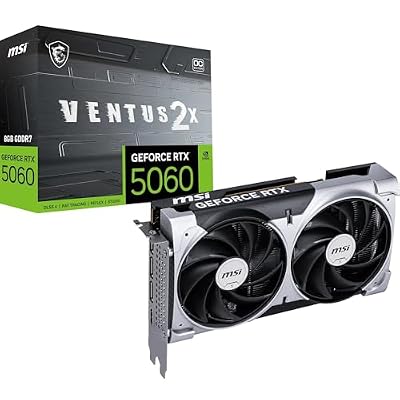
The plain RTX 5060 is the entry point of the current generation and the budget counterpart to the RTX 5060 Ti in the main list. It carries 8GB of GDDR7 on a 128-bit bus, is rated at 145W through a single 8-pin connector, and still includes DLSS 4 with Multi Frame Generation. The compact dual-fan Ventus design fits small cases and modest power supplies, which makes it a clean upgrade for older 1080p systems and esports players chasing high frame rates at that resolution. It does not fit players who want ultra textures in the newest releases, where 8GB can force settings down, or anyone buying for 1440p longevity; the 16GB RTX 5060 Ti is the safer long-term choice there.
Frequently Asked Questions
Which RTX series GPU is best for most gamers?
For most people the RTX 5060 Ti 16GB or RTX 5070 class is the sweet spot, covering 1080p and 1440p with good headroom. Step up to the RTX 5070 Ti only if you own a high-refresh or 4K display.
Is 12GB of VRAM enough?
For 1080p and most 1440p play, yes. If you want texture-heavy games, plan to keep the card for years, or aim at 4K, 16GB is the safer choice.
Do I need PCIe 5.0 for these cards?
No. PCIe 5.0 cards are designed to work in older slots too. The difference for gaming is usually small, but check the maker page for notes on your motherboard.
Should I buy a Founders Edition or a partner card?
Founders Edition cards use NVIDIA’s own cooler and styling, while partner cards from ASUS or MSI add different cooler sizes and clocks. Pick based on case fit, noise preference and look.
Is the RTX 3060 still worth buying?
It can be, for a 1080p system where you want a simple upgrade. For new builds, the newer architecture and faster memory on the 50-series cards give you more future headroom.