Affiliate disclosure: As an Amazon Associate we earn from qualifying purchases. This post contains affiliate links — we may earn a small commission at no extra cost to you. This never affects our picks. Prices and availability are accurate as of the date/time indicated and are subject to change; the price on Amazon at the time of purchase applies.
- Quick Comparison Table
- 1. CORSAIR Vengeance DDR5 32GB: Best for AMD and Intel DDR5 builds
- 2. Kingston FURY Beast 32GB DDR5-6000 CL30: Best for AMD AM5
- 3. TEAMGROUP T-Create Expert CL30 32GB: Best for tuners and creators
- 4. Crucial Pro DDR5 64GB: Best for heavy multitasking
- 5. TEAMGROUP T-Force Vulcan Z DDR4 16GB: Best for DDR4 upgrades
- How to Choose
- Frequently Asked Questions
- About the Author
- Related Articles
Quick answer: The best RAM kits for most new gaming PCs are DDR5-6000 32GB sets. Kingston FURY Beast CL30 EXPO suits AMD builds, Corsair Vengeance CL30 works across AMD and Intel, TEAMGROUP T-Create Expert targets tuners, Crucial Pro 64GB serves heavy multitasking, and the Vulcan Z DDR4 kit upgrades older systems.
Memory shopping is mostly about matching type, capacity and speed to your platform. This guide compares five kits using only what each listing states: capacity, DDR generation, speed and CAS latency. We did not run our own benchmarks, so we avoid performance claims and focus on fit, trade-offs and compatibility. Read the table, check your motherboard’s memory type, then use the checklist at the end.
Quick Comparison Table
| # | Model | Key specs (per listing) | Best for |
|---|---|---|---|
| 1 | CORSAIR Vengeance DDR5 32GB (2x16GB) | Up to 6000MHz, CL30, AMD EXPO and Intel XMP 3.0 | Mixed AMD and Intel DDR5 builds |
| 2 | Kingston FURY Beast 32GB (2x16GB) | 6000MT/s DDR5, CL30, AMD EXPO | AMD AM5 builds |
| 3 | TEAMGROUP T-Create Expert 32GB (2x16GB) | DDR5 6000MHz (PC5-48000), CL30, XMP 3.0 and EXPO | Tuners and creators |
| 4 | Crucial Pro DDR5 64GB (2x32GB) | 6000MHz, CL40, XMP 3.0 and EXPO | Heavy multitasking and editing |
| 5 | TEAMGROUP T-Force Vulcan Z DDR4 16GB (2x8GB) | 3200MHz (PC4-25600), CL16 | DDR4 platform upgrades |
1. CORSAIR Vengeance DDR5 32GB: Best for AMD and Intel DDR5 builds
Specs per the listing: 32GB kit (2 x 16GB), DDR5 up to 6000MHz, CL30, AMD EXPO and Intel XMP 3.0 profiles, grey, part CMK32GX5M2B6000Z30.
This is the safest general-purpose DDR5 pick in the list because the listing names both AMD EXPO and Intel XMP 3.0 profiles. That makes it easy to move between platforms later. 32GB in two sticks is the sweet spot for gaming and general work, and CL30 at 6000MHz is a respectable latency for that speed.
The listing does not mention RGB or a specific height, so check the maker page if your CPU cooler is big and could collide with the heat spreaders. As with every DDR5 kit, you must turn on the memory profile in the BIOS to reach the advertised speed.
- Pros: Both EXPO and XMP 3.0 profiles are listed; CL30 at 6000MHz in a 2x16GB layout; Simple 32GB capacity for most users
- Cons: Module height not listed; Needs profile enabled in BIOS

CORSAIR Vengeance DDR5 32GB (2 x 16GB) Up to 6000MHz AMD Intel RAM | Desktop Gaming Memory, AMD EXPO & Intel XMP 3.0 Compatible, CL30, Grey, CMK32GX5M2B6000Z30
Included for 'Best RAM Kits for Gaming PCs: DDR5 32GB, 64GB and DDR4 Picks' as a representative home product in this roundup; selection reflects the product set returned for this topic.
View on Amazon2. Kingston FURY Beast 32GB DDR5-6000 CL30: Best for AMD AM5
Specs per the listing: 32GB kit (2x16GB), 6000MT/s DDR5, CL30, AMD EXPO, part KF560C30BBEK2-32, kit of 2.
The listing specifically names AMD EXPO, which signals that the kit is tuned for Ryzen 7000-series and newer AM5 systems. If you are building around a Ryzen chip, this is the cleanest match: 32GB, 6000MT/s and CL30 hit the speed range commonly recommended for AM5 builds.
The caveat is Intel support: the title lists EXPO only, with no XMP profile mentioned, so an Intel board may need manual settings or may not run the advertised speed automatically. Check the maker page for XMP details before pairing it with an Intel system.
- Pros: EXPO profile for AM5 builds; CL30 at 6000MT/s; Kit of two for dual-channel
- Cons: XMP support not listed for Intel; No RGB mentioned

Kingston FURY Beast 32GB (2x16GB) 6000MT/s DDR5 CL30 Desktop Memory | AMD EXPO | Kit of 2 | KF560C30BBEK2-32
Included for 'Best RAM Kits for Gaming PCs: DDR5 32GB, 64GB and DDR4 Picks' as a representative home product in this roundup; selection reflects the product set returned for this topic.
View on Amazon3. TEAMGROUP T-Create Expert CL30 32GB: Best for tuners and creators
Specs per the listing: 32GB kit (2 x 16GB), DDR5 6000MHz (PC5-48000), CL30, Intel XMP 3.0 and AMD EXPO compatible, overclocking 10L, black, part CTCED532G6000HC30DC01.
This kit is the choice for people who like tuning memory settings. The listing mentions an overclocking focus and a 10-layer board, aiming at stability when timings are pushed. It also lists both EXPO and XMP 3.0, so it is not locked to one platform.
The trade-off is that you pay for tuning headroom you may never use. If you simply want to enable a profile and play, the Corsair or Kingston kit gives the same headline specs with fewer questions. Expect no RGB and check the heat spreader height.
- Pros: CL30 at 6000MHz with dual-profile support; Overclocking-oriented design per listing; Works on AMD and Intel
- Cons: Tuning features may go unused; Height not listed
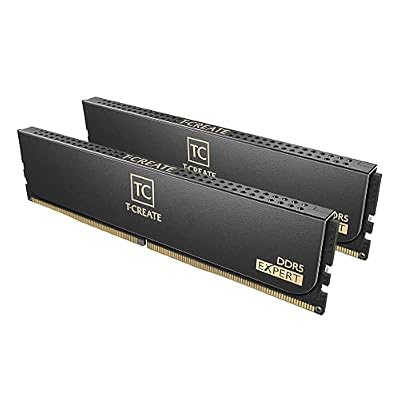
TEAMGROUP T-Create Expert CL30 Overclocking 10L DDR5 32GB Kit (2 x 16GB) 6000MHz (PC5-48000) Intel XMP 3.0 & AMD EXPO Compatible Desktop Memory Module Ram Black - CTCED532G6000HC30DC01
Included for 'Best RAM Kits for Gaming PCs: DDR5 32GB, 64GB and DDR4 Picks' as a representative home product in this roundup; selection reflects the product set returned for this topic.
View on Amazon4. Crucial Pro DDR5 64GB: Best for heavy multitasking
Specs per the listing: 64GB kit (2x32GB), DDR5 6000MHz, CL40, Intel XMP 3.0 and AMD EXPO compatible, black, part CP2K32G60C40U5B.
64GB is for people running virtual machines, large video or photo projects, or many browser tabs next to a game and streaming software. The 2x32GB layout keeps two sticks, which is friendlier for stability than four modules on many boards.
The cost of capacity is looser timing: CL40 versus CL30 on the 32GB kits. For gaming only, 32GB is usually the more sensible choice, so buy this one if capacity is your bottleneck. Confirm that your board lists 32GB modules as supported.
- Pros: 64GB for heavy workloads; EXPO and XMP 3.0 compatible; Two sticks instead of four
- Cons: CL40 timing is looser than the 32GB kits; More capacity than most gamers need

Crucial Pro DDR5 RAM 64GB Kit (2x32GB) 6000MHz CL40, Overclocking Desktop Gaming Memory, Intel XMP 3.0 & AMD Expo Compatible – Black CP2K32G60C40U5B
Included for 'Best RAM Kits for Gaming PCs: DDR5 32GB, 64GB and DDR4 Picks' as a representative home product in this roundup; selection reflects the product set returned for this topic.
View on Amazon5. TEAMGROUP T-Force Vulcan Z DDR4 16GB: Best for DDR4 upgrades
Specs per the listing: 16GB kit (2x8GB), DDR4 3200MHz (PC4-25600), CL16, gray, part TLZGD416G3200HC16FDC01.
If your motherboard uses DDR4, this is a straightforward kit. 3200MHz with CL16 is a long-standing standard configuration for DDR4 systems and works with a very wide range of boards.
The limitation is capacity and generation. 16GB is enough for many games but can feel tight with heavy multitasking, and DDR4 cannot be reused on AM5 or newer Intel DDR5 platforms. Consider this kit only when you are upgrading an existing DDR4 machine.
- Pros: Broadly compatible 3200MHz CL16 kit; Good fit for DDR4 platforms; Simple dual-channel 2x8GB
- Cons: 16GB can feel tight; DDR4 is a dead end for new builds

TEAMGROUP T-Force Vulcan Z DDR4 DRAM 16GB Kit (2x8GB) 3200MHz Desktop Memory Module (PC4-25600) CL16 Ram (Gray) - TLZGD416G3200HC16FDC01
Included for 'Best RAM Kits for Gaming PCs: DDR5 32GB, 64GB and DDR4 Picks' as a representative home product in this roundup; selection reflects the product set returned for this topic.
View on AmazonHow to Choose
Match the memory type to the board
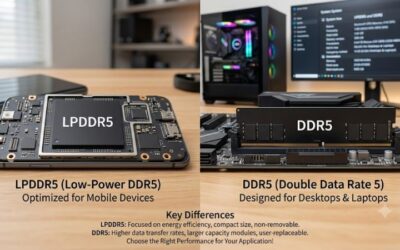
DDR4 and DDR5 use different slot notches and are not interchangeable. Look at your motherboard manual or specification page for the memory type. AM5 boards use DDR5 only. A DDR4 kit in a DDR5 board will not fit.
Choose the capacity by workload
16GB suits light gaming and office work, 32GB is the sensible target for modern gaming and content tasks, and 64GB is for editing, VMs and heavy multitasking. Two sticks usually beat four for stability and easier speed targets. If you are unsure, 32GB in a 2x16GB layout is the lowest-regret choice, because you can still add a matching kit later only if the board and the memory controller handle four modules well, which is not a given.
Speed and latency
For DDR5, 6000MT/s at CL30 is a sweet-spot target for AMD AM5 builds and a strong match for Intel boards too. Higher speeds may need extra settings and a recent BIOS, and gains beyond the sweet spot are usually small in games. Read the CAS number in the title: lower is better at the same speed, while the same CAS number at a higher speed means a faster absolute response.
Profiles and what to skip
EXPO is the AMD profile; XMP is the Intel one. Dual-labelled kits give flexibility. Skip single-module listings if you want dual-channel, skip kits without a clear speed in the title, and do not mix different kits in the same machine.
Frequently Asked Questions
Is 32GB enough for gaming?
Yes, for nearly all current games. 32GB gives headroom for the game plus background apps. Choose 64GB only if you also edit video, run virtual machines or keep many heavy applications open.
Do I need to enable EXPO or XMP?
Yes. Without enabling the profile in the BIOS, the memory typically runs at a lower default speed. Open the BIOS after installing, choose the profile, save and reboot.
Can I use a DDR5 kit on a DDR4 board?
No. The slots are physically different and the electrical standards are not compatible. Check the memory type on your motherboard specifications before ordering.
Should I buy two sticks or four?
Two sticks are generally easier on the memory controller, which helps reaching rated speeds. Buy a 2x32GB kit rather than four small modules if you need 64GB.
Does RGB affect performance?
No. Lighting is cosmetic. It may add height to the module, so check clearance with your CPU cooler if the kit has RGB or tall spreaders.