Affiliate disclosure: As an Amazon Associate we earn from qualifying purchases. This post contains affiliate links — we may earn a small commission at no extra cost to you. This never affects our picks. Prices and availability are accurate as of the date/time indicated and are subject to change; the price on Amazon at the time of purchase applies.
- Quick Comparison Table
- 1. CORSAIR Vengeance DDR5 32GB: Best for a Default Gaming Build
- 2. Kingston FURY Beast 64GB: Best for Multitasking and Content Work
- 3. Crucial Pro DDR5 32GB 6400MHz: Best for Tuners
- 4. TEAMGROUP T-Force Vulcan DDR5 32GB: Best Close Alternative
- 5. TEAMGROUP T-Force Vulcan Z DDR4 16GB: Best for Older DDR4 Systems
- How to Choose
- Frequently Asked Questions
- About the Author
- Related Articles
Quick answer: For the best RAM, the CORSAIR Vengeance DDR5 32GB 6000MHz CL30 kit is the safe default. The Kingston FURY Beast 64GB suits heavy multitasking, the Crucial Pro 6400MHz kit targets tuners, the TEAMGROUP T-Force Vulcan CL30 is a close alternative, and the DDR4 Vulcan Z fits older boards.
This guide compares five desktop memory kits across DDR5 and DDR4, covering capacity, speed and latency. All figures come from each listing’s published specs, and we did not run our own benchmarks, so we avoid claiming exact frame-rate gains. Memory is mostly a compatibility decision, so the sections below pair each kit with the kind of build it suits, and the buying rules explain how to avoid mismatches.
Quick Comparison Table
| # | Model | Key specs (per listing) | Best for |
|---|---|---|---|
| 1 | CORSAIR Vengeance DDR5 32GB (2x16GB) | Up to 6000MHz, CL30, AMD EXPO and Intel XMP 3.0 | Default gaming build |
| 2 | Kingston FURY Beast 64GB (2x32GB) | 6000MT/s DDR5, CL30, AMD EXPO | Heavy multitasking, creators |
| 3 | Crucial Pro DDR5 32GB (2x16GB) | 6400MHz, CL32, Intel XMP 3.0 and AMD EXPO | Overclocking-minded builders |
| 4 | TEAMGROUP T-Force Vulcan DDR5 32GB (2x16GB) | 6000MHz (PC5-48000), CL30, XMP 3.0 and EXPO | Matching a sibling kit |
| 5 | TEAMGROUP T-Force Vulcan Z DDR4 16GB (2x8GB) | 3200MHz (PC4-25600), CL16 | Older DDR4 systems |
1. CORSAIR Vengeance DDR5 32GB: Best for a Default Gaming Build
Specs per the listing: 32GB kit (2 x 16GB), DDR5, up to 6000MHz, CL30, AMD EXPO and Intel XMP 3.0 compatible, grey, model CMK32GX5M2B6000Z30.
A two-stick 32GB kit at 6000MHz with CL30 is the combination many current DDR5 builders aim for. The EXPO and XMP profiles mean the kit can be set to its rated speed on either platform with one BIOS option, rather than staying at the slower base speed. The plain heat spreader with no lighting keeps the look clean and helps with tall air coolers.
The only watchpoint is that “up to” speeds depend on your processor and board, so confirm your board supports the rated profile. Check the motherboard’s memory support list if you want certainty.
- Pros: 32GB in two sticks; CL30 at 6000MHz; works with both EXPO and XMP profiles; no RGB to clash
- Cons: Rated speed depends on platform support; not a DDR4 option

CORSAIR Vengeance DDR5 32GB (2 x 16GB) Up to 6000MHz AMD Intel RAM | Desktop Gaming Memory, AMD EXPO & Intel XMP 3.0 Compatible, CL30, Grey, CMK32GX5M2B6000Z30
Included for 'Best RAM for Gaming PCs: DDR5 and DDR4 Kits Compared' as a representative home product in this roundup; selection reflects the product set returned for this topic.
View on Amazon2. Kingston FURY Beast 64GB: Best for Multitasking and Content Work
Specs per the listing: 64GB kit (2x32GB), 6000MT/s DDR5, CL30, AMD EXPO, kit of 2, model KF560C30BBEK2-64.
Sixty-four gigabytes is more than most games need, but it matters for video editing, large photo libraries, virtual machines and running many browser tabs alongside a game and a streaming program. Keeping CL30 at 6000MT/s means you are not trading speed for capacity.
The listing names AMD EXPO, so this one is oriented to Ryzen platforms; if you use an Intel board, check the maker page for profile support. Two high-capacity sticks can also be harder for some boards to run at full speed, so check your board’s supported memory list.
- Pros: 64GB across two modules; CL30 at 6000MT/s; suited to creator workloads
- Cons: More capacity than most gamers need; EXPO-focused listing; board support matters

Kingston FURY Beast 64GB (2x32GB) 6000MT/s DDR5 CL30 Desktop Memory | AMD EXPO | Kit of 2 | KF560C30BBEK2-64
Included for 'Best RAM for Gaming PCs: DDR5 and DDR4 Kits Compared' as a representative home product in this roundup; selection reflects the product set returned for this topic.
View on Amazon3. Crucial Pro DDR5 32GB 6400MHz: Best for Tuners
Specs per the listing: 32GB kit (2x16GB), DDR5, 6400MHz, CL32, overclocking desktop gaming memory, Intel XMP 3.0 and AMD EXPO compatible, white, model CP2K16G64C32U5W.
This kit runs a higher rated speed than the 6000MHz kits, with slightly looser timings at CL32. It targets players who like to adjust memory settings or run a processor that handles faster memory. The white finish suits light-colored builds.
Higher rated speeds are not automatically better in practice. Some platforms run best near 6000MHz, and pushing beyond can require manual tuning. Check your board and processor guidance before assuming the faster kit will run at its rated speed.
- Pros: 6400MHz rated speed; supports both profile types; white color option
- Cons: Higher speed may not run at rating on every platform; looser CL32 timing

Crucial Pro DDR5 RAM 32GB Kit (2x16GB), 6400MHz CL32, Overclocking Desktop Gaming Memory, Intel XMP 3.0 & AMD Expo Compatible, White - CP2K16G64C32U5W
Included for 'Best RAM for Gaming PCs: DDR5 and DDR4 Kits Compared' as a representative home product in this roundup; selection reflects the product set returned for this topic.
View on Amazon4. TEAMGROUP T-Force Vulcan DDR5 32GB: Best Close Alternative
Specs per the listing: 32GB kit (2x16GB), DDR5, 6000MHz (PC5-48000), CL30, Intel XMP 3.0 and AMD EXPO compatible, black, model FLBD532G6000HC30DC01.
On paper this matches the Corsair kit: the same capacity, speed and CL30 timing. That makes it a useful second option if one is out of stock or if you prefer the styling. The black heat spreader is understated, and the dual-profile support keeps it flexible.
Since specs are close, the decision comes down to appearance, your board’s qualified memory list, and availability. Check if your motherboard maker lists this kit as qualified for your exact board, which is the strongest sign of smooth setup.
- Pros: CL30 at 6000MHz; dual profile support; low-key black look
- Cons: Little to separate it from similar kits; board compatibility still worth checking

TEAMGROUP T-Force Vulcan DDR5 32GB (2x16GB) 6000MHz (PC5-48000) CL30 Intel XMP 3.0 & AMD Expo Compatible Desktop Memory Ram Black FLBD532G6000HC30DC01
Included for 'Best RAM for Gaming PCs: DDR5 and DDR4 Kits Compared' as a representative home product in this roundup; selection reflects the product set returned for this topic.
View on Amazon5. TEAMGROUP T-Force Vulcan Z DDR4 16GB: Best for Older DDR4 Systems
Specs per the listing: 16GB kit (2x8GB), DDR4, 3200MHz (PC4-25600), CL16, grey, model TLZGD416G3200HC16FDC01.
If your motherboard uses DDR4 slots, DDR5 memory will not fit, so this kit covers the older platform. A 3200MHz CL16 pair is a common, widely supported setup, and two sticks give you dual-channel operation.
Sixteen gigabytes is workable for light gaming and office use but tight for modern titles with many background apps. If your board has free slots, you can later add a matching kit to reach 32GB.
- Pros: Fits DDR4 boards; dual-channel pair; widely compatible speed
- Cons: 16GB is limited for newer games; older platform

TEAMGROUP T-Force Vulcan Z DDR4 DRAM 16GB Kit (2x8GB) 3200MHz Desktop Memory Module (PC4-25600) CL16 Ram (Gray) - TLZGD416G3200HC16FDC01
Included for 'Best RAM for Gaming PCs: DDR5 and DDR4 Kits Compared' as a representative home product in this roundup; selection reflects the product set returned for this topic.
View on AmazonHow to Choose
Match the memory generation to your motherboard
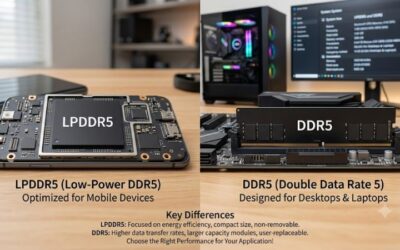
DDR4 and DDR5 are physically different and will not fit each other’s slots. Read your motherboard specification to confirm which one it takes, and never buy on assumption. Laptops use a different, smaller form factor, so these desktop kits are not interchangeable with them.
Pick capacity by workload
For gaming and general use today, 32GB is a comfortable target and 16GB is the floor. Choose 64GB if you edit video, run virtual machines or keep large projects open. Buy two matched sticks rather than one, because dual-channel operation improves memory bandwidth and is what the platforms expect.
Use speed and latency sensibly
On DDR5, 6000MHz with CL30 is a widely used balance for current platforms. Higher numbers such as 6400MHz can look attractive, but the real result depends on your processor and board. Lower first-word latency is helpful, but a kit that runs stably at its rated profile matters more than one that promises a bigger number and crashes.
Enable the profile and check compatibility
Memory runs at a slow default speed until you turn on its EXPO or XMP profile in the BIOS. Check that your board supports the profile type named in the listing, and look at the board maker’s qualified memory list. Update the BIOS if the maker recommends it for memory stability. If the PC fails to start after installing a fast kit, try the board’s memory-compatibility or recovery option before assuming the kit is faulty.
Consider clearance and looks
Tall heat spreaders can collide with large air coolers on the first memory slot. Check cooler clearance on the cooler maker’s page. RGB is optional, and plain kits avoid software clutter.
Frequently Asked Questions
Is 32GB of RAM enough for gaming?
Yes. 32GB gives headroom for current games plus background programs. Choose 64GB only if you do creative or virtual-machine work.
Should I get DDR5 or DDR4?
Whichever your motherboard supports. For a new build, DDR5 is the current platform. For an existing DDR4 board, stay with DDR4.
Does 6400MHz beat 6000MHz?
Not always. The benefit depends on your processor and board, and 6000MHz with tight CL30 timing is a very common sweet spot.
Why does my RAM run slower than advertised?
You likely need to enable the XMP or EXPO profile in the BIOS. Until then it runs at a lower default speed.
Can I mix two different kits?
It can work, but mixed kits often run at the slowest speed and may be unstable. Buying one matched kit is simpler and safer.