🛒 Best Price Today on Amazon
Prime members get fast, free shipping on everything above, plus member-only deals. New members get a 30-day free trial — cancel anytime.
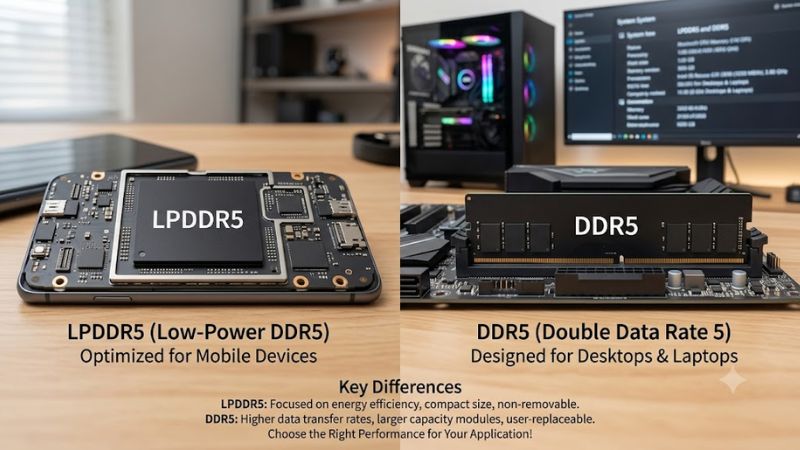
LPDDR5 vs DDR5 is mainly a choice between efficiency and flexibility rather than a simple speed contest. LPDDR5-family memory suits thin systems with low power budgets, while DDR5 is common in upgradeable laptops and desktops. For gaming, the right option depends on the GPU, chassis, capacity needs, and whether future RAM upgrades matter.
How to Choose the Right Memory Platform
The four criteria that matter most are power efficiency, bandwidth, upgradeability, and platform compatibility. LPDDR5X can provide high transfer rates in compact systems, while DDR5 SO-DIMM remains easier to replace. Newer LPCAMM2 systems add another option, so the memory label alone no longer tells the entire story.
Power Efficiency
LPDDR5 was designed around mobile power efficiency, making it a natural fit for thin laptops where memory power contributes to the overall thermal and battery budget. DDR5 targets broader system designs, including desktops and performance laptops, where upgradeability and capacity can take priority over the smallest possible memory footprint.
For a portable gaming or productivity system, LPDDR5-family memory makes the most sense when battery life and chassis size matter more than replacing RAM later. The benefit is system-level efficiency rather than a guaranteed frame-rate advantage, so a discrete GPU laptop should not be chosen on memory type alone.
Bandwidth and Gaming
LPDDR5X commonly appears at higher transfer rates than standard laptop DDR5, which can benefit integrated graphics because the GPU shares system memory. With a discrete GPU, however, graphics workloads primarily use dedicated VRAM, reducing the importance of system-memory bandwidth for many games.
The LPDDR5 vs DDR5 comparison therefore changes with the graphics architecture. An integrated GPU can benefit substantially from faster system memory, while a gaming laptop with dedicated NVIDIA graphics has a different bottleneck profile. CPU behavior, cooling, GPU power limits, and game settings still influence frame rates.
Upgradeability
Traditional LPDDR5 is normally integrated into the motherboard or processor package, so the installed capacity is generally fixed when the laptop is purchased. DDR5 SO-DIMM systems use removable modules, allowing supported laptops to replace or expand memory later. Samsung explicitly describes LPDDR5 as non-upgradeable.
There is now an important exception: LPCAMM2 can provide modular LPDDR5X memory without using conventional SO-DIMM slots. Lenovo’s ThinkPad T14 Gen 7, for example, uses one LPCAMM2 module and supports up to 64GB of LPDDR5X-6800, showing why buyers should check the exact platform instead of assuming every LPDDR design is permanently soldered.
Compatibility
LPDDR5 and DDR5 are not interchangeable memory modules. DDR5 laptops may use SO-DIMM or newer modular formats, while LPDDR5-family designs require the memory configuration specified by the system manufacturer. A conventional desktop DDR5 DIMM also cannot simply replace laptop SO-DIMM memory because the physical form factors differ.
Compatibility must therefore be checked at the complete-system level. Confirm the processor platform, motherboard or laptop model, memory form factor, supported capacity, and rated transfer speed before buying. For a desktop, also verify that the board supports the intended DDR5 UDIMM configuration rather than assuming any DDR5 module will work.
Top Picks
These current systems illustrate the practical choices behind the LPDDR5 vs DDR5 decision rather than pretending the two memory standards are interchangeable products. The table uses manufacturer specifications, and no cross-device gaming benchmark is presented because the CPUs, GPUs, power limits, and displays differ between these systems.
| Product | Best For | Key Spec | Compatibility | Watch Out For |
| Lenovo ThinkPad T14 Gen 7 Intel | Best Overall | Up to 64GB LPDDR5X-6800 | LPCAMM2, Intel platform | Not conventional SO-DIMM |
| ASUS TUF Gaming F16 (2026) | Best Value | DDR5-5600, up to 64GB | 2 DDR5 SO-DIMM slots | Larger gaming chassis |
| HP OmniBook X 14 | Best For Portability | 32GB LPDDR5X-8533 option | Onboard LPDDR5X | Memory is fixed |
| ASUS ROG Strix G16 (2026) | Best For Gaming | DDR5-5600, up to 64GB | 2 DDR5 SO-DIMM slots | Dedicated GPU changes the memory equation |
Lenovo ThinkPad T14 Gen 7 Intel
The ThinkPad T14 Gen 7 is the strongest overall illustration of where laptop memory is heading. Lenovo lists up to 64GB of LPDDR5X-6800 through one LPCAMM2 module, while the platform supports a PCIe 5.0 x4 M.2 storage interface. This makes it relevant for buyers wanting efficiency without conventional soldered-only memory.
Buy this system when compact business computing, modern memory packaging, and long-term capacity matter together. Do not buy it expecting ordinary DDR5 SO-DIMM installation, because LPCAMM2 is a different form factor. Its main weakness is that replacement memory availability depends on the specific LPCAMM2 ecosystem rather than the broad SO-DIMM market.
ASUS TUF Gaming F16 (2026)
The TUF Gaming F16 (2026) is the practical DDR5 choice for buyers prioritizing gaming hardware and future RAM flexibility. ASUS specifies DDR5-5600 SO-DIMM memory with two slots and support for up to 64GB, while configurations include modern NVIDIA Laptop GPUs and multiple display options.
Buy it when gaming performance and replaceable memory matter more than an ultra-thin chassis. Its real weakness is size and system power consumption compared with ultraportable LPDDR5X machines. It is also unnecessary for someone who mainly wants quiet mobile productivity and does not need a discrete GPU or future memory expansion.
HP OmniBook X 14
The HP OmniBook X 14 represents the efficiency-focused side of the comparison. Current configurations include 16GB or 32GB of LPDDR5X-8533 memory, depending on the model, alongside Intel Core Ultra Series 3 processors and integrated Intel graphics. The memory is onboard, so buyers need to select sufficient capacity before purchase.
Buy it for portable productivity where battery efficiency, a high-resolution OLED display, and compact design matter more than memory replacement. Its main weakness is fixed RAM, which can become restrictive if future workloads demand more capacity. It is not the right choice for buyers who specifically want socketed memory upgrades.
ASUS ROG Strix G16 (2026)
The ROG Strix G16 (2026) is the strongest pick for dedicated gaming because ASUS specifies DDR5-5600 SO-DIMM memory, two modules in supported configurations, and up to 64GB total capacity. Current versions pair this memory with discrete NVIDIA Laptop GPUs, making system RAM only one part of the gaming platform.
Buy it when gaming, sustained workloads, and replaceable memory are the priorities. The real weakness is that faster system memory cannot compensate for a GPU or CPU limitation, so buying extra RAM solely for higher FPS is not automatically worthwhile. Avoid it if portability and low-power operation are your primary concerns.
FAQ
The key takeaway from LPDDR5 vs DDR5 is that neither standard wins every workload. LPDDR5-family memory favors efficient compact systems, while conventional DDR5 remains attractive when upgradeability and broad platform flexibility matter. The newer LPCAMM2 format narrows that gap by combining LPDDR5X technology with modular installation.
Is LPDDR5 faster than DDR5?
LPDDR5X can have a higher advertised transfer rate than common laptop DDR5, but that does not mean every LPDDR5 system is faster in real applications. Performance depends on memory channels, processor design, integrated graphics architecture, latency, and the rest of the platform.
For gaming, the GPU configuration matters especially. An integrated GPU can benefit from higher system-memory bandwidth, whereas a discrete GPU has dedicated VRAM. As a result, comparing transfer-rate numbers alone is not a reliable way to predict game performance between two complete laptops.
Is LPDDR5 better for gaming laptops?
LPDDR5-family memory can be a strong choice for gaming laptops with integrated graphics because higher memory bandwidth can feed the GPU more effectively. It also suits thin systems where lower memory power and compact packaging are important design goals.
DDR5 remains attractive for gaming laptops with discrete GPUs because many models provide removable SO-DIMM slots and higher capacity options. The better choice depends on the entire machine, especially the GPU, cooling system, processor, display resolution, and intended upgrade path rather than RAM technology alone.
Can LPDDR5 be upgraded later?
Conventional LPDDR5 and LPDDR5X memory is normally integrated into the motherboard or processor package, so it cannot be upgraded like a standard SO-DIMM. Samsung states that LPDDR5 capacity is fixed during manufacturing, making the original configuration especially important.
LPCAMM2 changes that assumption on selected newer laptops. Lenovo’s ThinkPad T14 Gen 7 Intel uses a replaceable LPCAMM2 memory module, so buyers should check the exact machine’s service documentation before assuming that every LPDDR5X system is permanently fixed.
Should I choose DDR5 for a gaming PC?
DDR5 is the straightforward choice for a conventional desktop gaming PC because desktop platforms commonly use removable DDR5 UDIMMs rather than LPDDR5 packages. Samsung identifies UDIMM as a DIMM type used by supported desktop motherboards, while LPDDR5 is intended for different system designs.
For gaming laptops, the answer is more balanced. Choose DDR5 when replaceable memory and capacity expansion matter; choose LPDDR5-family memory when efficiency, compact design, or integrated-graphics bandwidth is more important. Always verify the exact platform before purchasing memory.
Final Thoughts
LPDDR5 vs DDR5 is ultimately a platform decision, not a universal speed ranking. Choose LPDDR5-family memory for efficient compact systems, DDR5 for conventional upgradeable designs, and LPCAMM2 when supported if you want modular LPDDR5X. For gaming, prioritize the complete CPU and GPU platform over memory labels alone.