Affiliate disclosure: As an Amazon Associate we earn from qualifying purchases. This post contains affiliate links — we may earn a small commission at no extra cost to you. This never affects our picks. Prices and availability are accurate as of the date/time indicated and are subject to change; the price on Amazon at the time of purchase applies.
- Quick Comparison Table
- 1. Keychron Q6 Max: Best for a full-size wireless custom board
- 2. Aula WIN60 HE: Best for competitive FPS play on a compact 60% board
- 3. GravaStar Mercury K1: Best for a quiet 75% board with wireless options
- 4. Geeky GK65: Best for first hot-swap boards on a tight budget
- How to Choose
- Frequently Asked Questions
- About the Author
- Related Articles
Quick answer: The Keychron Q6 Max is the best hot-swappable keyboard here for full-size custom builds. The Aula WIN60 HE suits competitive FPS play, the GravaStar Mercury K1 is a quiet wireless 75%, and the Geeky GK65 is the first hot-swap board for newcomers.
This guide compares four hot-swappable mechanical keyboards, covering a full-size wireless board, a 60% magnetic gaming board, a 75% gasket-mounted board and a 65% starter board. We kept to models whose listings clearly state hot-swap support. Comparisons use each listing’s published specifications; we did not run our own benchmarks, so confirm switch type, battery and software details on the maker page.
Quick Comparison Table
| # | Model | Key specs (per listing) | Best for |
|---|---|---|---|
| 1 | Keychron Q6 Max | Full-size, aluminum, QMK, knob, tri-mode wireless, hot-swap, RGB | a full-size wireless custom board |
| 2 | Aula WIN60 HE | 60% wired, magnetic switches, hot swappable, rapid trigger, 8000 Hz polling | competitive FPS play on a compact 60% board |
| 3 | GravaStar Mercury K1 | 75% wireless, gasket mount, hot swappable linear, 2.4GHz/USB-C/Bluetooth 5.0 | a quiet 75% board with wireless options |
| 4 | Geeky GK65 | 65%, 68 keys, hot swappable, RGB backlit, ANSI US | first hot-swap boards on a tight budget |
1. Keychron Q6 Max: Best for a full-size wireless custom board
Specs per the listing: Full-size layout, full aluminum body, QMK support, volume knob, Quiet Banana tactile switches, tri-mode wireless connection, hot-swap sockets, RGB backlighting, macOS, Windows and Linux.
The Q6 Max is the premium, full-size choice in this guide. A full aluminum body, a knob and QMK firmware support make it a board built for customization, and hot-swap sockets mean you can change switches without a soldering iron. The tri-mode connection adds Bluetooth and a 2.4GHz option alongside the wired mode.
The shipped Quiet Banana tactile switches suit a typing-heavy desk, and the hot-swap design lets you move to linear switches later if you game more. The aluminum build is heavy, so it is a desk board, not a travel one. It is the best fit for someone who wants a lasting base for experimentation.
- Pros: Hot-swap with QMK support; full aluminum build; tri-mode wireless
- Cons: Heavy; highest cost in the guide; size and weight not suited to travel
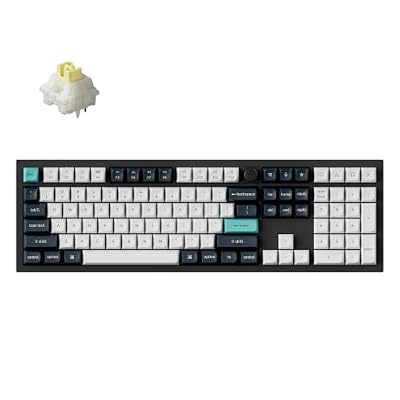
Keychron Q6 Max Full Size Wireless Mechanical Keyboard, Silent Banana,Black | Full Aluminum QMK Keyboard with Knob, Quiet Banana Tactile Switches, Tri-Mode, Hot-Swap, RGB, for macOS/Windows/Linux
Included for 'Best Hot-Swappable Keyboards for Gaming and Typing' as a representative home product in this roundup; selection reflects the product set returned for this topic.
View on Amazon2. Aula WIN60 HE: Best for competitive FPS play on a compact 60% board
Specs per the listing: 60% layout, wired, magnetic switch, hot swappable, adjustable actuation, rapid trigger mode, 8000 Hz polling rate, RGB.
This is the gaming-focused pick. Magnetic switches with adjustable actuation and rapid trigger let you set how far a key must travel before it registers, a feature competitive players use for fast movement in shooters. The 8000 Hz polling rate listed is also aimed at lower input latency.
A 60% layout drops the arrow keys, function row and number pad, so it is not the board for spreadsheets or long documents. It is wired only, so there is no wireless convenience. For a player who values speed and a small footprint, it fits that role.
- Pros: Adjustable actuation and rapid trigger; 8000 Hz polling; compact 60% footprint
- Cons: No arrow keys or number pad; wired only; magnetic switch types differ from standard ones
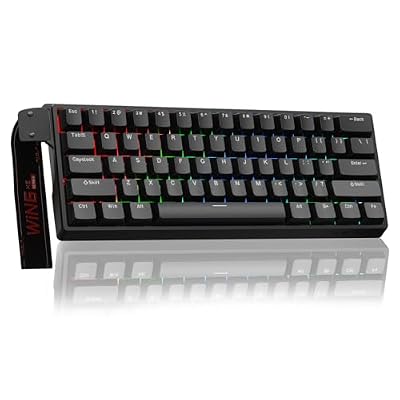
Aula WIN60 HE - 60% Mechanical Gaming Keyboard Wired, Magnetic Switch Hot Swappable, Adjustable Actuation Rapid Trigger Mode, 8000 Hz Polling Rate, RGB Small Keyboard 60 Percent Compact Design for PC
Included for 'Best Hot-Swappable Keyboards for Gaming and Typing' as a representative home product in this roundup; selection reflects the product set returned for this topic.
View on Amazon3. GravaStar Mercury K1: Best for a quiet 75% board with wireless options
Specs per the listing: 75% layout, wireless mechanical, RGB backlit, gasket mount, hot swappable linear switches, 2.4GHz, USB-C and Bluetooth 5.0 connections for Windows and Mac.
The Mercury K1 aims at a polished, deeper sound. A gasket mount is designed to soften the typing feel, and the listing mentions a creamy sound. The 75% layout keeps the arrow keys and function row, which makes it a good mix of compact size and daily usability.
Three connection modes are useful if you switch between a desktop and a laptop. The hot swappable linear switches come installed, so you can replace them later. The brand is less established than Keychron or Logitech, so check the warranty terms and software support on the maker page.
- Pros: Gasket mount for a softer feel; keeps arrow and function keys; 2.4GHz, USB-C and Bluetooth
- Cons: Less established brand; software support not listed; linear switches may not suit all typists

GravaStar Mercury K1 75% Wireless Mechanical Gaming Keyboard RGB Backlit | Gasket Mount, Hot Swappable Linear Switches, Creamy Sound Keyboard, 2.4GHz/USB-C/Bluetooth 5.0, for Win/Mac【Opaline White】
Included for 'Best Hot-Swappable Keyboards for Gaming and Typing' as a representative home product in this roundup; selection reflects the product set returned for this topic.
View on Amazon4. Geeky GK65: Best for first hot-swap boards on a tight budget
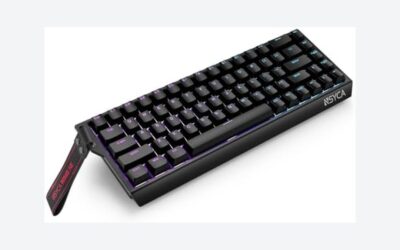
Specs per the listing: 65% layout, 68 keys, hot swappable, multi-color RGB LED backlight, ANSI US layout, for PC and Mac, available in white or black.
The GK65 is the starter board for people who want to try hot swapping. A 65% layout with 68 keys keeps the arrow keys, which makes it more practical than a 60% board for daily typing, and the listing’s RGB backlighting suits a gaming desk.
It is a value pick, so expect plastic build quality and basic features compared with aluminum boards. The listing does not name the switches installed, so check what you get. If you want to learn what different switches feel like, it is a low-risk way to start.
- Pros: Entry hot-swap board; 65% layout with arrow keys; RGB backlight
- Cons: Switch type not stated in the title; basic build; fewer features than premium boards

Geeky GK65 65% | Hot Swappable Mechanical Gaming Keyboard | 68 Keys Multi Color RGB LED Backlit for PC/Mac Gamer | ANSI US American Layout (White, Mechanical Black)
Included for 'Best Hot-Swappable Keyboards for Gaming and Typing' as a representative home product in this roundup; selection reflects the product set returned for this topic.
View on AmazonHow to Choose
Understand what hot-swappable means
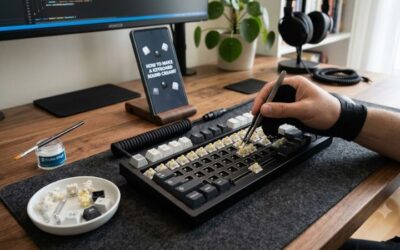
A hot-swappable keyboard has sockets that hold switches without solder, so you can pull a switch out and push another in with a puller tool. Check that the sockets accept the switch type you want, as some boards support only three-pin or five-pin switches. Boards that are not hot-swappable need soldering to change anything.
Choose a layout that fits your desk
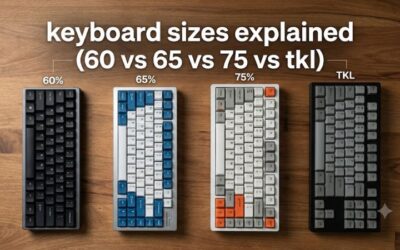
Full-size boards have a number pad and suit spreadsheets. A 75% or 65% layout drops the pad but keeps arrow keys. A 60% layout is the smallest and drops arrows and function keys, which you reach through layers. Smaller boards free mouse space for gaming, while larger ones are better for work.
Pick switches by feel, not hype
Linear switches are smooth and fast, tactile switches have a bump you can feel, and clicky ones are loud. Magnetic switches allow adjustable actuation and rapid trigger for competitive play. Because the board is hot-swappable, you can buy a sampler pack of different switches later to find the feel you prefer.
Wired, wireless and build quality
Wireless models offer 2.4GHz and Bluetooth, which suit a clean desk, but wired mode still gives the lowest latency. Aluminum cases and gasket mounts feel solid and reduce rattle. Check what is not in the listing, such as battery size and software, on the maker page before you order. Keep in mind that wireless boards need charging, so check whether the listing states battery life, and that a board with software such as QMK lets you remap keys and build macros without extra tools, which is helpful for gaming layers and for work shortcuts alike. Finally, a spare switch puller and a few extra switches make experimenting far easier, and most boards let you reverse any change by simply putting the original switches back.
Frequently Asked Questions
What is a hot-swappable keyboard?
It has sockets that let you swap switches without soldering. You can change feel or sound by pulling out a switch and pressing in a new one.
Why only four boards in this guide?
We only listed boards whose titles clearly state hot-swap support. Other keyboards in the store did not state it, so we left them out.
Are magnetic switch keyboards good for gaming?
Their adjustable actuation and rapid trigger help in fast shooters. They suit competitive players more than casual users.
Do I need a switch puller?
Yes. A puller tool removes switches safely. Many boards include one, but check the listing or buy one separately.
Is a 60% keyboard practical for daily use?
It works if you learn the function layers for arrow keys. A 65% or 75% board is easier for mixed work and gaming.