Buying a keyboard and mouse for a PS5 is not the same decision as buying them for a PC. The console only accepts these controls inside games that choose to support them, many headsets and controllers already compete for its front USB ports, and a set that feels perfect at a desk can be awkward on a couch tray. The real question is which combo your favourite PS5 titles will actually read, and whether its cable or receiver fits the way your console corner is arranged.
This guide serves three kinds of buyer: shooter and MMO players who want mouse aim in supported titles, couch players who need a cable-free set for chat and menus, and newcomers who simply want one box that works on console and PC alike. Every set below is a genuine keyboard-and-mouse combo whose Amazon listing names PS5 compatibility, and each pick was chosen from the names and specifications printed on that listing rather than from brand reputation.
Quick Picks
As an Amazon Associate we earn from qualifying purchases
| Product | Best for | Key spec from title |
|---|---|---|
| RedThunder 60% Gaming Keyboard and Mouse Combo | Desk players who want a light mouse for shooters | 7200 DPI honeycomb optical mouse |
| CHONCHOW Wireless TKL Keyboard Mouse Combo | Couch setups that need one shared receiver | 87 keys, tenkeyless compact layout |
| RedThunder K10 Wireless Gaming Keyboard and Mouse Combo | Full-size typing plus long wireless sessions | Rechargeable 3800mAh battery |
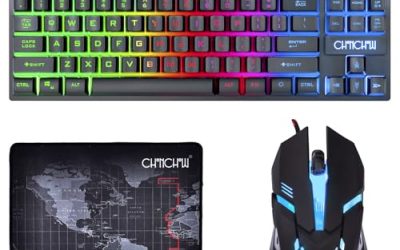
| CHONCHOW 87 Keys TKL Gaming Keyboard and Mouse Combo | A wired starter set with a mouse pad included | 800-3200 DPI RGB mouse |
How to Choose
Check That Your Games Accept Keyboard and Mouse Input
Sony lets the PS5 recognise most USB and wireless keyboards and mice at system level, so typing messages and browsing menus works almost everywhere. Playing with them is different: each developer decides whether a game reads keyboard and mouse controls, and big names are split. Several shooters and MMOs on the console accept them, while many story-driven titles ignore them completely and demand the DualSense. Before ordering any combo, search the official page or settings menu of your two or three most-played games for a keyboard option. A set bought for a title that never enables it becomes an expensive chat accessory.
Pick Wired, 2.4GHz Dongle or Bluetooth Carefully
A wired combo is the surest route on PS5: plug in, and both devices register with no pairing step and no battery anxiety. The catch is cable reach and the fact that two separate leads can swallow both front ports. A 2.4GHz set such as the CHONCHOW and RedThunder wireless picks here runs keyboard and mouse through one shared USB receiver, which frees a port and suits a sofa several metres from the console. Bluetooth looks tidy on paper, yet console pairing can be fussier and some combos reserve Bluetooth for phones and tablets. Whatever you choose, confirm the listing names PS5 rather than assuming any wireless set will pair.
Match the Keyboard Size to Couch or Desk Play
Layout decides how a combo feels in a living room. A 60% board like the RedThunder K62 drops the number pad, function row and arrow cluster, leaving a small rectangle that balances on a lap tray and leaves wide room for mouse sweeps at a desk. Tenkeyless sets keep the arrows and function row while still trimming width, which helps in strategy games heavy on shortcuts. Full-size boards such as the K10 give you a number pad for keybinds and data entry, but they dominate a coffee table. Measure your tray or desk depth before choosing, because a keyboard that overhangs the edge makes the mouse hand cramped.
Know Where Budget Combos Cut Corners
Combo pricing stays low by sharing parts across the box, and the savings usually land in predictable places. Most sets in this bracket use membrane keys with a mechanical feel rather than true mechanical switches, so keystrokes feel softer and less defined. Mouse sensors are honest mid-range units; headline DPI figures matter less than tracking consistency at the 800 to 3200 settings most players actually use. Companion software for remapping keys or saving profiles often runs on PC only, leaving console players with onboard controls. None of this ruins a budget set, but it tells you where the money went: lighting and styling first, switch hardware second.
The 4 Best Options
RedThunder 60% Gaming Keyboard and Mouse Combo
Desk-based PS5 players who load into supported shooters should start here. The 61-key board leaves an unusually wide mousing area, and the perforated honeycomb mouse weighs about 65 grams, so fast flicks ask little of your wrist. Because both pieces are wired, the console sees them the moment they are plugged in, with no receiver to misplace and no battery to nurse between sessions. The keyboard’s water-resistant build and braided cables also suit a busy desk where drinks sit close to the action, and the symmetrical mouse shape treats left-handed players fairly.
Specs
- Brand: RedThunder
- Model number: K62
- Keyboard: 61 keys, 60% layout, RGB backlit
- Connection: wired USB-A for both devices
- Mouse sensor: optical, up to 7200 DPI
- Mouse polling rate: 1000Hz, with 400 IPS tracking speed and 40G acceleration
- Mouse weight: 65 grams, plus or minus 5 grams
- Compatibility listed: PC, PS5, Xbox
Best for: Desk players chasing a light mouse and maximum mousing space in supported PS5 shooters.
Watch out for: Arrows and function keys live on a shortcut layer, so confirm you are comfortable reaching them through key combinations before buying.
ASIN: B0D2GSHCZ2
CHONCHOW Wireless TKL Keyboard Mouse Combo
This CHONCHOW set suits the player whose PS5 lives under a television rather than on a desk. Keyboard and mouse share a single 2.4GHz USB-A receiver, so one front port covers both devices and nothing trails across the floor. The 87-key tenkeyless layout keeps a proper function row and arrow keys, which couch players lean on for menus, chat and strategy shortcuts, while the rechargeable batteries remove the weekly hunt for spares. There is no driver or pairing routine to fight through, which matters when setup happens from a sofa with a controller in the other hand.
Specs
- Brand: CHONCHOW
- Keyboard: 87 keys, tenkeyless layout, LED backlit
- Mouse: 6 buttons
- Connection: 2.4GHz wireless through one shared USB-A receiver
- Power: rechargeable keyboard and mouse
- Setup: plug and play, no driver installation
- Compatibility listed: Windows, Mac, Linux, PS4, PS5, Switch, Xbox One X
Best for: Couch players who want one receiver, a full function row and no cables between sofa and screen.
Watch out for: The listing names no wired fallback, so losing the small receiver leaves both devices unusable until it is replaced.
ASIN: B09B9QQ3CL
RedThunder K10 Wireless Gaming Keyboard and Mouse Combo
Choose the K10 when your console setup doubles as a writing and browsing station. It is the only full-size board in this group, with 104 keys and a number pad that makes account sign-ups, long messages and spreadsheet-style keybinds far less painful. The keyboard and mouse carry rechargeable batteries totalling 3800mAh, share one 2.4GHz receiver, and offer several rainbow backlight patterns with adjustable brightness for late-night sessions. Its seven-button mouse reaches 3200 DPI, plenty for menu work and the supported games where precision matters more than raw sensitivity numbers.
Specs
- Brand: RedThunder
- Model number: K10
- Keyboard: 104 keys, full-size layout, mechanical-feel anti-ghosting keys
- Battery: 3800mAh total, split between a 3000mAh keyboard battery and an 800mAh mouse battery
- Connection: 2.4GHz wireless, single USB receiver for both devices
- Mouse: 7 buttons, up to 3200 DPI
- Backlighting: 3 rainbow groups, 2 breathing modes, 3 static modes, 4 brightness levels
- Key lifespan listed: 10 million keystrokes
- Compatibility listed: Windows, Mac, Linux, PS4, PS5, Xbox
Best for: Players who type as much as they play and want a full-size wireless board on the console.
Watch out for: Continuous use with the backlight on is listed at up to 8 hours, so heavy daily players should expect regular top-up charges.
ASIN: B09BR46F63
CHONCHOW 87 Keys TKL Gaming Keyboard and Mouse Combo
This wired CHONCHOW bundle is the straightforward starter option: keyboard, mouse and a mouse pad in one box, all running over USB with nothing to charge. The tenkeyless board measures about 13.5 inches wide, leaving sensible room beside it for the pad, and its membrane keys include 19 anti-ghosting keys for the simultaneous presses that movement and ability keys demand. The mouse adjusts between 800 and 3200 DPI, which covers the sensible range for console play, and the whole set moves easily between the PS5 and a family PC or laptop when the television is busy.
Specs
- Brand: CHONCHOW
- Keyboard: 87 keys, tenkeyless layout, wired LED rainbow backlit
- Switch type: membrane, with 19 anti-ghosting keys
- Mouse: RGB, adjustable 800 to 3200 DPI
- Keyboard dimensions: 13.5 x 5.5 x 1.2 inches
- Mouse dimensions: 5.23 x 2.75 x 1.57 inches
- Included mouse pad: 10.12 x 8.16 inches
- Compatibility listed: PC, laptop, PS3, PS4, PS5, Xbox, Mac
Best for: First-time buyers who want a complete wired TKL set that also includes the mouse pad.
Watch out for: It is a membrane board rather than a mechanical one, so order it expecting a quieter, softer key press.
ASIN: B07YHSTNJP
Which One Fits Your Situation
You Play Supported Shooters at a Desk
Pick the RedThunder 60% combo. Its wired link removes connection guesswork, the tiny footprint frees the wide mouse travel that low-sensitivity aiming needs, and the 65-gram honeycomb mouse keeps repeated flicks from tiring your arm during long sessions. Just accept the layered arrow keys as the trade for that extra space.
Your PS5 Sits Across the Living Room
The CHONCHOW wireless TKL set fits a sofa setup best. One receiver in the console’s front port serves both devices, the rechargeable batteries end cable runs across the carpet, and the tenkeyless layout still leaves a function row for quick menu work from the couch. It also leaves the second port free for a headset dongle or charging cable.
One Setup Has to Handle Chat, Browsing and Play
Take the RedThunder K10 wireless combo. The full-size layout and number pad make typing messages and entering codes painless, the shared receiver keeps a port free for a headset dongle, and the larger battery bank suits long evenings that mix gaming with everything else the console does, from streaming apps to store browsing.
You Are Buying a First Set on a Tight Budget
The wired CHONCHOW 87-key bundle covers the essentials in a single purchase, mouse pad included. Nothing needs charging, the USB connection works the moment it is plugged in, and the same set can serve a laptop or family PC when the PS5 is occupied, which makes it an easy first step into console keyboard play.
Common Mistakes
- Assuming every PS5 game accepts keyboard and mouse input, when support is decided game by game and many titles ignore these devices entirely.
- Buying a Bluetooth-only combo without checking console pairing, since a set that pairs happily with a tablet may never connect to a PS5.
- Choosing a full-size keyboard for a shallow lap tray, then discovering the mouse has nowhere sensible to travel.
- Judging a mouse by its maximum DPI figure alone instead of weight, shape and how it tracks at ordinary settings.
- Forgetting that a wireless receiver occupies a USB port, which can clash with a headset dongle or external drive already plugged in.
Frequently Asked Questions
Will any USB keyboard and mouse work on a PS5?
Most standard USB sets are recognised by the console for typing and menu navigation, and the four combos here have listings that name PS5 support directly. Playing a game with them is a separate matter, because each title decides for itself whether keyboard and mouse controls are enabled.
Do I need an adapter to use a keyboard and mouse combo on PS5?
No adapter is required for the sets in this guide. Wired models plug straight into a USB port, and the wireless models connect through the small USB receiver included in the box. Simply open the console’s accessory settings after plugging in, and both devices should appear ready to use.
Can I play shooters with a keyboard and mouse on PS5?
Only where the developer allows it. Certain console shooters and online games enable keyboard and mouse play and may place those players in their own matchmaking pool, while others restrict everyone to a controller. Check the settings or official support page of each shooter you own before counting on mouse aim.
Is a wired or wireless combo better for console gaming?
Wired sets win on certainty: no pairing, no charging and no interference worries, at the cost of cables crossing the room. Wireless combos using a shared 2.4GHz receiver suit couch distances and tidier setups, provided you keep the receiver safe and the batteries topped up. Your seating distance usually settles the choice.
Top picks from this guide
 RedThunderRedThunder K10 Wireless Gaming Keyboard and Mouse Combo, LED Backlit…
 CHONCHOWTKL Gaming Keyboard Mouse, Wired LED Keyboard RGB Mouse for…
 CHONCHOWGaming Wireless TKL Keyboard Mouse Rechargeable CHONCHOW G112 | LED…
 RedThunderRedThunder 60% Gaming Keyboard and Mouse Combo, Ultra-Compact 61-Key RGB…