The real decision when buying a Switch 2 controller is which first-party features you are willing to give up. Nintendo’s own pad is the only one here with the complete set: HD Rumble 2, amiibo scanning, a headset jack and the C Button that opens GameChat. Third-party pads answer with hardware Nintendo leaves out, including TMR and Hall Effect sticks that resist drift, remappable rear buttons and charging docks. A pad that merely works on the original Switch is not the same thing as one listed for Switch 2, so compatibility claims deserve a close read before anything else.
This roundup covers four kinds of Switch 2 players: docked players who want the complete first-party feature set, competitive players chasing extra buttons and drift-resistant sticks, households adding an affordable second pad, and multi-platform gamers who also play on PC. Every pick was chosen from the product names and specifications published on its Amazon page, and the specs under each controller come from that page only.
Quick Picks
As an Amazon Associate we earn from qualifying purchases.
| Product | Best for | Key spec from title |
|---|---|---|
| Nintendo Switch 2 Pro Controller | Docked players who want every first-party feature, including amiibo and GameChat | C Button and GL/GR buttons |
| 8BitDo Ultimate 2 Bluetooth Controller (White) | Players who want back buttons, trigger modes and a charging dock | TMR Joystick Update |
| 8BitDo Pro 3 Bluetooth Controller (G Classic) | Symmetrical-stick fans who also play on PC, Apple and Android | Swappable ABXY Buttons |
| 8BitDo Ultimate 2C Bluetooth Controller (Pink) | A lower-cost second pad with drift-resistant sticks | Hall Effect Joysticks |
| PowerA Advantage Wired Controller for Nintendo Switch 2 (Mario Time) | Docked-only players who want a licensed pad with a C Button and no charging | Hall Effects and C Button |
How to Choose
Confirm the listing names Switch 2, not just Switch
Plenty of controllers that pair happily with the original Switch are not listed for Switch 2 at all, and some that do support the new console need conditions met first. The 8BitDo Ultimate 2 Bluetooth reaches Switch 2 only after a firmware update, and the Ultimate 2C Bluetooth asks for Switch 2 system version 20.1.1 or newer. Read the compatibility line on the listing itself, and treat a pad as a Switch 2 controller only when the console is named there, not when a headline or a review roundup implies it.
Choose the stick sensor you can live with
Stick drift is the failure that ends most controllers, and the sensor type is the spec that speaks to it. Nintendo’s Pro Controller uses a conventional stick design, while the three 8BitDo pads here use magnetic sensors: TMR on the Ultimate 2 and Pro 3, Hall Effect on the Ultimate 2C. Magnetic sensors read stick position without the physical contact that wears down over time. If your last pad died from drift, weight this line of the spec table heavily; if you replace pads often anyway, it matters less.
Decide whether you need a C Button and rear buttons
The C Button opens GameChat, and on this list only Nintendo’s pad and the licensed PowerA Advantage carry one; the 8BitDo models do not list a C Button. Rear buttons are the opposite story. Nintendo’s GL and GR buttons map through the console’s own settings, the Ultimate 2 and Pro 3 add programmable rear buttons of their own, and the PowerA pad includes two mappable Advanced Gaming Buttons. Think about which matters more in your games: voice chat access without a menu dive, or extra inputs under your fingers.
Compare connection type and charging setup
Every pad here takes a different route to the console. Nintendo’s controller and the Ultimate 2C connect over Bluetooth, the Ultimate 2 and Pro 3 add a 2.4 GHz option through a USB-C adapter or dock receiver, and the PowerA is wired only, which removes charging from the routine entirely but ties you to the dock. The two docked 8BitDo models also solve storage and charging in one place. Match the setup to your room: a shared family dock favors a charging dock, while a desk setup may never notice a cable.
The 5 Best Options
Nintendo Switch 2 Pro Controller

Nintendo’s own pad is the reference point for this console, and it is the only controller here that gives up nothing on the first-party feature list. HD Rumble 2, motion controls, built-in amiibo scanning, a Capture Button and the C Button for GameChat are all present, and the new GL and GR rear buttons map to any button through the console’s settings. A 3.5 mm headset jack covers wired audio without an adapter. If your Switch 2 is your main console and you play docked most of the time, this is the pad the system was designed around.
Specs
- Compatibility: Nintendo Switch 2 only
- Rumble: HD Rumble 2
- Motion controls: Yes
- amiibo support: Built-in NFC reader
- Extra buttons: C Button for GameChat, GL/GR mappable rear buttons, Capture Button
- Audio: 3.5 mm 4-pole CTIA headset jack
- Charging: USB-C, charging cable included
- Battery life: not stated
- Model number: BEEAFSSKA
Best for: Docked and tabletop players who use GameChat, amiibo and wired headsets.
Watch out for: It is listed for Switch 2 only, so it will not serve as a spare pad for an original Switch.
ASIN: B0F3VTFD6J
8BitDo Ultimate 2 Bluetooth Controller (White)
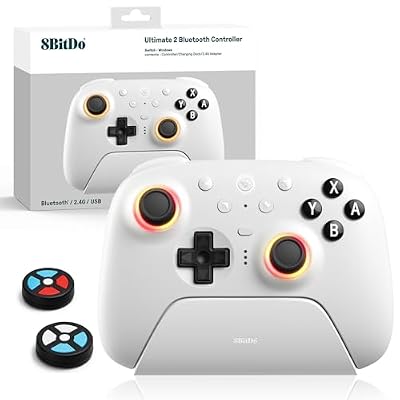
The Ultimate 2 Bluetooth is the pick for players who want the controls Nintendo does not offer. Its TMR sticks sit inside an RGB Fire Ring, the triggers switch between linear Hall Effect and tactile modes, and two rear buttons plus extra R4 and L4 bumpers can be mapped across up to three profiles in 8BitDo Ultimate Software V2. It connects over Bluetooth, 2.4 GHz or a cable, and the included dock handles charging and storage. Motion control and vibration are listed for Switch play, which keeps gyro aiming on the table for supported games.
Specs
- Joysticks: TMR with RGB Fire Ring and wear-resistant rings
- Triggers: Switchable Hall Effect linear and tactile modes
- Extra buttons: Two rear programmable buttons, R4/L4 bumpers
- Profiles: Up to 3 custom profiles via 8BitDo Ultimate Software V2
- Connection: Bluetooth, 2.4 GHz wireless, wired USB-C
- Charging: Multi-function charging dock with USB-C adapter included
- Motion and vibration: Listed for Switch only
- Compatibility: Switch, Switch 2 after a firmware update, Windows PC
- Battery capacity: not stated
- Model number: 80ND
Best for: Players who remap buttons, switch trigger feel by genre and also game on a Windows PC.
Watch out for: Switch 2 support needs the latest firmware on both the controller and the adapter before it will connect.
ASIN: B0F53LPKPW
8BitDo Pro 3 Bluetooth Controller (G Classic)

The Pro 3 is built for players who prefer symmetrical sticks and a retro-leaning layout. Its ABXY buttons can be swapped between layouts, the TMR sticks pair with Hall Effect triggers that include trigger stops, and pro back buttons cover remapping. A charging dock with a built-in 2.4 GHz receiver handles wireless duty away from Bluetooth range. The compatibility list is the widest here, spanning both Switch generations plus Windows, Apple devices, SteamOS and Android, so one pad can follow you from the console to a laptop or handheld without a second purchase.
Specs
- Joysticks: TMR
- Face buttons: Swappable ABXY layout
- Triggers: Hall Effect with trigger stops
- Extra buttons: Pro back buttons, L4/R4 bumpers
- Motion controls: 6-axis gyro sensor
- Connection: Bluetooth, 2.4 GHz via dock receiver, wired
- Charging: Charging dock included
- Compatibility: Switch, Switch 2, Windows, Apple, SteamOS, Android
- Model number: 6922621507123
Best for: Multi-platform players who like a symmetrical stick layout and a retro-styled shell.
Watch out for: The swappable ABXY caps are small parts; keep the unused set somewhere safe if you change layouts often.
ASIN: B0FFGRQ6XY
8BitDo Ultimate 2C Bluetooth Controller (Pink)

The Ultimate 2C Bluetooth trims the flagship formula down to the parts most players actually use. Hall Effect joysticks address drift, 6-axis motion control keeps gyro aiming available in supported games, and rumble is built in, with a refined D-pad and bumpers rounding out the listing’s highlights. It skips the charging dock and the extra rear buttons of the Ultimate 2, which is exactly why it works as the household’s second or third pad: the core Switch 2 experience is intact, and nobody has to hand over the main controller when friends come round.
Specs
- Joysticks: Hall Effect
- Motion controls: 6-axis motion control
- Rumble: Built-in vibration
- D-pad and bumpers: Refined design per the listing
- Connection: Bluetooth, wired USB
- Compatibility: Nintendo Switch 2, Nintendo Switch
- Battery capacity: not stated
Best for: Households adding an affordable second pad, and players who want Hall Effect sticks without flagship extras.
Watch out for: The listing ties Switch 2 use to system version 20.1.1 or newer, so update the console before pairing.
ASIN: B0DM18Q2M1
PowerA Advantage Wired Controller for Nintendo Switch 2 (Mario Time)

PowerA’s Advantage Wired is the licensed route to a C Button without buying Nintendo’s pad. Because it is officially licensed, it carries the GameChat button that unlicensed pads leave out, and it adds Hall Effect sticks and two mappable Advanced Gaming Buttons. On-board audio controls handle headset volume at the pad. The trade is the cable: a wired USB-C connection means zero charging and no pairing steps, but also no couch freedom beyond the lead’s reach and no motion controls listed. For a dedicated docked setup or a younger player’s everyday pad, that trade can be the right one.
Specs
- License: Officially licensed by Nintendo
- Joysticks: Hall Effect
- Extra buttons: C Button, two mappable Advanced Gaming Buttons
- Audio: On-board audio controls
- Connection: Wired USB-C, 10 ft cable
- Motion controls: not stated
- Compatibility: Nintendo Switch 2
- Battery: None, wired power
- Model number: NSGP0527-01
Best for: Docked-only players who want GameChat access and mappable buttons on a licensed wired pad.
Watch out for: The wired-only design cannot follow you to tabletop or handheld play away from the dock.
ASIN: B0F6WG7SM9
Which One Fits Your Situation
You play docked and use GameChat and amiibo
Pick the Nintendo Switch 2 Pro Controller. It is the only pad here with the C Button, GL/GR mapping through system settings, amiibo scanning and HD Rumble 2 in one body, and its headset jack covers wired audio for chat. Third-party pads match pieces of that list, but none of them match all of it at once.
You split your gaming between Switch 2 and a PC
Look at the 8BitDo Ultimate 2 Bluetooth or the Pro 3. Both list Windows alongside Switch and Switch 2, add 2.4 GHz and wired options on top of Bluetooth, and include charging docks. Choose the Ultimate 2 for its trigger mode switch, or the Pro 3 if you also want Apple, SteamOS and Android support and a symmetrical layout.
You need extra pads for family and guests
The Ultimate 2C Bluetooth keeps the essentials, Hall Effect sticks, motion control and rumble, at the simpler end of this list, while the PowerA Advantage Wired removes charging and pairing from the routine entirely. Either makes a sensible second pad; decide based on whether your spare players sit within cable reach of the dock.
You play fighters and retro games and care about the D-pad
The Pro 3 is your pad. Its symmetrical layout, swappable ABXY buttons and trigger stops suit older libraries and fighting games, and the back buttons give you somewhere to move awkward inputs. It still covers modern Switch 2 games fully, so it does not have to be a single-purpose purchase.
Common Mistakes
- Assuming any controller that works on the original Switch is a Switch 2 controller; check that the listing names Switch 2.
- Skipping the firmware or system-version steps, then blaming the pad when pairing fails on day one.
- Paying for a charging dock and three profiles when a second pad only ever gets used for party games.
- Expecting a C Button on an unlicensed pad; GameChat access is limited to Nintendo’s controller and licensed models like the PowerA.
- Ignoring stick sensor type if your previous controller developed drift; TMR and Hall Effect designs exist specifically to address it.
Frequently Asked Questions
Does the original Switch Pro Controller work on Switch 2?
Yes, first-generation Switch controllers can pair with Switch 2 and play supported games, which makes an old Pro Controller a workable spare. What you give up is the Switch 2 feature set: there is no C Button for GameChat, no GL or GR rear buttons and no HD Rumble 2. For a main pad, a controller listed for Switch 2 is the better long-term buy.
Can third-party controllers wake the Switch 2 from sleep?
Usually not. Several 8BitDo listings describe wake support on the original Switch while Switch 2 wake is not offered, and Nintendo’s own pad remains the reliable option for waking the console. If you hate reaching for the console or a Joy-Con 2 to start a session, factor that into the choice rather than discovering it after the purchase.
Which of these controllers also work on a PC?
The 8BitDo Ultimate 2 Bluetooth lists Windows over 2.4 GHz and wired connections, and the Pro 3 lists Windows, Apple, SteamOS and Android. Nintendo’s Pro Controller is listed for Switch 2 only, and the PowerA Advantage Wired is a Switch 2 pad. If one controller has to cover a desk and a dock, the two 8BitDo flagships are the flexible picks.
What does the C Button actually do?
The C Button opens the Switch 2 GameChat menu from anywhere, giving quick access to voice and video chat with friends. On this list it appears on Nintendo’s Pro Controller and on the officially licensed PowerA Advantage Wired. The 8BitDo controllers do not list a C Button, so GameChat users should weigh that gap before choosing them.