The real decision with an ultrawide is not whether an arm can hold the screen on day one, but whether its spring and tilt pivot can hold a 30-plus-pound curved panel at the same height in month six. Standard arms rated near 20 pounds sag, drift, or run out of tilt friction under a 49-inch panel, so this shortlist only covers arms whose published ratings start where normal arms stop.
This guide serves owners of 34- to 49-inch ultrawides, sim racers with deep 1000R curves, and desk builders mounting panels that weigh between 20 and 50 pounds without the stand. Every pick below was chosen from the product names and specifications published on its Amazon page, including the rated weight window, VESA patterns, and clamp ranges.
Quick Picks
As an Amazon Associate we earn from qualifying purchases.
| Product | Best for | Key spec from title |
|---|---|---|
| Ergotron HX Desk Monitor Arm with HD Pivot, White | A 49-inch 1000R curved gaming panel that keeps nosing down on normal pivots | Heavy duty gaming arm for curved ultrawides up to 49 inches, 28 to 42 lbs |
| AVLT Single Super Ultrawide Monitor Arm, White | The heaviest single screen in the room, flat or curved | Screens up to 50 lbs with USB 3.0 and AUX ports in the base |
| VIVO Heavy Duty Aluminum Ultrawide Monitor Tension Arm, White | A 49-inch panel under 44 pounds on a white desk setup | Holds 44 lbs, designed for Samsung Odyssey G9 and similar panels |
| HUANUO TitanLift Heavy Duty Monitor Arm | A thick wooden desk top that most clamps cannot grip | Up to 49 inches and 44 lbs, dual C-clamp, 0.8 to 3.5 inch desk range |
| Ergotron HX Desk Monitor Arm, Standard Pivot, Matte Black | A flat or gently curved ultrawide with a 200×200 VESA pattern | Up to 49 inches, 20 to 42 lbs, standard pivot for flat or slight curves |
How to Choose
Match the Rated Weight Window, Not Just the Maximum
Every heavy-duty arm publishes a window, not a single number, and both ends matter. A 49-inch panel that weighs 31 pounds without its stand overloads a 26-pound arm, but it also underloads an arm sprung for 28 to 42 pounds if the panel is a lighter 34-inch model at 16 pounds. Weigh your monitor with the stand removed, add the VESA plate and any adapter, then pick an arm that places that figure near the middle of its window. Middle-window loads hold height settings longer because the spring works in its designed tension range.
Check the Tilt Pivot Against Your Curve Depth
Curve depth is where ultrawide arms quietly fail. A 1000R panel puts its weight far forward of the VESA plate, so the tilt joint needs friction or a reinforced pivot rated for deep curves, not just the headline weight. Ergotron sells the HX in two versions for exactly this reason: the HD Pivot is built for 1000R screens, while the standard pivot targets flat or slightly curved panels. If your screen is an 1800R or flatter design, a standard pivot is fine. For 1000R gaming panels, choose an arm whose listing names deep-curve support.
Confirm VESA Pattern and Recessed Mounting
Most ultrawides use 100x100mm mounting, but larger productivity panels also ship with 200x100mm or 200x200mm patterns, and some hide the mount inside a recessed back panel that blocks wide VESA plates. Check your monitor manual for the pattern and the recess depth before ordering. Among the arms here, only the standard-pivot Ergotron HX covers 200x200mm natively; the rest stop at 100x100mm and need a separate adapter plate for bigger patterns. An adapter also adds weight and pushes the screen forward, which eats into the arm’s tilt margin.
Measure Desk Thickness and Edge Clearance
A heavy arm concentrates the full panel load on a few square inches of desk edge, so clamp range and top material are load specs, not footnotes. Measure your top’s thickness and check it against the clamp range: the TitanLift publishes 0.8 to 3.5 inches for wooden desks, while the Ergotron HX clamp covers 0.4 to 2.6 inches with a grommet option for thicker tops. Glass and hollow-core tops are poor candidates at these weights. Leave clearance behind the edge too, because a folded arm and clamp hardware need several inches of depth.
The 5 Best Options
Ergotron HX Desk Monitor Arm with HD Pivot, White
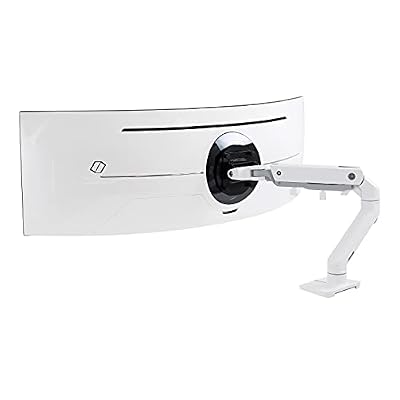
This is the arm built for the hardest case in the category: a 49-inch 1000R gaming panel whose forward weight makes ordinary tilt joints creep downward. Its heavy-duty pivot is rated for screens from 28 to 42 pounds, which brackets panels like the Samsung Odyssey G9 with room to spare, and the Constant Force lift gives 11.5 inches of height travel. It suits sim racers and flight sim builders who reposition a big curved screen often and need it to stay put between sessions.
Specs
- Model: 45-647-216
- Screen size: up to 49 inches, including 1000R curved panels
- Weight capacity: 28 to 42 lb
- VESA: 75x75mm, 100x100mm
- Lift: 11.5 inches; screen rises 17.8 inches from the worksurface
- Tilt: 20 degrees through the HD pivot
- Rotation: 360 degrees
- Mounting: desk clamp and grommet, both included
- Item weight: 18.3 lb
- Warranty: 10 years
Best for: owners of 49-inch 1000R curved gaming monitors in the 28 to 42 pound range.
Watch out for: panels under 28 pounds sit below this arm’s window and will ride high; also confirm the listing is the HD Pivot version, because the standard-pivot HX looks nearly identical.
ASIN: B0959D7XDM
AVLT Single Super Ultrawide Monitor Arm, White

AVLT rates this arm from 6.6 to 50 pounds, the widest window and the highest ceiling in this roundup, which makes it the default answer when a screen is simply too heavy for everything else. It covers flat, curved, and ultrawide screens from 17 to 49 inches, adjusts its height pneumatically, and builds USB 3.0 and AUX ports into the base so a headset and a peripheral stay plugged in at the desk edge. It fits builders running the heaviest 49-inch panels who still want full swivel, tilt, and rotation.
Specs
- Model: AVLT-DM42-1
- Screen size: 17 to 49 inches, flat, curved, or ultrawide
- Weight capacity: 6.6 to 50 lb
- Height adjustment: pneumatic
- Ports: USB 3.0 and AUX in the base
- VESA patterns: not stated
- Product weight: 12.7 lb
- Color: White
Best for: the heaviest single ultrawide in a setup, especially panels between 42 and 50 pounds.
Watch out for: AVLT notes the curved-screen rating depends on the lockable tilt bolt being fully secured, so follow the locking step during setup instead of leaving the joint friction-only.
ASIN: B0819Q8583
VIVO Heavy Duty Aluminum Ultrawide Monitor Tension Arm, White

VIVO designed this tension arm specifically around 49-inch panels such as the Samsung Odyssey G9, and it holds up to 44 pounds across screens from 17 to 49 inches. The spring-assist design gives 11 inches of height travel, and the published motion range is generous for the class: tilt from plus 50 to minus 20 degrees, 180 degrees of swivel, and full rotation. This white finish suits bright desk builds, and the clamp or grommet mounting covers most desk edges without extra hardware.
Specs
- Model: STAND-V101VW
- Screen size: 17 to 49 inches
- Weight capacity: 4.4 to 44 lb
- VESA: 75x75mm, 100x100mm
- Tilt: +50 to -20 degrees
- Swivel: 180 degrees
- Rotation: 360 degrees
- Height adjustment: 8.7 to 19.7 inches
- Mounting: C-clamp or grommet
- Warranty: 3 years
Best for: a 49-inch ultrawide under 44 pounds in a white or light-toned setup.
Watch out for: this code is the white finish; the black STAND-V101V is a separate listing, so check the color option on the page before ordering.
ASIN: B0F9ZTLS7R
HUANUO TitanLift Heavy Duty Monitor Arm

The TitanLift’s standout spec is one most listings hide: a published clamp range of 0.8 to 3.5 inches for wooden desks, handled by a dual C-clamp that spreads the load across two contact points. It carries screens from 17 to 49 inches weighing 6.6 to 44 pounds, reaches 22.5 inches of extension, and lifts the mount center up to 19.6 inches. HUANUO also publishes a 50,000-cycle motion test for the mechanism. It is the natural pick for thick butcher-block and solid wood tops that defeat standard clamps.
Specs
- Screen size: 17 to 49 inches
- Weight capacity: 6.6 to 44 lb
- VESA: 75x75mm, 100x100mm maximum
- Extension: up to 22.5 inches
- Height: up to 19.6 inches to the mount center
- Tilt: +50 to -50 degrees
- Mounting: dual C-clamp or grommet
- Desk fit: wood tops 0.8 to 3.5 inches thick
- Warranty: not stated
Best for: heavy ultrawides mounted on thick wooden desk tops between 0.8 and 3.5 inches.
Watch out for: full 360-degree rotation is only rated for screens up to 35 inches, and HUANUO specifies wooden tops with no cross beams or panels under the clamp point.
ASIN: B0DQ19YC9H
Ergotron HX Desk Monitor Arm, Standard Pivot, Matte Black

The standard-pivot HX covers the opposite end of the ultrawide market from its HD sibling: flat and slightly curved panels up to 49 inches and 20 to 42 pounds, with the broadest VESA support here, running from 75x75mm out to 200x200mm without adapters. That makes it the fit for large productivity ultrawides whose mounting patterns exceed 100x100mm. The lift range is 11.5 inches, the arm reaches 23.6 inches, and the two-piece clamp handles tops from 0.4 to 2.6 inches, with a grommet option beyond that.
Specs
- Model: 45-475-224
- Screen size: up to 49 inches, flat or slightly curved
- Weight capacity: 20 to 42 lb
- VESA: 75x75mm, 100x100mm, 200x100mm, 200x200mm
- Lift: 11.5 inches
- Extension: up to 23.6 inches
- Tilt range: 75 degrees
- Rotation: 360 degrees
- Desk clamp: 0.4 to 2.6 inches; grommet up to 2.8 inches
- Item weight: 17.2 lb
- Warranty: 10 years
Best for: flat or gently curved ultrawides with 200x100mm or 200x200mm VESA patterns.
Watch out for: the 20-pound minimum is firm, so lighter 34-inch panels will not stay down; for a deep 1000R curve, pick the HD Pivot version instead of this standard pivot.
ASIN: B08RD4FJ3Q
Which One Fits Your Situation
Your 49-Inch Gaming Panel Keeps Tilting Down
Choose the Ergotron HX with HD Pivot. Deep 1000R curves move the panel’s mass forward of the mount, and this is the one arm here whose tilt pivot is purpose-built for that load, with a 28 to 42 pound window sized for current 49-inch gaming screens. The AVLT is the fallback if your panel and bracket together exceed 42 pounds.
Your Desk Top Is Thick Solid Wood
Choose the HUANUO TitanLift. It is the only arm in this group that publishes a clamp range reaching 3.5 inches, and its dual C-clamp spreads a heavy panel’s load across two bolts. As long as your screen lands between 6.6 and 44 pounds and the underside is clear of cross beams, it solves the fit problem other arms leave to chance.
Your Ultrawide Uses a 200×200 VESA Pattern
Choose the standard-pivot Ergotron HX in matte black. It is the only pick that accepts 200x100mm and 200x200mm patterns natively, so large productivity panels mount directly without an adapter plate adding weight and forward offset. Keep the panel between 20 and 42 pounds and expect a flatter curve, since this pivot is not the deep-curve version.
You Want a White Setup With Ports at the Desk Edge
Choose between the VIVO tension arm and the AVLT. The VIVO fits white builds with panels under 44 pounds and adds the widest tilt range here, while the AVLT costs its place with the highest 50-pound ceiling and USB 3.0 plus AUX ports in the base for a headset that lives on the desk.
Common Mistakes
- Weighing the monitor with its stand attached, then buying an arm whose minimum the bare panel never reaches.
- Matching only the maximum capacity and ignoring the minimum, which leaves lighter ultrawides floating upward.
- Assuming a 1000R curved panel works on any pivot rated for its weight, when tilt friction is the part that fails.
- Skipping the VESA pattern check and discovering a 200x200mm panel or a recessed mount after the arm arrives.
- Clamping a 40-pound load to a glass, hollow-core, or particleboard edge that was never rated for the torque.
Frequently Asked Questions
How much weight capacity do I actually need for a 49-inch ultrawide?
Look up your panel’s weight without its stand, then add roughly a pound for the VESA plate and cables. Most 49-inch gaming ultrawides land between 25 and 35 pounds bare, which fits the 28 to 42 pound HX HD window or the wider AVLT range. Buy headroom above your figure rather than an arm whose ceiling equals it.
Can one arm hold both a 34-inch and a 49-inch ultrawide?
Only if both panels fall inside the same rated window. The AVLT spans 6.6 to 50 pounds, so it can cover a light 34-inch and a heavy 49-inch across different setups. The Ergotron HX models start at 20 or 28 pounds, which excludes many 34-inch panels. Check the minimum as carefully as the maximum before planning to reuse an arm.
Do I need the HD pivot for a curved monitor?
It depends on the curve. Panels with a 1000R radius concentrate weight far in front of the VESA plate, and Ergotron rates its HD pivot specifically for them. A 1500R or 1800R curve sits closer to the mount and usually works on a standard pivot rated for the weight. When a listing names your curve radius, treat that as the deciding spec.
Will a heavy-duty arm damage my desk?
It can if the top is thin, hollow, or glass, because the clamp concentrates the panel’s full load and leverage on a small edge area. Solid wood and quality laminate tops within the published clamp range are the safe pairing. The TitanLift’s dual clamp spreads force over two points, and a grommet mount through the top is the strongest option when your desk allows it.