The best gaming router for an Xbox Series S is the ASUS ROG Strix GS-BE12000, because it pairs triple-level game acceleration with eight 2.5 Gbps ports, so the console gets priority wired or on Wi-Fi. The Series S itself uses Wi-Fi 5 and a gigabit Ethernet port, so the gains come from smarter traffic handling and a cleaner 5 GHz band. This guide compares five routers across Wi-Fi 7 and Wi-Fi 6, including a budget gaming model and two mesh options.
As an Amazon Associate, we earn from qualifying purchases.
Table of Contents
- Quick Answer
- ASUS ROG Strix GS-BE12000
- TP-Link Archer BE600
- ASUS ROG Rapture GT6 (1-Pack)
- ASUS ZenWiFi BT10 (1-Pack)
- TP-Link Archer GE400
- How to Choose a Gaming Router for Xbox Series S
- Who Should Skip a Gaming Router
- FAQ
- Conclusion
Quick Answer
For most Xbox Series S owners, the ASUS ROG Strix GS-BE12000 is the best gaming router: Wi-Fi 7, triple-level game acceleration and eight 2.5 Gbps ports keep ping steady. The TP-Link Archer GE400 covers smaller budgets, the Archer BE600 adds a 10 Gbps port, and the GT6 and BT10 add mesh coverage.
ASUS ROG Strix GS-BE12000

The GS-BE12000 is the most complete gaming router in this roundup. Its triple-level game acceleration prioritises the console at the device, port and game-server level, while Gear Accelerator QoS and OpenNAT keep matchmaking traffic ahead of downloads and help maintain an open NAT type. Two of its eight 2.5 Gbps ports are dedicated gaming ports, so a wired Series S never queues behind other traffic.
On wireless, the tri-band Wi-Fi 7 design runs 5,764 Mbps on both the 5 GHz and 6 GHz bands plus 688 Mbps on 2.4 GHz, with 320 MHz channels and Multi-Link Operation. The Series S connects on 5 GHz, and the 6 GHz band still helps by moving newer phones and laptops off that crowded band. A 2.0 GHz quad-core processor with 2 GB of memory keeps it responsive under load, and AiProtection Pro is subscription-free.
Specs
- Wi-Fi standard: Wi-Fi 7 (802.11be), tri-band BE12000
- Wireless speeds: up to 5,764 Mbps (6 GHz), 5,764 Mbps (5 GHz), 688 Mbps (2.4 GHz)
- Antennas: 8 internal antennas
- Ports: 1 x 2.5 Gbps WAN, 7 x 2.5 Gbps LAN (2 dedicated gaming ports), 1 x USB 3.2 Gen 1
- Gaming features: triple-level game acceleration, Gear Accelerator QoS, OpenNAT, Mobile Game Mode, Gaming Network
- Processor: 2.0 GHz quad-core, 2 GB RAM
- Mesh and security: AiMesh support, AiProtection Pro with no subscription
- Tier: premium (coverage up to 3,000 sq ft)
TP-Link Archer BE600

The Archer BE600 is the value Wi-Fi 7 pick, sold in some regions as the Archer BE9700. It skips gaming branding but keeps the hardware that matters: tri-band Wi-Fi 7 with a 6 GHz band, Multi-Link Operation and 4,096-QAM, plus QoS to prioritise the console. Band speeds are 5,765 Mbps on 6 GHz, 2,882 Mbps on 5 GHz and 1,032 Mbps on 2.4 GHz across six streams.
Its port layout is the strongest in this guide relative to its tier. One 10 Gbps port handles a multi-gig internet plan, a second 2.5 Gbps port can serve as WAN or LAN, and three more 2.5 Gbps LAN ports cover the console, a PC and a TV. TP-Link rates coverage at 2,600 sq ft for up to 120 devices, and EasyMesh allows expansion later.
Specs
- Wi-Fi standard: Wi-Fi 7 (802.11be), tri-band BE9700
- Wireless speeds: up to 5,765 Mbps (6 GHz), 2,882 Mbps (5 GHz), 1,032 Mbps (2.4 GHz)
- Antennas: 6 external antennas
- Ports: 1 x 10 Gbps WAN/LAN, 1 x 2.5 Gbps WAN/LAN, 3 x 2.5 Gbps LAN, 1 x USB 3.0
- Gaming features: QoS device prioritisation (no dedicated gaming mode)
- Processor: not stated; 1 GB RAM
- Mesh and security: EasyMesh support, TP-Link HomeShield (advanced features by subscription)
- Tier: mid-range (coverage up to 2,600 sq ft, up to 120 devices)
ASUS ROG Rapture GT6 (1-Pack)
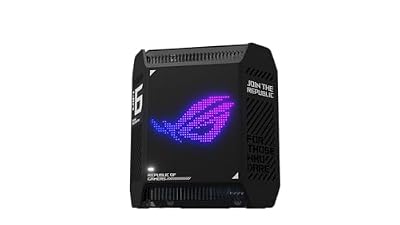
The GT6 is the gaming mesh pick, and the single-pack version here works as a standalone router that can grow into a mesh system later. It is a tri-band Wi-Fi 6 design rated AX10000, with 4,808 Mbps on each 5 GHz band and 574 Mbps on 2.4 GHz. One 5 GHz band can act as dedicated backhaul when a second unit is added, with UNII-4 support for extra backhaul spectrum.
For a single Series S setup, the draw is triple-level game acceleration, a 2.5 Gbps WAN/LAN port, and three gigabit LAN ports for other wired gear. Nine internal Smart Antennas cover up to 2,900 sq ft from one unit, AiProtection Pro is included for life with no subscription, and the GT6 runs on a 1.7 GHz quad-core processor.
Specs
- Wi-Fi standard: Wi-Fi 6 (802.11ax), tri-band AX10000
- Wireless speeds: up to 4,808 Mbps (5 GHz-1), 4,808 Mbps (5 GHz-2), 574 Mbps (2.4 GHz)
- Antennas: 9 internal Smart Antennas
- Ports: 1 x 2.5 Gbps WAN/LAN, 3 x 1 Gbps LAN
- Gaming features: triple-level game acceleration, dedicated gaming port, AiMesh backhaul prioritisation
- Processor: 1.7 GHz quad-core
- Mesh and security: AiMesh support, AiProtection Pro with no subscription, UNII-4 support
- Tier: mid-range (coverage up to 2,900 sq ft, 1-pack)
ASUS ZenWiFi BT10 (1-Pack)

The ZenWiFi BT10 is the future-proof mesh option, and a single unit works as a powerful standalone router. Its tri-band Wi-Fi 7 radios are rated BE18000 in total: 11,529 Mbps on 6 GHz, 5,764 Mbps on 5 GHz and 688 Mbps on 2.4 GHz. That capacity far exceeds what a Series S can use alone, but it keeps a busy household from crowding the console’s 5 GHz band.
Each unit carries two 10 Gbps ports plus a gigabit WAN/LAN port and a USB 3.0 port, so the console, a gaming PC and a NAS can all run wired. A 2.0 GHz quad-core processor with 2 GB of memory handles the load, and one unit covers up to 3,000 sq ft. There is no gaming acceleration suite; instead, Adaptive QoS prioritises devices and AiProtection Pro is subscription-free.
Specs
- Wi-Fi standard: Wi-Fi 7 (802.11be), tri-band BE18000
- Wireless speeds: up to 11,529 Mbps (6 GHz), 5,764 Mbps (5 GHz), 688 Mbps (2.4 GHz)
- Antennas: 8 internal antennas
- Ports: 1 x 10 Gbps WAN/LAN, 1 x 10 Gbps LAN, 1 x 1 Gbps WAN/LAN, 1 x USB 3.0
- Gaming features: Adaptive QoS device prioritisation (no dedicated gaming mode)
- Processor: 2.0 GHz quad-core, 2 GB RAM
- Mesh and security: AiMesh support, AiProtection Pro with no subscription, Smart Home Master
- Tier: premium (coverage up to 3,000 sq ft, 1-pack)
TP-Link Archer GE400
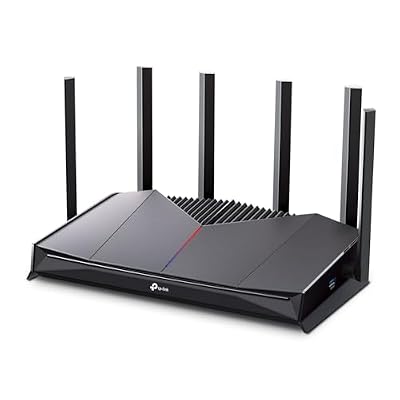
The Archer GE400 is the budget gaming pick, built for players who want gaming features without paying for a 6 GHz band. It is a dual-band Wi-Fi 7 router rated BE6500, with 5,764 Mbps on 5 GHz and 688 Mbps on 2.4 GHz across six streams. Because the Series S is a 5 GHz Wi-Fi 5 console, that fast 5 GHz radio is exactly where its traffic lands.
TP-Link adds the gaming layer the BE600 lacks: Turbo game acceleration QoS, a dedicated 2.5 Gbps gaming port for a wired console, a real-time game statistics panel and RGB lighting. A second 2.5 Gbps port and three gigabit LAN ports handle the modem and other wired devices, and six external antennas cover up to 2,600 sq ft.
Specs
- Wi-Fi standard: Wi-Fi 7 (802.11be), dual-band BE6500
- Wireless speeds: up to 5,764 Mbps (5 GHz), 688 Mbps (2.4 GHz)
- Antennas: 6 external antennas
- Ports: 1 x 2.5 Gbps WAN, 1 x 2.5 Gbps dedicated gaming LAN, 3 x 1 Gbps LAN
- Gaming features: Turbo game acceleration, dedicated gaming port, game statistics panel, RGB lighting
- Processor: quad-core (clock speed not stated)
- Mesh and security: EasyMesh support, TP-Link HomeShield (advanced features by subscription)
- Tier: budget (coverage up to 2,600 sq ft)
How to Choose a Gaming Router for Xbox Series S
Start with the console itself. The Series S has a gigabit Ethernet port and Wi-Fi 5 wireless, so a cable to any router here beats every wireless feature in this guide; if the console sits near the router, buy for ports and QoS rather than headline Wi-Fi speed. If it must run wireless, it connects on 5 GHz, so prioritise a strong 5 GHz radio and place the router in the open.
Next, look at traffic management. Game acceleration and QoS stop a household download or cloud backup from spiking your ping mid-match, and they matter more than raw bandwidth once your plan passes roughly 100 Mbps. OpenNAT and port forwarding also help keep the Xbox NAT type open.
Then consider the rest of the home. A 6 GHz band does nothing for the Series S directly, but it moves newer phones and laptops off 5 GHz, which does help. Multi-gig ports only matter if your internet plan or home server can use them, since the console itself is gigabit. Choose a standalone router for one-room setups and a mesh-capable model such as the GT6 or BT10 when walls or distance weaken the signal.
Who Should Skip a Gaming Router
Skip the upgrade if your console is already wired to a recent router and your ping is stable; a new router will not improve a connection that is not the bottleneck. No router fixes lag from an overloaded line or a distant server either.
Also skip gaming-branded models if nobody competes for bandwidth at home. A single-player household that mostly downloads Game Pass titles overnight gains little from game acceleration. If your problem is weak signal in one far room, a mesh node or a longer Ethernet run solves it more directly than a flagship router in the same spot.
FAQ
Does Wi-Fi 7 help an Xbox Series S?
Not directly. The Series S uses Wi-Fi 5, so it cannot connect to Wi-Fi 7 or the 6 GHz band. A Wi-Fi 7 router still helps indirectly: its QoS manages household traffic, and moving newer devices to 6 GHz leaves the console’s 5 GHz band less crowded.
Is wired or wireless better for Xbox Series S gaming?
Wired is better whenever it is practical. The console’s gigabit Ethernet port gives a stable, low-latency link that walls and interference cannot degrade. Use a gaming or priority LAN port where one is offered, such as on the GS-BE12000 or Archer GE400.
Can a gaming router fix a strict NAT on Xbox?
Often, yes. Gaming modes, OpenNAT and simple port forwarding make it easier to reach an open NAT type, which improves party chat and matchmaking. Enable UPnP or forward the ports Xbox recommends, and avoid double NAT by putting an ISP gateway into bridge mode where possible.
How fast does my internet need to be for Xbox Series S online play?
Online play uses little bandwidth; a stable 25 Mbps connection is enough for one console in most titles. Downloads and Game Pass installs are what benefit from faster plans. Latency and jitter matter more than headline speed, which is why QoS and a wired link beat a faster plan on a weak router.
Conclusion
For Xbox Series S players, the ASUS ROG Strix GS-BE12000 is the best gaming router here, combining real game acceleration with eight multi-gig ports. The Archer GE400 delivers the same gaming focus at a budget tier, the Archer BE600 is the value Wi-Fi 7 all-rounder, and the GT6 and ZenWiFi BT10 cover homes one router cannot reach. Wire the console when you can.
Product and ASIN Reference
| Product | ASIN |
|---|---|
| ASUS ROG Strix GS-BE12000 | B0FTP4PMYX |
| TP-Link Archer BE600 | B0F76PQ2T8 |
| ASUS ROG Rapture GT6 (1-Pack, Black) | B0C387CR8R |
| ASUS ZenWiFi BT10 (1-Pack) | B0DH8PY5VL |
| TP-Link Archer GE400 | B0FTTPB4MQ |