The best VR headset with eye tracking for PC gaming is the Pimax Crystal Super Ultrawide if your PC can drive it, because its 3840×3840-per-eye panels pair gaze tracking with automatic IPD adjustment and dynamic foveated rendering. The PlayStation VR2 is the budget-tier route to an eye-tracking OLED headset, and the Meta Quest Pro is the flexible pick that also works away from the PC.
Eye tracking changes what a PC VR headset can do with your hardware. Titles and runtimes that support it render full detail only where your eyes land and soften the periphery, easing the GPU load of high-resolution panels. It also drives automatic IPD adjustment on some models, gaze-based selection in social VR, and more expressive avatars. Support is uneven, though: each headset below exposes its eye tracking differently, and one keeps its best gaze features on a console.
As an Amazon Associate, we earn from qualifying purchases.
Table of Contents
- Quick Answer
- PlayStation VR2
- Meta Quest Pro
- HTC VIVE Focus Vision
- Pimax Crystal Super Ultrawide
- HTC Vive Pro Eye
- How to Choose
- Who Should Skip
- FAQ
- Final Verdict
Quick Answer
For most PC players, the Meta Quest Pro is the easiest eye-tracking headset to live with, thanks to pancake lenses, color passthrough and wireless PC VR. Sim racers and pilots should look at the Pimax Crystal Super Ultrawide. The PlayStation VR2 suits PS5 owners, the VIVE Focus Vision adds a DisplayPort mode, and the Vive Pro Eye fits existing SteamVR lighthouse setups.
PlayStation VR2

The PlayStation VR2 is the budget-tier entry in this roundup, and the only pick built for a console first. Its OLED panels deliver 2000×2040 resolution per eye with HDR support, a 110-degree field of view and refresh rates of 90 Hz and 120 Hz. Inside-out cameras handle six-degrees-of-freedom tracking, so there are no base stations to mount, and the Sense controllers add haptic feedback, adaptive triggers and finger touch detection.
Eye tracking is a headline feature, with gaze selection and foveated rendering in supported PS5 titles. On PC the picture is narrower: the headset connects through the PlayStation VR2 PC adapter, sold separately, and plays SteamVR games over a USB-C cable, but Sony does not expose the eye-tracking feed to SteamVR. Buy it as a PC headset only if you also game on a PS5 or accept that trade-off.
Specs
- Display: OLED, 2000×2040 per eye, HDR
- Refresh rate: 90 Hz and 120 Hz
- Field of view: 110 degrees
- Eye tracking: Yes, with foveated rendering on PS5
- Positional tracking: Inside-out, four embedded cameras
- PC connection: USB-C via PlayStation VR2 PC adapter (sold separately)
- Controllers: PlayStation VR2 Sense controllers included
- Extras: Headset vibration, 3D audio, adjustable IPD dial
Meta Quest Pro
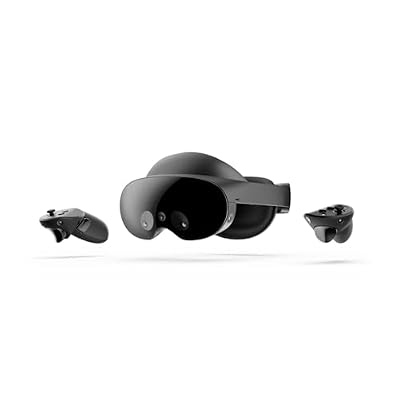
The Meta Quest Pro is the premium standalone pick that doubles as a PC VR headset. It runs on the Snapdragon XR2 Plus platform with 12 GB of memory and 256 GB of storage, and it connects to a gaming PC through a Link cable or wirelessly over Air Link and third-party streaming apps. Quantum dot LCD panels with local dimming produce 1800×1920 per eye behind pancake lenses, so the headset stays slimmer than Fresnel designs.
Its eye tracking is paired with face tracking, which feeds avatar expressions in social platforms and supports foveated rendering in compatible software. The Touch Pro controllers track themselves with built-in cameras, so they keep working where headset cameras lose sight of your hands. Meta has ended Quest Pro production, so Amazon listings are remaining retail stock. For PC players who want one headset for both the desk and the living room, it remains the most flexible option here.
Specs
- Display: LCD with quantum dot and local dimming, 1800×1920 per eye
- Refresh rate: 90 Hz
- Field of view: 106 degrees horizontal
- Eye tracking: Yes, plus face tracking
- Positional tracking: Inside-out, six degrees of freedom
- PC connection: USB-C Link cable or Air Link wireless streaming
- Storage: 256 GB
- Controllers: Meta Quest Touch Pro, self-tracking
HTC VIVE Focus Vision

The HTC VIVE Focus Vision is a hybrid headset that plays standalone content and PC VR. It carries 2448×2448 resolution per eye, a field of view up to 120 degrees and a 90 Hz refresh rate. Two 16 MP color cameras provide mixed-reality passthrough, and the battery sits at the back, is hot-swappable, and balances the visor for longer sessions.
Eye tracking is built in and drives automatic IPD adjustment across a 57 to 72 mm range, which makes the headset easy to share. For PC gaming it streams over Wi-Fi, or connects with lossless DisplayPort output using the VIVE Wired Streaming Kit, sold separately. That wired mode is the one to use for seated sims, where compression artifacts and latency matter most. It is a premium-tier headset, but the only standalone model here with a true DisplayPort path to the PC.
Specs
- Display: LCD, 2448×2448 per eye
- Refresh rate: 90 Hz
- Field of view: Up to 120 degrees
- Eye tracking: Yes, with automatic IPD adjustment (57 to 72 mm)
- Positional tracking: Inside-out, six degrees of freedom
- PC connection: Wi-Fi streaming or DisplayPort via VIVE Wired Streaming Kit (sold separately)
- Storage: 128 GB, expandable by microSD
- Battery: Hot-swappable rear battery
Pimax Crystal Super Ultrawide

The Pimax Crystal Super Ultrawide is the premium pick for simulation players who want the widest, sharpest image in consumer PC VR. Its QLED panels with mini-LED local dimming deliver 3840×3840 per eye at 50 pixels per degree, spread across a 140-degree field of view with glass aspheric lenses. Refresh rates are 72 Hz and 90 Hz. This listing is the full-payment Ultrawide version with controllers included.
Eye tracking runs at the center of the design: it powers dynamic foveated rendering in the Pimax software stack and adjusts the motorized IPD automatically across a 58 to 72 mm range. Tracking is inside-out SLAM with no base stations required, and an optional faceplate adds SteamVR lighthouse tracking. The demands are real, though: Pimax lists an RTX 2080-class graphics card as the minimum, and top-end cards are the realistic match for full resolution.
Specs
- Display: QLED with mini-LED local dimming, 3840×3840 per eye
- Refresh rate: 72 Hz and 90 Hz
- Field of view: 140 degrees (Ultrawide optical engine)
- Eye tracking: Yes, with dynamic foveated rendering and automatic IPD (58 to 72 mm)
- Positional tracking: Inside-out SLAM; SteamVR lighthouse faceplate optional
- PC connection: DisplayPort cable, tethered
- Controllers: Two Pimax controllers included
- Extras: Integrated spatial audio, noise-canceling microphone, replaceable facial interfaces
HTC Vive Pro Eye

The HTC Vive Pro Eye is the oldest design in this roundup and the mid-range route into SteamVR-native eye tracking. Dual AMOLED panels give 1440×1600 per eye at 90 Hz with a 110-degree field of view. Tobii eye tracking supports gaze interaction and foveated rendering in compatible SteamVR software, and it remains a reference platform for gaze analytics and research tools.
This listing is the headset only, model 99HAPT005-00, so controllers and base stations are not in the box. It needs SteamVR Tracking 2.0 base stations, which makes it a sensible upgrade for players who already own a Vive or Index lighthouse setup and a poor first purchase for everyone else. Built-in Hi-Res certified headphones and dual microphones with noise cancellation complete a package aimed at tinkerers rather than beginners.
Specs
- Display: Dual AMOLED, 1440×1600 per eye
- Refresh rate: 90 Hz
- Field of view: 110 degrees
- Eye tracking: Yes, Tobii eye tracking
- Positional tracking: SteamVR Tracking 2.0 base stations (required, not included)
- PC connection: DisplayPort 1.2 and USB 3.0 via link box
- Package: Headset only; controllers and base stations sold separately
- IPD range: 61 to 72 mm
How to Choose
Start with how the eye tracking is actually exposed to your PC. Dynamic foveated rendering only saves GPU work in titles and runtimes that support it, so check your main games before paying a premium for the feature. The Crystal Super and Vive Pro Eye feed gaze data into PC software directly. The Quest Pro and Focus Vision support it in compatible apps on their own platforms and through PC streaming tools. The PlayStation VR2 reserves its gaze features for the PS5, which makes it a console-first purchase.
Next, match the connection to your PC. DisplayPort headsets such as the Crystal Super, the Focus Vision in wired mode and the Vive Pro Eye send an uncompressed image and avoid streaming latency. Wireless PC VR through a Quest Pro or a streaming Focus Vision is more comfortable for room-scale games but depends on your router and adds compression. Inside-out headsets set up in minutes, while the Vive Pro Eye needs lighthouses mounted around the room.
Finally, weigh resolution against your graphics card. A 3840×3840-per-eye headset is wasted on a mid-range GPU, even with foveated rendering helping. Buyers with a recent high-end card get the most from the Crystal Super. Everyone else is better served by the Quest Pro or Focus Vision, whose lower panel counts leave headroom for higher frame rates, or by the Vive Pro Eye if a lighthouse setup already exists.
Who Should Skip
Skip this entire category if your game library does not support eye tracking and you will not use gaze input, automatic IPD or avatar face tracking; a standard PC VR headset will serve you better for less. Skip the PlayStation VR2 if you only game on PC, because its eye tracking stays on the console side. Skip the Vive Pro Eye if you do not already own SteamVR base stations and controllers. Skip the Crystal Super Ultrawide if your graphics card sits below the high-end tier, and skip the Quest Pro if discontinued hardware concerns you.
FAQ
Does eye tracking improve PC gaming performance?
It can, through dynamic foveated rendering, which draws full detail only where you are looking and lowers resolution in your peripheral vision. The gain depends on the game and runtime supporting the feature. Simulation titles and social platforms are the most common beneficiaries today, while many action games see no benefit at all.
Does the PlayStation VR2 eye tracking work on PC?
Not through SteamVR. The headset plays PC games using the PlayStation VR2 PC adapter, sold separately, but Sony does not expose the eye-tracking feed on PC. Gaze selection and foveated rendering work in supported PS5 titles, so PC-only players should treat the PSVR2 as a high-quality OLED headset without usable gaze features.
Which of these headsets needs base stations?
Only the HTC Vive Pro Eye. It uses SteamVR Tracking 2.0 and requires lighthouse base stations, and this listing is the headset only, so controllers and stations are separate purchases. The other four headsets track inside-out with onboard cameras and need no external sensors, although the Crystal Super accepts an optional lighthouse faceplate.
Is the Meta Quest Pro still worth buying for PC VR?
For the right buyer, yes. It is a discontinued model, so listings are remaining stock, but its pancake lenses, eye and face tracking, self-tracking controllers and wireless PC VR support still form a combination no current Meta headset fully repeats. Buy it if those features matter more than long-term product support.
Final Verdict
Eye tracking is worth buying when your software uses it. The Pimax Crystal Super Ultrawide is the performance ceiling for PC players with a flagship GPU, the Meta Quest Pro is the most flexible all-rounder, and the HTC VIVE Focus Vision is the hybrid to pick for its DisplayPort mode. The PlayStation VR2 makes the most sense in a PS5 household, and the Vive Pro Eye rewards players who already run a lighthouse setup.
Product and ASIN Reference
| Product | ASIN |
|---|---|
| PlayStation VR2 | B0C1QJ6VHY |
| Meta Quest Pro (256 GB) | B09Z7KGTVW |
| HTC VIVE Focus Vision (Consumer Edition) | B0DDRLX7V4 |
| Pimax Crystal Super Ultrawide | B0G1SLN8PV |
| HTC Vive Pro Eye (Headset Only) | B07RPPDJSN |