A 6K monitor changes how multitasking feels. With more than six thousand pixels across, you can place code, a spreadsheet and a reference document side by side without the text going soft, and a single 32-inch screen can replace a two-monitor setup on a crowded desk. USB-C power delivery completes the picture: one cable carries the picture and charges your laptop, so the desk stays tidy and the machine is ready to unplug and go.
This guide is for developers, designers, analysts and editors who want a 6K monitor with USB-C charging for a single-screen multitasking desk. Every monitor below was chosen from the panel size, resolution, USB-C or Thunderbolt charging and colour coverage stated in its Amazon listing, so you can compare what each one actually delivers.
Quick Picks
As an Amazon Associate we earn from qualifying purchases
| Product | Best for | Key spec from title |
|---|---|---|
| LG 32U990A-S UltraFine evo 6K | A high-resolution desk with one-cable charging | 32-inch 6K, 6144 x 3456, Thunderbolt 5, 96W charging |
| ASUS ProArt PA32QCV 6K | A colour-accurate desk for design and photo work | 32-inch 6K, 6016 x 3384, Thunderbolt 4, 96W power delivery |
| Apple Pro Display XDR 32-inch | A reference-grade desk for colour-critical work | 32-inch Retina 6K, 6016 x 3384, Thunderbolt 3 |
How to Choose
6K resolution earns its place on a single screen
A 6K panel holds far more pixels than a 4K screen of the same size, so text stays crisp when you split the desktop into three or four windows. A 32-inch 6K monitor suits a single-screen desk, because you can run a code editor, a browser and a document side by side without a second panel. Check the resolution in the listing rather than assuming it from the screen size, because many 32-inch monitors are 4K rather than 6K. Also check the pixel density if you read small text all day. That density also helps when you zoom out in a spreadsheet, because small cell values stay legible instead of turning into a blur at the edges.
USB-C charging should match your laptop
USB-C power delivery is the feature that makes a 6K monitor a docking station as well as a display. A 96W charge suits most thin and light laptops, while a larger workstation may need more power than the monitor can supply. Check the wattage in the listing and compare it with your laptop’s own charger, because a monitor that under-delivers will drain the battery slowly during a long day. Thunderbolt 5 or Thunderbolt 4 also matters: it carries the display signal, data and charging in one cable. A monitor that charges at 96W can also run a small USB hub from the same cable, so a keyboard and mouse can connect through the display instead of the laptop.
Colour coverage decides whether the monitor suits design work
A 6K monitor is often bought for visual work as well as multitasking, so check the colour coverage and the factory calibration stated in the listing. Near-full DCI-P3 coverage suits video and photo work, while a low Delta E value and a calibration certificate suit colour-critical editing. If you only write code and spreadsheets, a standard wide-gamut panel is enough, and you can spend the difference on the screen size or the stand instead. A factory calibration report, often included with a ProArt-style display, tells you how far the panel was from its target before it left the factory. If you hand files to a client, that report is worth keeping.
Stand, speakers and ports shape the desk
A 6K monitor is large and heavy, so check what the stand offers: height, tilt, swivel and pivot all matter when you share the desk or move between sitting and standing. Built-in speakers help when you do not have external audio, and a hub with extra USB ports keeps the desk tidy. Finally, check the port layout and the cable that ships with the monitor, because a Thunderbolt cable is a separate purchase on some listings. A pivot function turns the panel upright for long documents and code. Check the weight the stand can hold if you plan to mount the panel on an arm later, because a 6K display is heavier than a standard one.
The 3 Best Options
LG 32U990A-S UltraFine evo 6K

The LG 32U990A-S is the most complete 6K multitasking monitor in this guide. Its 32-inch Nano IPS Black panel renders 6144 x 3456 pixels at a high density, so text stays crisp even when the screen is split into three or four windows. Thunderbolt 5 carries the picture and charges a laptop at 96W through a single cable, while DisplayHDR 600 support and wide colour coverage suit photo and video work as well as everyday multitasking. The built-in speakers and the adjustable stand keep the desk tidy.
Specs
- 32-inch 6K display, 6144 x 3456 resolution
- Nano IPS Black panel
- Thunderbolt 5 with 96W charging
- 60Hz refresh rate
- DisplayHDR 600
- Near-full DCI-P3 and AdobeRGB coverage
- Built-in speakers
- Tilt, height and pivot adjustable stand
Best for: A single-screen multitasking desk where one cable carries the picture and the charging.
Watch out for: Confirm the exact Thunderbolt cable and stand included in the listing, because the configuration can vary by retailer.
ASUS ProArt PA32QCV 6K
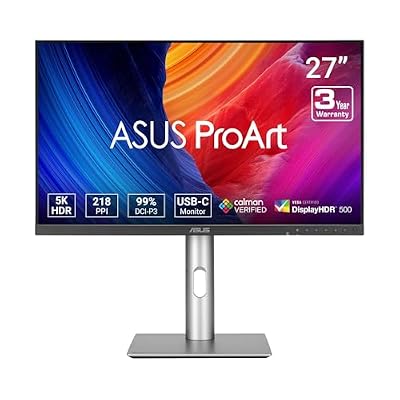
The ASUS ProArt PA32QCV is the colour-accurate pick for design and photo work. Its 32-inch IPS panel renders a 6016 x 3384 resolution with near-full DCI-P3 coverage, a low Delta E and Calman verification, so colours stay true from the factory. Thunderbolt 4 carries the picture and delivers 96W of power to a laptop through one cable, while DisplayHDR 600 support suits high dynamic range content. The stand adjusts in height, tilt, swivel and pivot, and the built-in speakers cover video calls and reference audio.
Specs
- 32-inch 6K display, 6016 x 3384 resolution
- IPS panel
- Near-full DCI-P3 coverage, Delta E below 2, Calman Verified
- Thunderbolt 4 with 96W power delivery
- DisplayHDR 600
- 60Hz refresh rate, 5ms response time
- Height, tilt, swivel and pivot adjustable stand, 130mm height range
- Built-in speakers
Best for: A design or photo desk where colour accuracy and one-cable charging both matter.
Watch out for: This is a 60Hz monitor aimed at colour work, so it is not the right choice for high-refresh gaming.
Apple Pro Display XDR 32-inch

The Apple Pro Display XDR is the reference-grade option for colour-critical work. Its 32-inch Retina 6K panel renders 6016 x 3384 pixels with P3 wide colour and a peak brightness of 1600 nits, which suits high dynamic range grading and detailed photo editing. Thunderbolt 3 carries the picture and charges a connected laptop, and the extreme dynamic range panel handles bright highlights and deep shadows together. It is the most expensive monitor in this guide, and it suits a desk where colour fidelity is the priority.
Specs
- 32-inch Retina 6K display, 6016 x 3384 resolution
- P3 wide colour
- 1600 nits peak brightness
- Thunderbolt 3
- Standard glass finish
Best for: A colour-critical desk where reference-grade brightness and colour matter most.
Watch out for: Check whether the stand is included in the listing, because the Pro Display XDR stand is sold separately in many listings.
Which One Fits Your Situation
You want one cable to carry picture and charging
Choose the LG 32U990A-S UltraFine evo 6K. Thunderbolt 5 and 96W charging handle a laptop through a single cable, and the 6K Nano IPS Black panel keeps text crisp across a split screen. The built-in speakers mean you do not need separate audio for calls, and the adjustable stand lets you set the screen at eye level without a riser.
You work with colour every day
Choose the ASUS ProArt PA32QCV 6K. Its factory-calibrated panel, near-full DCI-P3 coverage and low Delta E suit design and photo work, while Thunderbolt 4 and 96W power delivery keep the desk tidy. The stand adjusts in height, tilt, swivel and pivot, so the panel suits a shared desk, and the built-in speakers cover video calls without extra hardware.
You need reference-grade colour and brightness
Choose the Apple Pro Display XDR. Its Retina 6K panel, P3 wide colour and high peak brightness suit high dynamic range grading and detailed editing, with Thunderbolt 3 carrying the picture and charging. It suits a studio where the monitor is the final check before work goes to a client, and the Thunderbolt 3 connection keeps the desk to a single cable.
You are replacing a two-monitor setup with one screen
Choose the LG 32U990A-S or the ASUS ProArt PA32QCV. Both give you a 32-inch 6K panel that holds three or four windows side by side, with one-cable charging and an adjustable stand. A single panel also frees up the second monitor’s power cable and desk space, which makes room for a notebook, a tablet or a reference book beside the keyboard.
Common Mistakes
- Buying a 32-inch 4K monitor and expecting 6K sharpness.
- Choosing a monitor whose USB-C charging is weaker than the laptop’s own charger.
- Picking a gaming monitor for colour work and ignoring the calibration stated in the listing.
- Forgetting to check whether the stand is included, especially on the Apple display.
- Placing a 32-inch monitor too close and then never using the split-screen layout that justifies 6K.
Frequently Asked Questions
Is a 6K monitor worth it for multitasking?
Yes, if you want one large screen instead of two. A 32-inch 6K panel holds code, a spreadsheet and a document side by side with crisp text, and it removes the bezel gap between two monitors. If you only run one or two windows at a time, a 4K monitor may be enough. It also removes the colour and brightness mismatch that two different panels often create.
How much USB-C power do I need from a monitor?
Ninety-six watts suits most thin and light laptops, including many 14-inch and 16-inch models. A larger workstation with a discrete graphics card may need more power than a monitor can supply, so compare the monitor’s wattage in the listing with your laptop’s own charger before you buy. A workstation that draws more will still charge, just more slowly than its own adapter.
Do 6K monitors work with Windows as well as macOS?
Yes, both the LG and ASUS models work with Windows and macOS over Thunderbolt or USB-C, while the Apple display is designed for macOS and works best with a Mac. Check the listing for the connection types and the operating system support for the model you choose. A Windows PC may need a Thunderbolt driver update before the monitor charges the laptop correctly.
Why is the Apple Pro Display XDR so expensive?
It is a reference-grade display aimed at colour-critical work, with a 6K Retina panel, P3 wide colour and a peak brightness of 1600 nits. That combination suits high dynamic range grading and detailed photo editing. For general multitasking, the LG and ASUS models offer the same 6K sharpness and one-cable charging at a lower cost. It is built for studios that need that accuracy, not for a general office desk.