- Top Pick: Apple 2024 MacBook Pro with Apple M4 Pro Chip (16-inch, 24GB RAM, 512GB SSD Storage) (QWERTY English) Space Black (Renewed)
- Best Value: Apple 2024 MacBook Pro with Apple M4 Max Chip (16-inch, 48GB RAM, 1TB SSD Storage) (QWERTY English) Space Black (Renewed)
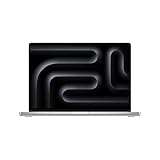
- Premium Choice: Apple 2024 MacBook Pro with Apple M4 Max Chip 16-inch. 36GB RAM, 1TB SSD Storage – Silver (Renewed)
The 16-inch MacBook Pro built around Apple’s M4 Pro and M4 Max silicon sits at the top of the creative-laptop pile, and for good reason. Between the Liquid Retina XDR panel, all-day battery, and a chip family that chews through video timelines and code compiles alike, it is the machine a lot of professionals buy once and keep for five years. The question most shoppers actually wrestle with is not whether it is good, but how much RAM and which chip tier they genuinely need.
This review looks at the current 16-inch configurations, including the widely available renewed units that shave a meaningful chunk off the price. If you have been comparing the 24GB M4 Pro against the 36GB and 48GB M4 Max builds, here is how they actually differ in daily use.
As an Amazon Associate we earn from qualifying purchases at no extra cost to you.





🎮 Get More From Your Setup — Free
Prime Gaming gives you free PC games every month, in-game loot, and a free Twitch channel sub — plus fast free shipping on all the gear above. New members get a 30-day free trial.
Watch: Apple Macbook Pro 16 m4 Pro Ram Reviews: Review & Buyer’s Guide — Video Review
Design & Build
Nothing about the chassis has changed dramatically, and that is a compliment. The unibody aluminum shell in Space Black or Silver remains one of the most rigid laptop bodies you can buy, with zero flex under the palm rests and a hinge that opens with one finger. At roughly 4.7 pounds the 16-inch model is not light, but the weight buys you a genuinely usable keyboard, a huge Force Touch trackpad, and a port selection that includes three Thunderbolt connectors, HDMI, an SD slot, and MagSafe. The 16.2-inch mini-LED display is the real showpiece: 1,000 nits sustained full-screen brightness, 1,600-nit HDR peaks, and ProMotion up to 120Hz that makes scrolling and playback feel liquid.
Performance
This is where the configuration choices matter. The M4 Pro build with 24GB of unified memory, like the 512GB Space Black and Silver renewed units, handles Lightroom, 4K editing in Final Cut, and heavy browser-plus-IDE workloads without breaking a sweat. Step up to the M4 Max options with 36GB or 48GB and a 40-core GPU, and you unlock a different class of throughput for ProRes exports, 3D rendering, and machine-learning tasks that lean on unified memory. In practice, most photographers and web developers are well served by the M4 Pro; the M4 Max earns its premium for 8K color grading, large After Effects comps, and local AI model work. All variants are built for Apple Intelligence and stay near-silent under load thanks to the generous cooling headroom in the 16-inch body.
Pros & Cons
- Class-leading XDR display with reference-grade color and brightness.
- Exceptional battery life, comfortably a full workday even under sustained editing.
- Silent, cool operation that never throttles during long exports.
- Renewed pricing makes pro-tier specs far more attainable.
- Expensive once you climb to M4 Max and higher storage.
- Non-upgradeable RAM and SSD, so buy the capacity you will need for years.
- Heavier than the 14-inch sibling for frequent travelers.
Alternatives to Consider
If portability outranks raw power, the 14-inch MacBook Pro or a MacBook Air with M-series silicon covers lighter creative work at a lower weight and price. Windows users chasing discrete-GPU gaming alongside content work should look at RTX-equipped mobile workstations, though none match the M4’s battery-to-performance ratio. Within this lineup, the smartest value play is often a renewed 24GB M4 Pro rather than a new base model.
Frequently Asked Questions
Is 24GB of RAM enough for professional work?
For photo editing, 4K video, coding, and typical multitasking, 24GB of unified memory is plenty. Consider 36GB or 48GB only if you regularly work in 8K, large 3D scenes, or local AI models.
Are the renewed units reliable?
Reputable renewed MacBooks are inspected, cleaned, and tested, and typically arrive in excellent cosmetic condition. Buy from sellers offering a return window and warranty, and you get near-new hardware for noticeably less.
What is the real difference between M4 Pro and M4 Max?
The M4 Max adds more GPU cores and higher memory bandwidth, which mainly benefits GPU-bound tasks like rendering and grading. CPU performance is closer than the naming suggests for everyday apps.
Can it drive multiple external displays?
Yes. The M4 Pro and M4 Max variants support several external monitors simultaneously, making the 16-inch an excellent desktop replacement when docked.
Verdict
The 16-inch MacBook Pro remains the reference professional laptop, and the current M4 Pro and M4 Max builds only widen the gap. Most buyers should target the 24GB M4 Pro, ideally a renewed unit, and reserve the 48GB M4 Max for genuinely GPU-heavy pipelines. Whichever you pick, you are getting a display, battery, and build quality that justify the investment for years.