🛒 Best Price Today on Amazon
Prime members get fast, free shipping on everything above, plus member-only deals. New members get a 30-day free trial — cancel anytime.
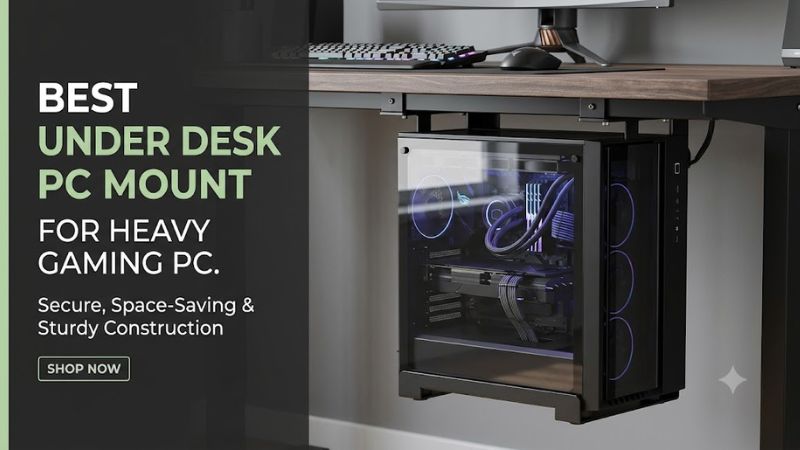
A heavy gaming tower deserves more than a basic computer holder. The best under desk pc mount for heavy gaming pc builds needs sufficient weight capacity, adjustable dimensions, and a secure attachment to your desk. This guide compares heavy-duty options and explains how to avoid clearance, airflow, and installation problems.
How to Choose an Under-Desk PC Mount for a Heavy Gaming Tower
Choosing a mount for a powerful gaming PC involves more than checking its advertised weight limit. Large cases can be unusually wide or tall, and a fully equipped system may weigh considerably more than an office desktop. Prioritize load capacity, case measurements, desk construction, and access to cooling and cables before purchasing.
1. Weight Capacity and Safety Margin
Start by weighing your complete PC rather than estimating from the empty case specifications. Include the installed GPU, power supply, cooling hardware, storage drives, and other components. A custom water-cooled system can be particularly heavy, making the mount’s maximum supported load an important purchasing factor.
As a practical selection guideline, look for a mount rated at least 20% above your computer’s actual weight. For example, a 50-pound gaming tower calls for a mount rated around 60 pounds or higher. This is a conservative selection margin, not an additional manufacturer-approved load rating.
2. Case Dimensions and Adjustment Range
A mount can support your PC’s weight and still be incompatible with its dimensions. Measure the tower’s actual height and width, including protruding feet or handles. Compare those measurements with the holder’s minimum and maximum adjustment ranges rather than relying on descriptions such as mid-tower or full-tower compatibility.
Depth also matters, especially for oversized cases with unusual shapes. Check whether the mounting frame supports the case’s base without covering important ventilation areas. If your gaming tower has a particularly wide dual-chamber design, a standard adjustable holder may not accommodate it.
3. Desk Construction and Mounting Method
Most under-desk PC holders use either a screw-mounted bracket or a clamp-on attachment. Screw-mounted designs provide a fixed installation, while clamp-on models avoid drilling and can be more convenient for renters or people who frequently rearrange their workspaces.
However, the desk itself must support the combined load. Solid wood and appropriately reinforced desktops are generally better mounting candidates than thin particleboard panels. Avoid assuming that a manufacturer’s weight rating applies to every desk surface, regardless of its construction.
4. Airflow, Cable Access, and Standing Desks
A gaming PC needs unrestricted access to its intake and exhaust areas. An open-frame holder is generally preferable to an enclosed compartment because it leaves more of the case exposed. Check the location of bottom-mounted fans, side intakes, and rear exhaust openings before deciding where to position the tower.
Standing desk owners should also consider cable movement. The PC must travel with the desk without pulling on its power cable, DisplayPort connection, Ethernet cable, or peripheral connections. Leave sufficient slack throughout the desk’s entire height range and check that the tower cannot collide with nearby furniture.
Top Picks: Best Under-Desk PC Mounts for Heavy Gaming PCs
The following three products offer different approaches to supporting heavier gaming towers. The VIVO models prioritize high load capacity with screw-mounted steel frames, while Mount-It! offers a clamp-on alternative. Their published specifications provide a useful starting point, but case and desk compatibility must still be checked individually.
1. VIVO MOUNT-PC10E – Best Overall
Best Overall
The VIVO MOUNT-PC10E is a strong starting point for builders looking for a high-capacity holder. Its advertised 77-pound weight capacity gives it more rated load capacity than the other two selections here. The adjustable steel frame is designed for mid-tower and full-size PC cases, making it worth considering for heavier gaming configurations.
Its main specifications include:
- Weight capacity: 77 pounds.
- Adjustable width: 7.5–11.8 inches.
- Adjustable height: 19.7–23.7 inches.
- Minimum desktop thickness: 1 inch.
- Construction: Steel.
- Product weight: 8.4 pounds.
The open-frame design and protective padding are useful features for a gaming setup. However, the relatively specific adjustment range means some extra-wide or unusually tall cases will not fit. It also requires a suitable desk surface for screw mounting. Choose another design if your tower falls outside its dimensions.
desk solutions, screen mounting, and more
2. VIVO MOUNT-PC04B – Best Value Heavy-Duty Mount
Best Value
The VIVO MOUNT-PC04B offers a practical combination of adjustable dimensions and a substantial 66-pound capacity. It uses a steel frame with protective interior padding, making it suitable for buyers who want a traditional under-desk mounting solution without moving into a more specialized holder.
Its key specifications include:
- Weight capacity: 66 pounds.
- Adjustable width: 5–10 inches.
- Adjustable height settings: 16, 18, 20, 22, and 24 inches.
- Minimum desktop thickness: 0.75 inches.
- Mounting base: 7 x 6.5 inches.
- Construction: Steel.
The adjustable height settings provide flexibility for different tower sizes, while the padding helps protect the case from scratches. Its main limitation is the 10-inch maximum width, which rules out some oversized gaming chassis. Buyers with particularly wide cases should consider the MOUNT-PC10E or another wider holder instead.
desk solutions, screen mounting, and more
3. Mount-It! MI-7159 – Best Clamp-On Option
Best No-Drill Option
The Mount-It! MI-7159 is an alternative for people who prefer not to drill mounting holes into their desks. Its clamp-based attachment secures to the desktop edge, while the adjustable holder accommodates a range of mid-size and full-size tower configurations.
Its published specifications include:
- Weight capacity: 66 pounds.
- Adjustable height: 16.1–25.6 inches.
- Adjustable width: 7.1–11.8 inches.
- Compatible tabletop thickness: 0.59–2.4 inches.
- Installation: Clamp-on.
- Finish: Matte black.
The wider adjustment range compared with the VIVO MOUNT-PC04B makes it attractive for certain larger cases. Its no-drill installation is also useful for sit-stand desks, provided the desk edge is compatible and structurally sound.
The trade-off is that clamp installation requires an accessible, suitable desk edge. It is not an appropriate choice for every desktop shape or construction. If you prefer a fixed screw-mounted installation, the VIVO options may be more suitable.
Mount-It!
Comparison Table
| Product | Best For | Key Spec | Compatibility | Watch Out For |
| VIVO MOUNT-PC10E | Overall | 77 lb capacity | 7.5–11.8″ width; 19.7–23.7″ height | Requires suitable screw-mounting surface |
| VIVO MOUNT-PC04B | Value | 66 lb capacity | 5–10″ width; 16–24″ height | Limited maximum width |
| Mount-It! MI-7159 | No-drill installation | 66 lb capacity | 7.1–11.8″ width; 16.1–25.6″ height | Requires compatible desk edge |
Which one should you choose?
- Choose VIVO MOUNT-PC10E if you want the highest advertised weight capacity among these selections.
- Choose VIVO MOUNT-PC04B if your case fits its narrower adjustment range and you prefer a conventional fixed installation.
- Choose Mount-It! MI-7159 if avoiding drilled holes is a priority.
These are specification-based recommendations, not results from comparative physical testing.
FAQ
1. What weight capacity should an under-desk PC mount have?
Choose a mount with a rated capacity comfortably above your fully assembled gaming PC’s weight. A 50-pound tower, for example, is better matched with a holder rated around 60 pounds or more. Also check the manufacturer’s installation requirements and the desk’s structural capacity. The mount rating alone does not establish that the complete desk assembly is safe.
2. Can an under-desk PC mount hold a full-tower gaming case?
Yes, some models can accommodate full-tower cases, provided their dimensions and weight fall within the manufacturer’s limits. The VIVO MOUNT-PC10E and Mount-It! MI-7159 both offer maximum adjustable widths of 11.8 inches. Measure your actual case before purchasing, since the full-tower label does not represent a standardized physical size.
3. Will mounting a gaming PC under a desk affect cooling?
It can affect cooling if the installation blocks intake or exhaust openings. Choose an open-frame holder, preserve the clearance required by your case, and avoid positioning the tower directly against walls or other obstructions. Monitor CPU and GPU temperatures during normal gaming sessions after installation to check whether the new position changes cooling behavior.
4. Is a clamp-on or screw-mounted PC holder better?
Neither mounting method is universally better. Screw-mounted holders provide a fixed attachment but require a suitable desktop and correct installation. Clamp-on models avoid drilling and can work well on compatible desk edges. Choose according to your desk construction, PC weight, and installation requirements rather than assuming either method is automatically safer.
Final Thoughts
The best under desk pc mount for heavy gaming pc setups should combine adequate load capacity, a compatible adjustment range, and secure desk attachment. VIVO’s MOUNT-PC10E is the strongest capacity choice here, while Mount-It! suits no-drill installations. Measure your tower and inspect your desk before committing to a mount.