Buying a gaming mouse pad on a tight budget sounds simple until you notice how much the cheap end varies. Two pads can look identical yet differ in the things that decide whether your aim feels repeatable: how wide the surface runs, whether the weave leans toward speed or control, how thick the base sits under your wrist, and whether the edges survive a year of forearm contact. The real decision is matching those traits to your sensitivity and desk, not chasing the longest feature list.
This roundup is for first-time pad buyers replacing a worn office mat, low-sensitivity shooter players who keep running out of room, and anyone furnishing a second setup without overspending. Every pad below is a gaming mouse pad sold on Amazon US, checked against its product page for size, surface, base and edge details, and each currently sits under the price cap in the search. Where a listing gives several sizes, the size named in the product section is the one that fits the budget.
Quick Picks
As an Amazon Associate we earn from qualifying purchases
| Product | Best for | Key spec from title |
|---|---|---|
| SteelSeries QcK Medium | Players who want the proven cloth standard | Micro-woven cloth, 320 x 270 mm |
| Razer Gigantus V2 Medium | A thicker pad with anti-fray edging | Textured micro-weave cloth, 360 x 275 mm |
| Corsair MM300 Extended | Keyboard and mouse on one long surface | Anti-fray cloth, 930 x 300 mm |
| KTRIO Large Gaming Mouse Pad | Extended coverage with a water-resistant top | Micro-weave cloth, 31.5 x 11.8 inches |
How to Choose
Match the pad size to your sensitivity
Pad width is the first filter because it decides how far your mouse can travel before you lift and recenter. Players on low sensitivity swing the mouse in wide arcs, so a compact pad forces constant pickups mid-fight; an extended mat removes that ceiling entirely. Higher-sensitivity players move in small wrist strokes and can use a medium pad comfortably, leaving desk room for a monitor stand or speakers. Measure the clear strip of desk in front of your keyboard before ordering, and remember that extended pads also change where your keyboard sits, since both devices share one surface.
Read the surface weave as speed versus control
Cloth pads are not interchangeable: a tighter, smoother weave lets the mouse glide with less effort, while a more textured weave adds friction that helps you stop exactly on a target. The listings in this price range describe their surfaces in plain terms — micro-woven, micro-weave, textile weave — and those descriptions hint at the feel. If your current problem is overshooting flicks, lean toward a textured control-leaning surface. If your mouse feels like it drags on your desk or an old pad, a smoother weave is the fix. Sensor type rarely limits the choice, since these cloth surfaces are made for optical and laser gaming sensors alike.
Decide how much thickness you want under your wrist
Thickness changes comfort more than tracking. Thin pads around two millimetres sit almost flush with the desk, which suits players who rest the heel of the hand on the desk itself and dislike a raised edge. Pads around three millimetres add a layer of foam that softens contact over long sessions and can smooth out small bumps or seams in the desk surface. There is no universal winner: a thicker pad can feel plush on a hard desk, while a thin pad feels more direct on an already smooth one. Check the stated thickness in the listing rather than judging from photos, which exaggerate depth.
Weigh stitched edges against the lowest prices
The border is where budget pads usually fail first. Unstitched cloth can peel away from the rubber base or fray where your forearm rubs, while stitched anti-fray edges lock the layers together and extend the pad’s working life. At this budget, stitching is the single durability feature most worth prioritising, because a pad that frays in six months costs more in the end than one that lasts two years. Also confirm the base material: a non-slip rubber underside keeps the pad planted during fast swipes, and a water-resistant coating on some models makes drink spills and cleaning less of a worry.
The 4 Best Options
SteelSeries QcK Medium

The QcK Medium is the reference point for cloth pads at this budget, and it suits players who want a known quantity instead of an experiment. Its micro-woven cloth gives a balanced glide that works for mixed wrist and arm aiming, and the medium footprint fits desks where an extended mat would crowd the monitor. The silicone rubber base keeps it planted during quick direction changes. Because the design is deliberately plain, it drops into any setup without clashing, and the thin profile keeps your wrist close to desk height during long sessions.
Specs
- Size: 320 x 270 mm
- Thickness: 2 mm
- Surface: Micro-woven cloth
- Base: Non-slip silicone rubber
- Model number: 63004
- Colour: Black
Best for: Players who want the long-running cloth standard in a desk-friendly medium size.
Watch out for: The edges are not stitched, so heavy forearm rub can fray them sooner than on the stitched models here.
ASIN: B000UEZ36W
Razer Gigantus V2 Medium

Razer’s Gigantus V2 Medium fits players who like a slightly larger, cushioned pad without moving up a price tier. The textured micro-weave cloth is tuned for a balance of speed and control, so flicks start easily yet still stop predictably. Its three-millimetre high-density rubber foam gives more padding than the thinner pads in this list, which helps on hard desks, and the foam keeps the surface uniformly flat. The medium footprint is a touch wider than the QcK, giving medium-sensitivity players extra room for horizontal sweeps in shooters and MOBAs.
Specs
- Size: 360 x 275 mm
- Thickness: 3 mm
- Surface: Textured micro-weave cloth
- Base: Thick, high-density rubber foam with non-slip underside
- Sizes in the range: M, L, XXL, 3XL (medium listed here)
- Colour: Classic Black
Best for: Players who want a thicker, softer pad with a textured surface for mixed speed and control.
Watch out for: Only the medium size sits under the cap; the larger versions of this pad cost more, so check the size selected before ordering.
ASIN: B086RJMTD9
Corsair MM300 Extended
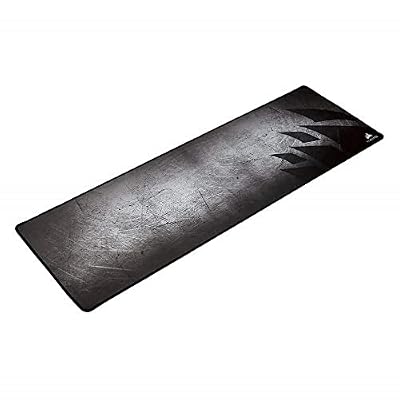
The MM300 Extended is the pick for low-sensitivity players who are tired of lifting the mouse at the worst moment. At 930 millimetres across, it runs under both keyboard and mouse, so your whole desktop surface feels consistent and the keyboard stops sliding on bare desk. The textile-weave cloth is built for control and precision tracking, and reinforced stitched edges guard against the peeling that kills large pads at the corners. A three-millimetre profile keeps it flatter than plush desk mats, and the anti-skid rubber base holds the whole span in place.
Specs
- Size: 930 x 300 mm (36.6 x 11.8 inches)
- Thickness: 3 mm
- Surface: Textile-weave cloth for control and precision tracking
- Edges: Reinforced stitched anti-fray edges
- Base: Anti-skid rubber base
- Model number: CH-9000108-WW
Best for: Low-sensitivity players who want one extended surface under keyboard and mouse.
Watch out for: Measure your desk first — at over ninety centimetres wide, it will overhang shallow desks and may clash with monitor feet.
ASIN: B01798VS4C
KTRIO Large Gaming Mouse Pad

KTRIO’s large pad suits buyers who want extended coverage plus a surface that shrugs off spills. The superior micro-weave cloth aims at precise mouse control, and the listing adds a water-resistant coating, so a knocked drink beads up instead of soaking into the weave. Stitched edges protect the border from fraying, and the non-slip rubber base keeps the mat steady when your keyboard shares the surface. At 31.5 inches wide it is shorter than the Corsair extended pad, which makes it a better fit for mid-size desks that cannot take a full metre of mat.
Specs
- Size: 31.5 x 11.8 inches
- Surface: Micro-weave cloth
- Edges: Stitched edges
- Coating: Water-resistant
- Base: Non-slip rubber
- Model number: KTRIO-Extended-Gaming-Mouse Pad-XL-BK
Best for: Buyers who want an extended mat with stitched edges and a spill-resistant surface.
Watch out for: The printed design variants share this listing family, so confirm the colour and size option selected matches the plain version described here.
ASIN: B0788LMLZL
Which One Fits Your Situation
You play shooters on low sensitivity
Room to swing matters more to you than any other trait, so start with the Corsair MM300 Extended. Its 930-millimetre span lets you complete a full turn without lifting the mouse, and the control-leaning textile weave helps those long sweeps end on target. If your desk cannot fit it, the KTRIO large pad is the fallback, trading some width for a water-resistant top that survives desk drinks.
Your desk is small or shared
A medium pad keeps the footprint modest and leaves space for everything else. The SteelSeries QcK Medium is the safest fit, with a thin profile that works even on a crowded desk or a laptop station. Choose the Razer Gigantus V2 Medium instead if the desk surface is hard or uneven, because its thicker foam base smooths small bumps and adds wrist comfort without taking much more room.
Your last pad frayed or peeled
Durability is your deciding factor, so narrow the list to the stitched models: the Corsair MM300 Extended and the KTRIO Large. Both lock their edges with stitching that resists the peeling unstitched cloth suffers. Between them, pick the Corsair for maximum width and the KTRIO if you also want the water-resistant coating for a desk where drinks sit next to the mouse.
You are building a first gaming setup
Start simple: the QcK Medium gives you the surface most gaming mice are tuned around, at a size that suits medium and high sensitivity play. It is the easiest pad to live with while you learn your preferred sensitivity. If you already know you play on low settings, skip ahead to an extended pad now rather than replacing a too-small pad within a few months.
Common Mistakes
- Buying a pad by photo alone without checking the stated dimensions against your desk and sensitivity.
- Assuming every size of a pad line sits under the budget cap, when only the medium or a sale size does.
- Ignoring edge construction, then replacing a frayed unstitched pad within the year.
- Placing an extended mat under a monitor stand without measuring the clear depth of the desk.
- Judging a cloth pad in the first hour, before the surface has flattened fully after unrolling.
Frequently Asked Questions
Does a budget cloth pad work with any gaming mouse?
Yes, in practice. The cloth surfaces in this roundup are made for optical and laser gaming sensors, and modern sensors track reliably on plain, consistent weaves. Problems usually come from worn, dirty or heavily patterned surfaces rather than the sensor itself. A plain black cloth pad is the safest pairing if your mouse has ever skipped on a printed desk mat.
How long should a pad at this budget last?
A stitched cloth pad used daily can stay in good shape for well over a year, while unstitched edges often show fraying sooner where your forearm rubs. Washing the pad gently and keeping drinks off it extends its life. Treat the pad as a consumable with a long cycle: when the glide turns uneven or the base stops gripping, replacement is due.
Is an extended pad better than a medium pad?
Neither is better in absolute terms; they serve different sensitivities and desks. Extended pads give low-sensitivity players uninterrupted travel and keep the keyboard on the same surface. Medium pads suit higher sensitivities, small desks and laptop setups. The wrong choice is the one that forces you to lift the mouse mid-swipe or hangs off the edge of your desk.
How do I clean a cloth gaming mouse pad?
Use lukewarm water with a small amount of mild soap, rub the surface gently by hand or with a soft cloth, rinse thoroughly and let it air-dry flat away from direct heat. Avoid machine washing and harsh detergents, which can break down the rubber base and the weave. Let the pad dry completely before playing, since a damp surface changes the glide.