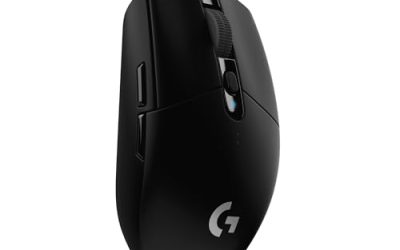
Picking a mouse for Destiny 2 is really two decisions wearing one trench coat. In the Crucible you need a sensor that stays honest through fast flicks and smooth tracking, while in a raid you need enough reachable buttons to fire a grenade, a charged melee and a finisher without tying your movement hand in knots. A mouse that only solves one half of that equation will quietly annoy you in the other half, so button layout matters here almost as much as sensor quality.
This guide is written for PC Guardians who split time between PvE and PvP, from weekly dungeon clears to Trials weekends and long raid nights. Every pick below was chosen from the names and specifications on its Amazon product page: programmable button counts, sensor models and DPI ranges, listed weights, battery figures and connection types, so you can compare the hardware on paper before it reaches your desk.
Quick Picks
As an Amazon Associate we earn from qualifying purchases
| Product | Best for | Key spec from title |
|---|---|---|
| Logitech G502 X Lightspeed | Mixed PvE and PvP players who want modern hardware | 13 programmable controls |
| Razer Naga V2 Pro | Ability-heavy builds that need maximum binds | 19+1 programmable buttons with swappable side plates |
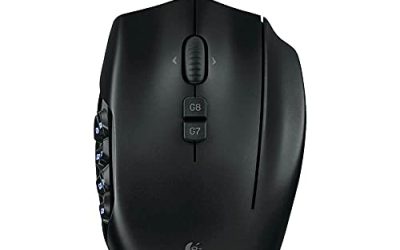
| Corsair Scimitar Elite Wireless | Raid players who want a fixed 12-button thumb grid | 16 programmable buttons, 26,000 DPI |
| Logitech G502 Lightspeed | Players who like a heavier, tunable mouse | 11 programmable buttons |
How to Choose
Button Count and Placement for Abilities
Destiny 2 hands your mouse more jobs than a typical shooter. Beyond aiming and firing, most players eventually bind class ability, charged melee, grenade, finisher, weapon swaps and interact to the mouse so the keyboard hand never leaves movement keys. Count the inputs you actually use, then look at placement: two thumb buttons cover the basics, a tilted scroll wheel adds two more, and a 12-button side panel can hold an entire ability rotation. Buttons you cannot reach without shifting your grip do not count, so panel position and button shape matter as much as the headline number.
Sensor Behavior for Flicks and Tracking
Destiny 2 aim mixes both movement styles in a single fight: you track a strafing Guardian through a primary duel, then flick to a second target or snap upward at a jumping opponent. What you need is a sensor with no smoothing, filtering or acceleration, so the crosshair stops where your hand stops. Every mouse here uses a flagship optical sensor rated far beyond human hand speed in inches per second, which means consistency rather than the maximum DPI figure is the real spec. Set DPI in a moderate range and let in-game sensitivity do the fine-tuning.
Shape, Weight and Grip for Long Sessions
A raid with teaching runs and repeated wipes can keep your hand on the mouse for three hours, and discomfort compounds quietly: a shell that is slightly too narrow or a weight that fights your grip style will show up as sloppy aim by the final encounter. Right-handed ergonomic shapes with a defined thumb rest suit palm and relaxed claw grips during long PvE sessions. Weight is personal rather than a contest; heavier mice around 114 to 134 grams feel planted for tracking, while lighter shells reduce fatigue during flick-heavy PvP.
Wireless Link, Polling and Battery
Modern 2.4 GHz gaming links report at 1 ms, the same rate as a wired connection, so cable drag no longer buys you responsiveness in Destiny 2. Polling rate is worth one check: most of these mice poll at 1,000 Hz, and the Corsair below reaches 2,000 Hz, though the practical difference in this game is small. Battery life varies far more, from 60 hours to several hundred depending on the model and lighting. For raid nights, also confirm the mouse can keep playing while it charges over its cable, so a low battery never ends a session early.
The 4 Best Options
Logitech G502 X Lightspeed

The G502 X Lightspeed is the most balanced Destiny 2 mouse in this group, modernizing the familiar G502 layout with LIGHTFORCE hybrid optical-mechanical switches and a lighter 102-gram shell. Its 13 programmable controls give you room for class ability, melee, grenade and a finisher alongside the usual weapon swaps, and the reversible DPI-shift button sits where your thumb naturally rests. The dual-mode wheel switches between free-spin for menus and ratcheted steps for weapon selection, with tilt clicks adding two more binds. Battery life up to 140 hours means charging becomes a monthly habit rather than a weekly one.
Specs
- Sensor: HERO 25K optical, 100–25,600 DPI
- Switches: LIGHTFORCE hybrid optical-mechanical
- Controls: 13 programmable
- Connectivity: LIGHTSPEED wireless, wired over USB-C
- Battery life: up to 140 hours
- Weight: 102 g
- Scroll wheel: dual-mode hyper-fast and ratcheted, with tilt
- Onboard memory: 5 profiles
- Model: 910-006178
Best for: Players who split time evenly between raids and Crucible and want one mouse that covers both.
Watch out for: The shape is right-handed only, and the shell still runs large for small hands using a fingertip grip.
ASIN: B092CRH1RX
Razer Naga V2 Pro

The Naga V2 Pro exists for Guardians whose builds revolve around abilities. Three magnetic side plates swap between 2, 6 and 12-button layouts, so the same mouse can run a minimal setup for Crucible and a full 12-button grid for raid rotations, with 19+1 programmable buttons in total. That grid is where finisher, both melee variants, grenade, class ability, barricade or rift, and weapon swaps can all live under one thumb. Razer’s Focus Pro 30K sensor keeps tracking consistent for primary duels, and the HyperScroll Pro wheel adjusts its own tension. Battery life is the strongest here, especially over Bluetooth for non-gaming use.
Specs
- Sensor: Razer Focus Pro 30K optical, up to 30,000 DPI, 750 IPS, 70 G
- Buttons: 19+1 programmable, with 2, 6 and 12-button swappable side plates
- Switches: Optical Mouse Switches Gen-3, rated for 90 million clicks
- Scroll wheel: HyperScroll Pro with adjustable tension
- Connectivity: HyperSpeed wireless, Bluetooth, wired USB-C
- Battery life: up to 150 hours over HyperSpeed, up to 300 hours over Bluetooth
- Weight: 134 g
- Model: RZ01-04400100-R3U1
Best for: Ability-heavy PvE players who want every power and finisher bound to the mouse.
Watch out for: At 134 grams it is the heaviest mouse here, and the side plates from older Naga models do not fit this one.
ASIN: B0BGJTLFN5
Corsair Scimitar Elite Wireless

Where the Naga swaps plates, the Scimitar commits to one excellent fixed layout: a 12-button side panel that slides forward or backward on Corsair’s Key Slider mechanism, so the grid sits exactly under your thumb instead of wherever the factory guessed your hand would be. With 16 programmable buttons in total, a full Destiny 2 rotation fits comfortably, and the textured alternating columns help your thumb learn positions without looking. The Marksman sensor tracks at 650 IPS with polling up to 2,000 Hz, and three onboard profiles store separate bind sets for different characters or activities without reopening the software mid-session.
Specs
- Sensor: CORSAIR MARKSMAN optical, 26,000 DPI, 650 IPS, 50 G
- Buttons: 16 programmable, including a 12-button Key Slider side panel
- Polling rate: up to 2,000 Hz
- Connectivity: SLIPSTREAM 2.4 GHz wireless, Bluetooth, wired USB-C
- Battery life: up to 120 hours over 2.4 GHz with backlighting off, up to 150 hours over Bluetooth
- Switches: optical, rated for 100 million clicks
- Onboard profiles: 3
- Weight: 114 g
- Model: CH-9314311-NA
Best for: Raid and dungeon regulars who want a permanent thumb grid positioned to fit their hand.
Watch out for: The wide body suits palm grips and larger hands; small hands may find the far row of the grid a stretch.
ASIN: B0CCVYHZ9N
Logitech G502 Lightspeed
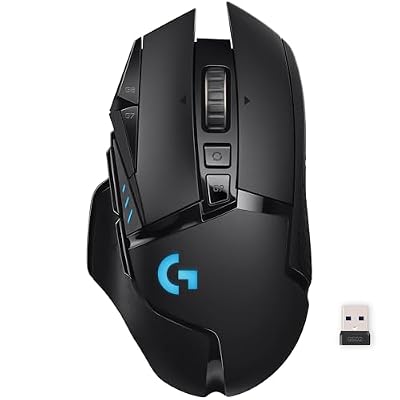
The original G502 Lightspeed remains a strong Destiny 2 pick for players who prefer a heavier mouse with adjustable balance. Eleven programmable buttons cover the core ability set plus weapon swaps, and the six included weights let you add mass and shift the feel until tracking through long primary fights feels settled. Its HERO 25K sensor reports over a 1 ms LIGHTSPEED link with no smoothing or acceleration, and the hyper-fast scroll wheel is genuinely useful for scrolling long menus and inventory screens. Five onboard profiles keep separate PvE and PvP bind sets on the mouse itself, ready on any PC.
Specs
- Sensor: HERO 25K optical, 100–25,600 DPI
- Buttons: 11 programmable
- Connectivity: LIGHTSPEED wireless at a 1 ms report rate, wired
- Battery life: up to 60 hours
- Weight: 114 g, with six adjustable weights included
- Scroll wheel: hyper-fast dual-mode, with tilt
- Onboard memory: up to 5 profiles
- Lighting: LIGHTSYNC RGB
- Model: 910-005565
Best for: Players who like a substantial, tunable mouse and a proven layout for mixed play.
Watch out for: Battery life is the shortest in this group, and it charges over an older-style cable rather than USB-C.
ASIN: B07L4BM851
Which One Fits Your Situation
You Spend Most Nights in Raids and Dungeons
Choose between the Razer Naga V2 Pro and the Corsair Scimitar Elite Wireless. Both put a 12-button grid under your thumb for full ability rotations, finishers and consumables. Pick the Naga if you also play other genres and want to swap down to a simpler plate, or the Scimitar if you prefer one fixed panel that slides to match your thumb reach and stays put.
Crucible and Trials Are Your Main Playlist
The Logitech G502 X Lightspeed fits best. Its lighter shell and 13 controls keep flicks quick while still holding class ability, melee and a finisher, and the HERO 25K sensor tracks without smoothing or acceleration. The 140-hour battery also means a Trials weekend never starts with a charging cable. The G502 Lightspeed works too if you prefer more weight behind your tracking.
You Play a Bit of Everything Each Week
Take the Logitech G502 Lightspeed or its newer X sibling and store two profiles onboard: one bind layout for PvE ability chains and one leaner layout for PvP. Both mice carry enough buttons for Destiny 2’s full move set without a full MMO grid, and both shapes stay comfortable when a session drifts from strikes into Crucible without a break.
Your Hands Ache During Long Sessions
Look first at shape, not specs. The Scimitar’s sliding panel and wide ergonomic body suit larger hands and palm grips, while the G502 X Lightspeed’s lighter weight reduces the effort of constant small corrections. Whichever you choose, keep the ability binds on the buttons closest to your natural thumb rest so you are not stretching for a finisher mid-encounter.
Common Mistakes
- Buying an ultralight mouse with only two side buttons, then discovering your grenade, melee and finisher have nowhere to live.
- Binding the finisher to a button your thumb brushes accidentally, which wastes the prompt or triggers it at the worst moment.
- Choosing by maximum DPI alone, when tracking consistency and a lack of smoothing matter far more for Destiny 2 aim.
- Ignoring weight and shell size, then wondering why aim falls apart during the third hour of a raid.
- Setting binds in software but never saving them to onboard memory, so your layout vanishes on a different PC or after an update.
Frequently Asked Questions
How many buttons do you actually need for Destiny 2?
Eight to eleven well-placed inputs cover most players: fire, aim, class ability, melee, grenade, finisher and two or three weapon or utility binds. A 12-button grid only becomes necessary if you also want consumables, sparrow summoning or multiple interact keys on the mouse. Reach matters more than the raw count.
Is a wireless mouse fast enough for Trials of Osiris?
Yes. The wireless links on these mice report at 1 ms, matching a wired connection, and their sensors track far beyond the speeds a human hand reaches in a gunfight. What decides Trials rounds is positioning and consistency, not a cable. Just keep the receiver close and the battery charged before a card.
What DPI should I set for Destiny 2?
Most players settle between 800 and 1,600 DPI with in-game sensitivity doing the rest of the work, which keeps both flicks and tracking controllable. The sensors here all perform identically across that range with no smoothing. Avoid chasing very high DPI settings; they add jitter to small corrections without making your aim faster.
Should I pick an MMO mouse or a general gaming mouse for Destiny 2?
Destiny 2 sits between genres, so decide by your playlist. Mostly raids, dungeons and ability-driven builds point to an MMO mouse like the Naga V2 Pro or Scimitar. Mostly Crucible points to a lighter general mouse like the G502 X Lightspeed. Players who split their week evenly are usually happiest with the general mouse and a second saved profile.