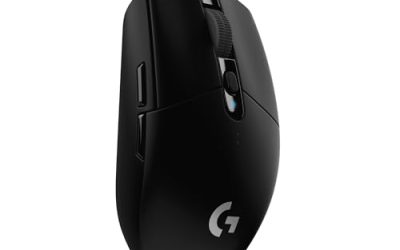
Buying a mouse for an Xbox Series X is not the same decision as buying one for a PC. The console only accepts mouse input in games that support it, it cannot run the setup software most gaming mice rely on, and many high-end PC mice never promise console support at all. The real question is whether a specific mouse states Xbox compatibility in its own listing, connects in a way the console accepts, and keeps its useful settings without a PC attached.
This guide is for Series X owners who play mouse-supported shooters, strategy titles, and simulators at a desk or on a couch setup. Every mouse below was chosen because its Amazon listing or the maker’s listing data names Xbox support directly, and its specifications come from the name and details on that product page rather than from general reputation.
Quick Picks
As an Amazon Associate we earn from qualifying purchases
| Product | Best for | Key spec from title |
|---|---|---|
| 8BitDo Retro R8 Mouse – Xbox Edition | Players who want an officially licensed Xbox mouse | PAW 3395 sensor, up to 26,000 DPI |
| HyperX Pulsefire Haste 2 Wireless | Lightweight wireless play across console and PC | 61g, HyperX 26K sensor |
| HyperX Pulsefire Haste 2 Core Wireless | Long battery life from a replaceable cell | Up to 100 hours on one AAA battery |
| HyperX Pulsefire Fuse Wireless | A symmetrical shape with textured grip panels | 75g with battery, dual wireless |
How to Choose
Confirm Xbox Support in the Listing Itself
Start with the compatibility line, not the marketing headline. A mouse earns a place on an Xbox shortlist only when its listing names Xbox Series X|S or Xbox One among supported platforms, or when it carries official Xbox licensing. Plenty of respected PC mice list only Windows and macOS, and those models were left out here even when their sensors are excellent. Game support is the second filter: the console passes mouse input only to titles built for it, so check your main games for mouse and keyboard support before spending anything.
Pick a Connection the Console Can Use
Wired USB is the least complicated route, because the console sees a standard mouse with nothing to pair and no battery to manage. Wireless models in this guide connect through a 2.4GHz USB dongle, which presents the mouse to the console the same way, while Bluetooth modes are aimed at laptops and tablets rather than console play. If you plan to sit across a living room, a dongle mouse plus a lap surface solves the distance problem without a cable run. Keep the dongle in a front console port where furniture cannot block the signal path.
Look for Onboard Settings, Not Software Promises
Xbox consoles cannot run Logitech G Hub, Razer Synapse, or HyperX NGENUITY, so any feature locked behind a desktop app is a feature you will set once on a PC or never use. Prefer mice with a physical DPI button, onboard memory for at least one profile, and switches that work at default settings out of the box. The HyperX models below store a profile onboard and cycle DPI presets from the mouse itself. If you own no PC at all, favour the mouse whose factory presets already land near the sensitivity you play at.
Match Shape and Weight to Your Play Space
Desk players can use almost any shell, but couch players need a mouse that stays put on a lap desk or cushion surface and does not drag a cable off the edge. Weight matters in both rooms: shells near 60 to 75 grams feel quick in shooters and tire the wrist less across long sessions, while a symmetrical shape suits claw and fingertip grips and shared households with mixed hand sizes. Check the listed dimensions against your current mouse instead of guessing, because a few millimetres of height change how a palm grip rests.
The 4 Best Options
8BitDo Retro R8 Mouse – Xbox Edition

The Retro R8 is the only mouse here built as an Xbox product first: its Amazon listing title names it the Xbox Edition and notes that it is officially licensed, with a transparent green shell modelled on the original Xbox. Under that styling sits a PAW 3395 sensor, three connection modes, programmable buttons, and a charging dock that also extends the wireless signal. For a Series X owner who wants the console connection taken seriously rather than treated as an afterthought, this is the natural starting point.
Specs
- Sensor: PAW 3395 optical sensor
- Resolution: 50 to 26,000 DPI across 6 sensitivity levels
- Polling rate: up to 8,000Hz wired, up to 4,000Hz on 2.4G, 125Hz on Bluetooth
- Switches: Kailh Sword GM X micro switches, rated up to 100 million clicks
- Connectivity: Bluetooth LE 5.3, 2.4G wireless, wired USB
- Battery: 450mAh rechargeable Li-ion, 100 hours on Bluetooth and 26 to 105 hours on 2.4G depending on polling rate
- Weight: 77g for the mouse, 192g for the charging dock
- Extras: charging dock included, left and right-hand mode switching, programmable side buttons
Best for: Xbox owners who want an officially licensed mouse with a charging dock for a desk setup.
Watch out for: high polling rates cut deeply into the 2.4G battery figure, so the longest battery claims apply at modest settings.
ASIN: B0DMVLD2HC
HyperX Pulsefire Haste 2 Wireless

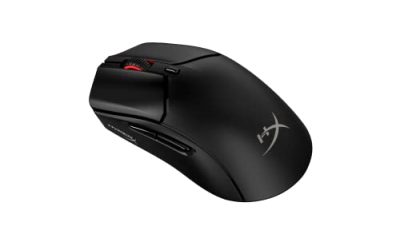
The Pulsefire Haste 2 Wireless suits players who split time between the Series X and a PC and want one light mouse for both. Its listing data names PC, PS5, PS4, Xbox Series X|S, and Xbox One as compatible platforms, and the hardware backs up the claim with a USB dongle for the console and Bluetooth for a laptop. At 61 grams with a 26,000 DPI sensor and a single onboard profile, it keeps the settings that matter on the mouse itself, which is exactly what console play demands.
Specs
- Sensor: HyperX 26K sensor
- Resolution: up to 26,000 DPI
- Tracking: up to 650 IPS
- Polling rate: up to 1,000Hz
- Connectivity: 2.4GHz wireless, Bluetooth 5.0, wired mode while charging
- Battery life: up to 100 hours per full charge
- Buttons: 6, with HyperX switches rated to 100 million clicks
- Weight: 61g
- Memory: 1 onboard profile
Best for: players who want the lightest rechargeable option here for both console and PC.
Watch out for: button mapping and lighting changes are made in NGENUITY on a PC, so set your profile before moving the mouse to the console.
ASIN: B0BX52C4LN
HyperX Pulsefire Haste 2 Core Wireless

The Core Wireless trims the flagship formula down to the parts a console player actually uses. HyperX lists its compatibility as PC, Xbox Series X|S, Xbox One, PS5, and PS4, and power comes from a single replaceable AAA battery rated for up to 100 hours in 2.4GHz mode, so a flat battery is a ten-second swap instead of a charging break. The symmetrical shell, six buttons, and four factory DPI presets make it easy to hand to another player in the same house without a settings lecture first.
Specs
- Sensor: HyperX Custom Core sensor
- Resolution: up to 12,000 DPI, with presets at 400, 800, 1600, and 3200 DPI
- Tracking: 300 IPS, 35G acceleration
- Polling rate: up to 1,000Hz
- Connectivity: 2.4GHz wireless and Bluetooth 5.2
- Battery: 1 user-replaceable AAA battery, up to 100 hours in 2.4GHz mode
- Switches: TTC Gold switches, rated to 20 million clicks
- Buttons: 6
- Weight: about 70g operating weight with battery fitted
- Memory: 1 onboard profile
Best for: households that want long battery life and a quick battery swap instead of charging cables.
Watch out for: Bluetooth mode runs at a reduced polling rate, so use the 2.4GHz dongle for console sessions.
ASIN: B0D2BJTX1L
HyperX Pulsefire Fuse Wireless

The Pulsefire Fuse is the grip-focused option in this group. Its compatibility statement covers PC, PS5, and Xbox Series X|S, and the ambidextrous shell adds Microline grip textured panels along the sides, which helps when a mouse is used on a lap desk where your hand also stabilises it. A single AAA battery delivers up to 85 hours, dual wireless covers console and laptop duties, and per-LED RGB lighting is available in 2.4GHz mode for players who set the mouse up on a PC first.
Specs
- Sensor: HyperX Custom Core sensor
- Resolution: up to 12,000 DPI
- Polling rate: 1,000Hz
- Connectivity: 2.4GHz wireless via USB dongle and Bluetooth
- Battery: 1 AAA battery, up to 85 hours
- Buttons: 6
- Switches: rated to 20 million clicks
- Weight: 75g with battery
- Shape: ambidextrous with Microline grip textured side panels
- Lighting: per-LED RGB in 2.4GHz mode
Best for: couch and lap-desk players who want extra side grip on a symmetrical wireless mouse.
Watch out for: its compatibility list names Xbox Series X|S without Xbox One, so older-console households should pick a different model here.
ASIN: B0DSQ3J7JD
Which One Fits Your Situation
You Play at a Desk Beside the TV
Choose the 8BitDo Retro R8 Xbox Edition. The charging dock gives the mouse a permanent home next to the console, the wired mode is there when you want the highest polling rates, and the officially licensed Xbox design matches the room instead of looking borrowed from an office. Its 77-gram shell also suits longer desk sessions better than an ultralight tournament shape might.
You Split Time Between Console and PC
Take the HyperX Pulsefire Haste 2 Wireless. One dongle serves the Xbox, Bluetooth serves a laptop, and the single onboard profile travels with the mouse so your DPI choice survives the move. At 61 grams it is the easiest mouse here to flick in shooters, and the rechargeable battery removes the spare-cell routine entirely if you remember a weekly top-up.
The Whole Household Shares One Mouse
The Pulsefire Haste 2 Core Wireless fits shared setups best. Its factory DPI presets cover most players without any software, the symmetrical shape works for different grips, and a replaceable AAA battery means the mouse is never out of action waiting on a charge. Keep a spare cell in the controller drawer and the shared setup runs itself for weeks at a time.
You Play From the Couch
Pick the Pulsefire Fuse Wireless. The textured Microline side panels help the mouse stay planted in your hand on a lap surface, the dongle connection reaches across a living room, and 85 hours per battery keeps charging out of the routine. Pair it with a rigid lap desk so the sensor gets a flat, consistent surface instead of fabric.
Common Mistakes
- Assuming every game on Xbox accepts a mouse, when support is decided title by title and many releases stay controller-only.
- Buying a well-known PC mouse whose listing names only Windows and macOS, then discovering the maker never promised console support.
- Planning to fix settings in desktop software that the console cannot run, instead of choosing a mouse with onboard profiles and a DPI button.
- Using a Bluetooth connection for console play when the listing’s low-latency mode is the 2.4GHz dongle.
- Playing on a sofa cushion or glass table where the sensor tracks poorly, rather than giving the mouse a flat pad or lap desk.
Frequently Asked Questions
Do all Xbox Series X games work with a mouse?
No. Each developer decides whether a game accepts mouse input, and the console simply passes the signal to titles that support it. Check the game’s store page or settings menu for keyboard and mouse support before buying a mouse for one specific title, because a working dashboard connection does not guarantee in-game support.
Is wired or wireless better on Xbox Series X?
Wired USB is the simplest and most predictable connection, with no battery or pairing concerns. A 2.4GHz dongle mouse is nearly as simple and suits couch distances, since the console treats the dongle as a standard mouse. Bluetooth is the weakest console option here and is better reserved for laptops and tablets.
Can I change DPI without connecting the mouse to a PC?
On the mice in this guide, yes, within limits. Each one offers preset sensitivity steps you can cycle from the mouse itself, and the HyperX models store one profile onboard. Deeper changes such as remapping buttons or adjusting lighting still need the maker’s software on a computer, so set those once before console use.
Why do some gaming mice not list Xbox compatibility?
Console support depends on how a mouse presents itself to the system and whether the maker validated and stated it. Many PC models are only documented for Windows or macOS, even if their sensors are excellent. For an Xbox purchase, the listing’s own compatibility statement is the safest evidence, which is why every mouse here was chosen from that line.