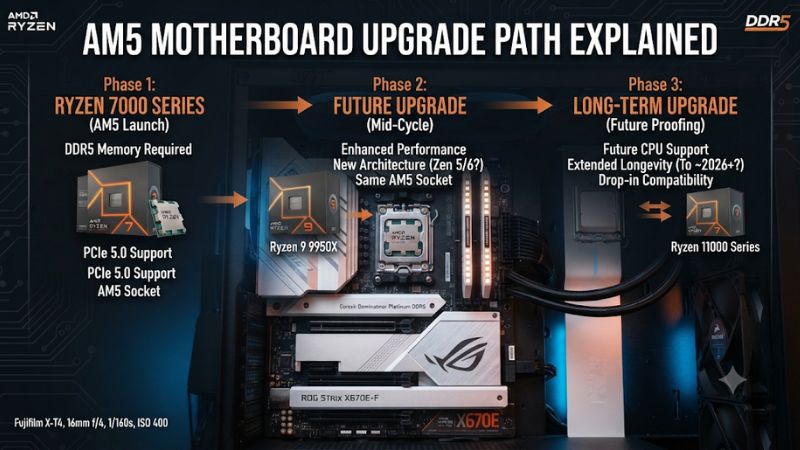
The AM5 motherboard upgrade path explained starts with one important advantage: AMD has committed to supporting Socket AM5 through 2029. That gives PC gamers room to upgrade their Ryzen processor without automatically replacing the motherboard, provided the board supports the new CPU through its BIOS and power specifications.
What the AM5 Upgrade Path Really Comes Down To
AM5 is AMD’s desktop CPU platform introduced with Ryzen 7000 processors. It supports DDR5 memory and provides a path across Ryzen 7000, 8000, and 9000 families. AMD’s extended support commitment through 2029 makes it a longer-term upgrade platform, but the motherboard chipset, BIOS, memory configuration, and CPU requirements still determine which upgrades make practical sense.
1. AM5 Supports Multiple Ryzen Generations
The AM5 socket debuted with Ryzen 7000 desktop processors based on Zen 4. Ryzen 8000 desktop processors followed, including models with integrated graphics and different PCIe capabilities. Ryzen 9000 introduced Zen 5 processors while retaining the same physical socket.
This means an AM5 motherboard does not automatically become obsolete when a new Ryzen generation arrives. AMD’s compatibility framework covers the 7000, 8000, and 9000 families, although older 600-series boards may require a BIOS update before recognizing newer processors.
AMD announced at Computex 2026 that AM5 support would continue through 2029. This is an important planning advantage, but it does not confirm that every future processor will work on every existing motherboard. Check the manufacturer’s CPU support list before purchasing a processor.
2. Your Chipset Determines Features, Not Just CPU Compatibility
The chipset identifies many of the motherboard’s connectivity and expansion capabilities. X-series boards generally target enthusiasts who need more expansion flexibility, while B-series models serve mainstream gaming builds. However, a more expensive chipset does not automatically deliver higher gaming FPS.
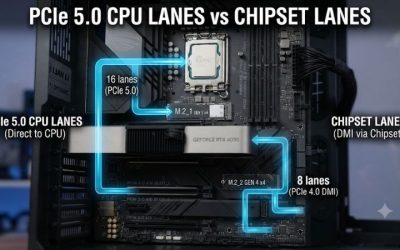
For example, B650 and B850 boards can be suitable foundations for gaming systems, while X670E and X870E offer more extensive connectivity and PCIe capabilities. The right choice depends on storage devices, graphics expansion, USB requirements, and the features you actually intend to use.
3. BIOS Support Is the Critical Compatibility Check
A processor can physically fit an AM5 socket without being supported by the motherboard’s currently installed firmware. BIOS versions contain CPU initialization and platform support information, so a board manufactured before a particular processor launch may need an update.
Before buying a replacement CPU, visit the motherboard manufacturer’s official support page. Find the exact model and hardware revision, open its CPU support list, and identify the minimum BIOS version required for your intended processor. Do not rely on the chipset name alone.
4. Moving From AM4 to AM5 Requires More Than a CPU Swap
If your current gaming PC uses AM4, moving to AM5 is a platform migration rather than a simple processor replacement. AM4 processors use a different socket and DDR4 memory, whereas AM5 motherboards use an LGA socket and DDR5. Your existing CPU and DDR4 kit cannot be carried over as compatible components.
You will generally need three core components: an AM5 processor, an AM5 motherboard, and DDR5 memory. Your graphics card, SSDs, power supply, and case may remain usable if their interfaces and physical requirements match. Check cooler mounting compatibility before reusing an existing cooling system.
How to Plan Your AM5 Motherboard Upgrade Path: Step by Step
Planning an upgrade means identifying which components can remain in your current PC and which need replacement. The most economical approach is usually to keep a compatible AM5 motherboard and upgrade the CPU when necessary. A motherboard replacement makes more sense when you need additional connectivity, expansion options, or a different feature set.
Step 1. Identify Your Current Motherboard and Processor
Start by checking your motherboard model and installed CPU. In Windows, press Win + R, enter msinfo32, and press Enter. The System Information window displays your processor and motherboard manufacturer and model information.
You can also check the motherboard model using CPU-Z or the manufacturer’s system information utility. Record the exact model and hardware revision because similarly named boards can have different BIOS downloads and CPU support lists.
Step 2. Choose a Chipset That Matches Your Upgrade Plans
Compare the motherboard’s expansion capabilities instead of selecting a chipset based solely on its position in the product hierarchy. A mainstream gaming PC with one graphics card and a few NVMe drives may not benefit from the additional connectivity of an enthusiast motherboard.
| Chipset | Best suited for | Graphics PCIe | NVMe support | Main consideration |
|---|---|---|---|---|
| A620 | Basic AM5 builds | PCIe 4.0 | PCIe 4.0 | No CPU overclocking |
| B650 | Mainstream gaming | PCIe 4.0 | PCIe 4.0, Gen 5 optional | Older but capable platform |
| B650E | Expanded PCIe 5.0 support | PCIe 5.0 | PCIe 5.0 | Check individual board features |
| B850 | Modern mainstream builds | PCIe 4.0 | PCIe 5.0 | Good balance of connectivity |
| B840 | Entry-level modern builds | PCIe 4.0 | PCIe 4.0 | No CPU overclocking |
| X670E | Enthusiast systems | PCIe 5.0 | PCIe 5.0 | Extensive expansion |
| X870 | High-end gaming and creation | PCIe 5.0 | PCIe 5.0 | USB4 standard |
| X870E | High-end expansion | PCIe 5.0 | PCIe 5.0 | More available connectivity |
These are chipset-level specifications, not a guarantee that every motherboard exposes every possible connection. Individual manufacturers can implement different slot layouts, USB ports, M.2 configurations, and networking features.
For most gaming builds, B650 or B850 is a sensible starting point. X870 and X870E become more attractive when USB4, extensive PCIe connectivity, and additional expansion flexibility are priorities.
Step 3. Check CPU Compatibility and Update the BIOS
Visit your motherboard manufacturer’s website and locate the exact motherboard support page. Open the CPU compatibility list and find your intended processor. Check its required BIOS version before purchasing or installing it.
If an update is necessary, download the correct BIOS file and follow the manufacturer’s instructions. Some motherboards provide BIOS Flashback, allowing firmware updates without an installed compatible CPU. Others require a supported processor to enter the firmware utility.
Do not interrupt an update or install firmware intended for another motherboard revision. If your current CPU still works, updating before removing it is often the simplest approach. Save important data and follow the manufacturer’s recovery instructions before proceeding.
Step 4. Confirm Memory, Cooling, and Physical Compatibility
AM5 requires DDR5 memory, so an existing DDR4 kit from an AM4 system cannot be reused. Check the motherboard’s memory specifications and compatibility list, particularly when choosing high-capacity kits or enabling AMD EXPO profiles.
Cooling and physical fit also matter. Many AM5 motherboards support existing AM4-compatible cooler mounting hardware, but compatibility depends on the specific cooler and mounting kit. Check the cooler manufacturer’s documentation rather than assuming every older cooler will fit.
Before completing the upgrade, verify these components:
-
Memory: DDR5 capacity, DIMM configuration, and supported speeds.
-
CPU cooler: AM5 mounting compatibility and processor cooling requirements.
-
Case: ATX, Micro-ATX, or Mini-ITX motherboard clearance.
-
Power supply: Required CPU power connectors and adequate capacity for the complete system.
-
Storage: M.2 slot compatibility, PCIe generation, and available SATA connections.
-
Graphics card: Physical clearance and compatibility with the motherboard’s primary PCIe slot.
What Doesn’t Help When Planning an AM5 Upgrade
Buying the most expensive chipset does not automatically improve gaming performance. A Ryzen processor running on a suitable B650 motherboard can provide an excellent gaming experience without requiring an X870E upgrade.
Likewise, replacing a functioning motherboard simply because a newer chipset exists is not necessarily worthwhile. If your existing board supports your intended processor, has adequate power delivery, and provides the necessary connectivity, keeping it can save money for a more meaningful CPU or GPU upgrade.
FAQ: Common AM5 Motherboard Upgrade Questions
1. How long will AMD support the AM5 motherboard platform?
AMD has officially committed to supporting AM5 through 2029. This provides a longer upgrade window for existing motherboard owners, although individual processor compatibility will still depend on motherboard firmware and manufacturer support.
2. Can I upgrade from Ryzen 7000 to Ryzen 9000 without changing my motherboard?
Yes, many AM5 motherboards support both processor generations. However, you must check the motherboard’s CPU support list and install the required BIOS version before changing processors. A compatible socket alone is not sufficient confirmation.
3. Do I need new RAM when upgrading from AM4 to AM5?
Yes, you need DDR5 memory because AM5 desktop motherboards do not support DDR4 system memory. Choose a compatible DDR5 kit and check the motherboard’s memory specifications before purchasing.
4. Is B850 better than B650 for a gaming PC?
B850 offers newer platform connectivity, including PCIe 5.0 NVMe support, while B650 remains a capable gaming option. Neither chipset automatically produces higher FPS. Choose based on motherboard features, expansion requirements, price, and your intended processor.
Final Thoughts
The AM5 motherboard upgrade path explained is ultimately about preserving compatible components while upgrading the processor when performance demands increase. With AMD’s support commitment through 2029, a suitable B650 or B850 motherboard can be a practical long-term foundation. Check BIOS compatibility and plan your next CPU upgrade before replacing the entire platform.