🛒 Best Price Today on Amazon
Prime members get fast, free shipping on everything above, plus member-only deals. New members get a 30-day free trial — cancel anytime.
Network storage is a small box that sits on your home network and holds your files, photos, and backups where every device can reach them. Under 300 dollars, the market splits cleanly in two: plug-and-play single-drive or dual-drive units that arrive with disks already installed, and diskless enclosures that put the drive choice in your hands. That split is the decision, and it matters more than any processor spec.
This guide is for households tired of scattered external drives, remote workers who want a private cloud, and gamers who keep game libraries and capture footage off their main SSD. We read the six listings strictly for what they state: bay count, included drives, capacity, processor and memory, and port speed. Where a listing leaves out something you will need, we flag it. A good 2026 purchase here is less about raw speed and more about picking the right number of bays for the way you plan to protect your data.
Quick Picks

BUFFALO LinkStation 210 4TB 1-Bay NAS Network Attached Storage with HDD Hard Drives Included NAS Storage that Works as Home Cloud or Network Storage Device for Home




As an Amazon Associate we earn from qualifying purchases. Product prices and availability are accurate as of the date/time indicated.
BUFFALO LinkStation 210 2TB 1-Bay NAS Network Attached Storage with HDD Hard Drives Included NAS Storage that Works as Home Cloud or Network Storage Device for Home
As an Amazon Associate we earn from qualifying purchases. Product prices and availability are accurate as of the date/time indicated.
BUFFALO LinkStation 210 6TB 1-Bay NAS Network Attached Storage with HDD Hard Drives Included NAS Storage that Works as Home Cloud or Network Storage Device for Home


As an Amazon Associate we earn from qualifying purchases. Product prices and availability are accurate as of the date/time indicated.
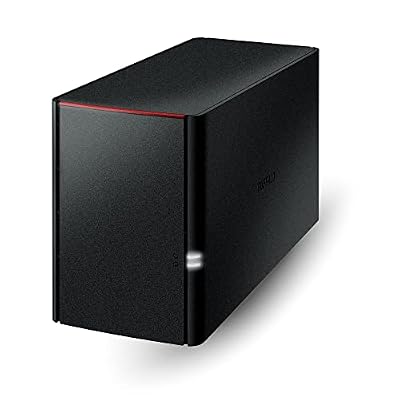
BUFFALO LinkStation 220 4TB 2-Bay NAS Network Attached Storage with HDD Hard Drives Included NAS Storage that Works as Home Cloud or Network Storage Device for Home


As an Amazon Associate we earn from qualifying purchases. Product prices and availability are accurate as of the date/time indicated.

TERRAMASTER F2-212 2-Bay NAS Quad Core CPU, DDR4 RAM (Diskless) | Personal Private Cloud Home Network Attached Storage, Rich Backup Solutions (Diskless)


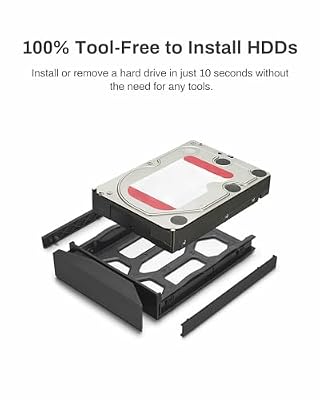


As an Amazon Associate we earn from qualifying purchases. Product prices and availability are accurate as of the date/time indicated.

Asustor Drivestor 2 Gen 2 AS1202T 2 Bay NAS Storage for Personal Home Users | Photo File Backup, Remote Access, Mobile App, 4K Media Server, 2.5GbE, Personal Cloud, Network Attached Storage (Diskless)


As an Amazon Associate we earn from qualifying purchases. Product prices and availability are accurate as of the date/time indicated.
| Product | Best for | Key spec from the title |
|---|---|---|
| Buffalo LinkStation 210 (4TB) | Simple first NAS | 1-bay, 4TB drive included |
| Buffalo LinkStation 210 (2TB) | Light photo and document backup | 1-bay, 2TB drive included |
| Buffalo LinkStation 210 (6TB) | Media library on one drive | 1-bay, 6TB drive included |
| Buffalo LinkStation 220 (4TB) | Two-drive redundancy out of the box | 2-bay, 4TB total, drives included |
| TerraMaster F2-212 | Choosing your own drives | 2-bay, quad-core CPU, DDR4, diskless |
| Asustor Drivestor 2 Gen 2 (AS1202T) | Fast home network and 4K media | 2-bay, 2.5GbE, 4K media server |
How to Choose
Decide how many bays you need
A single-bay NAS is simply a networked drive: if the disk fails, the data is gone unless you have a second copy elsewhere. A two-bay unit can mirror two drives so one can fail without losing anything, which is the sensible minimum for irreplaceable family photos. Mirroring is not a backup, though. It protects against hardware failure, not against deletion, so keep one more copy somewhere else.
Choose between included drives and diskless
Units that ship with drives are ready after setup and cost less up front, but you are locked to the capacity shipped. Diskless enclosures like the TerraMaster and the Asustor let you pick drives sized to your library and swap them later. Remember that drives are a separate cost, so budget for them if you go diskless.
Check the network port
Gigabit Ethernet moves roughly 110 megabytes per second at best, plenty for streaming and backups. A 2.5GbE port can push about 280 megabytes per second, which only helps if your router or switch also supports 2.5GbE and your drives can keep up. Without matching network gear, the faster port sits unused.
Think about processor and memory
A basic processor is fine for file storage and photo backup. If you want 4K media streaming, transcoding, or running apps, a quad-core chip and DDR4 memory give more headroom. Ignore feature lists you will not use, such as dozens of surveillance licenses, and focus on whether the unit can serve the files you already have. Cheap boxes with weak processors can also feel slow when several people browse thumbnails at once, so a modest upgrade in processor class is often worth it if the house has many users.
The 6 Best Options
Buffalo LinkStation 210 (4TB)
This 1-bay unit ships with a 4TB hard drive installed and is pitched as a home cloud or network storage device. It is the middle capacity in Buffalo’s single-bay line and the one that suits most households: enough room for years of family photos plus a computer backup. Setup is meant to be simple, which suits first-time buyers who have never logged into a router or configured a share. Plug it into the router with an Ethernet cable, create a shared folder, and point your computers at it. For a household that currently juggles a drawer of USB drives, collecting everything on one always-on box is a real quality-of-life upgrade, and 4TB leaves room to grow for a few years of casual use.
- Strength: drive included, so there is nothing to shop for separately.
- Strength: 4TB offers a balanced amount of space for most homes.
- Trade-off: a single bay means one failed disk takes everything with it.
Skip it if the photos on it are irreplaceable and you have no second copy.
Buffalo LinkStation 210 (2TB)
The 2TB version of the same single-bay design is for lighter needs: documents, a phone photo archive, and a modest laptop backup. A smaller disk keeps the cost down. It works as a first step into network storage without overbuying. A student, a retiree, or a couple who mostly store scanned paperwork and phone pictures will rarely fill it quickly. The same software and plug-in simplicity as the larger siblings apply, so you give up capacity rather than ease of use. If you later outgrow it, the files can be copied over to a bigger unit.
- Strength: the lowest entry point of the line.
- Strength: still delivers shared access across devices.
- Trade-off: 2TB fills quickly if you store video.
Skip it if you keep large media or game libraries.
Buffalo LinkStation 210 (6TB)
This is the largest single-drive option in the group, with 6TB aboard. It is meant for people who store movies, music, and camera footage and want everything in one place. Capacity is the draw, as no other listing here ships with a single drive that large. A hobbyist who rips discs, edits family video, or archives game captures will appreciate not having to split a library across several devices. The flip side is that a single large disk concentrates risk, so a separate backup copy, perhaps on an external drive kept in a different room, matters even more here.
- Strength: the most storage per bay of the included-drive models.
- Strength: remains a plug-in, ready-to-use solution.
- Trade-off: more data on one drive raises the stakes of a failure.
Skip it if you want redundancy without buying a second unit.
Buffalo LinkStation 220 (4TB)
The 220 steps up to two bays and ships with 4TB of drives, still described as a home cloud or network storage box. Two bays make mirroring possible on many two-bay units, so a failed drive need not mean lost files. It is the safest of the ready-to-use Buffalo options for a family archive, provided you confirm in the listing that a mirrored mode is supported and enable it during setup. Two drives in one chassis also tend to cost less than buying two separate single-bay units and managing them individually, and one shared folder structure keeps things simpler for everyone in the house.
- Strength: two bays allow a mirrored setup.
- Strength: drives are included, so there is no extra shopping.
- Trade-off: in a mirrored arrangement, usable space is less than the total.
Skip it if you want to choose your own drives.
TerraMaster F2-212
The F2-212 is a diskless 2-bay NAS with a quad-core CPU and DDR4 memory, positioned as a personal private cloud with broad backup options. Diskless means you supply the drives, which lets you pick capacity and brand. The quad-core processor and DDR4 give more headroom than basic units for multiple users and apps. This is the better fit for someone who wants to grow into running a few services, syncing several laptops at once, or switching drives later as capacities get cheaper. The learning curve is steeper than with a plug-and-play unit, so allow an evening for setup and for formatting your new drives.
- Strength: you control drive size and quality.
- Strength: quad-core CPU and DDR4 suit multitasking.
- Trade-off: drives are an extra purchase on top of the unit.
Skip it if you want a box that works the moment you plug it in.
Asustor Drivestor 2 Gen 2 (AS1202T)
The Drivestor 2 Gen 2 targets personal home users with photo and file backup, remote access, a mobile app, a 4K media server, and a 2.5GbE port. The faster network port is its standout, and the mobile app helps with access on the go. It is the most feature-rich pick here for a connected household. Families with several phones auto-uploading pictures, or a living room TV that streams from a shared library, will notice the benefit. Like the TerraMaster, it is described for personal use, and drives are not mentioned as included, so plan to add disks of your own and check compatibility before you buy.
- Strength: 2.5GbE port prepares you for faster home networks.
- Strength: mobile app and 4K media serving broaden what it can do.
- Trade-off: you need matching 2.5GbE gear to take advantage of the speed.
Skip it if your router and switch are gigabit-only and you do not plan to upgrade.
Which One Fits Your Situation
You want the simplest possible setup
The Buffalo LinkStation 210 (4TB) arrives with a drive and covers typical photos and backups. Nothing to buy beyond the box, and the setup is short enough to finish in an evening.
You cannot afford to lose family photos
The Buffalo LinkStation 220 (4TB) gives you two bays, so mirroring is possible from day one.
You want to grow and tinker
The TerraMaster F2-212 lets you choose drives and offers a stronger processor. Start with two modest disks and swap in larger ones as your collection expands.
You stream 4K video around the house
The Asustor Drivestor 2 Gen 2 pairs a 4K media server with a fast 2.5GbE port. Check that your TV or streaming box can play the file formats you store before you commit.
Common Mistakes
- Treating a single drive as a backup rather than as storage.
- Buying a diskless unit and forgetting to budget for drives.
- Paying for 2.5GbE without checking your router and switch.
- Confusing mirrored space with total capacity.
- Skipping a second off-site copy of important files, such as a cloud archive or a drive kept at a relative’s house, which covers fire and theft.
Related guides
- Gaming Chairs For Back Pain With Lumbar Support
- Gaming Keyboards For Fps With Rapid Trigger
- Travel Backpack With Laptop Compartment
Frequently Asked Questions
Do I need a NAS at all?
If you only have one computer, an external drive may be enough. A NAS makes sense when several devices share files or you want automatic backups.
What is the difference between mirroring and backup?
Mirroring copies data across two drives in the same box, protecting against one drive failing. A backup is a separate copy that also protects against deletion, theft, or fire.
Can I access my files away from home?
Many units offer remote access through an app or a web service. Set strong passwords, turn on two-step sign-in if the software supports it, and keep firmware updated, because an exposed NAS is a favorite target for automated attacks.
Which capacity should I buy?
Estimate your current data and double it. Video-heavy libraries need far more than documents, and two-bay units that mirror will give you only half of the raw space, so factor that into the math before you decide.