🛒 Best Price Today on Amazon
Prime members get fast, free shipping on everything above, plus member-only deals. New members get a 30-day free trial — cancel anytime.
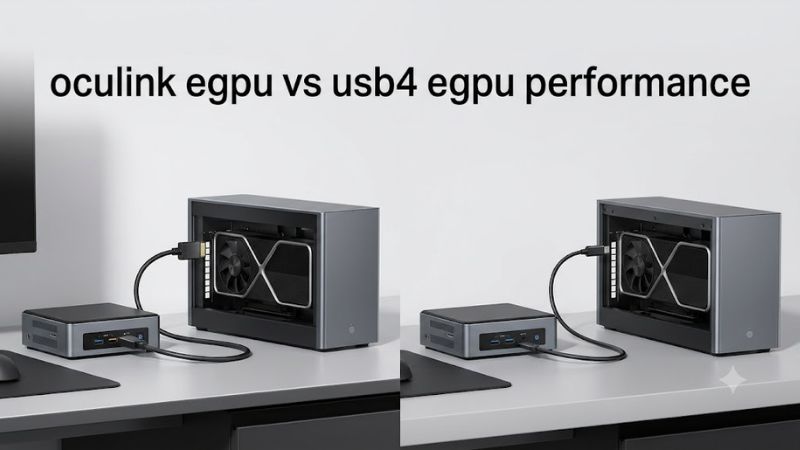
Choosing between oculink egpu vs usb4 egpu performance comes down to bandwidth, latency, compatibility, and convenience. OCuLink generally delivers better gaming performance through a direct PCIe connection, while USB4 offers simpler connectivity and broader docking functionality. This comparison explains the real-world trade-offs and which interface makes more sense for your gaming setup.
How to Choose Between OCuLink and USB4 for eGPU Gaming
The best connection depends on your computer’s available ports, the external GPU enclosure, and how you intend to use the setup. Raw bandwidth matters, but so do protocol overhead, display routing, and everyday convenience. Understanding these differences helps you avoid paying for an interface your computer cannot actually use.
1. Bandwidth and PCIe Connection
OCuLink is designed to carry PCI Express signals directly between a host computer and an external device. A common eGPU implementation uses PCIe 4.0 x4, providing a theoretical one-way bandwidth of approximately 7.88 GB/s. Actual performance depends on the PCIe generation, lane configuration, and host implementation.
PCI-SIG+1
USB4 works differently. Its 40Gbps headline speed describes the overall connection rather than dedicated PCIe bandwidth available to the GPU. PCIe traffic is tunneled through the USB4 connection, introducing protocol overhead and sharing resources with other supported traffic. Consequently, the two interfaces cannot be compared using headline bandwidth figures alone.
2. Latency and Gaming Performance
OCuLink generally has an advantage because its direct PCIe connection avoids some of the tunneling overhead associated with USB4. This can help maintain GPU performance in games that frequently transfer data between the processor and graphics card. The difference is particularly relevant when using a powerful desktop GPU in an external enclosure.
However, the performance gap varies with the graphics card, processor, game engine, resolution, and display connection. A GPU limited by its own processing capability may show a smaller difference than one frequently waiting for data transfers. Therefore, an interface advantage should not be mistaken for an identical FPS improvement in every game.
3. Compatibility and Upgrade Requirements
OCuLink requires a computer with a suitable OCuLink connection wired to PCIe. Some mini PCs and handheld gaming computers include this interface, while others require a compatible M.2-to-OCuLink adapter. The adapter route depends on an available PCIe-capable M.2 slot and the manufacturer’s electrical and physical implementation.
USB4 is easier to find on modern computers, but the presence of a USB-C connector does not establish eGPU compatibility. The port must support the necessary USB4 PCIe tunneling functionality, and the enclosure must support the corresponding connection. Check the computer manufacturer’s specifications rather than assuming every USB-C port can operate an eGPU.
4. Convenience and Everyday Use
USB4 is the more flexible option for people who want an external GPU and a multifunctional docking station. A compatible enclosure may support graphics, USB peripherals, storage, networking, and display connections through one cable. Depending on the computer and enclosure, it may also support charging.
OCuLink is more specialized. It is attractive for a permanent desktop-style gaming setup, but usually requires separate connections for peripherals and other docking functions. Its connector and cable arrangement also makes frequent disconnecting less convenient. If you regularly move between portable and desktop use, USB4 can be worth choosing despite its potential performance disadvantage.
OCuLink eGPU vs USB4 eGPU Performance: Direct Comparison
OCuLink has the performance advantage in many conventional eGPU configurations, but the difference is not a fixed percentage. Independent testing of the GPD G1 illustrates how much the host connection can matter. The comparison below focuses on common OCuLink PCIe 4.0 x4 and USB4 40Gbps implementations, while accounting for newer USB4 versions.
| Comparison | OCuLink eGPU | USB4 eGPU |
| Connection method | Direct PCIe connection | PCIe tunneling |
| Common bandwidth configuration | PCIe 4.0 x4 | USB4 40Gbps |
| Protocol overhead | Lower | Higher |
| Gaming performance | Generally faster | Generally slower |
| Compatibility | Requires OCuLink support | Requires compatible USB4 PCIe tunneling |
| External display support | Depends on GPU and enclosure outputs | Depends on GPU, enclosure, and host |
| Docking functionality | Usually requires separate connections | Can combine multiple functions |
| Best use case | Performance-focused desktop setup | Flexible laptop and handheld setup |
| Main limitation | Limited host availability | Shared bandwidth and tunneling overhead |
1. Independent Benchmark Results: OCuLink vs USB4
Notebookcheck compared the GPD G1, featuring an AMD Radeon RX 7600M XT, using OCuLink and USB4 connections on the Minisforum UM780 XTX. Its synthetic benchmark results showed OCuLink delivering approximately 16% more performance than USB4 in that particular comparison.
The publication also reported a gaming performance advantage for OCuLink across its tested games. Importantly, these results belong to a specific hardware configuration and testing environment. They should not be interpreted as a universal 16% FPS improvement for every external GPU.
Notebookcheck Review
2. Why USB4 Can Lose More Performance in Some Games
USB4’s PCIe tunneling introduces additional processing compared with a direct PCIe connection. Its available bandwidth can also be shared with other traffic, including display and USB data. Games that frequently exchange information between the CPU and GPU can be more sensitive to these limitations.
The effect also depends on where the monitor is connected. An external monitor connected directly to the eGPU can avoid sending rendered frames back through the host connection. Using the laptop’s internal display may require additional data transfer in the opposite direction, potentially increasing the bandwidth pressure.
3. Does USB4 80Gbps Close the Performance Gap?
USB4 Version 2.0 supports up to 80Gbps operation and updates the protocol architecture, including PCIe data tunneling. This makes it an important distinction when comparing newer systems against conventional 40Gbps USB4 connections.
USB-IF+1
However, an 80Gbps specification does not mean every USB4 2.0 computer or enclosure automatically delivers equivalent eGPU performance to OCuLink. Host implementation, PCIe tunneling support, controller design, cables, and enclosure compatibility still matter. Buyers should compare actual supported configurations rather than assuming that twice the headline bandwidth means twice the gaming performance.
4. Which Connection Makes More Sense for Your Setup?
Choose OCuLink if your mini PC or handheld already has a suitable native port, and you prioritize extracting as much performance as possible from an external GPU. It is particularly attractive for a stationary gaming setup where the enclosure remains connected to the same computer.
USB4 is a better practical choice when you need one connection for graphics and other peripherals, or when your laptop lacks OCuLink. The performance compromise may be worthwhile if it avoids purchasing adapters or replacing an otherwise capable computer. For newer USB4 80Gbps systems, check independent benchmarks before deciding.
Top Advantages and Limitations of Each eGPU Interface
Neither connection is automatically the right choice for every gaming computer. The decision becomes clearer when you consider the complete setup, including installation, display routing, upgrade flexibility, and the graphics card you intend to use. These four considerations help translate interface specifications into a practical purchase decision.
OCuLink: Best for Maximum External GPU Performance
OCuLink’s main advantage is its direct PCIe connection. It reduces the protocol overhead associated with USB4 tunneling and can provide more consistent access to PCIe bandwidth when paired with a properly configured host and enclosure. This makes it attractive for gaming workloads that are sensitive to connection limitations.
Its main disadvantage is compatibility. Many laptops do not include an OCuLink port, and adding one through an M.2 adapter may require opening the computer and sacrificing an available expansion slot. This is not an ideal upgrade for users who want a simple, portable docking solution.
USB4: Best for Convenience and Compatibility
USB4 offers a more versatile connection because the same USB-C port can support multiple data and display protocols. A compatible eGPU enclosure can also function as a docking station, reducing the number of cables needed for a desktop workstation or gaming setup.
The important limitation is that USB4 is not universally supported for external graphics. The computer, cable, and enclosure must support the required functionality. Furthermore, other traffic can compete for available link resources. A USB4 port that only supports ordinary USB data should not be assumed to support an external GPU.
External Monitor vs Internal Laptop Display
Display routing can influence eGPU performance independently of the connection standard. When an external monitor is plugged directly into the graphics card’s display output, the GPU can send rendered frames straight to the monitor. This avoids the additional return transfer required when displaying the output on the laptop’s built-in screen.
For a gaming desktop-style arrangement, connecting the monitor directly to the eGPU is generally the more sensible configuration. Check that the enclosure’s HDMI or DisplayPort outputs support your monitor’s resolution and refresh rate. The actual supported modes depend on the graphics card, enclosure, and display connection.
Upgrade Costs and Long-Term Flexibility
OCuLink can require additional hardware if your computer does not include a native port. An M.2 adapter, compatible cable, external GPU enclosure, graphics card, and separate power solution may all be necessary. Before buying, confirm that the M.2 slot exposes suitable PCIe lanes and that using it will not disable another component you need.
USB4 can simplify the physical setup, but a compatible enclosure may cost more because of its controller and docking features. Compare the complete cost rather than the cable price alone. If you already own a USB4-compatible computer, purchasing a separate OCuLink-capable system solely for a modest performance improvement may not be worthwhile.
FAQ: OCuLink eGPU vs USB4 eGPU Performance
1. Is OCuLink faster than USB4 for eGPU gaming?
Yes, OCuLink generally delivers better performance than conventional USB4 40Gbps eGPU connections because it provides a more direct PCIe connection. However, the difference varies by GPU, processor, game, and display configuration. USB4 80Gbps and Thunderbolt 5 should be evaluated separately rather than treated as equivalent to USB4 40Gbps.
2. Can I connect an OCuLink eGPU to a USB4 laptop?
No, not directly. OCuLink and USB4 use different connection technologies, so a standard USB-C-to-OCuLink cable cannot convert a USB4 port into an OCuLink connection. You need a compatible OCuLink interface on the host computer or an appropriate PCIe-based expansion solution.
3. Does OCuLink improve FPS in every game?
No, OCuLink does not produce the same FPS improvement in every game. Bandwidth-sensitive games may benefit more, while GPU-limited games can show smaller differences. Monitor routing, CPU performance, graphics settings, and the external GPU itself also influence the results.
4. Is USB4 worth choosing instead of OCuLink?
Yes, USB4 is worth considering if convenience, docking functionality, and broader device compatibility matter more than maximum eGPU performance. It is especially practical for laptops without native OCuLink support. Check the actual USB4 generation and PCIe tunneling capabilities before purchasing an enclosure.
Final Thoughts
The choice between oculink egpu vs usb4 egpu performance ultimately depends on your priorities. OCuLink is generally the stronger option for maximum gaming performance, while USB4 offers greater convenience and multifunctional connectivity. Compare your computer’s actual port specifications, enclosure compatibility, and display setup before investing in an external GPU.