🛒 Best Price Today on Amazon
Prime members get fast, free shipping on everything above, plus member-only deals. New members get a 30-day free trial — cancel anytime.
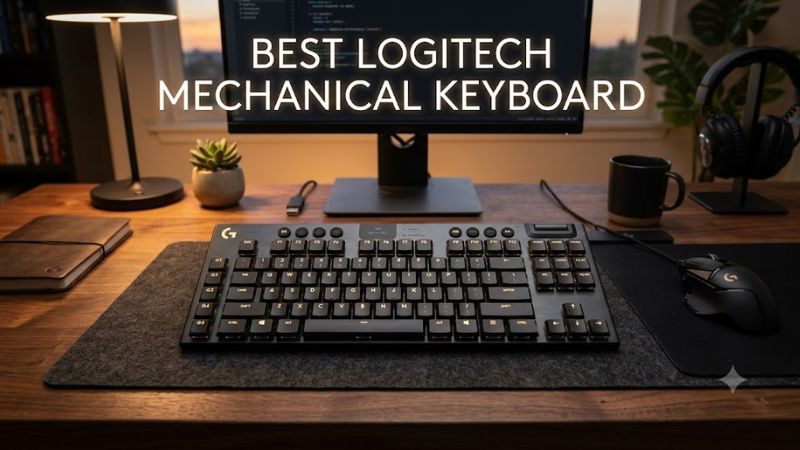
Choosing the best logitech mechanical keyboard depends on your preferred switch feel, desk space, connectivity, and budget. Logitech offers compact competitive-gaming keyboards, low-profile wireless models, and more affordable wired options. This guide compares four worthwhile choices to help you find the right balance of gaming performance, comfort, and features.
How to Choose the Best Logitech Mechanical Keyboard
The right keyboard should suit your daily workload rather than simply offer the most features. Before choosing a Logitech model, consider how you play, whether you need a number pad, how much you value wireless connectivity, and which switch type feels comfortable for extended sessions.
1. Choose the Right Mechanical Switch
Logitech G keyboards commonly offer linear, tactile, or clicky mechanical switches, depending on the model and configuration. Linear switches move without a pronounced tactile bump, making them attractive to players who prefer uninterrupted key travel. Tactile switches provide noticeable feedback, while clicky switches add an audible click.
Your ideal switch depends on personal preference and your surroundings. Linear switches suit many competitive gaming setups, but they are not automatically faster for every user. Tactile switches can be comfortable for mixed typing and gaming, while clicky switches may disturb people nearby. Check the exact switch options before purchasing because not every keyboard offers all three.
2. Decide Between Full-Size, TKL, and Compact Layouts
A full-size keyboard includes a dedicated number pad, navigation keys, and the standard function row. It works well for spreadsheets, productivity, and games that benefit from extensive key access, but its width can limit mouse movement.
Tenkeyless (TKL) keyboards remove the number pad while retaining the function and navigation keys. Smaller layouts save more desk space, although some omit dedicated controls or require function-layer shortcuts. If you frequently enter numbers or use navigation keys, a TKL model may be less convenient than a full-size alternative.
3. Compare Wired and Wireless Connectivity
Wired keyboards avoid battery management and connect directly through USB. They are sensible choices for permanent desktop setups, particularly when reducing costs matters more than cable-free convenience.
Logitech G’s LIGHTSPEED wireless technology uses a dedicated 2.4 GHz receiver, while supported models may also offer Bluetooth and USB connectivity. These options make a keyboard more flexible across compatible devices. However, connection modes vary by model, and wireless battery life depends on lighting, usage, and configuration. Verify whether the specific keyboard supports the connection method you need.
4. Consider Software, Customization, and Build
Logitech G keyboards can provide LIGHTSYNC RGB lighting, programmable controls, and configuration through Logitech G HUB, depending on the model. These features are useful for creating game-specific key assignments, adjusting lighting, and personalizing supported controls.
Build quality and maintenance matter just as much. Low-profile keyboards offer a different typing position from traditional mechanical models, while keycap material and construction affect the surface feel. Also, do not assume a Logitech mechanical keyboard supports hot-swappable switches. Confirm the replacement and customization options for the exact model before buying.
Top Logitech Mechanical Keyboards Compared
The following shortlist covers four distinct needs: premium wireless gaming, competitive play, compact wireless use, and lower-cost wired gaming. The recommendations are based on published specifications and intended use, not a claim of personal testing. Prices can change, so verify the current US retail price and included configuration before making a purchase.
| Product | Best For | Key Spec | Compatibility | Watch Out For |
| Logitech G915 X LIGHTSPEED | Premium all-round gaming | Low-profile mechanical switches, tri-mode connectivity | USB, LIGHTSPEED, Bluetooth | Premium price and low-profile feel |
| Logitech G PRO X TKL LIGHTSPEED | Competitive gaming | TKL layout, LIGHTSPEED wireless | USB receiver and supported wired use | No number pad |
| Logitech G515 LIGHTSPEED TKL | Compact low-profile gaming | Low-profile design, wireless connectivity | LIGHTSPEED and Bluetooth | Limited dedicated keys |
| Logitech G413 SE | Budget-conscious wired gaming | Full-size layout, tactile mechanical switches | USB wired connection | Fewer premium wireless features |
1. Logitech G915 X LIGHTSPEED — Best Overall
The Logitech G915 X LIGHTSPEED is a strong all-round choice for players who want a full-size keyboard with a premium, low-profile design. It combines GL mechanical switches, LIGHTSYNC RGB, a volume roller, dedicated media controls, and nine programmable G-keys. Its combination of gaming and productivity features makes it suitable for users who want more than a basic gaming keyboard.
Tri-mode connectivity supports LIGHTSPEED wireless, Bluetooth, and a wired USB connection. Logitech specifies a 1.3 mm actuation point for its low-profile GL switches, although actual typing comfort depends on the switch variant and individual preference. The keyboard also supports KEYCONTROL for extensive key customization.
The main drawback is cost. This premium model is difficult to justify if you only need dependable mechanical keys for gaming. Its low-profile design also feels different from a conventional mechanical keyboard, so traditional-switch enthusiasts should compare alternatives first.
Buy it if: You want a premium full-size keyboard with wireless flexibility, programmable controls, and low-profile switches.
Consider an alternative if: You prefer standard-height mechanical switches or want to spend less.
2. Logitech G PRO X TKL LIGHTSPEED — Best for Competitive Gaming
The Logitech G PRO X TKL LIGHTSPEED is designed around competitive gaming and a space-saving tenkeyless layout. Removing the number pad leaves more room for mouse movement, which can be useful for players who use low mouse sensitivity and wide aiming movements. Its dedicated gaming controls and compact dimensions also suit tournament-style desk setups.
Features include LIGHTSPEED wireless connectivity, RGB lighting, programmable keys, a Game Mode button, and a volume roller. Logitech offers different mechanical switch configurations, so check whether the specific version uses linear, tactile, or clicky switches before ordering. The wireless receiver also makes it possible to avoid a permanent keyboard cable across the desk.
Its main compromise is the missing number pad, which can inconvenience users who regularly work with numerical data. It is also a more specialized purchase than a basic wired keyboard. Players who need a low-profile design or Bluetooth flexibility should compare other models before deciding.
Buy it if: Competitive gaming, mouse space, and dedicated gaming controls are your priorities.
Consider an alternative if: You need a number pad or prefer a thin, low-profile keyboard.
3. Logitech G515 LIGHTSPEED TKL — Best Compact Wireless Option
The Logitech G515 LIGHTSPEED TKL is worth considering if you want a compact keyboard with a low-profile design and wireless connectivity without moving to the more premium G915 X range. Its tenkeyless layout frees desk space, while its low-profile mechanical construction provides an alternative to conventional tall keycaps.
The keyboard supports LIGHTSPEED wireless and Bluetooth, making it useful for compatible desktop and other Bluetooth-enabled setups. Its compact design suits players who want fewer obstacles around their mouse area, and its RGB lighting provides personalization through Logitech’s supported software. Confirm the exact regional version and switch configuration when shopping.
The trade-off is a smaller control layout and a different typing feel from standard-height mechanical keyboards. Users who rely on a dedicated number pad, extensive onboard controls, or a traditional full-size layout may prefer another model. Its value also depends on the current selling price relative to the G915 X TKL and wired alternatives.
Buy it if: You want a relatively compact, low-profile wireless gaming keyboard for everyday use.
Consider an alternative if: You need full-size keys or prefer conventional mechanical switch travel.
4. Logitech G413 SE — Best Budget Wired Choice
The Logitech G413 SE is a practical choice for buyers who want a straightforward mechanical gaming keyboard without paying for premium wireless features. Its full-size version includes a number pad, and its tactile mechanical switches provide feedback suitable for general typing and gaming. A wired USB connection also means you do not need to manage a rechargeable battery.
Its appeal comes from focusing on essential keyboard functions rather than extensive wireless options and advanced controls. That makes it a reasonable starting point for a first mechanical keyboard or a desktop that stays in one place. Check the exact G413 SE version, as the TKL model has a different layout and may suit smaller desks better.
The limitations are its more basic feature set and reduced emphasis on customization compared with premium Logitech G keyboards. Buyers seeking tri-mode connectivity, extensive programmable controls, or a low-profile design should look elsewhere. It is most attractive when its current price is meaningfully below the wireless alternatives.
Buy it if: You want a conventional wired mechanical keyboard for gaming, study, and everyday desktop use.
Consider an alternative if: Wireless connectivity, advanced macros, or a slim design matters more than simplicity.
FAQ
Which Logitech mechanical keyboard is best for gaming?
The Logitech G915 X LIGHTSPEED is a strong all-round choice, while the G PRO X TKL LIGHTSPEED is more suitable for players who prioritize competitive gaming and a compact layout. The right option depends on your preferred switch feel, desk space, and budget.
Are Logitech mechanical keyboards compatible with Windows 11?
Yes, these keyboards can be used with Windows 11 through their supported USB or wireless connections. Advanced configuration may require Logitech G HUB, and available software features vary by model. Check the manufacturer’s current compatibility information if you rely on particular macros or lighting controls.
Are wireless Logitech mechanical keyboards good for competitive gaming?
Yes, supported LIGHTSPEED models are designed for gaming over a dedicated 2.4 GHz wireless connection. Actual experience depends on the setup, receiver placement, and surrounding wireless interference. A wired connection remains a sensible option if you prefer not to manage battery charging.
Is a Logitech mechanical keyboard worth the price?
A Logitech mechanical keyboard can be worthwhile if you value its switch options, wireless connectivity, gaming controls, or software customization. Budget-conscious buyers should compare the G413 SE with more expensive models and avoid paying extra for features they will not use.
Final Thoughts
The best logitech mechanical keyboard is the one that matches your layout, switch preference, and budget. The G915 X LIGHTSPEED offers the broadest premium feature set, the G PRO X TKL LIGHTSPEED suits competitive players, and the G515 LIGHTSPEED TKL favors compact wireless setups. Compare current prices and switch options before choosing.