🛒 Best Price Today on Amazon
Prime members get fast, free shipping on everything above, plus member-only deals. New members get a 30-day free trial — cancel anytime.

Meta Quest 3 512GB | VR Headset — Get Batman: Arkham Shadow Included
Included for 'Best vr headset for flight simulator: Complete Best Guide' because the listing specifies VR Headset — Get Batman: Arkham Shadow Included, details this guide uses to compare options.
View on Amazon
Meta Quest 3S 128GB | VR Headset — Get Batman: Arkham Shadow Included
Included for 'Best vr headset for flight simulator: Complete Best Guide' because the listing specifies VR Headset — Get Batman: Arkham Shadow Included, details this guide uses to compare options.
View on Amazon
Meta Quest 2 — Advanced All-In-One Virtual Reality Headset — 256 GB
Included for 'Best vr headset for flight simulator: Complete Best Guide' as a relevant option in this category; details come from the product listing.
View on AmazonFor most PC pilots, best vr headset for flight simulator depends on cockpit readability, lens clarity, tracking, connection method and GPU headroom rather than panel resolution alone. Quest 3 is the flexible mainstream option, while Pimax and Bigscreen target higher visual detail or lower headset weight.
How to Choose a Flight Simulator VR Headset
The right headset should match both the simulator and the computer driving it. Microsoft Flight Simulator 2024 lists an RTX 2080-class GPU and 32GB RAM as recommended, rising to RTX 4080-class graphics and 64GB RAM for its ideal PC configuration. DCS World lists 32GB RAM and an 8GB discrete GPU in its recommended specification.
Prioritize Lens Clarity
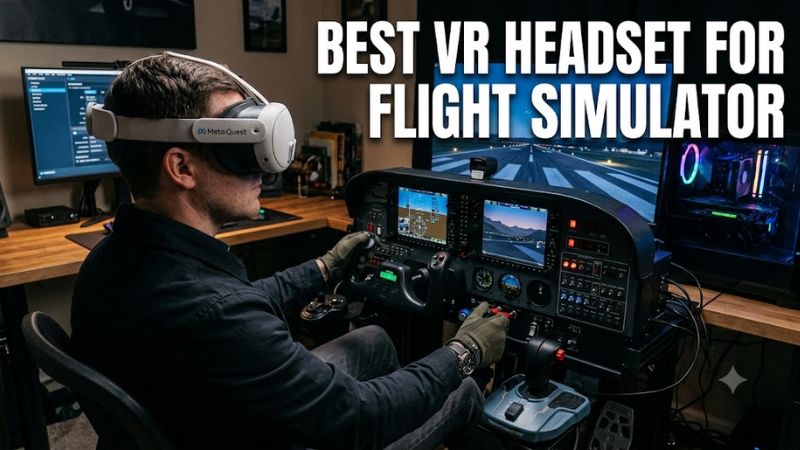
For a best vr headset for flight simulator, lens design matters because pilots repeatedly move their eyes between gauges, displays and the outside view. Quest 3 uses pancake optics with 2064 × 2208 pixels per eye, while Crystal Light uses glass aspheric lenses and 2880 × 2880 per eye. The higher panel resolution still requires substantially more GPU rendering.
Match the PC Connection
A wired DisplayPort connection can be useful when you want a direct PC video path. Crystal Light uses DisplayPort 1.4a, while Quest 3 supports PC VR through Meta Quest Link over cable or Air Link over Wi-Fi. The latter gives more flexibility, but PC VR remains dependent on the Windows gaming system rather than the headset running the simulator itself.
Check Tracking Requirements
Inside-out tracking is convenient for a seated cockpit because it does not require external base stations. Quest 3 and Crystal Light use inside-out tracking, whereas Bigscreen Beyond 2 requires SteamVR Base Stations 1.0 or 2.0. That extra hardware changes the installation requirements and should be included when comparing total setup complexity.
Match Resolution to GPU Headroom
A high-resolution headset is not automatically the right choice for every flight-sim PC. An independent MSFS 2024 report using a Crystal Light and an RTX 4090 recorded about 45 FPS after configuration changes, but that result used a specific system and settings rather than a universal benchmark. Treat it as a reference point, not a performance guarantee.
Top Picks for PC Flight Simulation
These four headsets target different flight-sim priorities rather than one universal specification. Quest 3 emphasizes flexible PC VR and pancake optics; Crystal Light emphasizes high-resolution DisplayPort output; Crystal Super pushes substantially higher pixel density; and Beyond 2 focuses on very low headset weight. Your GPU, connection preference and cockpit setup should determine the fit.
| Product | Best For | Key Spec | Compatibility | Watch Out For |
| Meta Quest 3 | Best Overall | 2064 × 2208 per eye; up to 120Hz | Windows PC via Link or Air Link | PC video is streamed |
| Meta Quest 3 | Best Value | 2064 × 2208 per eye; pancake optics | Windows PC VR | Needs a suitable gaming PC |
| Pimax Crystal Light | Cockpit clarity | 2880 × 2880 per eye; DP 1.4a | Windows PC; OpenXR/SteamVR titles | 815g headset |
| Bigscreen Beyond 2 | Long-session comfort | 2560 × 2560 per eye; 107g | Windows 10/11; SteamVR | Base Stations required |
Meta Quest 3: Best Overall
Quest 3 is a practical best vr headset for flight simulator choice when flexibility matters as much as cockpit detail. Meta lists 2064 × 2208 resolution per eye, up to 120Hz, continuous IPD adjustment and PC VR support through Link or Air Link. It also works as a standalone headset outside the simulator.
Its main weakness for dedicated PC simulation is the connection model: it does not provide the native DisplayPort path used by Crystal Light. That makes Quest 3 less suited to someone specifically prioritizing a direct PC video connection. It should also not be confused with a standalone MSFS 2024 solution; the simulator still requires a Windows gaming PC.
Meta Quest 3: Best Value
Quest 3 is also the best vr headset for flight simulator when one headset needs to cover PC VR and standalone VR. Pancake optics, inside-out tracking and both wired and wireless PC connections reduce the need for additional tracking hardware, while Meta supports 120Hz PC VR through Quest Link.
The person who should skip it is someone specifically buying for maximum cockpit pixel density and already owns a high-end PC capable of driving a higher-resolution DisplayPort headset. In that situation, Crystal Light provides 2880 × 2880 pixels per eye and direct DisplayPort 1.4a connectivity, at the cost of considerably greater headset weight.
Pimax Crystal Light: Best for Cockpit Clarity
Crystal Light is aimed directly at PC simulation, with 2880 × 2880 pixels per eye, 35 PPD, glass aspheric lenses, 110-degree horizontal FOV and 72/90/120Hz modes. Pimax lists inside-out tracking and DisplayPort 1.4a plus USB 3.0 connectivity, making it a focused cockpit-oriented design.
The real weakness is physical and rendering demand: Pimax lists the headset at 815g, and its higher pixel count asks more from the GPU. It is therefore a poor match for a modest PC or anyone prioritizing a lightweight headset. Pimax’s own MSFS material identifies Crystal Light as a flight-simulation-focused product, but performance still varies with simulator settings and hardware.
Bigscreen Beyond 2: Best for Long Sessions
Beyond 2 takes a different approach to the best vr headset for flight simulator category. Its headline specification is a 107g headset with 2560 × 2560 resolution per eye, pancake optics, up to 90Hz and a 108-degree horizontal field of view. That low weight can matter during long seated flights.
The trade-off is the surrounding hardware. Bigscreen requires SteamVR Base Stations, which are sold separately, and its PC requirements include Windows 10 or 11, 16GB RAM, a quad-core Intel or AMD CPU and an RTX 2070 or RX 5700 XT-class GPU with DisplayPort 1.4 and DSC. Someone wanting a self-contained tracking setup should look elsewhere.
FAQ: Flight Simulator VR Headset Questions
The best vr headset for flight simulator is not determined by resolution alone: Quest 3 emphasizes flexibility, Crystal Light prioritizes cockpit detail, Crystal Super targets very high visual density, and Beyond 2 minimizes headset weight. The simulator and PC configuration remain important because high-resolution VR can place substantially more load on the graphics card.
Does Microsoft Flight Simulator 2024 support PC VR?
Yes. Microsoft Flight Simulator 2024 is available on PC, with Windows 10 and DirectX 12 listed in its system requirements. Microsoft lists an RTX 2080-class GPU and 32GB RAM as recommended, while its ideal specification rises to an RTX 4080-class GPU and 64GB RAM. Those figures describe the simulator PC, not a minimum requirement for every headset.
A headset such as Quest 3 therefore acts as the VR display and input device rather than replacing the Windows PC. Crystal Light and Beyond 2 likewise depend on PC hardware. If your system falls below the simulator’s recommended specification, headset resolution alone cannot compensate for the missing CPU or GPU resources.
Is a high-resolution headset better for cockpit instruments?
Higher resolution can provide more pixels for fine cockpit details, but the practical result also depends on optics, rendered resolution and GPU performance. Crystal Light has 2880 × 2880 pixels per eye and 35 PPD, while Quest 3 has 2064 × 2208 pixels per eye and pancake optics. These specifications describe different parts of the visual system.
An independent MSFS 2024 Crystal Light report reached roughly 45 FPS in several locations after configuration changes on an RTX 4090 system, but it was not a standardized cross-headset benchmark. Because the test used a particular CPU, GPU, simulator configuration and settings, it should not be transferred directly to another PC.
Does DCS World support these PC VR headsets?
DCS World lists SteamVR and Oculus VR in its minimum VR support information, with OpenXR added to its recommended configuration. Its recommended PC specification includes Windows 10/11, an Intel or AMD processor with eight or more cores, 32GB RAM and an 8GB-or-better discrete GPU.
That does not mean every headset will produce identical performance. Connection method, render resolution, OpenXR runtime, simulator settings and aircraft or mission complexity can change the workload. A DCS benchmark using Quest 3 and Pimax hardware, for example, used an RTX 4090, Core i9-14900KF and 64GB DDR5, illustrating how demanding high-resolution VR configurations can be.
Which PC specifications matter most for flight-sim VR?
GPU capability is particularly important when driving high-resolution headsets because the PC must render the simulator for two eyes at a high display resolution. CPU performance and system memory also matter, especially in complex simulator scenes. Microsoft lists 32GB RAM as recommended for MSFS 2024 and 64GB in its ideal configuration.
Headset compatibility should also be checked before purchase. Quest 3 requires a Windows PC for PC VR, Crystal Light requires DisplayPort 1.4a and USB 3.0, while Beyond 2 requires SteamVR Base Stations plus DisplayPort 1.4 and USB 3.0. These requirements are independent of whether the PC uses DDR4 or DDR5 memory.
Final Thoughts
The best vr headset for flight simulator depends on the balance between cockpit clarity, PC performance, connection type and comfort. Quest 3 covers flexible PC VR, Crystal Light targets sharper DisplayPort simulation, while Beyond 2 favors low weight. Check your simulator, GPU and required accessories before choosing.