🛒 Best Price Today on Amazon
Prime members get fast, free shipping on everything above, plus member-only deals. New members get a 30-day free trial — cancel anytime.
Choosing the best astro, sony and jbl gaming headsets depends on your platform, wireless preferences, microphone needs, and budget. Astro, Sony, and JBL each offer different strengths, from multi-console switching to PlayStation-focused audio and spatial sound. This guide compares four options and explains which features justify the extra cost.
How to Choose a Gaming Headset
The right headset should work with your actual gaming devices, not simply advertise broad compatibility. Before choosing among Astro, Sony, and JBL, consider how you connect, whether you need simultaneous device audio, how long you play between charges, and which sound features work on your platform.
1. Check PC and Console Compatibility
Wireless gaming headsets can use proprietary USB transmitters, Bluetooth, or both. These connections are not interchangeable: a headset that works wirelessly with a PlayStation may require a different connection for Xbox, while some PC software features are unavailable on consoles. Check the exact model and console generation before buying.
For multi-platform households, connection flexibility matters more than a long compatibility list. Confirm whether game audio, microphone input, surround processing, and chat mixing work on each device. A 3.5 mm cable can provide a fallback on supported equipment, but it may not preserve every wireless feature.
2. Decide Which Audio Features Matter
Virtual surround sound, spatial audio, active noise cancellation (ANC), and head tracking serve different purposes. Spatial processing can help present directional cues, while ANC reduces certain external sounds. Head tracking changes the perceived sound position as you move your head; it is an immersion feature rather than a guarantee of better competitive performance.
For competitive shooters, prioritize clear positional cues, a consistent connection, and understandable voice chat. For cinematic games, spatial processing and stronger isolation may be more appealing. Remember that advertised driver size or frequency response alone cannot establish which headset sounds best.
3. Consider Microphone Quality and Comfort
A headset can deliver enjoyable game audio but still disappoint during team chat. Look for a boom microphone, convenient mute controls, and software adjustments that work with your operating system. Microphone noise reduction can help in a busy room, but results depend on the environment and the implementation.
Weight, clamping force, ear-cup depth, cushion material, and heat buildup also matter during long sessions. Specifications cannot fully predict fit, particularly for people who wear glasses. Buy from a seller with a suitable return policy if you cannot try the headset first.
4. Compare Battery Life, Software, and Value
Manufacturer battery estimates are useful for planning, but actual runtime depends on volume, wireless mode, lighting, ANC, and other features. A dock can make daily charging easier, while USB charging during play may matter more than maximum advertised runtime for marathon sessions.
Also consider whether you will use the accompanying software. Equalizers, microphone filters, spatial audio, and device switching can be valuable, but platform restrictions may limit them. For the best Astro, Sony, or JBL choice, pay for features you will actually use instead of selecting the most expensive model by default.
Top Astro, Sony, and JBL Gaming Headsets
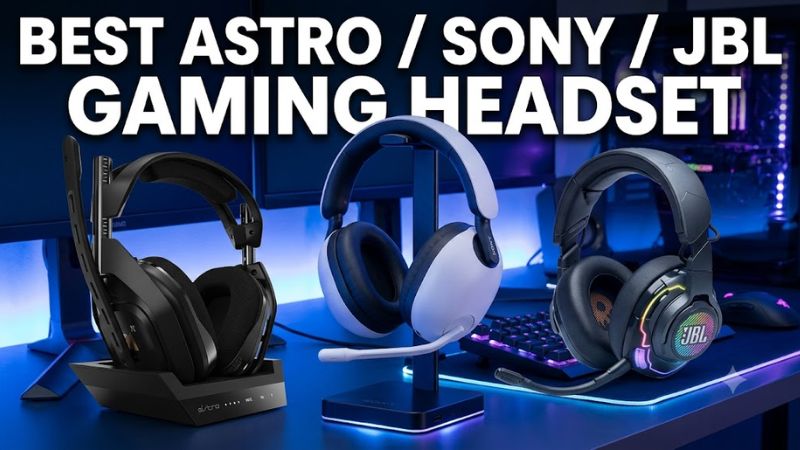
These four picks cover different priorities rather than pretending one headset suits every gamer. The Astro is aimed at multi-console setups, Sony targets PC and PlayStation players who value noise cancellation and a lighter design, and JBL offers spatial audio features with several connection options. Choose by platform first, then compare the trade-offs.
| Product | Best For | Key Spec | Compatibility | Watch Out For |
| Astro A50 X | Multi-console setups | HDMI 2.1 base station; up to 24-hour battery life | PC, PS5, Xbox Series X|S | Premium, specialized setup |
| Sony INZONE H9 II | PC and PS5 gaming | Approx. 260 g; up to 30-hour battery life | PC, PS5, Bluetooth devices | USB wireless dongle does not support Xbox |
| JBL Quantum 910 Wireless | Immersive PC gaming | 50 mm drivers; ANC and head tracking | PC, PS5, PS4, Switch; wired 3.5 mm support on additional devices | Approximately 420 g |
| JBL Quantum 910P Console Wireless | PlayStation-focused wireless gaming | 50 mm drivers; ANC and head tracking | PS5, PS4 and other supported connections | Check connection-specific features before buying |
1. Astro A50 X — Best for Multi-Console Setups
The Astro A50 X is the most compelling option here if you regularly switch between a PC, PlayStation 5, and Xbox Series X or S. Its base station supports HDMI 2.1 connections for the consoles, with one-button switching and game/chat mixing. Logitech G specifies up to 24 hours of battery life.
The important limitation is the setup itself: the base station and HDMI connections take more space and planning than a straightforward USB headset. HDMI cables are not included, and your display arrangement must support the intended signal path. If you mainly play on a single PC or console, this complexity may offer little benefit.
Buy if: You use multiple supported systems and want convenient switching.
Consider an alternative if: You need a simpler, less expensive headset for one device.
2. Sony INZONE H9 II — Best for PC and PS5
The Sony INZONE H9 II is a strong fit for players who want a lightweight wireless headset with active noise cancellation. Sony lists a weight of approximately 260 g, a closed-back design, carbon-composite drivers, and up to 30 hours of battery life. Its supplied USB-C wireless transceiver supports PC and PS5 gaming.
Dual wireless connectivity allows a compatible Bluetooth device to remain connected while game audio comes through the low-latency wireless link. This is useful if you want smartphone calls alongside gameplay. However, the headset’s USB wireless connection is not supported on Xbox consoles, so Xbox players should verify an alternative connection’s capabilities before purchasing.
Buy if: You primarily play on PC or PS5 and value low weight, ANC, and dual connectivity.
Consider an alternative if: You need direct Xbox wireless support or a multi-console switching base station.
3. JBL Quantum 910 Wireless — Best for Immersive Audio Features
The JBL Quantum 910 Wireless combines 50 mm drivers with active noise cancellation, head tracking, Bluetooth 5.2, and a dedicated 2.4 GHz wireless connection. JBL specifies up to 39 hours of battery life. The headset also supports a 3.5 mm audio connection, offering flexibility across supported computers, consoles, mobile devices, and other equipment.
Its main drawback is weight: the listed figure is approximately 420 g, which is substantially heavier than the Sony H9 II. JBL’s QuantumENGINE software provides additional sound and microphone controls on PC, but the company’s specifications note that these software features are not all available on consoles. The advertised battery figure is a maximum, not a guarantee for every feature configuration.
Buy if: You want ANC, head tracking, and multiple connection methods in one headset.
Consider an alternative if: You prioritize a lightweight design or need a headset optimized for Xbox wireless use.
4. JBL Quantum 910P Console Wireless — Best for PlayStation-Focused Features
The JBL Quantum 910P Console Wireless is worth considering when PlayStation gaming is your priority and you want the Quantum range’s immersive audio features. The official specification lists 50 mm drivers, active noise cancellation, head tracking, Bluetooth, and a 3.5 mm audio input. It also includes a USB wireless transmitter for supported connections.
Do not assume that the 910P and standard Quantum 910 Wireless are interchangeable. Their connection support and setup details differ, and software features available on PC may not carry over to PlayStation. Before buying, check the precise model number, included transmitter, and whether the connection you plan to use supports both game audio and microphone chat.
Buy if: You primarily play on a supported PlayStation console and want the Quantum feature set.
Consider an alternative if: You need a single headset with verified wireless support across PC, PlayStation, and Xbox.
FAQ
Is Astro, Sony, or JBL best for PC gaming?
Astro is the strongest fit for players switching between multiple consoles and a PC, Sony suits PC-focused players who value a lightweight headset with ANC, and JBL appeals to players who want head tracking and several connection options. The best choice depends on the exact model and the features you will use.
Can these gaming headsets work with PS5 and Xbox?
Not all four models support both consoles wirelessly. The Astro A50 X supports PS5 and Xbox Series X|S through its base station, while the Sony INZONE H9 II’s USB wireless connection is designed for PC and PS5 rather than Xbox. Check the exact JBL model and connection method before buying.
Is active noise cancellation worth paying extra for?
ANC is worthwhile if you play in a noisy room or want to reduce distracting environmental sounds. It does not automatically improve directional accuracy or microphone clarity, and its effect on battery life varies by model and settings. If you play in a quiet room, comfort and sound quality may matter more.
Which gaming headset offers the best value?
The best value is the model whose features match your setup at a price you can justify. The Astro A50 X makes the most sense when multi-console switching matters, while Sony’s lighter design may appeal to PC and PS5 players. Compare current US prices, warranty terms, and return policies before deciding.
Final Thoughts
The best astro / sony / jbl gaming headset depends on your setup more than its brand name. Choose the Astro A50 X for multi-console switching, the Sony INZONE H9 II for lightweight PC and PS5 gaming, or a JBL Quantum 910 model for immersive audio features. Confirm compatibility and current pricing before buying.