🛒 Best Price Today on Amazon
Prime members get fast, free shipping on everything above, plus member-only deals. New members get a 30-day free trial — cancel anytime.

CORSAIR Vengeance LPX DDR4 RAM 32GB (2x16GB) Up to 3200MHz CL16-20-20-38 1.35V Intel XMP AMD EXPO Computer Memory – Black (CMK32GX4M2E3200C16)
Included for 'Best ram for streaming while gaming: Practical Best Picks' because the listing specifies Black (CMK32GX4M2E3200C16), details this guide uses to compare options.
View on Amazon
CORSAIR Vengeance RGB PRO DDR4 RAM 32GB (2x16GB) 3200MHz CL16-20-20-38 1.35V Intel AMD Desktop Computer Memory - Black (CMW16GX4M2C3200C16)
Included for 'Best ram for streaming while gaming: Practical Best Picks' because the listing specifies Black (CMW16GX4M2C3200C16), details this guide uses to compare options.
View on Amazon
CORSAIR Vengeance RGB DDR5 RAM 32GB (2x16GB) Up to 6000MHz CL30-36-36-76 1.40V AMD EXPO Intel XMP Desktop Computer Memory - Gray (CMH32GX5M2B6000Z30K)
Included for 'Best ram for streaming while gaming: Practical Best Picks' because the listing specifies Gray (CMH32GX5M2B6000Z30K), details this guide uses to compare options.
View on Amazon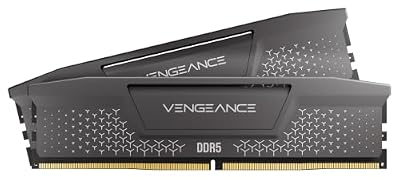
CORSAIR Vengeance RS DDR5 32GB (2 x 16GB) Up to 6000MHz AMD Intel RAM
Included for 'Best ram for streaming while gaming: Practical Best Picks' as a relevant option in this category; details come from the product listing.
View on AmazonBest ram for streaming while gaming means choosing enough capacity first, then matching DDR5 speed, timings, and platform support to your CPU and motherboard. For most single-PC streamers, 32GB is a practical starting point, while 64GB gives more room for demanding games, OBS scenes, browsers, and creation work.
How to Choose RAM for Gaming and Streaming
Capacity is the first decision because gaming, OBS, browser sources, Discord, recording software, and other background programs share system memory. Corsair lists 32GB for gaming and streaming, while current 2026 buying guides commonly place 64GB in the heavier streaming and content-creation tier.
Start With 32GB or 64GB
For a single-game stream with a conventional OBS scene, 32GB in a matched 2×16GB kit is a sensible starting point. It leaves substantially more room than 16GB for Windows, the game, OBS, chat, browser tabs, and overlays without making capacity the first limitation.
Move to 64GB when the workload includes demanding games, numerous browser sources, local recording, video editing, virtual machines, heavy mods, or several creative applications. The extra capacity primarily provides workload headroom rather than automatically raising game frame rates.
Target DDR5-6000 With Sensible Timings
DDR5-6000 is a practical target for many current AMD and Intel desktop systems, but the exact supported speed depends on the processor and motherboard. PC Gamer’s 2026 comparison used DDR5-6000 CL30 against DDR5-7200 CL34 and found small differences in five games on Intel platforms.
That comparison used 1080p settings ranging from Ultra to Epic, including Cyberpunk 2077 at RT Ultra with DLSS Balanced. Average FPS differences were 0–4% in four of the five games, while Baldur’s Gate 3 on the Core Ultra 7 270K Plus showed an 8% 1% low difference. Faster memory therefore should not be treated as the main streaming upgrade.
Buy Matched Two-Module Kits
A matched 2×16GB or 2×32GB kit is preferable to combining separate memory packages. G.SKILL explicitly states that its QVL validation applies to a single memory kit and advises against mixing kits, even when the modules appear to belong to the same product family.
Two-module kits also fit the usual dual-channel desktop configuration and leave the remaining motherboard slots available where the board provides four DIMM slots. Adding a second unrelated kit later can change memory loading and may require lower settings, so capacity planning before purchase is useful for streaming systems.
Check Platform and Motherboard Support
DDR5 is not interchangeable with DDR4, and desktop UDIMMs are different from laptop SO-DIMMs. Check the motherboard’s memory type, CPU generation, QVL, maximum supported capacity, and recommended DIMM slots before buying. AMD EXPO and Intel XMP profiles also depend on platform support.
The advertised 6000 MT/s setting is normally a memory profile rather than the default JEDEC speed. Corsair specifies 4800 MT/s as the SPD speed on its 32GB DDR5-6000 CL30 kit, while the 6000 MT/s profile requires the appropriate BIOS configuration and system support.
Top Picks for Gaming and Streaming
These four kits cover the main buying situations without treating memory speed as a substitute for CPU or GPU performance. The selections use current DDR5 products with documented capacities and profiles; availability and pricing can change, so the exact part number should be checked before purchase.
| Product | Best For | Key Spec | Compatibility | Watch Out For |
| Corsair Vengeance 64GB | Best Overall | 64GB, 2×32GB, DDR5-6000 CL30 | Intel 700/800; verify board QVL | 6000 MT/s uses XMP configuration |
| Corsair Vengeance 32GB | Best Value | 32GB, 2×16GB, DDR5-6000 CL30 | AMD 600/800, Intel 600/700/800 | Less headroom for heavy creation |
| Kingston FURY Beast 64GB | Best For AMD EXPO | 64GB, 2×32GB, DDR5-6000 CL30 | DDR5 UDIMM; AMD EXPO | Check exact motherboard support |
| G.SKILL Trident Z5 Neo RGB 64GB | Best For RGB Builds | 64GB, 2×32GB, DDR5-6000 CL30 | Intel XMP/AMD EXPO | RGB adds cost without memory benefit |
Corsair Vengeance 64GB: Best Overall
The 64GB Corsair Vengeance kit uses two 32GB DDR5 modules rated at 6000 MT/s with CL30 timings and a 1.40V tested profile. Corsair lists Intel 700- and 800-series compatibility for this specific SKU, with a 4800 MT/s SPD profile underneath the configured performance setting.
Buy it when gaming and streaming regularly overlap with browsers, recording, editing, or other memory-heavy software. Its weakness is platform targeting: the specific CMK64GX5M2B6000C30 listing is Intel-oriented, so an AMD buyer should choose a verified EXPO SKU instead. It is unnecessary for a light streaming workload.
Corsair Vengeance 32GB: Best Value
The 32GB Corsair Vengeance kit provides two 16GB modules at DDR5-6000 CL30, with both AMD EXPO and Intel XMP support on the documented SKU. Corsair lists compatibility across AMD 600/800-series and Intel 600/700/800-series platforms, subject to the individual motherboard and CPU configuration.
Choose it when the stream uses one game, OBS, normal browser sources, Discord, and routine background applications. The real limitation is capacity: a heavily modded game plus recording, editing, large browser sessions, or virtual machines can consume the available headroom faster than a 64GB system.
Kingston FURY Beast 64GB: Best For AMD EXPO
Kingston’s KF560C30BBEK2-64 is a 64GB kit using two 32GB DDR5 modules rated at 6000 MT/s, 30-36-36 timings, and 1.4V. Kingston identifies it as a FURY Beast Black kit with AMD EXPO, while its part-number documentation confirms the two-module and capacity coding.
It suits an AMD gaming-and-streaming build where 64GB capacity and an EXPO profile are priorities. The weakness is that the 6000 MT/s profile still depends on motherboard and CPU support, so buyers should verify the exact part number against the board QVL. It should not be chosen solely for the Kingston branding.
G.SKILL Trident Z5 Neo RGB 64GB: Best For RGB Builds
G.SKILL lists the Trident Z5 Neo RGB family in 64GB 2×32GB configurations, with DDR5-6000 profiles including CL30 variants and support for Intel XMP 3.0 and AMD EXPO on relevant models. Its QVL pages also identify specific compatible AMD X870 and Intel Z890 boards.
This kit fits a system where RGB presentation matters alongside 64GB capacity and a 6000 MT/s profile. Its weakness is that lighting does not improve streaming performance, while exact timings and profiles vary by SKU. Buyers who do not care about RGB should compare non-RGB kits at the same capacity and memory settings.
FAQ: RAM for Streaming While Gaming
Is 32GB enough for gaming and streaming?
Yes, 32GB is enough for many single-PC gaming-and-streaming setups when the game, OBS, Discord, browser sources, and normal background applications share memory. Corsair specifically lists 32GB for gaming and streaming, while heavier creation workloads move into the 32GB-plus category.
The important distinction is workload rather than stream resolution alone. A simple OBS scene can fit comfortably, while numerous browser sources, large mod packs, recording software, editing applications, or virtual machines can raise memory demand. Watch actual RAM usage before deciding that more capacity is required.
Does faster RAM increase streaming FPS?
Usually, faster RAM has a smaller effect than sufficient capacity, and the exact gaming impact depends on the CPU, GPU, resolution, settings, and game engine. PC Gamer’s 2026 comparison found small differences between DDR5-6000 CL30 and DDR5-7200 CL34 across five games at 1080p settings.
That comparison used an Intel Core Ultra platform, so its numbers should not be transferred directly to AMD systems or different resolutions. Its useful takeaway is narrower: once capacity is sufficient, paying substantially more for extreme memory speed does not automatically translate into a similar gaming or streaming improvement.
Should streamers buy 64GB instead of 32GB?
64GB makes more sense when the computer regularly handles gaming plus streaming plus other memory-heavy workloads, rather than because streaming itself has a fixed 64GB requirement. Current guidance places 32GB around the normal gaming-and-streaming tier and 64GB around heavier creation and multitasking.
A 64GB kit is particularly useful when memory usage approaches the system’s physical capacity during actual streams. If Windows and the running applications remain comfortably below 32GB, additional capacity may sit unused. Capacity should therefore follow the workload rather than an assumption that every streamer needs 64GB.
Does RAM speed matter more than RAM capacity?
Capacity should be addressed first when the system is running short of memory, while speed and timings become secondary once sufficient capacity is available. A 32GB DDR5-6000 kit can therefore make more sense than a smaller, faster kit for a streamer running several applications together.
Platform compatibility also matters more than chasing a headline memory speed. Corsair, Kingston, and G.SKILL all document specific profiles and motherboard support requirements, and their rated speeds can require BIOS configuration. Check the exact SKU and motherboard QVL before assuming a profile will operate at its advertised setting.
Final Thoughts
For most single-PC streamers, best ram for streaming while gaming starts with a matched 32GB DDR5 kit and moves to 64GB when real workloads justify the extra capacity. DDR5-6000 with sensible timings is a practical target, but motherboard, CPU, profile support, and workload should guide the final purchase.