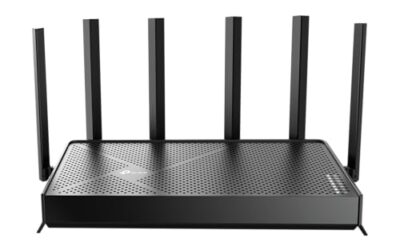
- Top Pick: TP-Link Tri-Band BE11000 Wi-Fi 7 Gaming Router Archer GE650 | 6-Stream 11 Gbps supports 320MHz | 2×5G + 3×2.5G Ports USB 3.0 | Game Acceleration, Dedicated Gaming Port & Panel, RGB Lighting|HomeShield
- Best Value: TP-Link BE6500 Dual-Band WiFi 7 Router (BE400) – Dual 2.5Gbps Ports, USB 3.0, Covers up to 2,400 sq. ft., 90 Devices, Quad-Core CPU, HomeShield, Private IoT, Free Expert Support
- Premium Choice: ASUS ROG Rapture GT-BE98 Pro WiFi 7 Gaming Router – Quad-Band, 30Gbps, Mesh
Changing your DNS is one of the cheapest, fastest tweaks you can make to improve your online gaming experience, yet most players never touch the default their internet provider hands them. A good DNS resolver can shorten the time it takes to connect to game servers, reduce lookup delays when matchmaking, and even help you sidestep sluggish or unreliable ISP infrastructure. In 2026, with more games than ever relying on cloud-based backends, those small gains add up.
This guide explains what gaming DNS actually does, which providers are worth using this year, and how to apply the change at the router level so every device benefits at once. Because your router is where DNS settings live for the whole household, we will also point to capable gaming routers that make the switch simple and keep your connection fast under load.
As an Amazon Associate we earn from qualifying purchases at no extra cost to you.





⚡ Save on Your Next PC — Amazon Prime
Prime members get fast free shipping on the systems above, plus early access to Prime Day & Black Friday PC deals. New members get a 30-day free trial.
Watch: Best DNS For Gaming 2026 — Video Review
What DNS Does for Gaming
DNS, the Domain Name System, translates human-readable server addresses into the numeric IP addresses your devices actually connect to. Every time you launch a game, join a lobby, or download an update, your system performs DNS lookups. A slow or overloaded resolver adds tiny delays to each of those steps. Switching to a fast, well-distributed DNS provider trims that overhead, which can mean quicker connections and less time staring at loading screens.
It is worth setting expectations, though: DNS does not lower your in-game ping to a server once you are connected. What it improves is the speed and reliability of finding and reaching those servers in the first place, plus resistance to certain outages and filtering.
Best Gaming DNS Providers in 2026
- Cloudflare (1.1.1.1): Consistently among the fastest resolvers worldwide, with strong privacy and a gaming-friendly reputation.
- Google Public DNS (8.8.8.8): Rock-solid reliability and broad global coverage make it a safe default for most players.
- Quad9 (9.9.9.9): Adds security filtering against malicious domains without a major speed penalty.
- OpenDNS: Offers customizable filtering and stability, handy for shared or family networks.
How to Change DNS at the Router Level
Setting DNS on your router applies it to every console, PC, and handheld automatically, which is far tidier than editing each device. Log in to your router’s admin panel, find the WAN or internet settings, and enter your chosen primary and secondary DNS addresses. Save, reboot, and the whole network uses the new resolver. A modern router with a capable processor, such as the TP-Link Archer GE650 with its game acceleration features, makes this menu easy to find and keeps traffic prioritized afterward.
If your current router feels sluggish or buries these settings, upgrading is worthwhile. The ASUS ROG Rapture GT-BE98 Pro and the TP-Link Archer AXE75 both offer clean interfaces, fast hardware, and gaming-oriented quality-of-service controls that complement a good DNS choice.
Getting the Most From Your Setup
DNS is one piece of a low-latency puzzle. Pair it with a wired Ethernet connection where possible, enable your router’s gaming QoS to prioritize game packets, and keep firmware updated for the latest performance fixes. Routers like the MSI Radix AXE6600 with its AI QoS or the NETGEAR Nighthawk RS90 give you granular control over traffic, so your carefully chosen DNS is not undermined by a congested network. Together, these tweaks deliver a snappier, more dependable online experience.
Frequently Asked Questions
Will changing DNS reduce my ping?
Not directly. DNS speeds up finding and connecting to servers, but your in-game ping is determined by the physical route and distance to that server once connected.
Is it safe to use a public DNS like Cloudflare?
Yes. Major providers such as Cloudflare, Google, and Quad9 are reputable, fast, and often more private and reliable than a default ISP resolver.
Should I set DNS on the router or each device?
The router is easier and covers everything at once, including consoles that make DNS changes awkward. Per-device settings are only needed for special cases.
Does a better router improve DNS performance?
A faster router processes lookups and manages traffic more efficiently, and its QoS features help ensure your DNS gains are not lost to network congestion.
Conclusion
Dialing in the best DNS for gaming in 2026 costs nothing and takes minutes, especially when you apply it once at the router for the whole home. Combine a fast resolver like Cloudflare or Google with a capable gaming router such as the TP-Link Archer AXE75, enable QoS, and use wired connections where you can. These simple steps make matchmaking quicker and your connection more dependable, letting you spend more time playing and less time waiting.