- Top Pick: Logitech for Creators Litra Glow Premium LED Streaming Light – Graphite
- Best Value: UBeesize 10" Key Light for Streaming, Desk Ring Light with Adjustable Arm, Zoom Lighting for Home Office, Gaming, Podcast, Video Calls, and Recording
- Premium Choice: NEEWER 25W 12.9" Streaming Key Light with Desk Stand/2.4G Remote, GL25B
Great streams are not won on frame rate alone. In 2026, viewers scroll past channels in less than three seconds, and the two fastest ways to look and sound like a professional are still the same: a properly diffused key light on your face and a clean, broadcast-grade microphone in front of it. Webcams and headset mics have improved, but nothing closes the gap between “someone talking in a dim bedroom” and “a creator I want to subscribe to” faster than dedicated lighting and audio gear. That is exactly what this guide covers.
- Streaming Key Lights Explained: Panel Size, Color Temperature, and Brightness
- USB vs XLR Microphones: Which Should Streamers Buy?
- Cardioid Pickup, Arm Mounts, and Positioning
- Comparison Table: Streaming Lights and Mics at a Glance
- Budget vs Pro: Building the Right Kit for Your Channel
- The Verdict: Our Top Picks for 2026
- Related Guides
- Frequently Asked Questions
- Related Guides
- Related Articles
We put the leading streaming light panels and USB/XLR microphones through their paces for Twitch, YouTube, Kick, and TikTok Live workflows. On the lighting side, the Elgato Key Light, Key Light Air, Ring Light, and Logitech Litra Glow/Beam dominate desk setups because they are edge-lit LED panels tuned for skin tones and controllable from software. On audio, the field splits between plug-and-play USB mics (Elgato Wave:3, Blue Yeti, Rode NT-USB) and studio-flavored options that straddle USB and XLR (Elgato Wave DX, Shure MV7, Shure SM7dB). Below we break down what actually matters when you buy.
As an Amazon Associate we earn from qualifying purchases at no extra cost to you. Product prices and availability are accurate as of the date shown and are subject to change.



Lowest in 30 days

Save $10.00


Whether you are lighting a single-person talking-head setup or building a multi-cam creator studio, the principles are identical: soft, adjustable light at eye level, and a cardioid microphone positioned close to your mouth on a solid boom arm. Nail those two things and your production value jumps overnight.
As an Amazon Associate we earn from qualifying purchases…
🛒 Best Price Today on Amazon
Prime members get fast, free shipping on everything above, plus member-only deals. New members get a 30-day free trial — cancel anytime.
Streaming Key Lights Explained: Panel Size, Color Temperature, and Brightness
A key light is your primary, purpose-built light source, usually placed at 45 degrees to one side of your face and slightly above eye level. Unlike a bare bulb or a harsh ring, a good streaming panel uses a large diffusion layer so the light wraps softly around your features and hides skin texture instead of exaggerating it. Three specs decide how good a panel is:
- Panel size and diffusion. Bigger panels produce softer, more flattering light. The Elgato Key Light’s roughly 100-square-inch face is noticeably softer than compact clip-ons like the Logitech Litra Glow. Larger surface area equals fewer harsh shadows.
- Color temperature (measured in Kelvin). Look for an adjustable range, typically 2900K (warm) to 7000K (cool daylight). Being able to dial temperature lets you match ambient room light or window light so your face does not look orange or blue.
- Brightness in lumens. The full-size Elgato Key Light hits around 2800 lumens, plenty to overpower a bright room. The Key Light Air lands near 1400 lumens, which is fine for controlled indoor spaces. More lumens means more headroom to keep ISO low and your image clean.
The other quiet advantage of the Elgato and Litra ecosystems is app control: brightness and temperature adjust from the Stream Deck or a phone, and can be tied to scene changes. If you are already deep into a Stream Deck build, see our Stream Deck workflow guide for tying lighting cues to your scene transitions.
USB vs XLR Microphones: Which Should Streamers Buy?
The single biggest audio decision is USB versus XLR, and the honest answer is that most streamers should start with USB and only graduate to XLR when they have a reason to.
USB microphones like the Blue Yeti, Rode NT-USB, and Elgato Wave:3 plug straight into your PC, carry their own built-in audio interface, and are ready in under a minute. The Wave:3 stands out for streamers because of its onboard Clipguard (which prevents distortion when you get loud during a clutch moment) and tight integration with Wave Link software for mixing multiple audio sources. The Yeti remains the value default thanks to multiple pickup patterns, though its side-address design and sensitivity mean it picks up more room noise.
XLR microphones like the Shure SM7dB and Elgato Wave DX require a separate audio interface or mixer, which adds cost and a small learning curve. What you get in return is upgradeability, better rejection of background noise, and that thick “podcast radio” tone. The Shure SM7dB is notable because it has a built-in preamp, so it no longer demands a pricey inline booster to reach usable levels. The Shure MV7 hedges the bet entirely: it offers both USB and XLR outputs, so you can start USB today and move to an interface later without rebuying. If you are weighing a full audio-interface upgrade, our audio interface buying guide walks through gain, phantom power, and connectivity.
Cardioid Pickup, Arm Mounts, and Positioning
Almost every mic here uses a cardioid pickup pattern, meaning it captures sound from the front and rejects it from the sides and rear. For a solo streamer that is exactly what you want: your voice in, keyboard clatter and room echo out. Position matters enormously; a cardioid mic sounds thin at 18 inches and rich at 4 to 6 inches, so getting the mic close is free EQ.
That is why a boom arm is not optional. A desk stand puts the mic too low and transmits every keyboard thump directly into your audio. A spring or friction-based arm (the Elgato Wave Mic Arm LP and Rode PSA1+ are the go-to choices) floats the mic near your mouth, keeps it out of the camera frame, and isolates it from desk vibration. Confirm the arm’s thread and weight rating match your mic; heavier dynamic mics like the SM7dB need a sturdier arm than a lightweight condenser. For clean cable management on a boom-arm build, check our desk setup and cable routing guide.
Comparison Table: Streaming Lights and Mics at a Glance
| Product | Type | Standout Feature | Best For | Approx Price (2026 USD) |
|---|---|---|---|---|
| Elgato Key Light | Key light (panel) | 2800 lumens, full app control | Bright rooms, pro setups | $199 |
| Logitech Litra Beam | Key light (compact) | TrueSoft diffusion, desk clamp | Budget desk lighting | $99 |
| Elgato Wave:3 | USB microphone | Clipguard + Wave Link mixing | Plug-and-play streamers | $149 |
| Shure MV7 | USB/XLR hybrid mic | Dual output, future-proof | Upgrade-minded creators | $249 |
| Shure SM7dB | XLR microphone | Built-in preamp, broadcast tone | Serious podcasters/pros | $499 |
Budget vs Pro: Building the Right Kit for Your Channel
You do not need to spend $700 to sound and look great. Match the kit to where your channel actually is:
- Starter (under $200 total). A Logitech Litra Glow or Beam plus a Blue Yeti gets you soft light and clear voice for well under $200 combined. Ideal for new streamers testing whether they enjoy the grind.
- Core creator (roughly $350). An Elgato Key Light Air paired with an Elgato Wave:3 and a basic boom arm is the sweet spot: app-controlled lighting, distortion-proof USB audio, and full software mixing.
- Pro studio ($700+). Two Elgato Key Lights for key-and-fill, a Shure SM7dB on a Rode PSA1+ arm, and an audio interface deliver a look and sound indistinguishable from a broadcast set.
Spend where the audience notices first. Most viewers forgive a modest camera long before they forgive muddy audio or a face lost in shadow, so if your budget forces a choice, prioritize the microphone and a single quality key light over a second camera.
The Verdict: Our Top Picks for 2026
For the best all-around streaming setup in 2026, the Elgato Key Light plus the Elgato Wave:3 is the combination we recommend most often. The ecosystem is tightly integrated, both pieces are controllable from a Stream Deck, and the results look and sound professional out of the box. Budget-focused creators should grab a Logitech Litra Beam and a Blue Yeti, while anyone building toward a serious podcast or long-term channel should invest in the Shure MV7 now so they can move from USB to XLR later without rebuying. Whatever you choose, remember the fundamentals: soft light at eye level, a cardioid mic close to your mouth on a solid arm, and color temperature matched to your room.
Frequently Asked Questions
Do I need a key light if I already have a ring light?
A ring light works, but a rectangular key light panel produces softer, more even light and avoids the telltale circular catchlights in your eyes. Panels like the Elgato Key Light also offer wider color-temperature control and app-based brightness adjustment, which makes them easier to match to room lighting and integrate into scene automation.
Is a USB or XLR microphone better for streaming?
For most streamers, USB is better because it is simpler, cheaper, and sounds excellent with mics like the Elgato Wave:3 or Rode NT-USB. Choose XLR only if you want maximum upgradeability, superior background-noise rejection, and the ability to add an interface or mixer. The Shure MV7 offers both outputs, making it the safest long-term pick.
What color temperature should I set my key light to?
Match your key light to the dominant ambient light in your room. If you stream near a daylight window, set the panel around 5600K to 6500K; for a warm, lamp-lit room, drop to 3200K to 4000K. The goal is consistency so your skin tone looks natural rather than orange or blue on camera.
Why do I need a boom arm instead of a desk stand?
A boom arm positions the microphone close to your mouth for a fuller sound, keeps it out of your camera frame, and isolates it from desk vibrations like keyboard and mouse clicks. Cardioid mics reward close placement, so an arm delivers noticeably richer audio and less background noise than a standard desk stand.
Related Guides
- Best Shure Mv6 Usb Gaming Microphone 2026
- Best Microphone Gaming Usb 2026
- Best Usb Condenser Microphone For Gaming 2026
Ready to decide? Our #1 pick for 2026 is the Elgato Key Light.
Live price & availability on Amazon.
Top picks from this guide
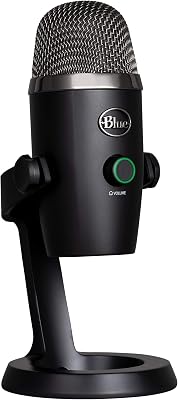
 Logitech GLogitech for Creators Blue Yeti Nano USB Microphone for Gaming,…$80 \xc2\xb7 99/100
 FIFINEFIFINE AmpliGame AM8 USB/XLR Dynamic Microphone for Gaming Streaming$57 \xc2\xb7 98/100
 FIFINEFIFINE AmpliTank K688CT Podcast Microphone Kit, USB/XLR Dynamic Vocal Mic$80 \xc2\xb7 97/100Logitech GLogitech for Creators Litra Glow Premium LED Streaming Light -…$60 \xc2\xb7 94/100