
- Top Pick: Capture Card, 4K HDMI Video Capture Card, Game Capture Card, 1080P 60FPS Video Capture Device, HDMI to USB 3.0 Capture Card for Streaming, Work with Camera/Xbox/PS4/PS5/PC/OBS
- Best Value: USB 3.0 HDMI Video Capture Card for Switch 2 PS5 Xbox DSLR Streaming
- Premium Choice: Elgato 4K S Capture Card for PS5, Xbox Series X/S, Switch 2
Streaming console gameplay in 2026 is no longer a niche hobby. With the Nintendo Switch 2 pushing 4K docked output, the PS5 and PS5 Pro pumping out HDR at high frame rates, and the Xbox Series X delivering 4K120 in supported titles, the humble capture card has become the single most important piece of hardware in a creator’s kit. It is the bridge between your console and your streaming PC, and if you pick the wrong one you will be stuck with washed-out HDR, input lag on your gameplay feed, or a resolution ceiling that makes your channel look dated next to the competition.
- External USB vs Internal PCIe Capture Cards
- 4K vs 1080p Capture: What You Actually Need
- 4K60 HDR Passthrough and Latency Explained
- Console Compatibility: PS5, Switch 2, Xbox Series X and PC
- Best Capture Cards for Streaming: 2026 Comparison
- Verdict: Which Capture Card Should You Buy?
- Related Guides
- Frequently Asked Questions
- Related Guides
- Related Articles
- Related Guides
The good news is that the current generation of capture cards is genuinely excellent. Elgato, AVerMedia, and Razer have all shipped hardware that handles 4K60 HDR10 passthrough with zero-lag pass-through to your TV, USB 3.2 external boxes that plug into a laptop, and internal PCIe cards that free up your CPU. The hard part is matching the right card to your setup, budget, and the specific consoles you plan to capture. A creator who only records 1080p Switch 2 clips has very different needs from a dual-PC streamer running 4K60 HDR off a PS5 Pro.
As an Amazon Associate we earn from qualifying purchases at no extra cost to you.






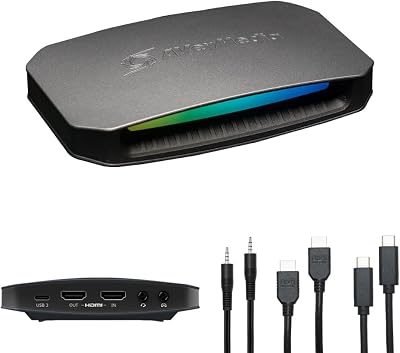


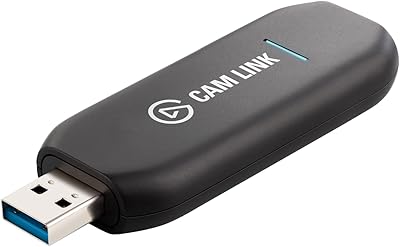

In this guide we break down external USB versus internal PCIe capture, explain why 4K60 HDR passthrough matters even if you stream at 1080p, cover latency and compatibility for every current console, and give you a clear verdict on which card to buy. If you are still deciding on the rest of your rig, our complete streaming PC build guide pairs perfectly with everything below.
As an Amazon Associate we earn from qualifying purchases…
🛒 Best Price Today on Amazon
Prime members get fast, free shipping on everything above, plus member-only deals. New members get a 30-day free trial — cancel anytime.
External USB vs Internal PCIe Capture Cards
The first decision every streamer faces is external versus internal. Both approaches capture the same signal, but the form factor changes how and where you can use them.
External USB capture cards connect over USB 3.0 or USB 3.2 Gen 1/2 and work with any modern desktop or laptop. This is the format of choice for the vast majority of console streamers because it is plug-and-play, portable, and does not require you to open your PC case. The Elgato HD60 X and 4K X, along with the AVerMedia Live Gamer series, are the dominant external boxes. Their only real drawback is that USB bandwidth caps the very highest capture modes, and a poorly powered USB port can introduce dropped frames.
Internal PCIe capture cards, like the Elgato 4K60 Pro, slot directly into a spare PCIe x4 slot in your desktop. Because PCIe offers far more bandwidth than USB, internal cards historically hit higher capture resolutions and frame rates with lower CPU overhead. They are the pro choice for single-PC streamers who want to capture 4K60 HDR while gaming on the same machine. The trade-off is zero portability and the need for an available slot and case space. If you are building around this, make sure your motherboard has the lanes to spare after your GPU.
- Choose external USB if you stream from a laptop, use a two-PC setup, or want to move your capture rig between rooms.
- Choose internal PCIe if you run a single powerful desktop and want the lowest CPU load and rock-solid 4K60 capture.
- USB-C convenience matters if your streaming laptop only has Thunderbolt or USB-C ports.
4K vs 1080p Capture: What You Actually Need
It is tempting to assume you need a 4K capture card, but the honest answer is that most streamers do not, at least not for the capture itself. Twitch, YouTube, and Kick all deliver the vast majority of live viewers at 1080p or lower, and a 1080p60 capture card produces a crisp, professional stream at a fraction of the cost.
Where 4K capture genuinely matters is recording and passthrough. If you record 4K60 gameplay for YouTube VODs, highlight reels, or future-proof archives, a card like the Elgato 4K X captures native 4K60 HDR that looks stunning on a big screen. Even if you downscale to 1080p for the live stream, capturing at 4K gives you sharper source footage and room to crop or zoom in editing. Content creators building a serious library should read our guide to the best microphones for streaming too, since audio quality matters just as much as resolution.
Our rule of thumb: if you are a live-first streamer on a budget, a 1080p60 card like the HD60 X is plenty. If you record for YouTube, run a 4K TV as your gameplay monitor, or want headroom for the next few years, spend up for a true 4K60 capture card.
4K60 HDR Passthrough and Latency Explained
Passthrough is the feature that separates a frustrating capture experience from a seamless one. When you plug a console into a capture card, the card sends the video to your PC to be captured and simultaneously passes an identical signal out to your TV or monitor so you can actually play the game. The quality of that passthrough is critical.
4K60 HDR10 passthrough means the card outputs a full-fat 4K, 60fps, HDR signal to your display even while capturing. The Elgato 4K X and 4K60 Pro both offer 4K144 or 4K60 HDR passthrough, so competitive players on PS5 Pro or Xbox Series X can play at full fidelity on their gaming monitor with no visual downgrade. A card that only passes through 1080p or strips HDR will leave you playing on a worse image than your console can produce.
Latency is the other half of the equation. Good capture cards use hardware passthrough that adds effectively zero perceptible lag to the signal going to your TV, because the passthrough path is separate from the USB capture path. The latency you see in your OBS preview window is not the latency you feel while playing, as long as you play off the passthrough display and not the software preview. Cheap or poorly designed cards can introduce noticeable input lag, which is a dealbreaker for reaction-heavy shooters and fighting games. For the fast-paced titles we cover in our best competitive FPS settings roundup, low-latency passthrough is non-negotiable.
Console Compatibility: PS5, Switch 2, Xbox Series X and PC
Compatibility is where a lot of new streamers get tripped up, mostly because of HDCP copy protection.
PlayStation 5 and PS5 Pro: Sony enables HDCP on the PS5 by default, which blocks capture of protected content like streaming apps, but you can disable HDCP in the system settings to capture gameplay freely. All the cards in our table handle PS5 and PS5 Pro at up to 4K60 HDR once HDCP is off. The PS5 Pro’s higher frame rate modes make a 4K-capable card worthwhile here.
Nintendo Switch 2: The Switch 2 outputs up to 4K60 when docked, a huge upgrade over the original Switch’s 1080p ceiling. This is the single biggest reason casual Nintendo streamers are upgrading their capture cards in 2026. Any card that supports 4K60 HDR passthrough will capture the Switch 2 in its full docked glory, and even a 1080p card works fine if you only need HD clips. The Switch 2 does not apply HDCP to gameplay, so setup is painless.
Xbox Series X and Series S: Xbox does not force HDCP on gameplay, making it the most capture-friendly console. The Series X can output 4K120 in supported titles, though most capture cards top out at 4K60 for recording, with 4K120 or even 4K144 available on passthrough for cards like the 4K X.
PC capture: A dedicated capture card is also useful for two-PC streaming setups, where your gaming PC’s output is captured by a second streaming PC to offload encoding. This is the gold-standard setup for high-end streamers and pairs naturally with an internal PCIe card in the streaming machine.
Best Capture Cards for Streaming: 2026 Comparison
| Capture Card | Max Capture | Connection | Best For | Approx Price (USD) |
|---|---|---|---|---|
| Elgato 4K X | 4K60 HDR10 (4K144 passthrough) | External USB-C 3.2 | 4K recording and future-proofing | $200 |
| Elgato HD60 X | 1080p60 / 4K30 HDR | External USB 3.0 | Best value 1080p streaming | $160 |
| Elgato 4K60 Pro (MK.2) | 4K60 HDR10 | Internal PCIe x4 | Single-PC 4K capture | $250 |
| AVerMedia Live Gamer 4K 2.1 | 4K60 HDR / 4K144 passthrough | Internal PCIe | High-refresh HDMI 2.1 passthrough | $300 |
| Razer Ripsaw X | 4K30 / 1080p60 | External USB-C | Budget 4K-in / DSLR webcam | $140 |
Verdict: Which Capture Card Should You Buy?
For the overwhelming majority of streamers, the Elgato 4K X is the card to buy in 2026. It captures native 4K60 HDR, offers high-refresh passthrough so you never compromise your gameplay display, connects over a single USB-C cable, and works flawlessly with PS5, Switch 2, Xbox Series X, and PC. It is the best balance of price, features, and future-proofing on the market.
If you stream live at 1080p and want to save money, the Elgato HD60 X remains the smartest value pick. It handles every current console, offers HDR passthrough, and produces a clean 1080p60 feed that looks great on Twitch and Kick. Budget-conscious creators who still want 4K input should look at the Razer Ripsaw X, which doubles as a way to use a DSLR as a high-quality webcam.
Single-PC power users who want the lowest CPU overhead should go internal with the Elgato 4K60 Pro or, if you need HDMI 2.1 4K144 passthrough for competitive play, the AVerMedia Live Gamer 4K 2.1. Whichever you choose, pair it with a capable encoder and the right streaming software, and you will be broadcasting console gameplay that looks every bit as sharp as the pros.
Frequently Asked Questions
Do I need a 4K capture card to stream in 1080p?
No. If you only stream live at 1080p, a card like the Elgato HD60 X captures crisp 1080p60 at a lower price. A 4K card only matters if you record 4K VODs, want future-proofing, or need 4K HDR passthrough to your gaming display while you play.
Can I capture PS5 gameplay without disabling HDCP?
You can capture actual gameplay, but you must disable HDCP in the PS5 system settings first, because Sony enables it by default. Once HDCP is off, any card in our comparison table records PS5 and PS5 Pro at up to 4K60 HDR. Streaming apps like Netflix stay protected and cannot be captured.
Does a capture card add input lag to my gameplay?
Not if you play off the card’s hardware passthrough output to your TV or monitor, which adds effectively zero perceptible latency. The lag you see in the OBS software preview is separate and only affects the recorded feed, not what you feel while playing. Always game on the passthrough display, never the software preview.
Will these capture cards work with the Nintendo Switch 2?
Yes. The Switch 2 outputs up to 4K60 when docked, and every card listed handles it. For full 4K60 capture and passthrough choose the Elgato 4K X or AVerMedia Live Gamer 4K 2.1; for 1080p clips the HD60 X or Razer Ripsaw X work perfectly. The Switch 2 does not apply HDCP to gameplay, so setup is quick and hassle-free.
Related Guides
- Best Gaming Capture Card Elgato 2026
- Best Gaming Video Capture Card 2026
- Best Gaming Capture Card 2026
Top picks from this guide
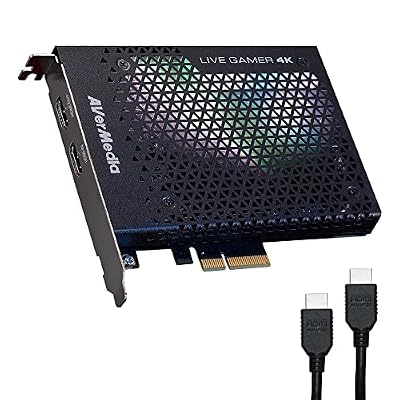 AVerMediaAVerMedia GC573 Live Gamer 4K, Internal Capture Card, Stream and…$140 \xc2\xb7 99/100
 VIXLWCapture Card, 4K HDMI Video Capture Card, Game Capture Card,…$21 \xc2\xb7 98/100
 GuermokGuermok Video Capture Card, 4K USB3.0 HDMI to USB C,…$19 \xc2\xb7 98/100
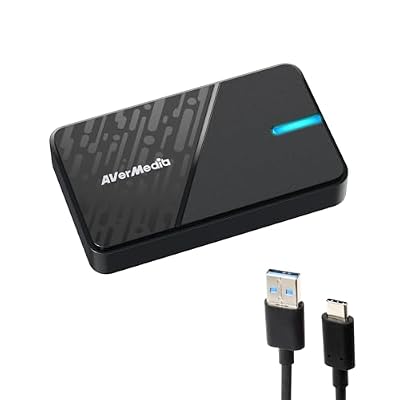 AVerMediaAVerMedia GC311G2 USB-C Game Capture Card, 1080p60, 4K60 HDR Pass-Through…$80 \xc2\xb7 97/100








