Affiliate disclosure: As an Amazon Associate we earn from qualifying purchases. This post contains affiliate links — we may earn a small commission at no extra cost to you. This never affects our picks. Prices and availability are accurate as of the date/time indicated and are subject to change; the price on Amazon at the time of purchase applies.
- Quick Comparison Table
- 1. Keychron K2 HE: Best for competitive play with Hall effect switches
- 2. EPOMAKER x Aula F75 MAX: Best for a feature-rich wireless 75% board
- 3. GravaStar Mercury K1: Best for a creamy-sounding wireless 75% board
- 4. Klymra DK75: Best for quiet typing on a silent membrane board
- 5. Newmen GM326: Best for a first wired hot-swappable 75% board
- How to Choose
- Frequently Asked Questions
- About the Author
- Related Articles
Quick answer: The Keychron K2 HE is our pick for the best 75% keyboards for competitive gaming. The EPOMAKER x Aula F75 MAX suits feature lovers, the GravaStar Mercury K1 suits a creamy typing feel, the Klymra DK75 suits quiet rooms, and the Newmen GM326 suits a first wired board.
This guide compares five 75% keyboards, covering Hall effect, gasket-mounted, silent membrane and basic wired designs. Comparisons use each listing’s published specs, and we did not run our own benchmarks. We flag where the listing leaves out switch type or battery details so you know what to confirm on the maker page.
Quick Comparison Table
| # | Model | Key specs (per listing) | Best for |
|---|---|---|---|
| 1 | Keychron K2 HE | 75%, magnetic Hall effect, wireless, QMK | competitive play with Hall effect switches |
| 2 | EPOMAKER x Aula F75 MAX | 75%, wireless, TFT screen, knob, gasket | a feature-rich wireless 75% board |
| 3 | GravaStar Mercury K1 | 75%, gasket, hot-swappable linear, tri-mode | a creamy-sounding wireless 75% board |
| 4 | Klymra DK75 | 75%, silent membrane, tri-mode, OLED screen, knob | quiet typing on a silent membrane board |
| 5 | Newmen GM326 | 75%, wired, hot-swappable, red switches, knob | a first wired hot-swappable 75% board |
1. Keychron K2 HE: Best for competitive play with Hall effect switches
Specs per the listing: Keychron K2 HE wireless custom keyboard, 75% layout, 2.4 GHz, Bluetooth and Type-C, QMK Launcher, Rapid Trigger, Gateron magnetic switches, aluminum and wood, for Mac, Windows and Linux.
Magnetic Hall effect switches let you set how far a key must travel before it registers, and Rapid Trigger resets the key the moment you lift. That is why this model suits fast shooters and rhythm games, and QMK Launcher support means you can remap keys and tune behavior.
It is a more technical keyboard than the others here, so expect time spent in software to get the best out of it. The aluminum-and-wood build suits a desk where looks matter, and wireless gives you three ways to connect.
- Pros: Adjustable actuation and Rapid Trigger; 2.4 GHz, Bluetooth and wired; QMK remapping
- Cons: More tuning needed to get the benefits; premium class of keyboard

Keychron K2 HE Wireless Magnetic Hall Effect Custom Keyboard 75% Layout | 2.4 GHz/Bluetooth/Type-C, QMK Launcher, Rapid Trigger Gateron Magnetic Switch for Mac Windows Linux (Aluminum + Wood) - Black
Included for 'Best 75% Keyboards for Gaming and Everyday Typing' as a representative home product in this roundup; selection reflects the product set returned for this topic.
View on Amazon2. EPOMAKER x Aula F75 MAX: Best for a feature-rich wireless 75% board
Specs per the listing: EPOMAKER X Aula F75 MAX wireless mechanical keyboard, 75% layout, TFT screen and knob, gasket design, hot-swappable, RGB backlight, for PC, Mac and Linux, black gradient.
The F75 MAX packs a lot into a 75% frame: a small TFT screen, a volume knob, a gasket-mounted structure for a softer typing feel and hot-swappable sockets so you can change switches later. It suits people who like customizing a board over time.
The screen and extra features add complexity, and the title does not state switch type or battery capacity, so check the maker page for those. If you want a ready-to-use wireless keyboard with room to grow, this is a flexible choice.
- Pros: Gasket design; hot-swappable switches; TFT screen and knob; wireless
- Cons: Switch type and battery details not in the title; many features to configure

EPOMAKER X Aula F75 MAX Wireless Mechanical Keyboard with TFT Screen and Knob, Gasket Gaming Keyboard in 75% Layout, Hot Swappable, RGB Backlight, for PC/Mac/Linux (Black Gradient)
Included for 'Best 75% Keyboards for Gaming and Everyday Typing' as a representative home product in this roundup; selection reflects the product set returned for this topic.
View on Amazon3. GravaStar Mercury K1: Best for a creamy-sounding wireless 75% board
Specs per the listing: GravaStar Mercury K1 75% wireless mechanical gaming keyboard, RGB backlit, gasket mount, hot-swappable linear switches, creamy sound, 2.4GHz, USB-C and Bluetooth 5.0, for Windows and Mac, Opaline White.
The Mercury K1 is aimed at people who care how a keyboard sounds and feels. Gasket mounting and linear switches are the usual recipe for a smooth, cushioned typing feel, and the hot-swap sockets let you change switches later.
It lists three ways to connect, which is handy if you move between a PC and a laptop. The Opaline White finish stands out on a light desk, and the trade-off is that its distinct style may not suit every setup.
- Pros: Gasket mount and linear switches; hot-swappable; 2.4GHz, USB-C and Bluetooth 5.0
- Cons: Linear switches may not suit everyone; styling is distinctive

GravaStar Mercury K1 75% Wireless Mechanical Gaming Keyboard RGB Backlit | Gasket Mount, Hot Swappable Linear Switches, Creamy Sound Keyboard, 2.4GHz/USB-C/Bluetooth 5.0, for Win/Mac【Opaline White】
Included for 'Best 75% Keyboards for Gaming and Everyday Typing' as a representative home product in this roundup; selection reflects the product set returned for this topic.
View on Amazon4. Klymra DK75: Best for quiet typing on a silent membrane board
Specs per the listing: Klymra DK75 75% wireless gaming keyboard, silent membrane, tri-mode 2.4GHz, USB-C and Bluetooth 5.0, RGB backlit, OLED screen, media knob, anti-ghosting, for Mac and Windows.
Note that this is a membrane keyboard, not a mechanical one. That matters because it is quieter and softer than mechanical switches, so it suits shared rooms, late-night play and offices, while still offering the compact 75% layout.
If you want the click and customization of a mechanical board, look at the others on this list. If you want an inexpensive wireless layout with an OLED display and a knob, this is a sensible way to try 75%.
- Pros: Silent membrane for shared spaces; tri-mode wireless; OLED screen and knob
- Cons: Not mechanical; fewer customization options

Klymra DK75 75% Wireless Gaming Keyboard, Creamy Computer Keyboards, Black | Tri-Mode 2.4GHz/USB-C/BT5.0 Silent Membrane Keyboard, RGB Backlit, OLED Screen, Media Knob, Anti-Ghosting, Mac/Windows
Included for 'Best 75% Keyboards for Gaming and Everyday Typing' as a representative home product in this roundup; selection reflects the product set returned for this topic.
View on Amazon5. Newmen GM326: Best for a first wired hot-swappable 75% board
Specs per the listing: Newmen GM326 mechanical keyboard, 75% layout, wired, backlit, hot-swappable, compact, with knob and red switches.
The GM326 is the simple, wired option. It gives you a mechanical 75% layout with linear red switches, a backlight, a knob and hot-swap sockets, so you can experiment with switches later without soldering.
There is no wireless or software remapping listed, and it is a lesser-known brand than the others here, so expect a more basic build. For a first compact keyboard on a tight allowance, it covers the basics, and the hot-swap sockets mean it can grow with you.
- Pros: Hot-swappable mechanical board; wired connection; knob and backlight
- Cons: No wireless; lesser-known brand with fewer features

Newmen GM326 Mechanical Keyboard,75% Percent Gaming Keyboard,Wired Keyboard | Mechanical Keyboard,75% Percent Gaming Keyboard,Wired,Backlit,Hot Swappable,Compact,Mini,Black,PC Keyboards,Knob,Red Switch
Included for 'Best 75% Keyboards for Gaming and Everyday Typing' as a representative home product in this roundup; selection reflects the product set returned for this topic.
View on AmazonHow to Choose
Understand what 75% means
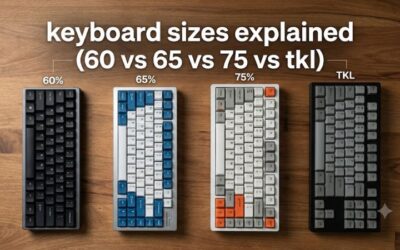
A 75% keyboard keeps the function row, arrow keys and a few navigation keys in a compact layout, and drops the number pad. It saves desk space for mouse movement while keeping the keys you use most. If you use a number pad daily, consider a different layout. Most 75% boards also squeeze the arrow cluster closer to the main keys, so give yourself a few days to adjust before judging the layout.
Choose switch type for how you use it
Linear switches such as red are smooth and quick for gaming. Tactile switches give feedback for typing, and magnetic Hall effect switches like the Keychron K2 HE let you set actuation points and use Rapid Trigger. A silent membrane board, like the Klymra, is a different type altogether and is the quietest.
Decide between wired, wireless and tri-mode
Wired is simplest and avoids latency concerns. Boards with 2.4GHz, Bluetooth and USB-C let you switch between a gaming PC and a laptop. Check battery capacity on the maker page, because the titles here rarely state it. For fast shooters, a wired or 2.4GHz connection is the safer choice, while Bluetooth is better kept for office and travel use, where a little delay does not matter.
Check hot-swap and build features
Hot-swap sockets mean you can change switches without soldering. Gasket mounting changes how the board feels and sounds. If you like tinkering, choose a hot-swappable board; if you want a finished board, pick one with software support such as QMK. Software matters more than it seems: a board that remaps keys on its own memory works on any computer, while one that needs a desktop app can be awkward on a shared or work PC.
Frequently Asked Questions
Is a 75% keyboard good for gaming?
Yes. It keeps arrows and function keys while freeing space for your mouse, which many gamers prefer.
Are Hall effect keyboards worth it?
They help competitive players, who can set actuation points and use Rapid Trigger. For casual typing, a standard mechanical board is fine.
What does hot-swappable mean?
You can pull a switch out of its socket and put in a different one without soldering, which makes it easy to customize.
Is a membrane keyboard bad?
Not necessarily. It is quieter and softer, though it lacks the feel and customization of a mechanical board.