
🛒 Best Price Today on Amazon
Prime members get fast, free shipping on everything above, plus member-only deals. New members get a 30-day free trial — cancel anytime.
- Start with the job, then compare brands
- Brand comparison: useful starting questions
- Apple: begin with software compatibility
- Lenovo: identify the machine type and panel
- Dell: inspect documentation and support entitlement
- HP: compare product numbers, not broad labels
- ASUS and Acer: evaluate the precise performance model
- Framework: weigh serviceability against your preferences
- How to assess reliability claims
- Compare the support you can actually use
- Frequently asked questions
The better laptop brand is the one offering a suitable model, configuration and support arrangement for your needs. There is no useful universal answer that ignores budget, applications, local service and the exact computer. Comparing an entry model from one brand with a premium workstation from another says little about either company’s whole range.
This guide compares how to evaluate Apple, Lenovo, Dell, HP, ASUS, Acer and Framework. It does not assign unsupported reliability percentages or pretend every model in one brand behaves the same. Decorative stickers and accessories are separate purchases and do not answer which computer maker to choose.

Apple 2026 MacBook Air 13-inch Laptop with M5 chip: Built for AI, 13.6-inch Liquid Retina Display, 16GB Unified Memory, 512GB SSD, 12MP Center Stage Camera, Touch ID, Wi-Fi 7; Midnight
Included for 'What Is The Better Laptop Brand: Review & Buyer's Guide' because the listing specifies 13.6-inch Liquid Retina Display and 16GB Unified Memory, details this guide uses to compare options.
View on Amazon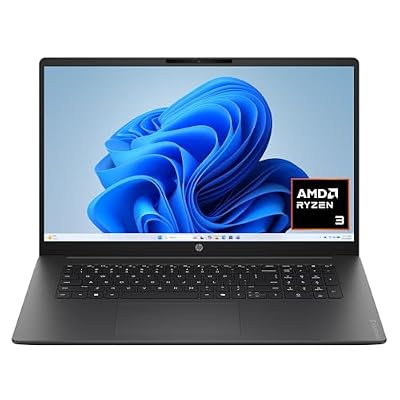
HP OmniBook 3 17.3 inch Laptop PC, FHD Display, AMD Ryzen 3 30, 8 GB RAM, 512 GB SSD, AMD Radeon 610M Graphics, Windows 11 Home, Mica Silver, 17-dp0199nr
Included for 'What Is The Better Laptop Brand: Review & Buyer's Guide' because the listing specifies FHD Display and AMD Ryzen 3 30, details this guide uses to compare options.
View on AmazonStart with the job, then compare brands
List your essential software and peripherals first. Add your preferred screen size, how often you travel and the maximum total you can spend. These requirements can narrow the field more effectively than a broad brand popularity poll.
For work, include organizational requirements such as an approved operating system or service arrangement. For gaming, check the actual games and target settings. For study, distinguish ordinary documents from specialist engineering, design or media applications before choosing a machine.
Brand comparison: useful starting questions
Brand / What to investigate / Avoid assuming
- Apple
-
What to investigate: macOS software fit and exact Mac configuration
Avoid assuming: Every required Windows application will work unchanged
- Lenovo
-
What to investigate: Machine type, display options and service package
Avoid assuming: Every ThinkPad or consumer model has the same features
- Dell
-
What to investigate: Product-specific manuals and support entitlement
Avoid assuming: Every offer includes the same repair service
- HP
-
What to investigate: Product number, configuration and regional warranty
Avoid assuming: A family name identifies the complete machine
- ASUS or Acer
-
What to investigate: Exact model, graphics configuration and support
Avoid assuming: A gaming label establishes frame rates or noise
- Framework
-
What to investigate: Replaceable parts, complete package and local availability
Avoid assuming: Every buyer wants to perform upgrades personally
Apple: begin with software compatibility
Compare Apple when macOS supports your required work and the complete configuration fits your budget. Use an exact model identifier: Apple’s 13-inch M4 MacBook Air technical page, for example, distinguishes a particular generation and its memory and storage options.
Check specialist applications, plug-ins, games and peripherals before considering hardware advantages. Include the capacity you need at purchase and the adapters your setup requires. A positive experience with a phone or tablet does not establish that a particular laptop suits all your computer tasks.
Lenovo: identify the machine type and panel
Lenovo’s product specification references can help distinguish configurations. Use the full machine type or part number in a quote instead of assuming that a familiar family name fixes the screen, memory or operating system.
Compare work-focused and consumer-oriented offers according to what is actually included. Keyboard preference, needed ports and the service arrangement may matter more to your day than a small processor change. Ask for written clarification when a seller’s abbreviated description leaves a material feature unspecified.
Dell: inspect documentation and support entitlement
Dell provides manuals identified by model or Service Tag. For a particular device, its support system can help locate the relevant documentation rather than relying on another generation’s service instructions.
Check the actual coverage and region before assigning extra value to a warranty. A seller’s phrase such as “business support” should be backed by the included service terms. For a used computer, distinguish the seller’s return policy from any remaining manufacturer coverage.
HP: compare product numbers, not broad labels
HP’s computer support portal accepts a serial number, product number or product name. Use the exact product number to find the right specifications and support information. Its warranty guidance explains where to check coverage.
When comparing offers, verify the display, installed memory, storage and charger. Similar-looking machines can be configured differently. Evaluate the configuration that will be delivered, not the most attractive specification available somewhere in the same product family.
ASUS and Acer: evaluate the precise performance model
Both brands have specific computer models that should be evaluated individually. The ASUS Flow Z13 specification page and Acer Nitro 16 model page illustrate why complete model codes matter.
For a gaming purchase, check the exact graphics hardware, power settings and screen. Look for measured results from that configuration. Cooling noise, keyboard comfort and carried weight need evidence of their own; a powerful component name does not resolve those questions.
Framework: weigh serviceability against your preferences
Framework publishes Laptop 13 upgrade guidance for memory and storage. Consider this approach if access to parts and the ability to change components are important to your ownership plan.
Compare a complete usable package and confirm local parts availability. A DIY configuration may suit someone comfortable with assembly, while another buyer may prefer a ready-to-use machine and a service provider. Repair options are valuable when they match how you intend to maintain the computer.
How to assess reliability claims
A few positive or negative anecdotes cannot establish a brand-wide failure rate. Look for the exact model, generation, ownership period and nature of a reported problem. Distinguish a defective unit from a design issue demonstrated across comparable systems.
Reviews are most useful when they show their methods and explain the configuration. A first-day impression can inform keyboard or screen preferences but cannot prove years of durability. Treat predictions about lifespan as uncertain rather than turning them into a guaranteed ownership period.
Compare the support you can actually use
Check repair availability where you live, how a faulty device is returned and whether you can tolerate the likely downtime. Read the terms for accidental damage separately from ordinary hardware defects. If work depends on the laptop, a backup plan may matter as much as an extended service package.
Include the complete purchase and ownership cost: required memory or storage, adapters, software and service. Do not pay for a premium brand name while choosing a configuration that fails an essential requirement. Conversely, a low upfront price may lose its advantage after necessary additions.
Frequently asked questions
Which brand is best for everyone?
None can be selected responsibly without requirements. Shortlist suitable models from several makers, then compare exact configurations and local offers.
Does a business label guarantee better durability?
No. Check the specific design, service documentation and included coverage. A label is a starting point for investigation, not evidence of a universal quality ranking.
Should brand loyalty decide my next purchase?
Past experience is useful context, but reassess the current model and your changed needs. Keep the decision tied to software, usability, configuration and support.









