- Top Pick: ASUS ROG Strix G16 (2025) Gaming Laptop, 16” FHD+ 16:10 165Hz/3ms, NVIDIA® GeForce RTX™ 5060, Intel® Core™ i7 Processor 14650HX, 16GB DDR5, 1TB Gen 4 SSD, Wi-Fi 7, Windows 11 Home, G615JMR-AS74
- Best Value: HP Victus Gaming 15 Laptop: 15.6" FHD 144Hz Display • Intel 8-Core i5-13420H • NVIDIA GeForce RTX 3050 • 8 GB DDR4 SDRAM • 512 GB NVMe SSD • Win11 Home • Wi-Fi 6 • Backlit Keyboard (Renewed)
- Premium Choice: Acer Nitro V Gaming Laptop | Intel Core 7 Processor 240H | NVIDIA GeForce RTX 5050 Laptop GPU | 16" WUXGA IPS 180Hz Display | 16GB DDR5 | 1TB Gen 4 SSD | Wi-Fi 6 | Backlit KB | ANV16-72-73EW
Shopping for a gaming laptop under $1,000 in 2026 means navigating a market where spec sheets look increasingly similar but real-world performance varies wildly. Manufacturers pair capable GPUs with bottlenecked CPUs, advertise high refresh rates on panels with mediocre color coverage, and ship 8GB RAM configurations that struggle in modern titles. The result is a category where two laptops at the same price can deliver dramatically different experiences.
This guide cuts through that noise. We’ve focused on machines that hold the line at or near the $1,000 mark while delivering genuine 1080p and 1200p gaming performance, adequate memory, and thermal designs that don’t throttle after twenty minutes. Below you’ll find our current picks, a breakdown of the specs that actually matter at this budget, and answers to the questions buyers ask most.
As an Amazon Associate we earn from qualifying purchases at no extra cost to you.




⚡ Save on Your Next PC — Amazon Prime
Prime members get fast free shipping on the systems above, plus early access to Prime Day & Black Friday PC deals. New members get a 30-day free trial.
Watch: Best Gaming Laptop Under $1000 — Video Review
How to Choose Gaming Laptop Under $1000
- GPU tier over GPU generation: A newer RTX 5050 and an older RTX 4050 land in similar performance territory, but the 5050’s GDDR7 memory and improved DLSS support give it better legs. Don’t pay a premium for a newer badge alone — compare actual frame rates in the games you play.
- 16GB of RAM is the floor: Modern titles routinely exceed 8GB of system memory, and shared VRAM configurations make this worse. If a listing shows 8GB, factor in the cost and hassle of upgrading before you buy.
- Display quality beyond refresh rate: A 144Hz or 165Hz panel is standard now, so look at resolution and aspect ratio instead. 16:10 displays at 1920×1200 give you meaningfully more vertical working space, and IPS panels deliver better viewing angles than the TN screens still lurking in budget models.
- Storage headroom: A 512GB SSD fills up after four or five modern installs. A 1TB Gen 4 drive is worth the upgrade if it’s within budget, and confirming a second M.2 slot exists gives you a cheap expansion path later.
- Cooling and chassis: Thin gaming laptops throttle. At this price, prioritize models with dual-fan designs and visible rear exhaust vents over slim profiles — sustained performance matters more than portability for most buyers.
The Best Picks Reviewed
ASUS ROG Strix G16 (2025)
The Strix G16 pairs an RTX 5060 with a 14-core i7-14650HX, making it the most capable configuration on this list and a genuine 1200p gaming machine rather than a 1080p compromise. The 16:10 165Hz panel, 1TB Gen 4 SSD, and Wi-Fi 7 round out a package that stretches the budget but justifies it.
Acer Nitro V 16
Acer’s 16-inch Nitro V hits an excellent balance with an RTX 5050, Core 7 240H, 16GB of DDR5, and a 1TB drive — the same storage and memory as far pricier machines. The 180Hz WUXGA display is the fastest panel here, and the chassis handles sustained loads better than its price suggests.
Alienware 16 Aurora
The Aurora brings Alienware’s build quality and thermal engineering to a price point the brand historically ignored, pairing an RTX 5050 with the Core 7 240H. You’re paying something for the badge, but the keyboard, chassis rigidity, and cooling headroom are noticeably above category norms.
Acer Nitro V 15.6″
The 15.6-inch Nitro V is the value play: an RTX 5050 with 8GB of GDDR7 and 16GB of system RAM for well under the cap. The 165Hz IPS panel is solid, and the i5-13420H is adequate for GPU-bound gaming, though the 512GB SSD will need supplementing before long.
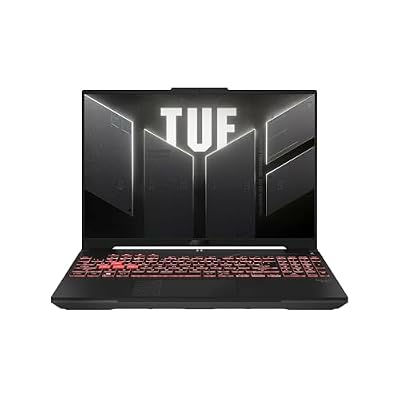
ASUS TUF Gaming A16
The TUF A16’s Ryzen 7 7445HS and RTX 4050 make it a last-gen pick, but its military-spec chassis and reliable cooling remain genuinely good at this price. Consider it if you find it discounted below the newer RTX 5050 machines — otherwise the Nitro V models offer more performance per dollar.
Frequently Asked Questions
Can a $1,000 laptop run modern games at high settings?
At 1080p, yes — an RTX 5050 or 5060 will hold 60fps or better at high settings in most current titles, especially with DLSS enabled. At 1440p or on the most demanding releases, expect to drop to medium settings or lean on upscaling.
Is a renewed or refurbished gaming laptop a reasonable buy?
It can be, if the seller offers a meaningful warranty and the discount is substantial. The tradeoff is unknown battery wear and thermal paste age — both fixable, but factor the maintenance into your budget before committing.
Should I wait for a sale?
Gaming laptop pricing is heavily promotional, and models in this bracket regularly drop $100 to $200 during major sales events. If you’re not in a hurry, watching prices for a few weeks often pays off more than jumping on a marginally better spec.
How long will one of these laptops stay viable?
Plan on three to four years of comfortable 1080p gaming with settings adjustments along the way. Buying 16GB of RAM and adequate storage up front extends that meaningfully, since neither is easy to upgrade on every model.
Final Thoughts
For most buyers, the Acer Nitro V 16 is the smartest pick under $1,000 — the RTX 5050, 16GB of DDR5, 1TB of Gen 4 storage, and 180Hz display combination is hard to beat at this price. If your budget stretches to the top of the range, the ASUS ROG Strix G16 delivers a genuine step up in GPU and CPU performance that will age better over the next few years. Shoppers looking to spend as little as possible while still getting current-generation hardware should look at the 15.6-inch Acer Nitro V, which delivers the same GPU for noticeably less.