🛒 Best Price Today on Amazon
Prime members get fast, free shipping on everything above, plus member-only deals. New members get a 30-day free trial — cancel anytime.
The skytech king 95 review starts with one important distinction: KING 95 is a prebuilt gaming PC series, not a single fixed configuration. Available systems pair different AMD or Intel processors with graphics cards, DDR5 memory, and NVMe storage. Its appeal depends on the exact hardware, current price, cooling setup, and warranty included with the model you choose.
How to Choose a Skytech KING 95 Gaming PC
Choosing a KING 95 requires comparing the complete component list rather than judging the computer by its case or product name. Skytech offers configurations with different processors, GPUs, memory capacities, and storage options. Check the exact SKU, listed price, power supply, motherboard, and warranty before comparing it with another prebuilt desktop.
Match the GPU to Your Gaming Resolution
The graphics card is usually the most important component for gaming performance. An RTX 5070 configuration suits a different budget and workload from an RTX 5080 model, while Radeon RX 9070 and RX 9070 XT systems offer alternative graphics options. Choose according to your monitor resolution, desired frame rate, and graphics settings rather than the KING 95 branding alone.
A 1080p esports player may not benefit enough from a flagship GPU to justify the additional cost. For demanding 1440p games, compare GPU memory, ray-tracing performance, and upscaling support. For 4K gaming, examine the performance of the exact graphics card in your preferred titles, particularly when demanding ray tracing or high-resolution textures increase the workload.
Check the Processor and Gaming Workload
Processor choice matters most when games rely heavily on CPU performance, particularly simulation titles, competitive shooters, and large multiplayer environments. KING 95 configurations include AMD Ryzen processors and Intel Core Ultra options. A Ryzen 7 7800X3D or 9800X3D model targets a different gaming profile from a system built around a more general-purpose processor.
Consider streaming, video editing, and background applications alongside gaming. A faster gaming CPU can improve performance in CPU-limited situations, but it will not deliver the same benefit in every game. Compare the CPU and GPU together, because paying extra for a high-end processor may offer limited value if the graphics card is the main performance constraint.
Verify Memory, Storage, and Upgrade Compatibility
DDR5 is the relevant memory generation for the configurations discussed here. Capacity and speed still vary by SKU, so confirm whether the selected system includes 16GB, 32GB, or more, and whether the advertised memory runs at its intended profile. For a new gaming desktop, 32GB is a sensible target for demanding games and multitasking, although lighter workloads can use less.
Storage capacity also affects the experience. A 1TB NVMe SSD can fill quickly when a library includes several large modern games, while a 2TB drive provides more room. Check the motherboard’s available M.2 slots, memory slots, and SATA connections before planning upgrades. Never assume that another KING 95 configuration uses the same motherboard or internal components.
Evaluate the Case, Cooling, and Power Supply
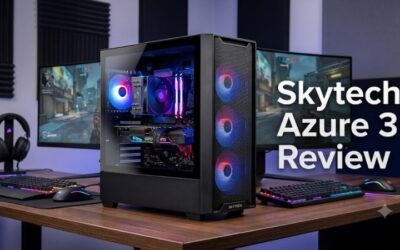
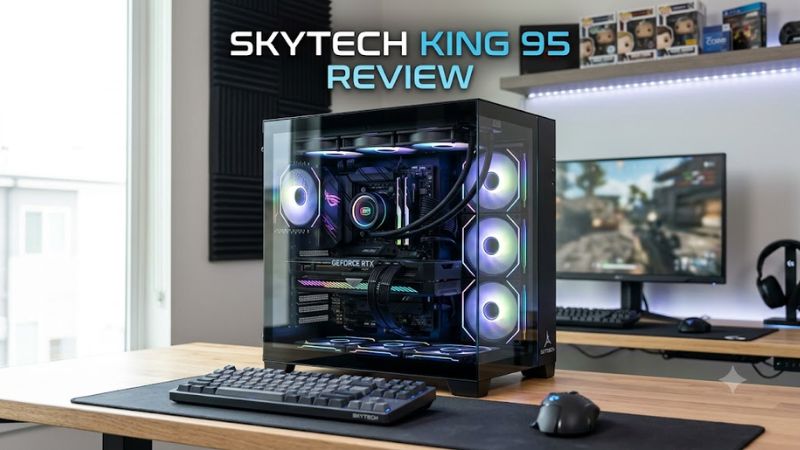
The KING 95 chassis uses a dual-chamber mid-tower design with curved tempered-glass panels. Skytech lists support for ATX, Micro-ATX, and Mini-ITX motherboards, graphics cards up to 420mm long, and CPU coolers up to 175mm tall. The case supports a top-mounted radiator up to 360mm, but the actual cooler and fan arrangement depend on the purchased system.
A large case does not automatically mean low temperatures or quiet operation. Check the included fans, radiator size, PSU rating, and GPU power requirements on the individual product page. A listed 850W Gold ATX 3.0 power supply appears in some configurations, but buyers should not assume every KING 95 system includes the same unit. Leave enough space for the tower and its airflow.
Top Picks: Which KING 95 Configuration Is Worth Buying?
The right choice depends on your budget and the games you play. The following comparison uses configurations listed by Skytech, rather than treating advertised FPS figures as independently verified results. Prices are the listed amounts found during research and can change with availability, promotions, and configuration updates.
| Product | Best For | Key Spec | Compatibility | Watch Out For |
| KING 95 RTX 5070 / Ryzen 7 9700X | Best Value | RTX 5070 12GB; 2TB NVMe | DDR5 platform; Windows 11 Home | Confirm included RAM and PSU |
| KING 95 Radeon RX 9070 XT / Ryzen 7 9800X3D | Best Overall for AMD gaming | 32GB DDR5-6000; 2TB NVMe | B650 motherboard; AM5 CPU platform | Higher-end parts may cost more |
| KING 95 RTX 5070 Ti / Ryzen 7 9850X3D | Best for NVIDIA features | RTX 5070 Ti 16GB; 2TB NVMe | DDR5 platform; Windows 11 Home | Higher purchase price |
| KING 95 RTX 5080 / Intel Core Ultra 7 265K | Best for demanding 4K gaming | RTX 5080 16GB; 32GB DDR5-6000 | Z890 motherboard; LGA1851 CPU platform | Premium pricing |
Best Value: KING 95 RTX 5070
The RTX 5070 model paired with a Ryzen 7 9700X is a sensible starting point for buyers who want a modern gaming desktop without paying for an upper-tier graphics card. Skytech lists a configuration with a 2TB NVMe drive at $2,049.99 on its product page, although the exact memory and remaining components should be checked before checkout. See the
official configuration
.
Its main appeal is the balance between a capable gaming processor, NVIDIA graphics features, and generous listed storage. Buyers focused on 1440p should compare actual game benchmarks at their intended settings. This option is less compelling if a similarly priced desktop offers a faster GPU, or if you primarily play at 4K with demanding ray tracing enabled.
Best Overall for AMD Gaming: KING 95 RX 9070 XT
For buyers who prefer AMD graphics, Skytech lists a KING 95 configuration with a Ryzen 7 9800X3D, Radeon RX 9070 XT, 32GB DDR5-6000 memory, a 2TB Gen4 NVMe SSD, and a 360mm liquid cooler. The listed motherboard is B650 and the power supply is 1000W Gold. Those specifications make this a strong candidate for a high-performance gaming build.
The main drawback is cost, particularly if you do not need a high-end processor and graphics card together. Skytech’s displayed performance figures include 1080p and 1440p results, but the page does not establish a complete reproducible test protocol for every game. Treat those numbers as manufacturer-provided estimates rather than independent benchmark results. The product page has also shown the configuration as out of stock, so availability matters. See the
official RX 9070 XT configuration
.
Best for NVIDIA Features: KING 95 RTX 5070 Ti
A KING 95 configuration pairing the RTX 5070 Ti 16GB with a Ryzen 7 9850X3D is listed at $2,799.99, reduced from $2,999.99 when the page was checked. Its 16GB graphics memory and NVIDIA feature set make it worth considering for players who want to compare ray tracing, upscaling, and demanding graphics workloads. The processor is also aimed at high-performance gaming.
The trade-off is the premium price. A buyer who mainly plays competitive games at 1080p may gain more practical value from a less expensive configuration and a high-refresh-rate monitor. Before purchasing, confirm the current price, motherboard, RAM capacity, cooling hardware, and PSU details for the exact SKU instead of assuming they match another KING 95 listing. See the
official RTX 5070 Ti configuration
.
Best for Demanding 4K Gaming: KING 95 RTX 5080
Skytech lists a KING 95 system with an Intel Core Ultra 7 265K, RTX 5080 16GB, 32GB DDR5-6000 RGB memory, 2TB Gen4 NVMe storage, a 360mm liquid cooler, and a Z890 motherboard. Its listed price is $2,999.99, previously $3,199.99. This configuration targets buyers prioritizing demanding graphics workloads and high-resolution gaming.
The higher cost is difficult to justify if your monitor and games do not need this level of GPU performance. The Intel platform also differs from the AMD configurations, so processor and motherboard upgrade plans must account for the LGA1851 socket and Z890 chipset. Review the exact listing for PSU specifications, dimensions, and warranty coverage before making a final decision. See the
official RTX 5080 configuration
.
Frequently Asked Questions
Is the Skytech KING 95 worth buying?
Yes, the Skytech KING 95 can be worth buying if the included components, current price, and warranty compare favorably with competing prebuilt gaming PCs. Its dual-chamber case, curved tempered glass, and flexible cooling support are useful design features, but the GPU and CPU determine most of the gaming value.
Compare the total system cost against alternatives with similar processors, graphics cards, memory, and storage. Also account for shipping, return conditions, and support. The case alone is not a reason to pay more for a configuration that offers weaker gaming hardware at the same price.
What games can the Skytech KING 95 run?
The Skytech KING 95 can run modern PC games, but performance depends on the specific processor, GPU, resolution, and graphics settings. An RTX 5070 system and an RTX 5080 system will not deliver identical results, particularly in demanding 1440p and 4K games.
Skytech publishes FPS estimates for selected configurations, including games such as Cyberpunk 2077 and Fortnite. Its RX 9070 XT configuration, for example, lists results at 1080p and 1440p, but the page does not provide all the settings needed for a reproducible comparison. Check independent benchmarks for the exact GPU and game before relying on a particular FPS target.
Can you upgrade the Skytech KING 95 later?
Yes, the KING 95 chassis supports component upgrades, although compatibility depends on the motherboard, PSU, and specific parts installed in your configuration. Skytech lists support for graphics cards up to 420mm long, CPU coolers up to 175mm tall, and ATX, Micro-ATX, and Mini-ITX motherboards.
Before upgrading, verify the graphics card’s power connector and wattage requirements, available PCIe slots, PSU capacity, memory type, and motherboard support. The chassis clearance does not guarantee that every graphics card fits alongside every radiator or cable arrangement. Check the exact system specifications before ordering replacement hardware.
What warranty does the Skytech KING 95 include?
Skytech lists a one-year standard parts, labor, and shipping warranty on the cited prebuilt configuration, along with lifetime technical support. The company also offers optional extended protection on some listings, but the terms and prices depend on the purchase.
Read the warranty and return policy for the exact SKU and seller before paying. Confirm whether shipping for repairs is covered, how returns are handled, and what conditions apply to optional coverage. These details can influence the overall value of a prebuilt PC as much as a small difference in component specifications.
Final Thoughts
The skytech king 95 review comes down to configuration and price rather than the case alone. Its spacious chassis, cooling flexibility, and range of AMD and NVIDIA systems make it appealing to gaming enthusiasts. Compare the exact GPU, processor, PSU, memory, and warranty with competing desktops, and buy only when the complete specification justifies the asking price.