🛒 Best Price Today on Amazon
Prime members get fast, free shipping on everything above, plus member-only deals. New members get a 30-day free trial — cancel anytime.
The Skytech Azure 3 review depends on the exact configuration, because this prebuilt gaming desktop is sold with different processors, graphics cards, memory capacities, and cooling systems. Models with an NVIDIA GeForce RTX 5070 target demanding 1440p gaming, but the right purchase also depends on pricing, component quality, and upgrade needs.
What the Skytech Azure 3 Really Offers
The Skytech Azure 3 is a configurable prebuilt desktop rather than one fixed hardware package. Official listings include Ryzen 5 and Ryzen 7 processors, GeForce RTX 5070 graphics, and other GPU options. That flexibility makes the model name insufficient for judging value: the full parts list and current price should determine whether a particular system makes sense for your games and budget.
Processor and Graphics Card
The CPU and GPU combination determines much of the system’s gaming capability. One listed configuration pairs an AMD Ryzen 7 9700X with an NVIDIA GeForce RTX 5070 featuring 12GB of VRAM. Another combines a Ryzen 7 7700X with the same graphics card. Both offer a stronger starting point for demanding games than an entry-level configuration, although CPU-sensitive titles can respond differently to each processor.
The Skytech Azure 3 review should therefore focus on the exact SKU instead of assuming every system carries the same performance. Check the processor model, graphics memory, and cooling hardware before comparing prices. The RTX 5070 supports NVIDIA DLSS features, but frame generation and upscaling results vary by game, image-quality settings, and implementation.
Memory and Storage
Configurations with 32GB of DDR5 memory and a 1TB NVMe SSD provide a practical starting point for modern gaming, Windows applications, and everyday multitasking. Some less expensive listings use 16GB of memory instead. That difference can matter when playing demanding games while running a browser, voice chat, recording software, or other background applications.
Storage capacity deserves similar attention because a 1TB SSD can fill quickly when several large games are installed. Confirm whether the motherboard has an available M.2 slot or SATA connection before planning an expansion. Memory type also matters: DDR5 and DDR4 modules are not interchangeable, and the motherboard determines which memory generation the system accepts.
Cooling and Case Design
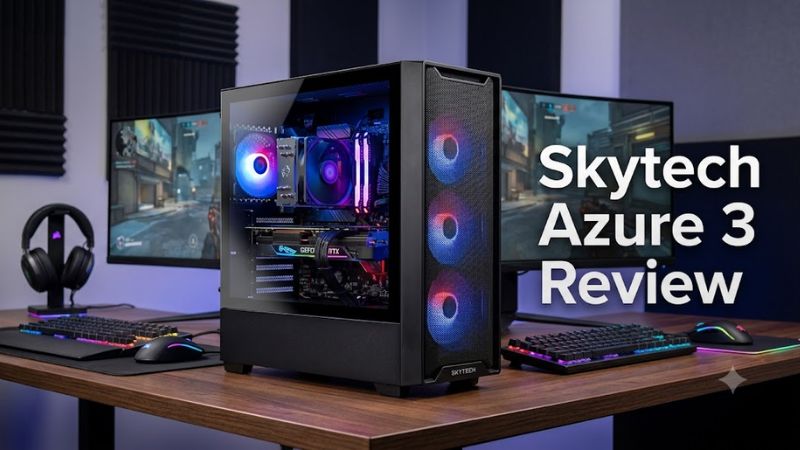
Skytech sells Azure 3 systems with different cooling arrangements. For example, one Ryzen 7 9700X and RTX 5070 configuration lists a 360mm liquid cooler and six fans, while a Ryzen 7 7700X version lists tower cooling and four fans. These are configuration-specific details, not features that should be assumed across the entire product family.
A larger cooler can provide more thermal headroom, but it does not automatically mean quieter operation or higher gaming frame rates. Fan curves, case airflow, room temperature, and the individual CPU’s power limits all influence results. Buyers should verify the actual cooler, fan count, and included case before treating photographs or product-family descriptions as a definitive parts list.
Connectivity and Upgrade Potential
An Azure 3 desktop can be attractive to buyers who want a conventional tower that can be upgraded over time. The motherboard, power supply, and physical layout determine whether a future graphics card, additional SSD, or memory kit will fit and work correctly. A B650 motherboard, for example, belongs to AMD’s AM5 platform and supports compatible Ryzen processors and DDR5 memory.
Do not assume every Azure 3 uses that platform, since Intel-based and older AMD-based configurations also appear in the product range. Before purchasing, verify the motherboard model, power-supply wattage and connectors, available expansion slots, and graphics-card clearance. The manufacturer’s specifications for the exact SKU are more useful than general statements about the Azure 3 name.
Skytech Azure 3 Review: Price, Performance, and Value
The price question is difficult to answer without the exact configuration and seller. Skytech’s official listing for the Ryzen 7 9700X and RTX 5070 model has shown a $2,099.99 starting price, reduced from $2,399.99, but the page also indicates that this configuration is out of stock. Treat that figure as a listed price, not a guaranteed current offer.
Gaming Performance at 1080p and 1440p
The RTX 5070 configuration is aimed at players who want strong 1440p gaming, with 1080p remaining useful for high-refresh competitive titles. Skytech publishes estimated frame rates for games including Cyberpunk 2077, Fortnite, and Baldur’s Gate 3. However, its listing does not provide a complete, reproducible settings profile for those figures, so they should be treated as manufacturer-provided reference results rather than independent comparative measurements.
For a meaningful comparison, look for independent benchmarks that identify the resolution, graphics preset, ray-tracing mode, upscaling configuration, and test system. Results from different presets or DLSS modes are not directly interchangeable. Without a verified independent test of the exact Azure 3 configuration, it would be misleading to assign one universal FPS figure to the entire desktop range.
Price and Component Value
The strongest value proposition is convenience: the computer arrives assembled with Windows, a discrete graphics card, memory, storage, and a manufacturer warranty. Buyers avoid sourcing every component individually and troubleshooting a new build. Whether that convenience justifies the premium depends on the price of comparable systems and the quality of the components included in the exact SKU.
The weakness is that the Azure 3 name does not guarantee a consistent component list. A model with 32GB of DDR5, a larger cooler, and an 850W power supply is materially different from a lower-cost configuration with less memory or another graphics card. Compare the complete specification and warranty before deciding that a discount represents genuine value.
Who Should Buy This Desktop?
A buyer who wants a ready-to-use gaming PC for demanding modern games should consider a configuration with the RTX 5070 and 32GB of DDR5. That combination offers a sensible starting point for 1440p gaming, streaming, and multitasking, provided the price is competitive. The Ryzen 7 9700X version is particularly worth examining if you also use processor-heavy applications.
A budget-focused player should be more cautious. If the main goal is esports at 1080p, a less expensive GPU configuration may deliver sufficient performance without paying for graphics capacity that goes unused. Likewise, buyers who prioritize easy upgrades should verify the motherboard, PSU, and cooling parts rather than assuming that every prebuilt tower has the same expansion options.
Models and Alternatives to Compare
The following configurations appear in Skytech’s product catalog. Availability and prices can change, so confirm the current product page before ordering. The entries are distinct Azure 3 configurations, not separate benchmark-tested systems.
| Product | Best For | Key Spec | Compatibility | Watch Out For |
| Azure 3 Ryzen 7 9700X / RTX 5070 | Higher-end all-round gaming | 32GB DDR5, 1TB NVMe | AM5, B650, DDR5 | Listed price and stock may change |
| Azure 3 Ryzen 7 7700X / RTX 5070 | Gaming and multitasking | 32GB DDR5, 1TB NVMe | AM5, B650, DDR5 | Tower cooler instead of 360mm AIO on the cited white model |
| Azure 3 Ryzen 5 7600X / RTX 5070 | Buyers who prioritize the GPU | 16GB DDR5, 1TB NVMe | AM5, DDR5 | Less memory than the 32GB options |
| Azure 3 Core i7-14700F / RTX 5060 | Mixed gaming and productivity | RTX 5060, 32GB RAM listed | Intel platform; confirm motherboard memory type | Less GPU capability than the RTX 5070 models |
The best option is the one whose exact parts and total price match your needs. For example, the 9700X configuration lists a 360mm liquid cooler and 850W Gold ATX 3.0 PSU, while the cited 7700X white model lists tower cooling and four fans. These differences matter when comparing overall value, noise expectations, and future upgrades.
Frequently Asked Questions
Is the Skytech Azure 3 worth buying?
The Skytech Azure 3 is worth considering if its price, graphics card, and component list compare favorably with competing prebuilt PCs. An RTX 5070 model with 32GB of DDR5 is a stronger all-round option than a version with less memory, but buyers should check stock and warranty terms before ordering.
Can the Skytech Azure 3 run games at 1440p?
Yes, configurations with an RTX 5070 are suitable candidates for 1440p gaming, although results depend on the game, graphics settings, ray tracing, and upscaling. Skytech publishes reference FPS figures, but independent benchmarks with disclosed settings are preferable when comparing actual performance between systems.
Can you upgrade the Skytech Azure 3?
Yes, upgrades may be possible, but the supported components depend on the specific motherboard, power supply, case clearance, and available expansion slots. Confirm whether the system uses DDR4 or DDR5, check the GPU’s power connectors, and verify the motherboard’s CPU support before buying replacement parts.
What warranty does the Skytech Azure 3 include?
Skytech lists a one-year parts, labor, and shipping warranty with lifetime technical support on the cited RTX 5070 configurations. Optional protection plans may be available at additional cost. Review the terms for the exact model and retailer because coverage, return conditions, and optional plans can differ.
Final Thoughts
The Skytech Azure 3 review comes down to configuration and price rather than appearance alone. An RTX 5070 model with 32GB of DDR5 is a compelling starting point for 1440p gaming, but cooler design, storage, PSU specifications, and availability deserve equal attention. Compare the full parts list before committing to a purchase.