🛒 Best Price Today on Amazon
Prime members get fast, free shipping on everything above, plus member-only deals. New members get a 30-day free trial — cancel anytime.

Samsung SSD 990 PRO 2TB, PCIe 4.0 M.2 2280, Up to 7,450 MB/s
Included for 'Sata vs nvme ssd for gaming: Practical Best SSD Buying Guide' because the listing specifies PCIe 4.0 M.2 2280 and Up to 7, details this guide uses to compare options.
View on Amazon
Samsung SSD 990 PRO 1TB, PCIe 4.0 M.2 2280, Up to 7,450 MB/s
Included for 'Sata vs nvme ssd for gaming: Practical Best SSD Buying Guide' because the listing specifies PCIe 4.0 M.2 2280 and Up to 7, details this guide uses to compare options.
View on Amazon
Samsung SSD 9100 PRO 2TB, PCIe 5.0x4 M.2 2280, Up to 14,700MB/s
Included for 'Sata vs nvme ssd for gaming: Practical Best SSD Buying Guide' because the listing specifies PCIe 5.0x4 M.2 2280 and Up to 14, details this guide uses to compare options.
View on Amazon
Samsung SSD 990 PRO 4TB, PCIe 4.0 M.2 2280, Up to 7,450 MB/s
Included for 'Sata vs nvme ssd for gaming: Practical Best SSD Buying Guide' because the listing specifies PCIe 4.0 M.2 2280 and Up to 7, details this guide uses to compare options.
View on AmazonIs NVMe faster, does it raise FPS, does SATA still work for modern games, and which drive should you buy? sata vs nvme ssd for gaming comes down to interface bandwidth, game workload, motherboard support, and price rather than FPS alone. Current testing shows the gap varies by title and streaming technology.
How to Choose SATA vs NVMe SSD for Gaming
The useful choice is not simply the drive with the largest sequential-read number. Check four things: game-loading and asset-streaming behavior, sustained storage needs, motherboard compatibility, and capacity. For PCIe systems, Samsung 990 Pro or WD_BLACK SN850X fit high-end builds; for newer PCIe flexibility, 990 EVO Plus fits; for SATA-only PCs, Samsung 870 EVO remains a current option.
Check Your Interface Before Buying
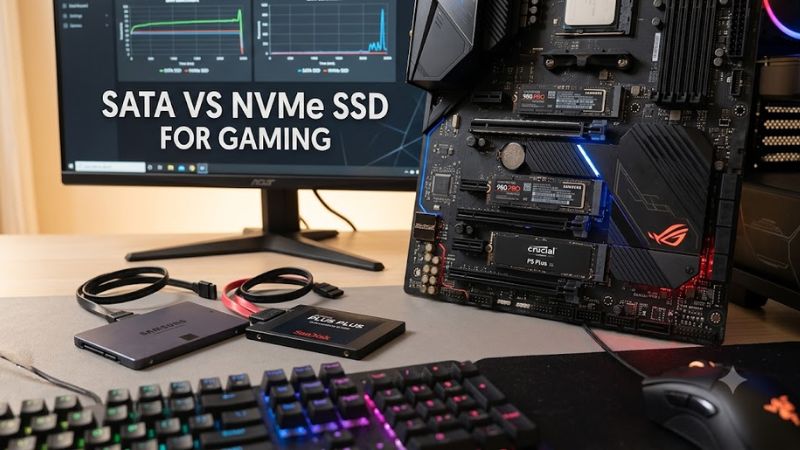
The first distinction is physical and electrical. A 2.5-inch SATA SSD connects through SATA, while NVMe drives normally use an M.2 slot connected to PCIe. M.2 alone does not mean NVMe, because M.2 SATA drives also exist. Check the motherboard manual before ordering any drive.
For a desktop with a suitable M.2 M-key slot, PCIe 4.0 NVMe models such as the Samsung 990 Pro and WD_BLACK SN850X are straightforward choices. A SATA drive instead needs a compatible SATA data port and SATA power connection, so older systems may favor the 870 EVO.
Match Capacity to Your Game Library
Capacity often matters more than chasing the highest interface speed. Modern AAA installations can consume substantial space, while Windows and applications also share the drive. Tom’s Hardware currently notes that 2TB drives represent a practical capacity point for many users, with 4TB models increasingly common.
A 2TB 990 Pro provides up to 7,450 MB/s sequential read and 6,900 MB/s sequential write, while the 2TB SN850X reaches 7,300 MB/s and 6,600 MB/s. The 2TB 870 EVO is limited to 560 MB/s read and 530 MB/s write because it uses SATA.
Consider Streaming-Heavy Games
Modern games can use storage differently. Tom’s Hardware’s August 2026 comparison covered 11 games across SATA, PCIe 3.0, PCIe 4.0, and PCIe 5.0 drives. The results varied considerably: some titles barely stressed SATA, while certain streaming-heavy sequences produced measurable 1% low differences.
For example, in Ratchet & Clank: Rift Apart, the PCIe drives had about a 38% 1% low advantage over SATA during a storage-intensive portal sequence at 4K. In normal gameplay, however, the same test reported no performance difference between SATA and PCIe storage.
Leave Room for Platform Limits
A fast SSD cannot exceed the capabilities of its connection. The 990 Pro requires a PCIe 4.0 x4-capable M.2 interface for its rated performance, while the 990 EVO Plus supports PCIe 4.0 x4 or PCIe 5.0 x2. Older PCIe systems can still run compatible NVMe drives, but bandwidth may be lower.
Thermal design also belongs in the compatibility check. The SN850X is available as a bare M.2 drive or with an optional heatsink, while the 990 Pro also has a heatsink version. Confirm motherboard heatsink clearance before choosing a thicker model, particularly when the M.2 slot sits beneath a graphics card.
Top Picks
The current comparison favors matching the drive to the platform rather than assuming every NVMe model produces a meaningful gaming difference. Tom’s Hardware’s 2026 testing used Windows 11 25H2, a Ryzen 7 9800X3D, GeForce RTX 5090, 16GB DDR5-6000, and an Asus ROG Strix B850-F Gaming WiFi. Results covered 1080p, 1440p, and 4K workloads.
| Product | Best For | Key Spec | Compatibility | Watch Out For |
| Samsung 990 Pro 2TB | Best Overall | 7,450/6,900 MB/s read/write | M.2 2280, PCIe 4.0 x4 | Needs suitable M.2 slot |
| Samsung 990 EVO Plus 2TB | Best Value | 7,250/6,300 MB/s read/write | M.2 2280, PCIe 4.0 x4 or 5.0 x2 | HMB design, not onboard DRAM |
| WD_BLACK SN850X 2TB | Best For Gaming Libraries | 7,300/6,600 MB/s read/write | M.2 2280, PCIe 4.0 x4 | Heatsink version needs clearance |
| Samsung 870 EVO 2TB | Best For SATA Systems | 560/530 MB/s read/write | 2.5-inch SATA III | Much lower interface bandwidth |
Samsung 990 Pro 2TB: Best Overall
The Samsung 990 Pro 2TB pairs PCIe 4.0 x4 with NVMe 2.0, Samsung V-NAND TLC, and an in-house controller. Its rated sequential performance reaches 7,450 MB/s read and 6,900 MB/s write, with up to 1.4 million random-read IOPS and 1.55 million random-write IOPS.
Buy it when the PC has an appropriate M.2 PCIe 4.0 slot and you also want strong general storage performance beyond gaming. Its real weakness is platform dependence: an older motherboard may not provide PCIe 4.0, so paying for its rated throughput makes less sense if the slot is limited to an earlier PCIe generation.
Samsung 990 EVO Plus 2TB: Best Value
The Samsung 990 EVO Plus 2TB supports PCIe 4.0 x4 or PCIe 5.0 x2, uses TLC NAND and HMB, and is rated for up to 7,250 MB/s sequential read and 6,300 MB/s sequential write. Samsung lists 1,000K random-read and 1,350K random-write IOPS for the 2TB model.
It suits buyers who want a modern NVMe platform without specifically needing the 990 Pro’s higher-end specification. The weakness is its HMB architecture rather than dedicated DRAM, which makes it a different design from the DRAM-equipped 990 Pro. It should not be selected simply because the label says PCIe 5.0.
WD_BLACK SN850X 2TB: Best For Gaming Libraries
The WD_BLACK SN850X 2TB uses PCIe 4.0 x4 and M.2 2280 packaging, with rated sequential read and write speeds of 7,300 MB/s and 6,600 MB/s. Its specifications also list 1,200K random-read and 1,100K random-write IOPS, plus 1,200 TBW and a five-year limited warranty.
It is appropriate for a desktop with an M-key M.2 slot and a large game library, particularly when the optional heatsink version fits the motherboard. Its weakness is that the platform still limits it to PCIe 4.0 x4, so a system without a suitable M.2 interface cannot use this model as intended.
Samsung 870 EVO 2TB: Best For SATA Systems
The Samsung 870 EVO 2TB remains a SATA III 2.5-inch option, with rated sequential read and write speeds of 560 MB/s and 530 MB/s. Samsung lists V-NAND storage and capacities extending beyond 2TB, while Tom’s Hardware identifies the 870 EVO as one of the remaining SATA choices with TLC flash and DRAM.
Choose it when the motherboard lacks a suitable NVMe slot or when an existing SATA-based system is being expanded. Its weakness is interface bandwidth: it cannot approach modern PCIe NVMe throughput. It is therefore not the natural choice for a new motherboard that already provides an open PCIe 4.0 M.2 slot at a comparable purchase cost.
FAQ
The main questions are whether NVMe increases FPS, whether SATA is still adequate, whether DirectStorage changes the comparison, and whether an older PC can use a new NVMe drive. The answers depend on workload and platform: storage can affect streaming and frame-time behavior, while interface compatibility determines which drives can actually operate in a given system.
Does NVMe Increase Gaming FPS?
Usually, storage speed is not a direct FPS upgrade because rendering remains primarily dependent on the CPU and GPU. Tom’s Hardware’s 2026 comparison instead found game-specific differences in 1% lows during some storage-intensive sequences. In Alan Wake 2, for example, storage activity increased substantially at 4K.
That does not mean SATA and NVMe behave identically in every workload. The same testing found a PCIe advantage in specific Ratchet & Clank portal transitions, while normal gameplay showed no difference. The practical question is therefore whether the games you play create a storage bottleneck rather than whether one interface has a higher specification.
Is SATA SSD Still Good for Gaming?
Yes, SATA remains suitable for many gaming PCs, especially systems that lack a usable NVMe slot. The 870 EVO reaches the practical sequential ceiling of SATA III at 560/530 MB/s, and recent testing showed several games placing relatively modest demands on storage even when using modern rendering and streaming technologies.
The limitation becomes clearer in storage-intensive workloads. Tom’s Hardware measured higher PCIe bandwidth and better 1% lows in selected sequences, including a 4K Ratchet & Clank portal transition. That makes NVMe more relevant for certain modern workloads, but it does not make SATA universally unsuitable for gaming.
Does DirectStorage Make NVMe Necessary?
DirectStorage is designed to let compatible games make greater use of fast storage while reducing CPU overhead during disk reads. Forspoken was the first PC game supporting the technology, and later titles in the test set included Spider-Man 2 and 007 First Light.
However, DirectStorage does not automatically mean every NVMe drive produces a large gaming advantage. Tom’s Hardware reported that Spider-Man 2 did not heavily stress the tested SSDs, while 007 First Light showed similar storage performance across the drives. The game engine and workload still determine the practical difference.
Can an Older Gaming PC Use NVMe?
An older PC can use NVMe only when its motherboard provides a compatible PCIe-connected M.2 slot or another supported NVMe adapter path. The drive may operate at a lower PCIe generation than its maximum specification, so the motherboard manual is the correct reference for slot type, lane allocation, and supported boot configuration.
If the system has only SATA storage connections, a 2.5-inch SATA model such as the 870 EVO is the simpler compatibility path. For a new build with a suitable M.2 slot, current PCIe 4.0 NVMe drives offer substantially higher interface bandwidth than SATA without requiring a separate SATA data cable.
Final Thoughts
The practical answer to sata vs nvme ssd for gaming is platform first, workload second, and raw sequential speed third. SATA remains viable for compatible systems, while PCIe NVMe makes more sense when an M.2 slot is available and storage-heavy games or broader PC workloads can benefit from its higher bandwidth.