🛒 Best Price Today on Amazon
Prime members get fast, free shipping on everything above, plus member-only deals. New members get a 30-day free trial — cancel anytime.
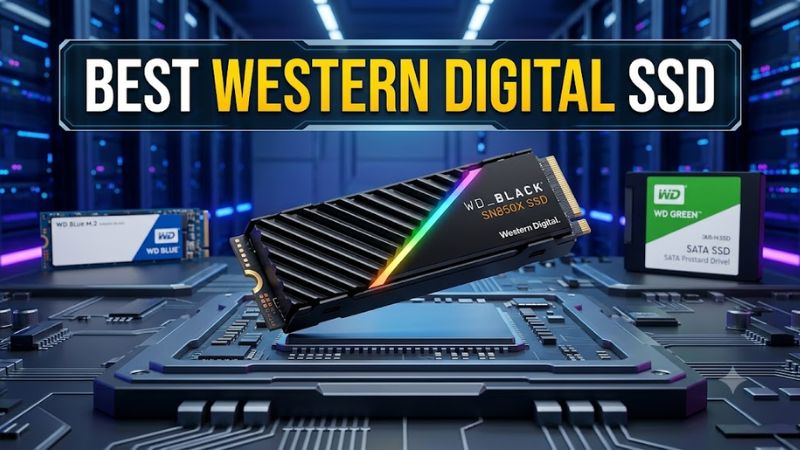
Choosing the best western digital ssd depends on your motherboard, budget, storage needs, and the games you play. WD’s lineup includes high-speed PCIe 5.0 drives, capable PCIe 4.0 gaming models, and more affordable storage options. Comparing interface limits, cooling, capacity, and warranty helps you avoid paying for performance your system cannot use.
How to Choose a Western Digital SSD
Start with your computer’s available M.2 slots, supported PCIe generation, and storage requirements. A fast drive is useful only when the rest of your system can accommodate it. For gaming, capacity, sustained performance, and sensible pricing usually matter more than the largest advertised sequential-read figure.
Match the PCIe generation to your motherboard
PCIe compatibility should come before advertised speed. The WD_BLACK SN8100 uses PCIe 5.0 x4, while the SN850X and SN7100 use PCIe 4.0 x4. A compatible PCIe 5.0 drive can operate in an appropriate backward-compatible PCIe 4.0 slot, but its maximum throughput will be limited by the host interface.
For a recent high-end desktop, the SN8100 is worth considering when the motherboard supports PCIe 5.0 storage. For many existing gaming PCs, the SN850X or SN7100 offers substantial bandwidth without requiring a Gen 5 slot. Check the motherboard manual because M.2 slot capabilities and lane-sharing arrangements differ by model.
Choose capacity for your game library
A 1TB SSD can suit a Windows installation, applications, and a moderately sized game collection, but a library containing several large modern games can fill it quickly. A 2TB model gives most gaming desktops more room for new releases, updates, recordings, and applications without frequent storage management.
Consider 4TB if you keep many large games installed or work with video projects alongside gaming. The SN850X offers capacities beyond those of the SN8100, making it particularly interesting when storage space matters more than adopting the newest interface. Remember that formatted capacity and usable space are lower than the advertised decimal capacity.
Account for cooling and physical clearance
An M.2 2280 SSD is approximately 22mm wide and 80mm long. Before purchasing, verify that your motherboard has a compatible M-key M.2 socket and supports the selected drive’s interface. Check the installation manual for clearance around graphics cards, motherboard covers, and other components that might obstruct the slot.
Some SSD configurations include a heatsink, while others rely on a motherboard’s integrated cooling. The SN850X has heatsink and non-heatsink options, whereas the SN8100 data sheet specifies a slim, non-heatsink drive. Use a compatible cooling solution when the system requires one, and avoid stacking a drive heatsink beneath a motherboard cover unless the manufacturer permits it.
Evaluate endurance and warranty
Warranty coverage and endurance ratings help distinguish drives intended for different workloads. Terabytes written (TBW) indicate the manufacturer’s rated write endurance, not a prediction of exactly when a drive will fail. The SN8100 and SN850X both have five-year limited warranties, subject to their published conditions and endurance limits.
For a gaming PC, ordinary game downloads, updates, and saves usually make raw endurance figures less important than capacity, price, and reliability support. Content creators who regularly write large video files should compare the specific capacity’s TBW rating. Keep backups of important data regardless of which SSD you choose, since a warranty does not replace lost files.
Top Picks: Best Western Digital SSD Models
The right choice depends on whether you prioritize peak throughput, value, gaming capacity, or a compact laptop upgrade. The following comparison uses manufacturer specifications and independent review evidence rather than claiming PC Gaming Universe conducted detailed research. Advertised sequential speeds are maximum specifications, not guaranteed game-loading times.
| Product | Best For | Key Spec | Compatibility | Watch Out For |
| WD_BLACK SN8100 | Best Overall | PCIe 5.0 x4; up to 14,900MB/s read | Compatible M.2 2280 NVMe slot; PCIe 5.0 preferred | Premium cost; Gen 4 limits speed |
| WD_BLACK SN7100 | Best Value | PCIe 4.0 x4; up to 7,250MB/s read on 1TB–2TB models | Compatible M.2 2280 NVMe slot | DRAM-less design |
| WD_BLACK SN850X | Best for Large Game Libraries | PCIe 4.0 x4; up to 8TB capacity | Compatible M.2 2280 NVMe slot | Older Gen 4 interface |
| WD Blue SN580 | Best for Budget Upgrades | PCIe 4.0 x4 NVMe | Compatible M.2 2280 NVMe slot | Older model; compare current prices |
Specifications: Western Digital product data sheets for the SN8100 and SN7100, plus the SN850X data sheet. The SN580 is included as a budget alternative, not as the newest model.
Best Overall: WD_BLACK SN8100
The WD_BLACK SN8100 is the strongest option here for buyers building a compatible high-end desktop around PCIe 5.0 storage. Its manufacturer-rated sequential read speed reaches 14,900MB/s, with sequential writes up to 14,000MB/s on the specified 2TB and 4TB models. It also uses TLC NAND and includes onboard DRAM.
Choose this drive for large transfers, demanding storage workloads, and a premium gaming system that supports its interface. Its main weakness is the cost of the platform and drive, while many games cannot exploit its sequential bandwidth fully. Buyers with PCIe 4.0-only systems should compare the SN850X before paying extra for the newer interface.
Best Value: WD_BLACK SN7100
The WD_BLACK SN7100 targets gaming laptops, handheld gaming devices, and desktops that need fast PCIe 4.0 storage. Western Digital specifies sequential reads up to 7,250MB/s and writes up to 6,900MB/s for the 1TB and 2TB versions. The drive uses TLC NAND and a DRAM-less design with host-memory-buffer technology.
It makes sense for buyers who want strong storage performance without moving to PCIe 5.0. However, sustained workloads can behave differently from short transfers, and the absence of onboard DRAM may matter in some storage scenarios. Compare the current price at your preferred capacity against the SN850X before deciding which offers better value.
Best for Large Game Libraries: WD_BLACK SN850X
The WD_BLACK SN850X remains an attractive option for a gaming desktop that needs high-performance PCIe 4.0 storage and generous capacity. Western Digital lists capacities up to 8TB, with sequential reads reaching 7,300MB/s on the 1TB through 4TB models. The drive also offers optional heatsink configurations and supports Microsoft DirectStorage.
Choose it if you want room for a substantial game collection without stepping up to a PCIe 5.0 drive. Its weakness is that the interface is an older generation than the SN8100, and the largest capacities can cost considerably more. Compare the heatsink and non-heatsink versions carefully, particularly if your motherboard already includes M.2 cooling.
Best for Budget Upgrades: WD Blue SN580
The WD Blue SN580 is an older PCIe 4.0 NVMe SSD worth considering when its sale price makes it substantially cheaper than newer alternatives. Independent coverage from Tom’s Hardware describes it as an efficient, budget-oriented drive with a single-sided layout that can suit space-constrained systems. It can be a sensible upgrade from a slower drive when capacity and price matter most.
The drawback is its age and the possibility that newer products deliver better value at similar prices. It is not automatically the cheapest or best purchase simply because it belongs to the Blue family. Check current availability, capacity-specific specifications, and warranty terms before buying, and compare it with the SN7100 and other competing PCIe 4.0 models.
FAQ
Is WD_BLACK better than WD Blue for gaming?
WD_BLACK is generally the more performance-oriented range, while WD Blue includes mainstream storage options. For a gaming build, the SN850X and SN7100 offer strong PCIe 4.0 specifications, while the SN8100 targets compatible PCIe 5.0 systems. However, a Blue drive can still serve well for a game library or secondary storage when the price is right. Actual game-loading differences depend on the game, system, and workload, not sequential speed alone.
Does a PCIe 5.0 SSD work in a PCIe 4.0 slot?
Yes, a backward-compatible PCIe 5.0 NVMe SSD can work in a suitable PCIe 4.0 M.2 slot, but it will be limited by the host connection. The SN8100 therefore cannot deliver its full advertised PCIe 5.0 throughput through a Gen 4 connection. Check the motherboard manual for supported slot modes, lane sharing, and firmware requirements before installing the drive.
Is 1TB enough for a gaming PC?
Yes, 1TB can be enough for a gaming PC with a curated library, but it may feel restrictive if you keep many large games installed. Windows, applications, game updates, and recordings all consume space. A 2TB SSD offers more flexibility for many players, while 4TB or larger is worth considering for extensive libraries or creative workloads. Choose capacity based on your actual storage habits rather than advertised transfer speed alone.
Do Western Digital SSDs need a separate heatsink?
No, not every Western Digital SSD requires a separately purchased heatsink, because cooling needs depend on the model and installation environment. The SN850X is sold in configurations with or without a heatsink, and compatible motherboard cooling may be sufficient for a bare drive. Check the exact SKU, case airflow, and motherboard instructions before choosing a cooling setup, and avoid installing incompatible overlapping heatsinks.
Final Thoughts
The best western digital ssd depends on your hardware and workload. The SN8100 suits premium PCIe 5.0 builds, the SN7100 offers strong PCIe 4.0 performance, and the SN850X combines gaming-focused features with capacities up to 8TB. Compare local prices, cooling, and motherboard support before making your final choice.