
- Top Pick: KEFEYA Laptop Screen Extender, 14" FHD 1080P IPS Laptop Monitor Extender Dual Screen, Portable Monitor for Laptops 13-17" with USB-C/HDMI Port, Plug n Play for Windows/Mac/Android/Switch/PS5
- Best Value: MNN 15.6" FHD 60Hz Portable Monitor USB-C HDMI IPS HDR Gaming Laptop
- Premium Choice: 15.6" Laptop Screen Extender, 1080P FHD Triple Portable Monitor for Laptops, Ultra-Slim Travel Dual Monitor Fit for 12"-17.3" Laptops, USB-C Plug&Play Extended Screen Compatible with Win/Mac/Android
A laptop screen extender clips or stands beside your laptop to instantly add a second, or even third, display wherever you work. For anyone who has felt boxed in by a single 15-inch panel on the road, these portable extenders bring desktop-style multitasking to hotels, coffee shops, and cramped desks.
We compared a range of laptop extended monitors, from single side-mount panels to triple-screen setups, to see how well they deliver more workspace on the go. Here is our review of build, image quality, and which portable screen extender best fits your mobile workflow.
As an Amazon Associate we earn from qualifying purchases at no extra cost to you.





🎮 Get More From Your Setup — Free
Prime Gaming gives you free PC games every month, in-game loot, and a free Twitch channel sub — plus fast free shipping on all the gear above. New members get a 30-day free trial.
Watch: Laptop Extended Monitor: Review & Buyer’s Guide — Video Review
Design & Build
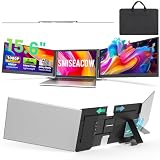
The defining feature of a screen extender is portability, and these panels are impressively svelte. Single-screen models like the KEFEYA and InnoView are thin, light, and travel easily, using a kickstand or a magnetic mount to sit beside your laptop. The more ambitious triple-monitor extenders, such as the 15.6-inch and SMISEACOW models, fold two additional screens that wing out from a central mount attaching to your laptop lid, effectively tripling your workspace while still packing down for travel. Weights range from under two pounds for a single 14.2-inch panel to a few pounds for a triple setup. Connectivity is refreshingly simple across the board: a single USB-C cable carries power and video on compatible laptops, with HDMI as a fallback. The MNN and InnoView panels add built-in speakers and protective cases for extra convenience.
Performance
These 1080p FHD IPS panels deliver crisp, wide-angle images that are ideal for spreadsheets, email, code, and reference documents alongside your main screen. Feeding a display over a single USB-C cable is the ideal plug-and-play experience on modern laptops, mirroring or extending your desktop instantly with no drivers required. The single-screen KEFEYA and InnoView options are the simplest and most reliable for adding one extra panel, while the triple-screen extenders transform a laptop into a mobile command center for stock trading, coding, or data work, provided your laptop’s ports and graphics can drive multiple displays. Response is smooth enough for video and casual gaming, though these are productivity panels at heart. In real-world use, the boost to focus and efficiency from spreading work across multiple screens is immediately obvious.
Pros & Cons
- Instant extra workspace anywhere you take your laptop.
- Single-cable USB-C operation on compatible machines.
- Triple-screen options for serious mobile multitasking.
- Lightweight, foldable designs that pack down for travel.
- Triple setups add weight and can strain a laptop lid.
- Driving multiple panels requires capable ports and graphics.
Alternatives to Consider
If you only need one extra screen and want maximum simplicity, a standalone portable monitor like the InnoView 15.6-inch with its own stand and case is a flexible, reliable pick. For the biggest workspace boost, the triple-screen SMISEACOW or 15.6-inch extenders are unmatched, though they are heavier. Those who want a lightweight single side-panel that mounts cleanly to the laptop should look at the KEFEYA or the sub-two-pound 14.2-inch extender.
Frequently Asked Questions
Will a screen extender work with one USB-C cable?
Yes, if your laptop’s USB-C port supports video output and enough power. If not, use the HDMI input plus a separate USB power source.
Can my laptop drive a triple-screen extender?
It depends on your laptop’s graphics and ports. Some triple extenders use a mix of USB-C and DisplayLink to drive multiple panels. Check your machine’s display output support first.
Are these good for anything besides work?
Yes. They double as travel displays for movies, and casual gaming works fine at 60Hz. They are most valuable, though, for productivity multitasking.
Do they need special software?
Simple USB-C and HDMI panels are plug-and-play. Some multi-screen DisplayLink extenders may require a lightweight driver, which the listing will specify.
Verdict
A laptop extended monitor is a game-changer for mobile productivity. For a straightforward single-screen boost, the KEFEYA or InnoView panels are excellent, while power users who want to triple their workspace should look at the SMISEACOW or 15.6-inch triple extenders. Match the setup to your workflow and you will wonder how you managed with one screen.











