
🛒 Best Price Today on Amazon
Prime members get fast, free shipping on everything above, plus member-only deals. New members get a 30-day free trial — cancel anytime.
Evaluating gaming laptop vs gaming pc which is better value requires looking beyond initial hardware costs. While laptops include an integrated screen, keyboard, and battery, desktop computers deliver much higher power limits and thermal capacity. Buyers must weigh portable convenience against long-term component upgrade flexibility.
What Gaming Laptop vs Desktop Value Really Comes Down To
Determining gaming laptop vs gaming pc which is better value comes down to how each platform handles thermal headroom, silicon power limits, peripheral investments, and long-term upgrade paths. While both platforms utilize DDR5 memory and PCIe Gen 4 storage, their sustained gaming performance profiles differ drastically over multi-hour gaming sessions.
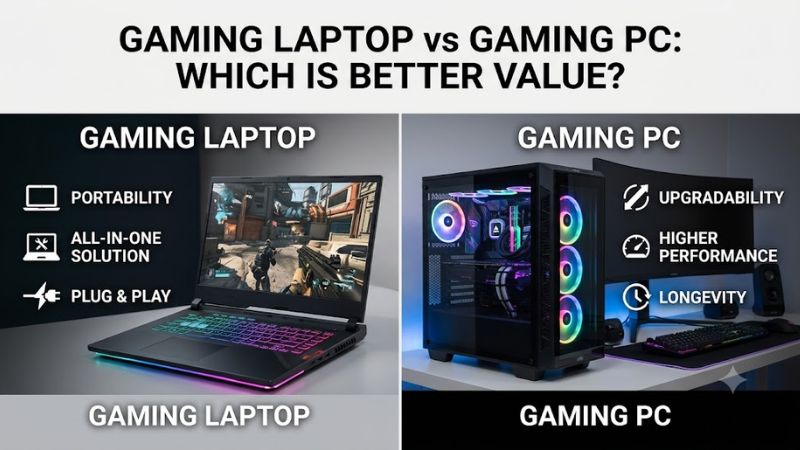
Silicon Power Limits and Thermal Overhead
When comparing a gaming laptop vs gaming pc which is better value, power delivery dictates raw graphics output. A mobile NVIDIA GeForce RTX 4070 GPU operates within a strict 140W total graphics power limit, whereas a desktop RTX 4070 graphics card draws up to 200W through standard PCIe power connectors on an ATX power supply.
In 1440p Ultra benchmarks published by Hardware Unboxed, the desktop RTX 4070 averages 105 FPS in Cyberpunk 2077 compared to 78 FPS on the 140W mobile RTX 4070. Larger desktop heat sinks and 120mm case fans dissipate heat efficiently without triggering thermal throttling during long gaming sessions on Windows systems.
Component Upgradability and System Lifespan
Desktop computers feature modular standards such as AM5 socket motherboards, removable PCIe expansion cards, and standardized ATX power supplies. When individual hardware components age, gamers can swap a single graphics card or add DDR5 RAM modules without replacing the motherboard, display panel, or outer chassis frame.
Laptops solder the CPU and GPU directly to the motherboard. Aside from M.2 NVMe storage and select SO-DIMM RAM slots, upgrading core hardware is impossible. This engineering constraint limits system flexibility, requiring complete replacement when game software demands increase over multi-year ownership cycles.
Integrated Screen and Peripheral Equipment Costs
When determining a gaming laptop vs gaming pc which is better value, integrated hardware reduces initial setup friction. Laptops include a high-refresh-rate display, mechanical keyboard switches, trackpad, and lithium-ion battery in one package. Desktop builds require purchasing a standalone high-refresh-rate monitor and peripherals.
A standalone 27-inch 1440p 165Hz IPS monitor, mechanical keyboard, and optical gaming mouse typically add $250 to $400 to the total cost of a desktop platform. However, desktop monitors offer larger viewing angles, adjustable ergonomic stands, and reusable utility across multiple PC hardware generations over a ten-year span.
What Does Not Help Value Decisions
Third-party software utilities, RAM cleaners, and aggressive registry tweaking scripts do not resolve core hardware power limits or thermal restrictions. These software modifications fail to alter physical silicon operating frequencies or expand system power delivery headroom during intensive 3D gaming workloads on Windows.
Disabling Windows telemetry services or altering OS background processing policies yields zero measurable frame rate gains in modern gaming titles like Cyberpunk 2077 or Starfield. Hardware buyers should evaluate actual graphics card power limits, cooling capacity, and physical motherboard expansion slots rather than software tweaks.
How to Evaluate Gaming Value: Step by Step
To analyze a gaming laptop vs gaming pc which is better value, buyers must follow a structured evaluation procedure before spending money. Assessing power targets, calculating long-term system ownership costs, measuring frame rate output per dollar, and verifying setup needs prevents buyers from overpaying for unnecessary mobility.
| Setting | Where | Effect | Risk |
| GPU Power Budget | BIOS / NVIDIA Control Panel | Increases frame rates | Raises thermal output |
| Display Resolution | Windows Display Settings | Enhances visual clarity | Reduces frame rates |
| Fan Speed Profile | Hardware Utility / BIOS | Lowers component heat | Increases fan noise |
| Frame Rate Cap | In-Game Graphics Menu | Stabilizes temperatures | Limits peak frames |
Step 1: Assess GPU Power Limits and Thermal Cooling Limits
Inspect the graphics card total graphics power rating in manufacturer specifications or HWiNFO diagnostic software before purchasing. A laptop GPU with a low 75W power target delivers drastically lower frame rates than a high-power 140W variant sharing the same chip name, directly impacting performance value in demanding titles.
Desktop graphic expansion cards feature larger aluminum heatsinks and dual or triple 90mm fans, allowing sustained operation at higher clock frequencies. Gamers using Windows can verify GPU core temperatures and thermal throttling status in MSI Afterburner to ensure system temperatures remain below 85 degrees Celsius.
Step 2: Factor External Display and Peripheral Costs
Calculating gaming laptop vs gaming pc which is better value demands accounting for essential peripheral accessories. A complete desktop setup requires spending funds on a high-refresh monitor, mechanical keyboard, and precision gaming mouse, whereas a laptop provides these components integrated directly inside its body.
Gamers who already possess a 1440p monitor and desktop peripherals retain those investments when upgrading desktop components. Conversely, laptop buyers must repurchase built-in screen panels and mechanical laptop keyboards every time they upgrade their gaming machine, inflating lifetime spending across multiple years.
Step 3: Calculate Long-Term Total Cost of Ownership
Calculate total system cost over a six-year ownership window rather than evaluating initial purchase price alone. A desktop PC allows targeted upgrades, such as spending $350 on a mid-generation graphics card update at year three, while preserving the original computer case, power supply, CPU cooler, and storage drives.
Replacing an entire gaming laptop every three years costs significantly more over time than performing incremental desktop component updates. Gamers can swap failing individual desktop components, such as a power supply or system fan, using standard retail components without incurring complete machine replacement expenses.
Step 4: Measure Frame Rate Performance Output Per Dollar
Evaluating gaming laptop vs gaming pc which is better value involves calculating frame rates divided by hardware price. A $1,200 desktop build featuring an AMD Ryzen 5 processor and desktop graphics card delivers approximately 0.083 frames per dollar at 1440p in Cyberpunk 2077 compared to 0.058 frames per dollar on a $1,200 laptop.
Higher frame rate efficiency on desktop hardware stems from unconstrained board power limits and desktop cooling space. While laptops charge a price premium for portable engineering and built-in battery power delivery, desktop platforms dedicate the majority of their manufacturing budget directly into core graphics and CPU hardware.
Frequently Asked Questions
Addressing gaming laptop vs gaming pc which is better value questions clarifies real hardware performance trade-offs for gamers. Reviewing direct answers regarding component pricing, frame rate gaps, desktop replacements, and system lifespan helps prospective buyers make informed platform investments for their gaming setups.
Is a desktop gaming PC always cheaper than a laptop?
A desktop gaming PC is not always cheaper upfront when factoring in mandatory external peripherals like high-refresh monitors and keyboards. However, at equal price points, a desktop system consistently delivers superior graphics performance due to higher graphics power targets and unconstrained thermal cooling solutions.
Entry-level desktop configurations allow gamers to spend money incrementally on individual components over time. Building around a standardized AM5 motherboard or ATX power supply allows users to purchase budget graphics cards initially and upgrade to higher-tier expansion cards later without replacing the entire base system.
How big is the performance gap between laptop and desktop GPUs?
The performance gap between laptop and desktop graphics cards typically ranges from 20% to 40% even when sharing identical model branding names. This difference occurs because mobile graphics chips operate under restricted power caps and smaller physical cooling designs inside slim laptop chassis enclosures.
For example, a desktop RTX 4080 graphics card operating at 320W significantly outperforms an RTX 4080 mobile GPU operating at its maximum 150W limit. Gamers seeking maximum frame rates at 1440p or 4K resolution receive noticeably higher rendering stability on full-sized desktop PCIe hardware.
Can a gaming laptop replace a desktop setup completely?
A gaming laptop can fully replace a desktop setup if mobility between work, school, and home is a primary requirement. Modern laptops feature HDMI 2.1 display outputs, Thunderbolt connectivity, and support for external gaming mice, keyboards, and high-refresh-rate desktop monitors.
However, operating a laptop docked to external monitors produces higher fan noise under load compared to a desktop computer case. Gamers should maintain clear intake airflow underneath the laptop chassis using a raised cooling stand to prevent thermal throttling during extended gaming sessions.
How long do gaming laptops last compared to desktop PCs?
Gaming laptops typically offer a useful gaming lifespan of three to four years before thermal degradation and un-upgradeable components limit performance in new game releases. In contrast, a well-maintained desktop PC platform can last seven to ten years through incremental hardware upgrades.
Desktop component standardization allows users to replace worn cooling fans, upgrade internal storage, or replace an aging ATX power supply individually. Laptops suffer from non-replaceable batteries and soldered thermal modules that make component-level repairs impractical once warranty coverage expires.
Final Thoughts
When evaluating a gaming laptop vs gaming pc which is better value, fixed desk gamers benefit significantly more from a modular desktop PC. While laptops offer essential portability for travelling users, desktops deliver higher GPU power limits, superior thermal cooling, and modular upgrade options that lower long-term gaming hardware costs.









