🛒 Best Price Today on Amazon
Prime members get fast, free shipping on everything above, plus member-only deals. New members get a 30-day free trial — cancel anytime.
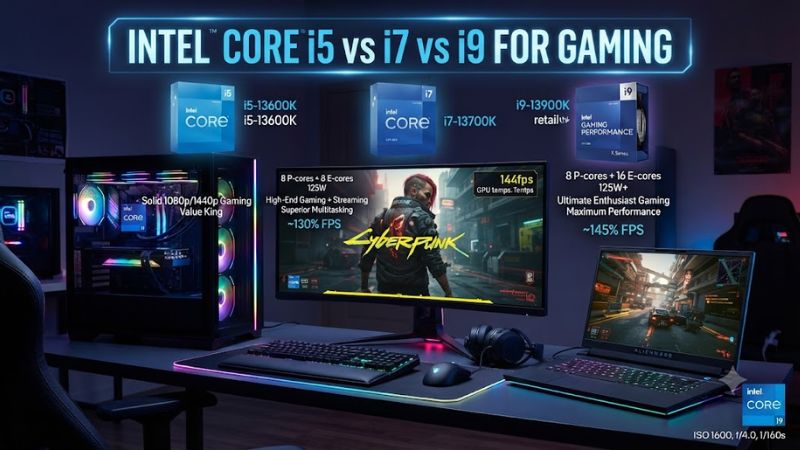
Intel core i5 vs i7 vs i9 for gaming is no longer a simple three-chip choice because Intel now uses Core Ultra branding on its current desktop processors. For 2026 builds, the Ultra 5, Ultra 7 and Ultra 9 tiers still provide a useful performance hierarchy, but exact model, platform, GPU and workload matter more than the badge alone.
How to Choose an Intel Gaming CPU
The main choice comes down to four factors: gaming performance, total system budget, platform compatibility and workload beyond games. Current Intel desktop options use LGA1851 and DDR5, while the newer 200S Plus models add higher memory support and revised core configurations. That makes the exact CPU more important than simply choosing the highest tier.
Match the CPU Tier to Your GPU
For intel core i5 vs i7 vs i9 for gaming, the graphics card should influence the decision first. At higher resolutions, the GPU commonly becomes the limiting component, so paying more for a CPU may produce a smaller frame-rate gain. At 1080p with a high-end GPU, CPU differences are easier to expose, making stronger processors more relevant.
The Core Ultra 5 250K Plus is particularly relevant for balanced gaming systems because it has 18 cores and 18 threads, with six P-cores and 12 E-cores. Intel rates it for up to 5.3 GHz and DDR5-7200 support, giving it substantial CPU capacity without moving into the higher Ultra 7 or Ultra 9 tier.
Consider High-Refresh Gaming
If your intel core i5 vs i7 vs i9 for gaming decision involves a 144Hz or higher display, CPU headroom becomes more important when targeting high frame rates. The Core Ultra 7 270K Plus is a stronger fit for this use because it has 24 cores and 24 threads, while Intel positions it as its fastest desktop gaming processor in the 200S Plus family.
Independent testing also shows why the Ultra 7 tier deserves attention. The FPS Review compared the 270K Plus and Ultra 9 285K at 1080p with a GeForce RTX 5090 and found the 270K Plus slightly ahead on average across its 14-game CPU-focused suite, although individual games varied.
Check Motherboard and Memory Compatibility
For intel core i5 vs i7 vs i9 for gaming, compatibility is a hard requirement rather than a performance preference. Current desktop Core Ultra Series 2 processors use LGA1851 and Intel 800-series chipsets, while DDR5 is the supported memory type. The 200S Plus processors support DDR5-7200, so an older DDR4 platform cannot simply be reused.
The Core Ultra 7 270K Plus and Core Ultra 5 250K Plus are compatible with Intel 800-series chipset motherboards, and Intel says the 200S Plus processors maintain compatibility across those chipsets. A suitable CPU cooler is also necessary because these K-series chips have a 125W processor base power and can reach substantially higher maximum turbo power.
Account for Streaming and Creation
For intel core i5 vs i7 vs i9 for gaming, extra cores matter more when gaming is combined with streaming, recording, compiling or content creation. The Ultra 7 270K Plus provides 24 cores and 24 threads, while the Ultra 9 285K has the same 24-core and 24-thread count but belongs to the earlier Series 2 launch. Gaming performance therefore cannot be inferred from the tier number alone.
The Ultra 9 285K remains relevant for buyers who want a high-end Intel desktop processor for mixed workloads, but its launch price was substantially higher than the 270K Plus. Independent comparisons found the newer Ultra 7 can match or slightly exceed the 285K in many games, reducing the gaming case for paying extra solely for the Ultra 9 label.
Top Picks for Intel Gaming CPUs
The strongest intel core i5 vs i7 vs i9 for gaming choices are not simply the most expensive models. The Core Ultra 7 270K Plus is the leading gaming-oriented option in Intel’s current Plus range, while the Ultra 5 250K Plus targets value. The Ultra 9 285K remains a high-end alternative, and the Ultra 7 265K can make sense when its platform price is lower.
| Product | Best For | Key Spec | Compatibility | Watch Out For |
| Intel Core Ultra 7 270K Plus | Best Overall | 24 cores / 24 threads; up to 5.5 GHz | LGA1851, Intel 800 series, DDR5-7200 | 125W base power and needs suitable cooling |
| Intel Core Ultra 5 250K Plus | Best Value | 18 cores / 18 threads; up to 5.3 GHz | LGA1851, Intel 800 series, DDR5-7200 | K-series platform and cooler required |
| Intel Core Ultra 9 285K | Best for high-end mixed workloads | 24 cores / 24 threads; up to 5.7 GHz | LGA1851, Intel 800 series, DDR5-6400 official spec | Gaming gains over cheaper options can be small |
| Intel Core Ultra 7 265K | Best for discounted Series 2 builds | 20 cores / 20 threads; up to 5.5 GHz | LGA1851, Intel 800 series, DDR5-6400 | Slower gaming choice than 270K Plus |
Intel Core Ultra 7 270K Plus: Best Overall
The Core Ultra 7 270K Plus is the strongest overall choice because it combines the Ultra 7 tier with 24 cores, 24 threads, up to 5.5 GHz and DDR5-7200 support. Intel also reports up to 15% higher gaming performance than the Ultra 7 265K in its own geomean comparison, while independent testing places it close to or ahead of the Ultra 9 285K in many games.
Its weakness is that the processor still belongs to a high-power K-series platform, so the complete build needs an appropriate LGA1851 motherboard, DDR5 memory and adequate CPU cooling. Buyers should not choose it simply because it has more cores than an Ultra 5. For a GPU-limited 4K system, the saved money may be better allocated elsewhere.
Intel Core Ultra 5 250K Plus: Best Value
The Core Ultra 5 250K Plus is the clearest value choice for intel core i5 vs i7 vs i9 for gaming because its 18-core configuration is unusually substantial for the Ultra 5 tier. It has six P-cores, 12 E-cores, 30MB of L3 cache and up to 5.3 GHz, while Intel lists a $199 suggested starting price at launch.
The limitation is platform cost rather than CPU capability. It still requires LGA1851, an Intel 800-series motherboard and DDR5 memory, so it is not a drop-in upgrade for an older DDR4 Intel system. It also carries a 125W base power rating, meaning a basic boxed-cooler assumption is inappropriate for this unlocked desktop processor.
Intel Core Ultra 9 285K: Best for High-End Workloads
The Core Ultra 9 285K remains Intel’s flagship Series 2 desktop option, with 24 cores, 24 threads, 36MB of L3 cache and a maximum turbo frequency of 5.7 GHz. It uses LGA1851 and DDR5, with Intel specifying DDR5-6400 for the original Series 2 platform. These specifications make it better suited to buyers who combine gaming with demanding CPU workloads.
Its real weakness for gaming is value. In a 1080p CPU-focused comparison using a GeForce RTX 5090, the Ultra 7 270K Plus was slightly faster overall in the FPS Review’s 14-game suite. That does not make the 285K slow, but it means pure gaming buyers should not assume the Ultra 9 tier automatically produces higher frame rates.
Intel Core Ultra 7 265K: Best for Discounted Builds
The Core Ultra 7 265K is a reasonable choice when its street price is substantially below the newer 270K Plus. It provides 20 cores and 20 threads, up to 5.5 GHz and 30MB of L3 cache, using the same LGA1851 platform as the newer Plus processors. It therefore fits existing Series 2 motherboard plans without requiring a different socket.
The disadvantage is straightforward: the 270K Plus is the newer and faster gaming-oriented option. Intel reports up to 15% higher average gaming performance for the 270K Plus against the 265K, while both use the same general platform. Choose the 265K when pricing makes the older model compelling, rather than because it carries the Ultra 7 name.
FAQ
The most useful intel core i5 vs i7 vs i9 for gaming questions focus on whether the higher tier actually changes gaming performance, which current models correspond to the traditional labels, and how the platform affects an upgrade. The answers depend on resolution, GPU, game engine and whether the PC also handles demanding workloads outside gaming.
Is Core Ultra 5 enough for gaming?
Yes, Core Ultra 5 is enough for most gaming PCs when the processor is matched with an appropriate graphics card. The Core Ultra 5 250K Plus has 18 cores and 18 threads, up to 5.3 GHz and 30MB of L3 cache, making it substantially more capable than the old idea of an entry-level i5 suggests.
At 1440p or 4K, the graphics card often has greater influence over frame rates than moving from Ultra 5 to Ultra 7 or Ultra 9. At 1080p with a powerful GPU, the CPU matters more, particularly for very high refresh rates. That makes the 250K Plus a sensible starting point rather than a processor reserved for basic gaming.
Is Core Ultra 7 better than Core Ultra 9 for gaming?
Not automatically; the Core Ultra 7 270K Plus can match or exceed the Core Ultra 9 285K in gaming despite its lower tier. The FPS Review’s 1080p CPU-focused 14-game comparison found the 270K Plus slightly ahead on average, while individual results varied between games.
The Ultra 9 285K still has a place in high-end mixed-use systems, especially when CPU-heavy applications are important. For a gaming-only build, however, the price difference should be considered against the GPU, display and storage budget rather than assuming the Ultra 9 badge delivers a proportional gaming improvement.
Can I use DDR4 with these Intel CPUs?
No, the current LGA1851 desktop Core Ultra processors discussed here require DDR5 memory. Intel’s Series 2 documentation specifies DDR5 support, while the 200S Plus models raise the official memory-speed support to DDR5-7200. An older DDR4 kit therefore cannot simply move into a new LGA1851 build.
This also means motherboard compatibility must be checked before buying the CPU. LGA1700 boards used by earlier Intel desktop generations are not compatible with LGA1851 processors, even though both are Intel platforms. For a new system, select the CPU, 800-series motherboard and DDR5 kit as one platform rather than mixing generations.
Which Intel CPU should gamers buy in 2026?
For most buyers, the Core Ultra 7 270K Plus is the strongest all-round gaming choice, while the Core Ultra 5 250K Plus is the better value-oriented option. Intel’s current 200S Plus desktop range specifically targets gaming with these two models, and both support DDR5-7200 on compatible 800-series platforms.
The Core Ultra 9 285K makes more sense when gaming is only part of a demanding desktop workload, while the 265K can be attractive when discounted. In intel core i5 vs i7 vs i9 for gaming, the exact model and total platform cost should therefore decide the purchase, not the i5, i7 or i9 label alone.
Final Thoughts
Intel core i5 vs i7 vs i9 for gaming is best understood as a comparison of Intel performance tiers rather than three fixed specifications. In today’s desktop lineup, the Core Ultra 5 250K Plus offers strong value, the Ultra 7 270K Plus is the standout gaming option, and the Ultra 9 285K remains useful for demanding mixed workloads.