🛒 Best Price Today on Amazon
Prime members get fast, free shipping on everything above, plus member-only deals. New members get a 30-day free trial — cancel anytime.
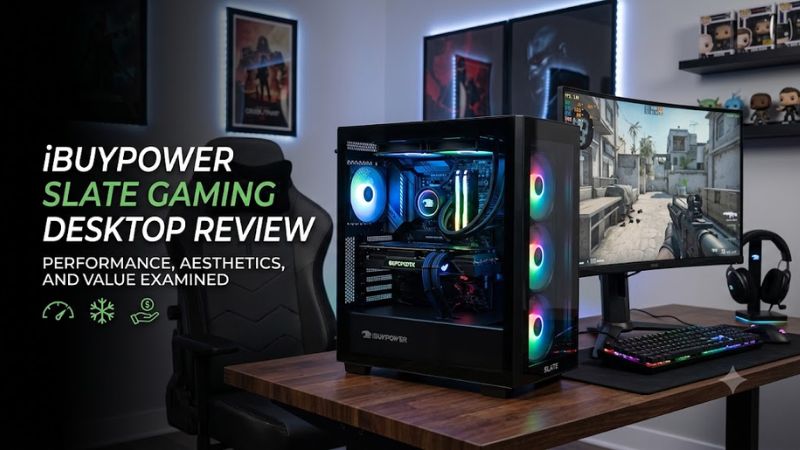
The ibuypower slate gaming desktop review depends on the exact configuration, because the Slate name covers systems with different processors, graphics cards, memory, and storage. The RTX 5070 configuration is a compelling option for 1080p and 1440p gaming, but its price, processor performance in creative workloads, and cooling noise deserve attention before you buy.
How to Choose an iBUYPOWER Slate Gaming Desktop
Start with the graphics card, then compare the processor, memory, storage, and total system price. A gaming desktop with an RTX 5070 targets a different performance tier from one with an RTX 5060 or RTX 5060 Ti. Check the complete model number before comparing deals, since a similar-looking Slate case does not mean two computers deliver the same gaming experience.
Choose the GPU for Your Resolution
The graphics card is the most important starting point for a gaming-focused purchase. The RTX 5070 configuration reviewed by Tom’s Hardware uses 12GB of GDDR7 memory and is suited to demanding 1080p and 1440p games. It can also run many titles at 4K, although demanding graphics settings may require upscaling or other compromises to maintain a comfortable frame rate.
Buyers considering an RTX 5060 or RTX 5060 Ti Slate should judge those systems on their own specifications rather than assuming they perform like the RTX 5070 model. The ibuypower slate gaming desktop review results discussed below apply to the specific Ryzen 7 7700X3D and RTX 5070 configuration, not every desktop sold under the Slate name.
Match the Processor to Your Workload
The reviewed system combines an AMD Ryzen 7 7700X3D with an RTX 5070. This gaming-oriented processor can deliver strong results in games that benefit from its cache design, but CPU-heavy tasks such as video transcoding and intensive productivity applications may favor competing processors with stronger multicore performance.
Consider how you use your computer outside gaming. If you mainly play games, stream casually, browse, and run everyday applications, the configuration has plenty of capability. If you frequently compile software, render complex projects, or encode video, compare independent CPU benchmarks and the cost of similarly priced Intel-based desktops before deciding.
Check Memory, Storage, and Upgrade Compatibility
The reviewed configuration includes 32GB of DDR5-5200 memory in a two-module arrangement and a 1TB PCIe 4.0 SSD. This is a practical starting point for modern gaming, multitasking, and installing several large games. Buyers with extensive game libraries may need additional storage sooner, depending on the size of their installed titles and applications.
Before upgrading, confirm the exact motherboard, memory support, available M.2 slots, and power-supply capacity for your SKU. The reviewed system has four memory slots and two M.2 drive slots, but component availability and motherboard details should be checked against the actual machine. DDR5 modules are not interchangeable with DDR4 slots, and a graphics-card upgrade must fit the case and work with the available power connectors.
Compare the Full Price and Included Equipment
The reviewed RTX 5070 model was listed at $1,999.99 when Tom’s Hardware published its review on September 30, 2026. That price included a 360mm liquid CPU cooler, a tempered-glass case, and a mechanical keyboard and gaming mouse. Those extras add practical value for someone building a complete gaming setup rather than replacing an existing tower.
However, a review price is not a guarantee of today’s checkout price. Retailers may carry different configurations, promotions, and warranty terms. Compare the CPU, GPU, memory, SSD capacity, operating system, and included peripherals line by line. A cheaper computer may be the better purchase if it offers comparable gaming performance without charging extra for equipment you do not need.
Top Picks: Which Slate Configuration Is Worth Buying?
The best configuration depends on your budget and the games you play. The following comparison separates a reviewed RTX 5070 desktop from other documented Slate systems. Prices are reference figures from the cited listings or review, not guaranteed current offers; verify the precise SKU and warranty before purchasing.
| Product | Best For | Key Spec | Compatibility | Watch Out For |
| Slate, Ryzen 7 7700X3D | Best Overall for gaming | RTX 5070 12GB; 32GB DDR5-5200 | DDR5 platform; 750W PSU in reviewed unit | $1,999.99 review price; CPU-heavy work trails some rivals |
| Slate 4 refurbished | Best Value on a tight budget | Ryzen 3 3100; GTX 1650 4GB | B550 motherboard; 16GB DDR4-3200 | Older GPU, 500GB SSD plus 1TB HDD, refurbished warranty |
| Slate with Core Ultra 7 270K Plus | Best For mixed gaming and productivity | RTX 5070 12GB; 32GB DDR5-5200 | Z890 Wi-Fi motherboard; 750W 80 Plus Gold PSU | Confirm retail price and exact SKU |
| RDY Slate 8MP R01 | Best For larger game libraries | Ryzen 7 9700X; RX 9060 XT 16GB | B650 motherboard; 32GB DDR5-5600 | Different GPU ecosystem; compare game-specific performance |
Best Overall: Slate with Ryzen 7 7700X3D and RTX 5070
The reviewed configuration is the strongest choice here for buyers who prioritize gaming and want a complete desktop setup. Its RTX 5070, 32GB of memory, 1TB SSD, and included keyboard and mouse provide a balanced starting point for modern PC games. The liquid CPU cooler and tempered-glass chassis also give the system a more elaborate presentation than a basic office-style tower.
Its main weakness is value outside gaming. Tom’s Hardware reported lower productivity performance than competing Intel-based desktops in the tested workloads, while CPU-heavy loads could make the cooling fans noticeably louder. Choose this configuration if gaming is your primary task; users who spend much of their time encoding video or running multicore applications should compare alternatives at the same price.
Best Value: Slate 4 Refurbished
The refurbished Slate 4 listing is a lower-cost entry point for casual gaming, older titles, and buyers who do not need high-end graphics. Its documented configuration includes a Ryzen 3 3100 processor, GTX 1650 with 4GB of GDDR5 memory, 16GB of DDR4-3200 RAM, and a storage combination of a 500GB NVMe SSD and a 1TB hard drive. The listed price was $699.
The trade-off is substantially older hardware and a shorter stated refurbished warranty than many new desktops. The listing specifies a 90-day refurbished warranty and a 30-day return period, so check those terms before ordering. This model is not the right choice for someone seeking high graphics settings in demanding new releases or the capabilities of the RTX 5070 configuration.
Best For Productivity: Slate with Core Ultra 7 270K Plus
iBUYPOWER’s official specification page lists a Slate configuration with an Intel Core Ultra 7 270K Plus, GeForce RTX 5070 with 12GB of memory, 32GB of DDR5-5200 RAM, and a 1TB M.2 NVMe SSD. It also specifies a Z890 Wi-Fi motherboard and a 750W 80 Plus Gold power supply. This combination deserves consideration if you want gaming capability alongside a different CPU platform.
The available specifications do not establish a directly comparable gaming or productivity result against every other Slate model. Check independent benchmarks for your applications and confirm the exact retail SKU before paying a premium for the processor. The system uses DDR5 memory, so existing DDR4 desktop memory cannot be transferred into its DDR5 slots.
Best For Storage Capacity: RDY Slate 8MP R01
The official RDY Slate 8MP R01 listing pairs an AMD Ryzen 7 9700X with a Radeon RX 9060 XT featuring 16GB of GDDR6 memory. Its remaining documented specifications include 32GB of DDR5-5600 RAM, a 2TB NVMe SSD, a B650 motherboard, and a 750W 80 Plus Gold power supply. The larger SSD is particularly useful if you keep many games installed at once.
Its graphics hardware comes from AMD rather than NVIDIA, so compare results in your preferred games and applications rather than relying on the RTX 5070 model’s results. Features such as DLSS are specific to supported NVIDIA GPUs, while AMD’s FSR technology follows a different compatibility path. Check the exact software support, current price, and included warranty to determine whether this configuration suits your gaming library.
FAQ
Is the iBUYPOWER Slate gaming desktop worth buying?
Yes, the Slate can be worth buying if its exact configuration matches your gaming needs and its price compares favorably with competing desktops. The RTX 5070 model offers strong gaming capability and useful included peripherals, but its value depends on current pricing and whether you need its liquid cooler and accessories.
Can the iBUYPOWER Slate run modern games at 1440p?
Yes, the RTX 5070 configuration is suitable for 1440p gaming across a broad range of modern titles. Actual frame rates depend on the game, graphics preset, ray tracing, and upscaling settings, so check independent benchmarks for demanding games you plan to play.
Can you upgrade the iBUYPOWER Slate later?
Yes, upgrades are possible, but the available options depend on the exact model and motherboard. The reviewed RTX 5070 configuration has four memory slots and two M.2 drive slots; verify GPU clearance, power connectors, PSU capacity, and supported memory before replacing components.
Does the iBUYPOWER Slate include a keyboard and mouse?
Yes, the reviewed Ryzen 7 7700X3D and RTX 5070 configuration includes a mechanical RGB keyboard and gaming mouse. Included accessories can differ across Slate models and retailer listings, so confirm the package contents for the specific SKU you intend to purchase.
Final Thoughts
The ibuypower slate gaming desktop review points to a capable gaming PC rather than a universal winner. The RTX 5070 configuration is attractive for 1080p and 1440p gaming, while its price and productivity limitations deserve consideration. Compare current configurations, warranty coverage, and independent benchmarks before choosing the Slate that best fits your budget.