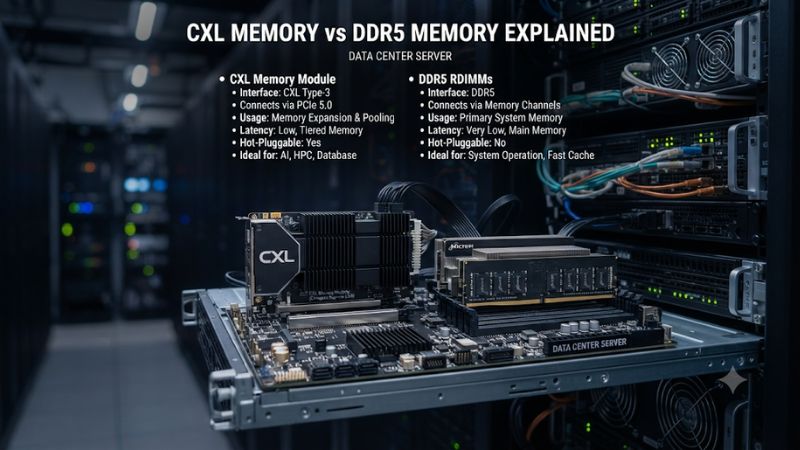
CXL memory vs DDR5 memory explained starts with an important distinction: DDR5 is a system memory standard, while CXL is an interconnect technology that allows processors to access additional memory and accelerators. Both can use DRAM, but they serve different purposes. Understanding their differences helps explain future memory expansion and its relevance to gaming PCs.
What CXL Memory and DDR5 Really Come Down To
CXL and DDR5 are not direct competitors in the traditional sense. DDR5 provides the primary memory used by modern desktop and server processors, whereas CXL creates another pathway for accessing memory outside conventional CPU-attached DIMM slots. Their differences involve architecture, latency, bandwidth, and scalability.
1. What Is DDR5 Memory?
DDR5 (Double Data Rate 5) is the fifth generation of mainstream DDR synchronous dynamic random-access memory. It connects to a processor’s integrated memory controller through dedicated motherboard memory channels. Desktop users typically install DDR5 UDIMMs into compatible motherboard slots.
DDR5 increases memory capacity and bandwidth through architectural improvements over DDR4. Each DDR5 DIMM also contains two independent 32-bit subchannels, improving memory access flexibility. This makes DDR5 suitable for gaming, content creation, multitasking, and demanding workstation applications.
For gaming PCs, DDR5 provides the working memory needed by Windows, game engines, background applications, and CPU-side game processing. Its performance depends on data rate, timings, channel configuration, memory-controller capabilities, and the processor platform.
2. What Is CXL Memory?
Compute Express Link (CXL) is an open interconnect standard designed to connect processors with memory and accelerator devices while maintaining memory coherency. It builds on PCI Express physical connectivity but introduces additional protocols for communicating with compatible devices.
Unlike a conventional DDR5 DIMM, a CXL memory expansion device can provide additional memory through a supported PCIe-based connection. This makes it possible to increase available system memory without relying exclusively on the processor’s directly attached DIMM slots.
CXL is particularly relevant to data centers, virtualization, artificial intelligence, and large-memory workloads. These environments often need more memory capacity than conventional processor-attached DRAM configurations can economically provide.
Compute Express Link+1
3. How CXL Memory Types Work
CXL defines three main device categories, each serving a different architectural purpose. Understanding them prevents confusion between CXL memory expansion and accelerator memory.
- Type 1: Provides caching capabilities for devices that need coherent access to host memory.
- Type 2: Combines caching with device-attached memory, supporting accelerators such as specialized computing hardware.
- Type 3: Provides memory expansion through the CXL.mem protocol.
Type 3 is the most relevant category when discussing CXL memory versus DDR5. It allows a compatible host processor to access memory attached to a separate CXL device. Depending on its implementation, that device can use DRAM or other supported memory technologies.
This distinction matters because CXL does not define a new DRAM generation. Instead, it defines how compatible components communicate and access memory.
Specification+1
4. What Doesn’t Help: Treating CXL as Faster DDR5
Comparing CXL and DDR5 solely by advertised transfer rates produces misleading conclusions. CXL 4.0, for example, doubles the interconnect data rate from 64 GT/s to 128 GT/s. That does not mean a CXL memory device automatically delivers twice the performance of DDR5.
Actual memory performance depends on the complete hardware implementation, including the processor, memory controller, CXL link width, device memory, switches, and access patterns.
For gaming, replacing conventional DDR5 with an expansion device is not a sensible upgrade strategy. CXL primarily addresses memory capacity and resource allocation challenges rather than providing a straightforward replacement for low-latency desktop RAM.
Compute Express Link -+1
CXL Memory vs DDR5 Memory: Technical Comparison
The practical difference becomes clearer when comparing how each technology connects to the processor, handles memory access, and scales across larger systems. DDR5 prioritizes direct CPU memory access, while CXL introduces additional connectivity options for expanding and sharing memory resources. Neither should be judged by capacity or transfer rate alone.
1. Architecture and Memory Connectivity
DDR5 connects directly to the processor’s integrated memory controller through motherboard memory channels. The CPU accesses installed modules through this dedicated memory subsystem, making DDR5 the conventional choice for primary system memory.
CXL uses a compatible PCIe-based connection to communicate with external memory devices. A Type 3 device can contribute memory to the host’s physical address space, depending on platform configuration. The additional connection and protocol layers introduce different performance considerations.
The architectural distinction is central to CXL memory vs DDR5 memory explained: one describes the DRAM interface, while the other describes a coherent interconnect that can transport memory transactions.
2. Latency and Bandwidth Differences
DDR5 generally offers lower access latency than CXL-attached memory because the processor accesses local DRAM through its integrated memory controller. CXL introduces additional communication overhead, although actual results depend on device architecture and system configuration.
Independent research published by Microsoft demonstrates this difference on fifth-generation Intel Xeon hardware. Its Flat Memory Mode research reports approximately 2.02 times the load-to-use latency for CXL memory compared with local DDR5 under the evaluated configuration. This is a specific server result, not a universal performance ratio.
Microsoft
Bandwidth also depends on the number of available memory channels and CXL links. A multi-device CXL configuration can provide substantial aggregate bandwidth, but that does not automatically make it equivalent to directly attached DDR5 for latency-sensitive workloads.
3. Memory Capacity and Scalability
DDR5 capacity is limited by the processor’s supported memory configuration, motherboard design, available DIMM slots, and the memory modules installed. Desktop platforms generally provide sufficient capacity for gaming and mainstream productivity.
CXL introduces another expansion approach. Compatible systems can connect additional memory devices, potentially increasing total available memory beyond the conventional DIMM configuration. CXL 2.0 and later generations also introduce capabilities for memory pooling and more flexible resource allocation.
This is especially useful for servers hosting multiple virtual machines or applications with large memory requirements. Instead of allocating every workload a fixed amount of directly attached DRAM, administrators can use different memory tiers according to workload requirements.
4. Compatibility and Platform Requirements
DDR5 requires a processor and motherboard that support DDR5 memory. DDR4 and DDR5 modules are not interchangeable because their electrical and physical interfaces differ. Users must also follow motherboard memory configuration and capacity recommendations.
CXL has more extensive platform requirements. A compatible processor alone is insufficient: the motherboard or server platform, firmware, CXL device, physical connection, and operating-system support must work together.
Intel officially lists fourth-generation Intel Xeon Scalable processors and newer supported Xeon generations as supporting CXL. Specific memory-expansion functionality still depends on the server platform and its validation. Intel Xeon 6 also supports Flat Memory Mode with compatible CXL Type 3 devices and appropriate firmware and OS support.
Intel+1
Side-by-Side Comparison Table
| Feature | DDR5 Memory | CXL Memory |
| Technology | DRAM memory standard | Coherent interconnect |
| Primary purpose | Main system memory | Memory expansion and sharing |
| CPU connection | Dedicated memory channels | PCIe-based CXL connection |
| Memory controller | Integrated CPU memory controller | CXL-compatible host and device architecture |
| Latency | Generally lower for local DRAM | Generally higher than local DRAM |
| Bandwidth | Depends on DDR5 data rate and channels | Depends on CXL generation, link width, and device |
| Capacity expansion | DIMM slots and platform limits | Additional compatible memory devices |
| Memory pooling | Not a native DDR5 feature | Supported by appropriate CXL implementations |
| Gaming relevance | Mainstream gaming memory | Specialized, limited desktop relevance |
| Typical applications | Gaming, desktops, workstations, servers | Data centers, AI, virtualization, large-memory systems |
How to Choose Between CXL and DDR5 for Your System
Choosing between these technologies depends on the workload rather than simply selecting whichever has a newer specification. Gaming desktops, workstations, and enterprise servers have different memory requirements. For most PC gamers, conventional DDR5 remains the practical choice, while CXL makes more sense when memory capacity and resource sharing become major system constraints.
1. For Gaming PCs: Choose DDR5
DDR5 is the appropriate choice for modern gaming desktops built around compatible Intel or AMD processors. It provides the primary working memory required by games and operating-system processes without requiring specialized expansion hardware.
Gaming performance depends on more than memory capacity. Memory speed, timings, CPU architecture, game engine behavior, and GPU performance all influence the final experience. Installing more memory than a workload needs does not automatically increase average FPS.
For a new gaming build, prioritize a compatible DDR5 kit, follow the motherboard manufacturer’s memory recommendations, and enable supported memory profiles when appropriate. CXL should not be treated as a substitute for this configuration.
2. For Workstations: Evaluate Both Technologies
Professional workstations can benefit from DDR5’s direct memory access and CXL’s additional expansion capabilities. Applications involving large datasets, simulation, scientific computing, and complex development environments may require more memory than a conventional configuration can provide.
A workstation with a compatible CXL platform can use additional memory for workloads that benefit from increased capacity. However, frequently accessed data may perform better in local DRAM because CXL-attached memory introduces additional latency.
The right approach is to identify the application’s actual memory requirements before choosing a platform. If the workload is limited by memory capacity rather than access speed, CXL may be worth investigating.
3. For Servers: Consider CXL Memory Expansion
Servers are among the strongest use cases for CXL. Large virtualization environments and in-memory databases can consume substantial memory, making additional expansion options valuable.
CXL allows supported servers to connect memory devices through compatible expansion interfaces. CXL 2.0 also introduced switching and memory-pooling capabilities that support more flexible memory resource allocation.
Intel’s Xeon 6 Flat Memory Mode provides another example. It can present processor-attached DRAM and CXL memory as a combined memory address space, with hardware-managed memory placement. This functionality requires supported processors, firmware, CXL devices, and validated operating-system configurations.
Intel+1
4. Consider CXL’s Future Development
CXL continues to evolve as data centers demand more flexible memory architectures. The CXL 4.0 specification, released in November 2025, increases the interconnect data rate to 128 GT/s from the previous generation’s 64 GT/s and introduces bundled-port capabilities and additional reliability, availability, and serviceability improvements.
These changes create opportunities for higher-bandwidth memory expansion and more flexible device configurations. However, specification improvements do not automatically translate into immediate consumer motherboard support or better gaming performance.
For desktop enthusiasts, the important development is the potential for future platforms to adopt more flexible memory architectures. Until compatible consumer hardware and meaningful gaming benefits become available, conventional DDR5 remains the sensible choice.
Compute Express Link -+1
FAQ
1. Is CXL memory faster than DDR5?
No, CXL memory is generally slower than directly attached DDR5 in memory access latency. CXL introduces additional communication overhead through its interconnect. However, it offers different advantages, particularly additional capacity and memory sharing for compatible server platforms.
2. Can CXL memory replace DDR5 RAM?
No, CXL memory is not a universal replacement for DDR5 RAM. Most compatible systems use processor-attached DRAM alongside CXL memory expansion devices. Their roles can complement each other, with local DRAM serving performance-sensitive workloads and CXL providing additional capacity.
3. Can gaming PCs use CXL memory?
Some specialized workstation and desktop configurations can support CXL devices, but compatibility is highly platform-dependent. Standard gaming motherboards should not be assumed to support CXL memory expansion. Check the processor, motherboard, BIOS, expansion device, and operating-system requirements before considering such a configuration.
4. Will CXL replace DDR5 in the future?
CXL is unlikely to replace DDR5 outright because the technologies serve different architectural purposes. DDR5 remains a mainstream DRAM interface, while CXL provides connectivity for memory expansion, accelerators, and resource sharing. Future systems may combine multiple memory technologies to balance capacity, bandwidth, and latency.
Final Thoughts
Understanding CXL memory vs DDR5 memory explained comes down to recognizing that these technologies solve different problems. DDR5 remains the practical choice for gaming and everyday computing, while CXL targets scalable memory expansion and enterprise workloads. If you’re building a gaming PC, prioritize compatible DDR5 memory rather than waiting for CXL adoption.